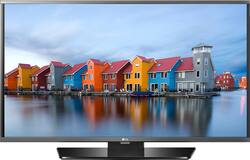
LG - 40" Class - (40" Diag.) - LED - 1080p - HDTV
- Key Specs
- Display Type: LED
- Screen Size Class: 40 inches (The group size measurement of a screen. This differs from a screen size measured diagonally from corner to corner.)
- Refresh Rate: 60Hz (The number of frames per second the device can produce natively without enhancement. Higher rates help produce smooth, seamless pictures.)
- Specific Manufacturer Technologies: Triple XD Engine (This is technology that's specific to a TV brand (sometimes called proprietary technology). Here you'll see terms related to picture quality, brightness, processors and more.)
- General
- Brand: LG
- Model Number: 40LH5300
- Product Name: 40" Class - (40" Diag.) - LED - 1080p - HDTV
- Color: Black
- Dimensions
- Product Width: 35.9 inches (The out of box width of the item. Width is measured as the horizontal distance from one side of the item to the other as it would be primarily used or placed.)
- Product Height Without Stand: 20.8 inches
- Product Depth Without Stand: 2.2 inches
- Product Weight Without Stand: 16.5 pounds
- Display
- Display Type: LED
- Screen Size: 40 inches (Size of the screen, measured diagonally from corner to corner.)
- Screen Size Class: 40 inches (The group size measurement of a screen. This differs from a screen size measured diagonally from corner to corner.)
- Refresh Rate: 60Hz (The number of frames per second the device can produce natively without enhancement. Higher rates help produce smooth, seamless pictures.)
- Features
- Specific Manufacturer Technologies: Triple XD Engine (This is technology that's specific to a TV brand (sometimes called proprietary technology). Here you'll see terms related to picture quality, brightness, processors and more.)
- TV Tuner: Digital (The ATSC TV Tuner is a component built into conventional TV sets or other devices for receiving over-the-air broadcast TV without a cable/satellite box. Digital tuners may be purchased separately and connected to a device if it does not have one built in.)
- Connectivity
- Number Of USB Port(s) (Total): 1 (The total number of USB ports including all generations and versions.)
- Compatibility
- VESA Wall Mount Standard: 200mm x 200mm (VESA wall mount standards refer to the spacing of screw holes built into a TV in order to fit with standard TV wall mounts. These standards are implemented into most TVs and monitors.)
- Power
- ENERGY STAR Certified: true (Devices carrying the ENERGY STAR service mark, such as computer products and peripherals, kitchen appliances, and other products, generally use 20% to 30% less energy than required by federal standards.)
- EPEAT Qualified: false (The Electronic Product Environmental Assessment Tool (EPEAT) was designed to provide an environmental assessment tool for purchasers. In order to qualify for EPEAT, a product must meet all 23 required criteria.)
- Estimated Annual Operating Cost: 8 United States dollars (Predicted cost of operating the product under average conditions for one year.)
- Estimated Annual Electricity Use: 69 kilowatt hours (Predicted amount of electricity needed to operate the product under average conditions for one year.)
- Box Dimension
- Height: 23.8 inches
- Width: 5 inches
- Depth: 39 inches
- CubicDimension: 4641 inches
- Other
- UPC: 719192606029
Enjoy your favorite movies and TV shows in crisp HD clarity with this LG 40-inch LED TV. The versatile design lets you mount this TV on your wall or place it on your entertainment stand, and the large screen size offers easy viewing. Boasting 1080p resolution and rich color contrasts, this LG 40-inch LED TV brings movies to life.
- 40.0" screen (measured diagonally from corner to corner):
A good size for a living room, or if you want a larger bedroom TV. - LED TVs perform well in all lighting conditions:
They also deliver plasma-like deep blacks and rich colors. - 1080p resolution for stunning HD images:
Watch Blu-ray movies and 1080p HD content at their highest level of detail. - 2 HDMI inputs for the best home theater connection:
High-speed HDMI delivers up to 1080p picture and digital surround sound in one convenient cable. HDMI cable not included. - 60Hz refresh rate:
Images refresh 60 times per second for basic performance during fast-motion scenes. - 1 USB input:
Easily connect your digital camera, camcorder or other USB device.
Whats Included
- LG 40LH5300; Remote control; Stand
Product Manuals
A: Yes, it is very confusing on how Best Buy describes the specifications. Typically I end up going to the vendor site, since BB does a poor job on specs. But here is your answer. The there a combo composite/component input in addition to the two HDMI ports. I've attached a photo with the details of the connection.
A: No, it's not a smart TV. But, you can cheaply purchase a Roku stick (which plugs into an HDMI port) which basically turns it into a smart TV by giving you the option to use various apps. We did this and are easily able to watch Netflix, YouTube, browse the web, etc.
Q: can i play ps4 on this tv by using hdmi cable
A: The television can be used to play a PS4.
A: No, this TV is not capable of transmitting sound to a bluetooth speaker without any additional items or adapters.
Q: Want to know the year of the TV manufactured !!
A: The LG - 40" Class - (40" Diag.) - LED - 1080p - HDTV - Black, Model # 40LH5300 is a 2016 model. 1080p LED TVs with the "LH" before the series number are 2016 models. As for the date of manufacture, that can be found on the nameplate attached to the unit that will identify the date of manufacture and country of manufacture and shows the TV's serial number and model number...^IFV
Q: What is the width of this tv?
A: This television is 35.9 inches wide.
Q: Is there any way to listen to this TV via headphones?
A: This HDTV does not feature any audio outputs for headphones or systems that enable headphones.
Q: I have no instructions that came with the TV..How to assemble the stand..can someone help
A: On the long flat piece there is a slot, the "L" shaped piece slides into that slot. There are holes for four screws in the bottom of flat part you should have four small screws they go in those holes. Then you should have two other screws hear go into the upright part of the base and screw into the back of the television. The instructions are on the set up guide for the TV. Provided you have the sheet of picture instructions for set up.
People also viewed
 $159.99The price was $229.99
 $699.99The price was $999.99
Today's top picks
 $499.99The price was $749.99
 $199.99The price was $249.99
 $789.99The price was $1,049.99