FREE shipping to
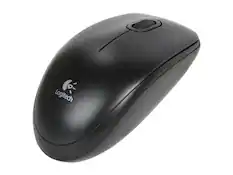
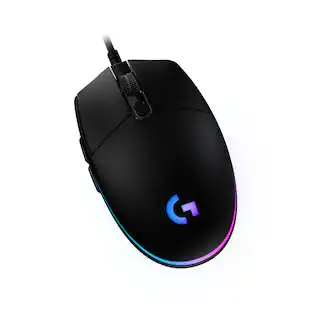
Experience lightning-fast response rates with this Logitech gaming mouse. The programmable design lets you switch between five sensitivity modes, while the onboard memory retains set programs without the use of outside software. This Logitech gaming mouse has built-in metal springs, minimizing needed force and ensuring the right and left buttons are ready to click.
Q: What kind of connection does this Logitech gaming mouse use?
A: This is a wired mouse that connects to your computer using a USB port.
Q: Is this gaming mouse compatible with Mac computers?
A: Yes, this mouse is compatible with Mac computers running Apple MacOS 10.11 or later.
Q: How many buttons does this Logitech mouse have?
A: This mouse has a total of 6 buttons.
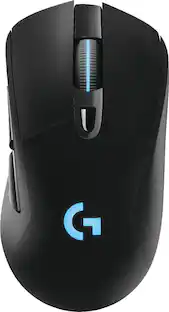
Q: Does the Logitech G403 gaming mouse have customizable lighting?
A: Yes, it has LIGHTSYNC RGB where you can customize lighting effects from 16.8M colors with G HUB gaming software.
Q: What is the maximum sensitivity of the Logitech G403?
A: The maximum sensitivity is 25600 dpi.
Q: Is the Logitech g403 hero compatible with a ps4
A: Yes it coMpatible
A: The DPI ranges between 100 - 16,000 and can be customized in the free Logitech GHub software.
Q: Can this mouse be used on a Macbook Pro?
A: As long as your Macbook Pro has a USB-A port, this will work just fine.

Experience lightning-fast response rates with this Logitech gaming mouse. The programmable design lets you switch between five sensitivity modes, while the onboard memory retains set programs without the use of outside software. This Logitech gaming mouse has built-in metal springs, minimizing needed force and ensuring the right and left buttons are ready to click.

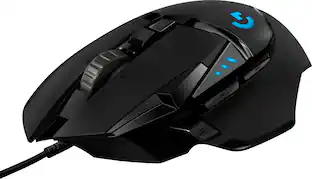
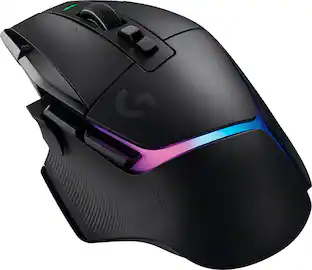
Step up your game with this Logitech HERO Core wired gaming mouse.Customize RGB lighting to match your style and environment or sync to other Logitech G products. G502 High Performance Gaming Mouse features Logitech HERO 25K optical sensor for maximum tracking accuracy and precision. No matter your gaming style, it’s easyto tweak G502 to match your requirements, with custom profiles for your games, adjustable sensitivity from 200 up to 25,600 DPI, and tunable weight system that allows for tuning and balancing of up to five additional weights for just the right balance andfeel.

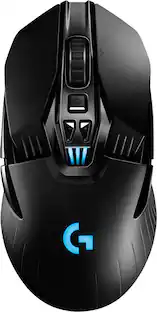
Logitech G703 LIGHTSPEED Gaming Mouse meets the next-gen HERO 25K sensor. Go pro with precise gameplay at 25,600 max DPI and zero smoothing, plus enhanced wireless performance. 10X the battery efficiency of previous generation sensors means up to 35 hours of gameplay with LIGHTSYNC RGB enabled. A comfortable design meets advanced button technology for supreme comfort and crisp, clean clicks. G703 LIGHTSPEED lets you play like the pros — and play to win.

G305 features the next-gen HERO sensor with 12,000 DPI sensitivity and LIGHTSPEED wireless 1 ms performance. It’s long-lasting with 250 gaming hours from one AA battery (an indicator light reminds you before you need a new AA), ultra-portable with built-in nano receiver storage, lightweight weighing in at 99 grams, and ready to game with 6 programmable buttons. G305 is the LIGHTSPEED wireless mouse for all.
| Pros for Logitech - G403 (Hero) Wired Optical Gaming Mouse - Wired - Black | |||
|---|---|---|---|
| There were no pros for this product— | Weight, Comfort, Price, Buttons, RGB Lighting | Battery Life, Weight, Comfort, Wireless, Size | Weight, Battery Life, Price, Overall Performance, Ease of use |
| Cons for Logitech - G403 (Hero) Wired Optical Gaming Mouse - Wired - Black | |||
| There were no cons for this product— | Size, Wireless | Scroll Wheel, Lag, Software | Lag, Scroll Wheel, Side Buttons, Ergonomics |
The vast majority of our reviews come from verified purchases. Reviews from customers may include My Best Buy members, employees, and Tech Insider Network members (as tagged). Select reviewers may receive discounted products, promotional considerations or entries into drawings for honest, helpful reviews.

PROs: - Reasonably lightweight yet you don’t really notice the nice, high quality braided cable spooling out the back end—with DPI settings at/near maximum, even the slightest movements can translate into HUGE cursor travel on the screen - Soft-textured (but not sticky/rubberized) surface is a joy to the touch; recessed thumb cradle on the left side of the mouse shell put my thumb precisely where it needed to be to use the side buttons - The more understated design--no sharp angles or extra surfaces like the more garish “look-at-me” gaming mice--gives off a bit of a pro-grade or refined gamer feel…perfect for those of you who’ve moved beyond the need to have your mouse look like the Tumbler from the Dark Knight movies - Conservative yet still striking LED illumination breaks up the otherwise completely black silhouette with a stylized ‘G’ on the top and an LED slit running all the way along the centerline of the scroll wheel…colors, patterns, and other effects are totally at the discretion of the user via the G Hub software (and yes, you can even turn them off entirely) - Solid-feeling button clicks without excessively long/wasted travel…appropriately “clicky” rather than mushy or hair-trigger over-sensitive - Tactile feedback registers the detents for each scroll wheel click…the horizontal ribbing on the scroll wheel provides a reassuringly grippy surface to scroll easily and quickly with the pad/tip of the finger - Included 10g tuning weight definitely changed the feeling of the mouse FAR more than I expected—perfect for those of you who really push your mice around during gaming and are looking for something that feels a bit more substantial under the palm - The Hero sensor really IS all that for your gaming…maximum DPI settings afford some stunning accuracy for headshots/twitch moves - Lightsync feature (accessed via G Hub software) allows you to synchronize LED illumination patterns/colors across other compatible Logitech accessories—I tried it with my wireless Lightsync mouse and the effect was cool enough, but I can see where having the same illumination patterns and activity flickering away across the mouse, keyboard, and a headset would be kind of fun, especially during the heat of battle! - Logitech did their homework on where to place the two under-thumb buttons; a simple rocking motion of the thumb easily activated the front or rearward buttons without a hint of ghosting/misfires between the two - G Hub software allows you to customize DPI stops/settings, change button functions, and even save multiple combinations of these settings in profiles that instantly change depending on the use (i.e. Windows desktop) or game in play at the time (G Hub instantly recognized when I switched between Alien Isolation and Assassin’s Creed Odyssey and loaded the customized DPI and button mappings) CONs: - Surprisingly, it’s a bit heavier in the hand than the Hero sensor-enabled G Pro Wireless mouse; add in the tuning weight and you can start to feel the heft of something that theoretically should be even MORE of a lightweight than a mouse with more buttons/switches & an onboard battery - The simple, understated design may not be for everyone—in this case, you really ARE paying more for what’s under the hood than for curb appeal - Minimal LED illumination options again may not be for everyone, nor is the illumination necessarily informative—you get a Windows popup that the DPI settings have changed, but a series of bars or dots in the scroll wheel LED strip, or flashes of the LED at each DPI change, would be a welcome usability tweak - Just SLIGHTLY wider than the G Pro Wireless; yet the thumb indentation, while obviously intended to make things more ergonomic, actually makes my thumb curl under/inward toward my wrist more than my natural inclination when my hand is at rest…some of you may have similar comfort issues depending on the shape of your hand - Your mileage may vary, but I experienced some very weird tracking behavior using my mouse-mat with the G403. My G Pro Wireless (also with the 16K Hero sensor) has worked flawlessly on my mini Persian rug-style mouse-mat or directly on my very dark wood-finish desk for close to a full year running…but the G403 routinely exhibited stutters, pauses, and tracking loss on the mouse-mat. At first I was certain I had a problem with the G403, but when I removed the mouse mat, cursor/mouse tracking returned to the same flawless, smooth, and precise pointing performance I enjoyed in Logitech’s own top-of-the-line wireless mouse with the same Hero sensor at work. At least in my case, intricate surface design/ornamentation seemed to confuse the Hero Sensor in the G403 Summary review: This is my second 16K Hero sensor-enabled mouse from Logitech, this time in a corded flavor of what I figured would be a more budget friendly version of my current daily driver--the G Pro Wireless. By and large, my experience with the G403 suggests it will provide you nearly all of the same top-tier accuracy and speed you’d expect from Logitech’s other, pricier top-flight gaming mouse offerings, with just a few caveats in design/performance that keep it from being a perfect value-leader. On the positive side of things, the G403 demonstrates Logitech’s typical high build quality without drowning you in features you might not ultimately use. You get Logitech’s coveted 16,000 DPI Hero sensor which really does have an appreciable and positive effect on mousing performance both in-game and in the Windows desktop environment, especially if you have a VERY large/high-resolution screen where there is LOTS of mouse travel involved in getting the cursor from one of the screen to the other. I was surprised by the errant behavior I observed on my mouse-mat, but swapping out the pad or eliminating it entirely returned performance to what was expected--maybe just be mindful that you MIGHT have to settle for a slightly less busy mouse mat??? The mouse itself is solidly built, attractive without being garish or over-the-top, and will **probably** be very comfortable for most right-handed users. The included tuning weight simply snaps into place under a magnetic panel on the bottom, and was certainly appreciated, even if I personally felt it made the mouse heavier than it needed to be. Some might bemoan the fact that there are only two left-side thumb buttons, with a total of six in all to customize in the G Hub software, but that’s simply where you have to know what you want going in. Personally, I have no need for an entire miniature keyboard’s worth of shortcut buttons on the side of my mouse. Instead, I was fully satisfied with customizing the function of the two surprisingly comfortable/easy-to-reach & easy-to-activate thumb-side buttons, middle click wheel (it only spins and clicks, no side-to-side tilting), and even the DPI shift button (I left mine at maximum DPI all the time so I always had a spare button I could remap to something else). If you don’t plan on duplicating multiple shortcuts or keystrokes on your mouse (or want to deal with the trouble of remembering which shortcut was mapped to which button during the heat of a frenzied gaming session), the G403 will probably be all you need for head-shot accurate sniping or precision desktop app pointing. Unfortunately, the mouse is not designed symmetrically so it’s only really suited for right-handed users. I would also suggest you lay your hand across one in the store as I personally found the ergonomic thumb depression actually a bit uncomfortable and unnatural compared to my other mice that allow my thumb to rest a bit further out to the side of my hand. The cord was long enough to reach across my desk at slightly more than 6.5 feet, but a few extra inches or more might really help those whose PC is situated a little further away from the monitor/keyboard. To really knock things out of the park, I would have loved the ability to change the click-wheel over to free-scrolling as you can with the G903; or an optional “precision mode” like Logitech uses in their trackball offerings to allow slower, super-fine movements and cursor control in media/content creation apps like Photoshop. Still, this mouse (and the accompanying G Hub software application) really does seem to excel in its current form for gaming-oriented mixed use thanks to being high performing, well designed, and easy-to-use…easily a solid buy for the money!
This review is from Logitech - G403 (Hero) Wired Optical Gaming Mouse - Wired - Black
Posted by WyldeBlue
I've tried many and couldn't find a comfortable mouse to game with. I have the Logitech G502 hero, Roccat Kone Aimo, Corsair Glaive, Corsair Iron Claw, Steelseries Rival 600 and none of them were comfortable after a few months of testing each mouse. I looking to get the Razer Viper wired on black Friday. The comfort of the Logitech G403 was so much better than the viper and even better the G403 was on sale for more than half the price of the Razer mouse. Its great for FPS, MMO, and Strategy games for long periods of time.
This review is from Logitech - G403 (Hero) Wired Optical Gaming Mouse - Wired - Black
Posted by DarthKrakenx69
Pc gammer and this works great easy to manage with lg software
This review is from Logitech - G403 (Hero) Wired Optical Gaming Mouse - Wired - Black
Posted by Keven