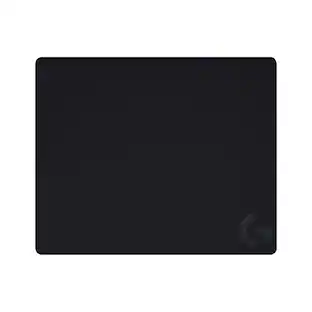
Logitech - G440 Gaming Mouse Pad - Black
- Key Specs
- Non-Slip Backing: true
- General
- Brand: Logitech
- Model Number: 943-000098
- Product Name: G440 Gaming Mouse Pad
- Color: Black
- Features
- Wireless Device Charging: false
- Lighting Type: None
- Integrated Wrist/Palm Support: false
- Dimensions
- Product Height: 0.13 inches (The out of box height of the item. Height is measured as the vertical distance from the bottom of the item to the top as it would be primarily used or placed.)
- Product Length: 11.03 inches (The out of box length of the item. Length is measured as the longest dimension of the item.)
- Product Width: 13.39 inches (The out of box width of the item. Width is measured as the horizontal distance from one side of the item to the other as it would be primarily used or placed.)
- Product Weight: 8.07 ounces (The out of box weight of the item.)
- Material
- Non-Slip Backing: true
- Surface Material: Polymer
- Machine Washable: false
- Power
- Power Source: None
- Compatibility
- Model Compatibility: Universal
- Warranty
- Warranty - Parts: 3 years
- Warranty - Labor: None
- Other
- UPC: 097855120519
Get in the game and stay there with this Logitech hard gaming mouse pad. The durable hard surface lets you make your moves quickly, and low surface friction is perfect for high-DPI titles. The multilayer construction of this Logitech hard gaming mouse pad offers longevity, and a rubberized base keeps this mouse pad in place.
- Compatible with most mice: For wide-ranging use.
- Multi-layer construction: The polypropylene top layer provides the low-friction surface. A high-impact polystyrene core provides the firm, semi-rigid foundation. And finally, the rubber base keeps the mouse pad stationary.
- Low surface friction: Offering high DPI gamers an ideal surface for subtle hand movements and quick mouse gestures.
- More sustainable: Certified carbon neutral: the carbon impact of the product and packaging has been reduced to zero.
Whats Included
- Logitech G440 Gaming Mouse Pad
- Owner`s manual
A: This pad measures Product 11.03 x 13.39 x 0.13 inches.
Q: Is the "G" logo white or blue? Ive seen pictures of both.
A: Mine is white...........this is an awesome pad. Smooth enough to micro move mouse, like for a pool stick adjustment. It's also hard so it extends the mouse area even if it overlaps shelf or table it is on.
Q: Is the rubber bottom latex I have a severe latex alergey
A: I can't confirm if it's a rubber latex. The package says "rubber-backed high-impact polymer core remains in place during high intensity gaming". I have a slight allergic reaction (hives) when wearing latex gloves. I have not had any issues using this mouse pad all day. I tried rubbing the bottom of the mouse pad on the back of my hand and didn't experience any reaction.
Q: how big is the mouse pad i do have it and its a really good pad just wondering how big it is
A: Height: 11 1/4 inches Length" 13 1/2 inches
Q: How hard is it? Like, can you bend it easily, or no? Just wonderin.
A: it bends to a certain extent nicely but then obviously if you do to much it can break
A: It Is 13 1/2” x 11” and about 3/16 thick.
Q: what would be the best sensitivity for the mouse pad
A: Well that all depends on your play style, Some people like it nice and slow, others are right o the point and want to get things done and are very accurate with High Sensitivity. Its actually not called sensitivity its called DPI. So the numbers for some mice go as high as 12000 and as low as 200. I play at about 600-1000. I would say meet it in the middle and go ahead and start off at 800 and adjust according to your judgement. Hope this Helps.
Q: Will this mouse pad work with any brand of optical mouse?
A: Far as I know Yes
People also viewed
 $39.99The price was $42.99





Today's top picks
 $479.99The price was $729.99
 $69.99The price was $129.99
 $199.99The price was $249.99
 $49.99The price was $62.99