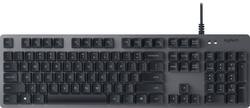
- Key Specs
- Lighting Type: None
- Form Factor: Full-size (The size, arrangement, and physical configuration of the product.)
- Keyboard Technology: Mechanical (Type of technology that detects a key press.)
- Key Switch Behavior: Tactile (Refers to the mechanisms under the keycaps on a keyboard that enable you to type faster and more precisely. Linear switches move straight up and down without any sound or bump. Tactile switches provide a noticeable bump in the key press, and no sound. Clicky switches provide a bump in the key press and "clicky" sound.)
- General
- Brand: Logitech
- Model Number: 920-008350
- Product Name: K840 Mechanical USB Keyboard
- Color: Black/gray
- Features
- Lighting Type: None
- Numeric Keypad: true
- Touchpad: false
- Keyboard Type: Keypad, Programmable
- Palm Rest: false
- Spill Resistant: false (Designed to resist some degree of accidental liquid spill. The level of spill-resistance is indicated by the product manufacturer, but the degree of protection may not be guaranteed after normal wear of the product.)
- Keyboard Features: ROMER-G™ MECHANICAL SWITCHES, ANODIZED ALUMINUM BUILD
- Foldable: false
- Functions
- Form Factor: Full-size (The size, arrangement, and physical configuration of the product.)
- Number Of Keys: 104
- Keyboard Technology: Mechanical (Type of technology that detects a key press.)
- Dedicated Macro Keys: false (Perform shortcuts of key sequences to carry out commands with a single key. Key sequences may include key strokes, mouse actions, and/or menu actions.)
- Adjustable Tilt Function: true
- Key Switch Type: Romer-G
- Key Switch Behavior: Tactile (Refers to the mechanisms under the keycaps on a keyboard that enable you to type faster and more precisely. Linear switches move straight up and down without any sound or bump. Tactile switches provide a noticeable bump in the key press, and no sound. Clicky switches provide a bump in the key press and "clicky" sound.)
- Multimedia Keys: false
- Internet Keys: false
- Number Of Programmable Keys: 12
- Connectivity
- Cable Length: 5.9 feet
- Detachable Cable: false
- Number Of USB Port(s): 1 (The total number of USB ports including all generations and versions.)
- Compatibility
- Operating System Compatibility: Windows
- Plug and Play Operation: true
- System Requirements: Microsoft Windows 7 / 8 / 10 (The software that a product must have for it to be able to integrate with another product.)
- Dimensions
- Product Height: 5.2 inches (The out of box height of the item. Height is measured as the vertical distance from the bottom of the item to the top as it would be primarily used or placed.)
- Product Width: 17.5 inches (The out of box width of the item. Width is measured as the horizontal distance from one side of the item to the other as it would be primarily used or placed.)
- Product Weight: 32.1 ounces (The out of box weight of the item.)
- Mouse
- Mouse Included: false
- Other
- UPC: 097855127990
Type comfortably for hours with this Logitech mechanical corded keyboard. Highly responsive keys operate quietly with a light touch, and media and shortcut keys, including programmable keys, facilitate your workload. The tilted legs of this Logitech mechanical corded keyboard place it at an angle that minimizes typing fatigue, and it plugs in to any USB port.
- Romer-G mechanical switches: Offer rapid response times for quick in-game action.
- Programmable keys: Enable you to reassign keys for enhanced gaming.
- USB interface: Enables a simple wired connection to your computer.
- 6' cable: Allows you to type at a comfortable distance.
- Windows compatible: For use with your existing computer.
Whats Included
- Logitech K840 Mechanical USB Keyboard
Product Manuals
A: This is a common "issue" with this keyboard due to how it's designed. I personally don't mind it but some people may. However, it is nothing to worry about.
Q: Does this keyboard use the romer-g switches like the g413? If not what kind of switch is it?
A: Hello, the switches on the K840 are Romer G's.
A: The associate at the Best Buy we visited was extremely helpful and allowed me to test the two or three keyboards I had selected, as I was looking for a certain “touch”. Am thrilled with my new keyboard!
A: I think this should do the trick for you. The keys on the K840 have a slight concave to them so your fingers fit nicely. Also, the keys have a nice spacing so you shouldn't have too much difficulty distinguishing between key caps.
A: Hello, we are sorry to hear about your issue. If your space bar is sticking it may be that the keyboard needs cleaning: Cleaning Logitech keyboards and mice Before you clean your device: Unplug it from your computer and make sure it’s turned off. Remove the batteries. Keep liquids away from your device, and don’t use solvents or abrasives. To clean your Touchpad, and other touch-sensitive and gesture-capable devices: Use lens cleaner to lightly moisten a soft, lint-free cloth and gently wipe down your device. To clean your keyboard: Use compressed air to remove any loose debris and dust between the keys. To clean the keys, use water to lightly moisten a soft, lint-free cloth and gently wipe down the keys. To clean your mouse: Use water to lightly moisten a soft, lint-free cloth and gently wipe down the mouse. NOTE: In most cases, you can use isopropyl alcohol (rubbing alcohol) and anti-bacterial wipes. Before using rubbing alcohol or wipes, we suggest you test it first in an inconspicuous area to make sure it doesn’t cause discoloration or remove the lettering from the keys.
Q: Is it Cherry MX compatible?
A: No. It is a different key cap entirely.
Q: Will this work with Apple Mac?
A: Yes but the "Windows" key will be used as the "command" key for mac. A slight difference but they function the same. I pretty much only use Windows keyboards with my Mac because no one makes a decent mechanical keyboard for Mac under $100
People also viewed
 $129.99The price was $159.99
 $99.99The price was $119.99
 $129.00The price was $199.00

Today's top picks
 $199.99The price was $249.99
 $149.99The price was $239.99
 $789.99The price was $1,049.99











