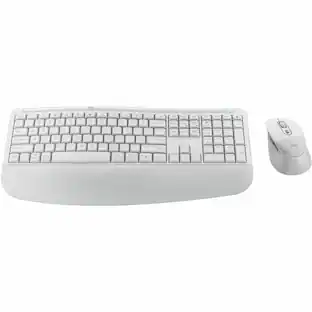
Logitech - Signature K650 Full-Size Wireless Keyboard for PC/Window/Mac with Wrist Rest - Off-White
Customers are saying
Customers praise the overall performance, seamless connectivity, and comfortable typing experience of this keyboard. Users also appreciate the quiet key operation, the convenient built-in wrist rest, and the straightforward setup process. While the majority of feedback is positive, some users have noted that the key action can feel a bit clunky during use.
Color
Off-WhiteFeatures
All day comfort
Integrated soft-touch keyboard palm rest meets deep-cushioned keys with that instantly familiar feeling for a satisfying typing experience.
Achieve more with less effort
Wireless full-size keyboard layout with convenient access to all the right shortcut keys; save time with commands like mic mute, unmute, screenshot, and web navigation.
Connect the way you like
Wireless connectivity via BLE (Bluetooth Low Energy) wireless technology or the included Logi Bolt receiver.
Works on multiple platforms
Signature K650 Logitech Wireless Keyboard works with multiple operating systems—Windows, macOS, Chrome OS, Linux, iPadOS, iOS and Android.
Reliable and hassle-free wireless keyboard
Your cordless keyboard won’t require new batteries for up to 36 months; it is also easy to clean and spill-resistant.¹
Simply better together
Upgrade to better productivity and flexibility by combining your K650 with the M650 Logitech mouse; personalize via Logi Options+ Software.²
A design choice you’ll feel good about
Plastic parts in Signature K650 include certified post-consumer recycled plastic (Graphite: 28%, Off-White: 21%).³
¹ Battery life may vary based on user and computing conditions
² Logi Options+ software available only on Windows 10 and macOS 10.15 or later.
³ Excludes plastic in printed wiring assembly (PWA) and packaging.
Specifications
- Lighting TypeNoneForm FactorFull-sizeKeyboard TechnologyMembraneConnection TypeWireless
Reviews
Rating 4.8 out of 5 stars with 1402 reviews
- Overall Performance (21)
- Connectivity (16)
- Comfort (12)
- Noise Level (9)
- Size (4)
- Key Action (5)
Customer Images
The vast majority of our reviews come from verified purchases. Reviews from customers may include My Best Buy members, employees, and Tech Insider Network members (as tagged). Select reviewers may receive discounted products, promotional considerations or entries into drawings for honest, helpful reviews.

Compare similar products

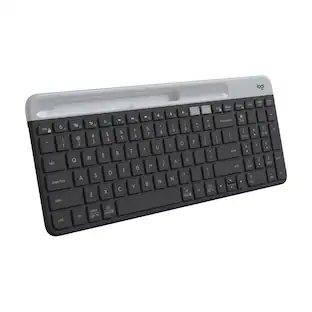
Type in comfort and get more done with the Logitech Signature K650 Wireless Comfort Keyboard. Featuring a built-in soft-touch palm rest and deep-cushioned keys, this comfortable keyboard lets you type with ease all day long. The adjustable feet offer two different tilt angles so you can customize your typing position, and the full-size keyboard layout provides convenient access to all the right keys. Logitech’s upgraded shortcut keyboard helps you save time with 24 different commands including mic mute and unmute, screenshot, and web navigation.

MK540 Advanced is an instantly familiar wireless keyboard and mouse combo built for precision, comfort and reliability. The full-size keyboard features a familiar key shape, size, and feeling – optimized for precision and noise reduction. The palmrest and adjustable tilt legs keep you comfortable for long stretches and the contoured mouse is designed to fit perfectly into either palm. Plug and play your keyboard and mouse with one tiny USB receiver with Logitech Unifying technology. You’ll get a reliable – and encrypted – wireless connection up to 32.8 ft away with virtually no delays or dropouts.

Effortlessly switch typing between your computer, tablet and phone with the Logitech Signature Slim Wireless Keyboard K950, made with recycled plastic. Make work-life magic with customization and shortcuts that keep you in control. Enjoy a familiar laptop-style keyboard feel that allows you to work even smarter with Logi Options+ App’s custom shortcuts. Quiet typing gives you more focus and less disturbance to others. Connect this computer keyboard wirelessly with Bluetooth or the included Logi Bolt USB receiver, and stay concentrated for longer with up to 36 months of battery life.

Defy Boring with Pebble Keys 2 K380s minimalist keyboard made with recycled plastic. Its minimalist, streamlined shape and sleek curves make it as iconic as you and super portable. Hop across 3 devices with the Easy-Switch buttons on the Bluetooth keyboard and work faster with the Fn shortcut keys like screen capture, search, and more. Customize the 10 keyboard Fn shortcut keys to work how you want and save time with shortcuts in Logi Options+ App.
| Pros for Logitech - Signature K650 Full-Size Wireless Keyboard for PC/Window/Mac with Wrist Rest - Off-White | |||
|---|---|---|---|
| Connectivity, Size, Overall Performance, Comfort, Noise Level | Keyboard Quality, Battery Life, Ease of use, Wireless, Price | There were no pros for this product— | Size, Keyboard Quality, Connectivity, Battery Life, Portability |
| Cons for Logitech - Signature K650 Full-Size Wireless Keyboard for PC/Window/Mac with Wrist Rest - Off-White | |||
| Key Action | Lag, Size | There were no cons for this product— | Number Pad |
Specs
Customers often buy these together





Customers ultimately bought
 $89.99The price was $97.49
 $119.99The price was $129.99
 $119.99The price was $149.99
Explore tech essentials Sponsored
 $179.99The price was $249.99



Discover related products
 $12.99The price was $13.99
 $31.99The price was $32.99