Maestro - GPS Antenna Adapter for Select Alpine and Kenwood Receivers - Black
Reviews coming soon
About this product
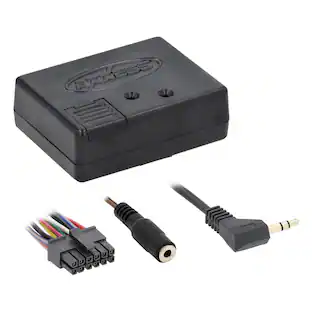
When upgrading to an aftermarket navigation receiver, you're usually forced to install a new, magnetic GPS antenna somewhere on your dashboard or roofline. The iDatalink Maestro ACC-NAV4 antenna adapter eliminates this tedious step. By bridging the gap between your car’s original wiring and your new multimedia screen, this adapter lets you utilize the highly accurate, pre-existing GPS antenna that built into your vehicle from the factory. Avoid the hassle of routing long, unsightly wires through your interior panels or mounting external magnetic pucks on your paint. This 9-inch adapter cable offers a plug-and-play solution that seamlessly adapts the factory antenna connection to fit securely into the specialized GPS input on the back of your new receiver. It saves you installation time while maintaining a clean, clutter-free dashboard appearance.
Features
Broad aftermarket stereo compatibility
Specifically engineered to adapt original factory GPS signals for flawless operation with select Alpine and Kenwood navigation and multimedia receivers.
Keep your factory antenna
Allows you to retain and use your vehicle's original, pre-installed factory GPS antenna instead of replacing it with a secondary aftermarket unit.
No messy wire routing
Eliminates the need to mount an external magnetic GPS antenna puck to your exterior paint or route long, cumbersome cables across your dashboard.
100% plug-and-play connection
Locks directly into your vehicle’s factory antenna harness on one end and snaps straight into your new stereo's GPS input port on the other, without requiring any wire cutting.
9-inch adapter length
Provides the perfect amount of flexible slack required to bridge connections comfortably within the tight confines of a standard dashboard cavity.
Preserves optimal signal integrity
Constructed with high-quality shielding and solid core connections to prevent signal dropouts and ensure rapid, accurate satellite positioning for your maps.
Specifications
- BrandMaestroModel NumberACC-NAV4Product NameGPS Antenna Adapter for Select Alpine and Kenwood ReceiversColorBlackProduct CompatibilityAudio/Video, Stereo/receiverProduct TypeHarness
Reviews
This product doesn't have any reviews yet.
Compare similar products

When upgrading to an aftermarket navigation receiver, you're usually forced to install a new, magnetic GPS antenna somewhere on your dashboard or roofline. The iDatalink Maestro ACC-NAV4 antenna adapter eliminates this tedious step. By bridging the gap between your car’s original wiring and your new multimedia screen, this adapter lets you utilize the highly accurate, pre-existing GPS antenna that built into your vehicle from the factory. Avoid the hassle of routing long, unsightly wires through your interior panels or mounting external magnetic pucks on your paint. This 9-inch adapter cable offers a plug-and-play solution that seamlessly adapts the factory antenna connection to fit securely into the specialized GPS input on the back of your new receiver. It saves you installation time while maintaining a clean, clutter-free dashboard appearance.

The iDatalink ACC-HU-KEN1 adapter harness allows for direct connection between select Kenwood or JVC aftermarket radios and compatible iDatalink Maestro vehicle specific harnesses used with the iDatalink Maestro ADS-MRR or ADS-MRR2 radio replacement interface module. The ACC-HU-KEN1 adapter harness will replace the wiring harness that comes with your Kenwood or JVC radio. There is a 22-pin Kenwood/JVC connector one end that plugs into the back of your Kenwood or JVC radio and a 20-pin iDatalink Maestro connector on the other end that will plug into a compatible iDatalink Maestro vehicle specific harness. The 22-pin Kenwood/JVC connector features the following wiring pinout.The iDatalink Maestro ACC-HU-KEN1 adapter allows you to connect select Kenwood and JVC radios to compatible iDatalink T-harnesses. This extra harness takes the place of the harness that comes with your new Kenwood or JVC stereo. It connects directly between select Kenwood and JVC radios and the latest Maestro "Head-unit ready" HRN-HRR T-harnesses so you won't have to splice any wires.

Streamline your aftermarket radio installation with the ACC-HU-KEN4 Headunit Adapter. Specifically engineered for JVCKenwood receivers, this premium adapter allows a Maestro T-harness to plug directly into compatible Kenwood and JVC radios, completely eliminating the need for tedious manual splicing or extra wiring.

Upgrading your car audio with an aftermarket touchscreen can quickly become a complicated mess of tangled wires. The iDatalink Maestro ACC-HU-BOS1 head-unit adapter changes that by eliminating the stressful, time-consuming task of matching, stripping, and crimping dozens of tiny radio wires together. Designed specifically for DIYers and professional installers alike, this harness bridges the gap between your new stereo and your vehicle's dash architecture in seconds. This adapter takes the place of the standard wire harness packaged with your new receiver. It features a dedicated 20-pin BOSS connector on one end that plugs directly into the back of your radio, and a 20-pin iDatalink Maestro connector on the other end that locks seamlessly into a compatible, vehicle-specific Maestro T-harness. By removing the need to splice or solder wires, it guarantees a clean installation while preventing common wiring mistakes that can lead to blown fuses or audio dropouts.
Specs
Be the first to ask a question.
We’ll try to get your question answered within 24 hours by a Best Buy customer or brand representative.
More to consider
Maestro Dash Kit for Select 2011-2023 Ford F-150 Mustang F-250/350/450/550 Ranger Escape DIN DDIN
$219.99The price was $239.99Maestro Radio Replacement and Steering Wheel Interface for Select Vehicles
$169.36The price was $189.99Metra Speaker Harness for Select 1987-2023 Toyota Chevrolet Honda Subaru Hyundai Chrysler
$10.49The price was $11.99




Enjoy your ride Sponsored



Discover related products
VEVOR GPS Navigator for Car, 9 inch Touch Screen 16GB GPS Navigation System with Lifetime Map Updates
$103.99The price was $129.99





Keep exploring
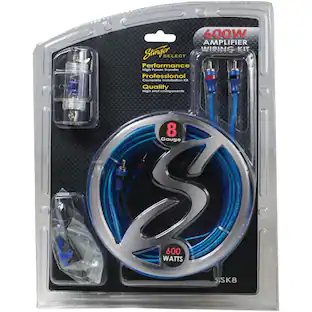
Stinger Select Series 8-Gauge 600W Amp Wiring Kit with Ultra-Flexible Copper-Clad Aluminum Cables
$27.99The price was $39.36Stinger Select Series 1/0-Gauge 1500W Amp Wiring Kit, Ultra-Flexible Copper-Clad Aluminum Cables
$62.99The price was $66.99