
Manhattan - USB-C Dock/Hub, Ports (x7): USB-A (x7), 5 Gbps (USB 3.2 Gen1 aka USB 3.0), External Power Supply Not Needed, Universal
Manhattan - USB-C Dock/Hub, Ports (x7): USB-A (x7), 5 Gbps (USB 3.2 Gen1 aka USB 3.0), External Power Supply Not Needed, Universal
About This Item
- Key Specs
- Maximum Number of Displays Supported: 1
- Number of DisplayPort Outputs (Total): 0
- General
- Brand: Manhattan
- Product Name: USB-C Dock/Hub, Ports (x7): USB-A (x7), 5 Gbps (USB 3.2 Gen1 aka USB 3.0), External Power Supply Not Needed, Universal
- Display
- Maximum Number of Displays Supported: 1
- Ports
- Display Connector(s): 1 x HDMI 1.4, 1 x Thunderbolt 4 (The number and type of connectors used to connect to an external display.)
- Number of DisplayPort Outputs (Total): 0
- Number of HDMI Ports (Total): 0
- Number of VGA Ports: 0 (VGA (Video Graphics Adapter or Video Graphics Array) is a display standard that transmits via analog signals. This type of interface is typically used to connect a computer to a display device such as a monitor, projector, or TV.)
- USB Ports: 1 x USB-A, 2 x USB-C (The number and type of USB ports the product has.)
- Power
- Powered: false
- Compatibility
- Brand Compatibility: Apple
- Model Compatibility: MacBook Pro 2016-2021, MacBook Air 2016-2021
- Dimensions
- Product Height: 0.55 inches (The out of box height of the item. Height is measured as the vertical distance from the bottom of the item to the top as it would be primarily used or placed.)
- Product Length: 4.5 inches (The out of box length of the item. Length is measured as the longest dimension of the item.)
- Product Width: 1.65 inches (The out of box width of the item. Width is measured as the horizontal distance from one side of the item to the other as it would be primarily used or placed.)
- Product Weight: 0.15 ounces (The out of box weight of the item.)
- Warranty
- Warranty - Parts: 3 year limited
- Warranty - Labor: 3 Year Warranty
- Other
- UPC: 766623168410
7-Port USB Hub with Type-C plug for more ways to connect your USB-A devices. The Manhattan 7-Port USB 3.0 Type-C Hub turns one of your device's USB-C ports into seven USB-A ports, so you can easily connect a keyboard, mouse, flash drive and more. Devices that fit the USB 3.2 Gen 1 spec (formerly known as USB 3.0) can reach transfer speeds up to 5 Gbps for external storage, printing and more. The Hub's SuperSpeed ports are backward compatible to run older USB versions 2.0 or even 1.1, too. You can also charge your phone or tablet since the Hub supplies up to 5 V / 0.9 A of power. Connectivity you can take with you. This Hub's durable case, compact size and bus power mean greater portability for you when you have to pack up and go. You don't have to worry about carrying an additional power supply, which makes the Hub an ideal travel companion. Simply unplug it from your upstream device, disconnect your peripherals and put what you need in your laptop bag to be on your way. Alternatively, if you find that you need more power for your devices, the Hub includes a Micro-USB port to connect your own 10 W USB charger. Universal compatibility for easy installation. This universal USB 3.0 Hub will work with a wide range of computers because it requires no additional software or drivers. It installs automatically when you connect it to your laptop or desktop so you can be up and running quickly. It also works with a range of operating systems such as Windows®, macOS®, Linux and Chrome OS, so it's multi-platform compatible.
- USB-C Dock/Hub, Ports (x7): USB-A (x7), 5 Gbps (USB 3.2 Gen1: 7-Port USB Hub with Type-C plug for more ways to connect your USB-A devices. The Manhattan 7-Port USB 3.0 Type-C Hub turns one of your device's USB-C ports into seven USB-A ports, so you can easily connect a keyboard, mouse, flash drive and more. Devices that fit the USB 3.2 Gen 1 spec (formerly known as USB 3.0) can reach transfer speeds up to 5 Gbps for external storage, printing and more. The Hub's SuperSpeed ports are
- USB-C Dock/Hub, Ports (x7): USB-A (x7), 5 Gbps (USB 3.2 Gen1: 7-Port USB Hub with Type-C plug for more ways to connect your USB-A devices. The Manhattan 7-Port USB 3.0 Type-C Hub turns one of your device's USB-C ports into seven USB-A ports, so you can easily connect a keyboard, mouse, flash drive and more. Devices that fit the USB 3.2 Gen 1 spec (formerly known as USB 3.0) can reach transfer speeds up to 5 Gbps for external storage, printing and more. The Hub's SuperSpeed ports are
Reviews
This product doesn't have any reviews yet.
Compare similar products
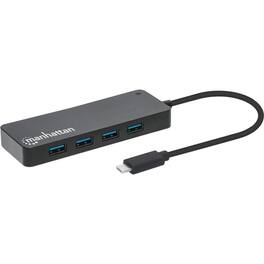
7-Port USB Hub with Type-C plug for more ways to connect your USB-A devices. The Manhattan 7-Port USB 3.0 Type-C Hub turns one of your device's USB-C ports into seven USB-A ports, so you can easily connect a keyboard, mouse, flash drive and more. Devices that fit the USB 3.2 Gen 1 spec (formerly known as USB 3.0) can reach transfer speeds up to 5 Gbps for external storage, printing and more. The Hub's SuperSpeed ports are backward compatible to run older USB versions 2.0 or even 1.1, too. You can also charge your phone or tablet since the Hub supplies up to 5 V / 0.9 A of power. Connectivity you can take with you. This Hub's durable case, compact size and bus power mean greater portability for you when you have to pack up and go. You don't have to worry about carrying an additional power supply, which makes the Hub an ideal travel companion. Simply unplug it from your upstream device, disconnect your peripherals and put what you need in your laptop bag to be on your way. Alternatively, if you find that you need more power for your devices, the Hub includes a Micro-USB port to connect your own 10 W USB charger. Universal compatibility for easy installation. This universal USB 3.0 Hub will work with a wide range of computers because it requires no additional software or drivers. It installs automatically when you connect it to your laptop or desktop so you can be up and running quickly. It also works with a range of operating systems such as Windows®, macOS®, Linux and Chrome OS, so it's multi-platform compatible.
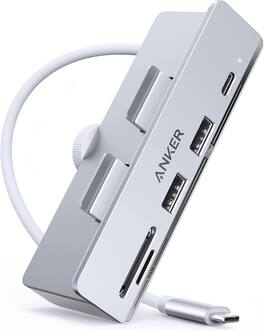
Anker USB C Hub, 535 USB C Hub (5-in-1), with 2 USB-A 10 Gbps Data Ports, USBC 10 Gbps Port, SD and microSD Card Reader, for iMac Pro/iMac 24 inch 2021 / iMac 27 inch / 21.5 inch
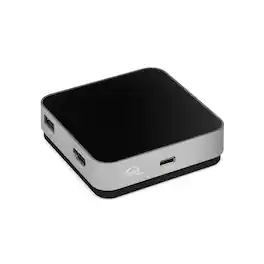
With 5 essential ports, up to 100W of pass-through charging, and just one cable, the USB-C Travel Dock is ready to display, charge, connect, and import while you're on the move. Palm-sized and lightweight, it slips easily into your bag and stays neat and tidy with built-in cable storage. Catch your inspiration The USB-C Travel Dock helps lighten your load of adapters and dongles while expanding your connectivity options – USB-C, USB-A, SD Card, and HDMI ports. With minimal gear, you can find inspiration anywhere, download your SD card quickly, and keep covering the moment. In addition to USB Type-C connectivity, the OWC USB-C Travel Dock is also fully compatible with Thunderbolt 3 equipped Macs and PCs as well as iOS, Android, and Chrome OS devices, and may be connected directly through a Thunderbolt 3 port on a computer or Thunderbolt 3 device. Powerful options When you're on the go, having power and charging options can help keep your work flowing. The USB-C Travel Dock can be used via bus power when you don't have access to a power outlet. Or use your notebook's USB-C adapter to deliver up to 100W of pass-through power and use the open port on your computer to connect another device.

Acer USB C Docking Station Dual Monitor With 2 HDMI, 9-IN-1 Laptop Docking Station with 4K HDMI, USB A&C 3.0, SD/Micro SD, 100W PD Charging, USB C Dock Compatible with Acer/Dell XPS/HP/Mac/Surface etc
| Pros for Manhattan - USB-C Dock/Hub, Ports (x7): USB-A (x7), 5 Gbps (USB 3.2 Gen1 aka USB 3.0), External Power Supply Not Needed, Universal | |||
|---|---|---|---|
| There were no pros for this product— | There were no pros for this product— | There were no pros for this product— | Overall Performance, Connectivity, Port Selection, Portability |