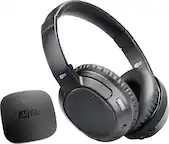
MEE audio - Matrix Cinema Wireless Over-the-Ear Headphones - Black
- Key Specs
- Sound Mode: Stereo
- Connection Type: Wireless
- Wireless Connectivity: Bluetooth (The manner in which a device sends data to another device over a short distance without the use of wires or cables.)
- True Wireless: false (These headphones not only lack wires between the device and headphones, they also lack wires between the headphones themselves. (true wireless is really only possible with in-ear headphones))
- Maximum Wireless Range: 33 feet
- Built-In Microphone: true
- Headphone Fit: Over-the-Ear
- Adjustable Headband: false
- Battery Life: 30 hours (Battery life will vary depending on the product configuration, product model, applications loaded on the product, power management setting of the product and the product features used by the customer. As with all batteries, the maximum capacity of this battery will decrease with time and usage.)
- Battery Charge Time: 2 hours (Battery charge time will vary depending on the product configuration, product model, applications loaded on the product, power management setting of the product and the product features used by the customer. Charging time will likely decrease with time and usage of the battery.)
- General
- Brand: MEE audio
- Model Number: HP-AF68-CMA
- Product Name: Matrix Cinema Wireless Over-the-Ear Headphones
- Color: Black
- Audio
- Sound Isolating: false
- Minimum Frequency Response: 20 hertz (Describes the maximum range of frequencies or musical tones a product can reproduce, from very low tones to very high treble tones. The minimum frequency or musical tone the speaker can reproduce. High treble tones have higher frequencies while low tones and deep bass have lower frequencies.)
- Maximum Frequency Response: 20 kilohertz (Describes the maximum range of frequencies or musical tones a product can reproduce, from very low tones to very high treble tones. The maximum frequency or musical tone the speaker can reproduce. High treble tones have higher frequencies while low tones and deep bass have lower frequencies.)
- Impedance: 32 ohms (Describes the resistance of an electric signal throughout the system. Devices with low impedance require less power to deliver optimal signals but are more at risk for damage from overloading. Higher impedance requires more power but is more protected from overload damage.)
- Sensitivity: 115 decibels adjusted
- Sound Mode: Stereo
- Driver Size: 40 millimeters
- Connectivity
- Connection Type: Wireless
- Wireless Connectivity: Bluetooth (The manner in which a device sends data to another device over a short distance without the use of wires or cables.)
- True Wireless: false (These headphones not only lack wires between the device and headphones, they also lack wires between the headphones themselves. (true wireless is really only possible with in-ear headphones))
- Bluetooth Version: 4.2 (The Bluetooth specification formalized by the Bluetooth Special Interest Group. All versions of the Bluetooth standard are backwards compatible with previous versions.)
- Maximum Wireless Range: 33 feet
- Features
- Built-In Microphone: true
- Maximum Talk Time: 30 hours
- Stand-By Time: 41.7 days (Amount of time it takes for the device to deplete a single battery charge when powered on but not in active use. This length of time is dependent on the network environment the device is connected to, if applicable, and the applications running.)
- Design
- Headphone Fit: Over-the-Ear
- Adjustable Headband: false
- Foldable Design: true
- Power
- Rechargeable: true
- Battery Life: 30 hours (Battery life will vary depending on the product configuration, product model, applications loaded on the product, power management setting of the product and the product features used by the customer. As with all batteries, the maximum capacity of this battery will decrease with time and usage.)
- Battery Charge Time: 2 hours (Battery charge time will vary depending on the product configuration, product model, applications loaded on the product, power management setting of the product and the product features used by the customer. Charging time will likely decrease with time and usage of the battery.)
- Charging Accessory Included: Case, Cable
- Charging Interface(s): Micro-USB (The connection for transmitting power to charge the device.)
- Dimensions
- Product Height: 1.6 inches (The out of box height of the item. Height is measured as the vertical distance from the bottom of the item to the top as it would be primarily used or placed.)
- Product Width: 7.9 inches (The out of box width of the item. Width is measured as the horizontal distance from one side of the item to the other as it would be primarily used or placed.)
- Product Weight: 0.5 pounds (The out of box weight of the item.)
- Other
- UPC: 616312620852
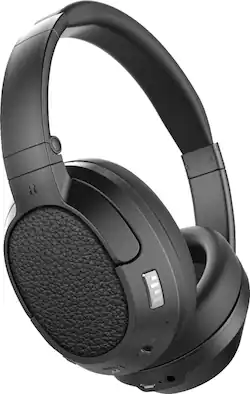
Enhance audio tones with this pair of MEElectronics wireless headphones. The Bluetooth function syncs with a TV or other device, and settings for voice and music clarity let you adjust the sound for a better listening experience. These comfortable MEElectronics wireless headphones have a low-latency codec that reduces lag and an integrated microphone that lets you take calls. src="https://images.bestbuy.com/BestBuy_US/en_US/images/abn/2013/com/pm/buying_guides/headphones/images/BuyingGuides_pdp_headphones.png" width="514 px" height="90 px" alt="Headphones Buying Guide">
- Bluetooth 4.2 interface: Enables simple wireless pairing with your Bluetooth-enabled device, such as TV or cell phone.
- Rechargeable battery: Offers up to 30 hours of use and lasts up to 1000 hours on standby mode.
- Over-the-ear design: For a secure fit.
- Folding design: Along with an included carrying case enables easy portability.
- Carrying case included: For easy portability.
- Built-in microphone: Enables simple hands-free chatting via a compatible device.
Whats Included
- MEE audio Matrix Cinema
- Carrying case, micro-USB charging cable
Product Manuals
Q: Hey is this all I need to hook this ear phones to listen to my tv?
A: It depends. If your TV has bluetooth capability then that is all you need. If it does not then you need to buy their separate component that plugs into the audio output plugs and acts as a bluetooth adapter.
Q: Can you really not adjust the headband on these?
A: The headband is adjustable and the ear pieces swivel to accommodate your ears and how you want to wear the,.
A: Yes, you hear through the headphones and your family hears through the tv.
A: It depends on the TV. If it is a model that has bluetooth already built in you are fine. If not then you need to buy the adapter that plugs into the audio plugs on the back of the tv.
A: We have these headphones for my 90 year old mom, who is nearly deaf. Sometimes she forgets to unplug the charging cord, and doesn’t have any problem wearing the headphones with the wire connected. I put a little command strip hook on the table next to her chair, to hold the usb cord so it would not be in her way and would not fall out of reach if it wasn’t connected. I also used a piece of colored tape on both the end of the usb cord and the USB port on the headphones so she would know where to connect the wire. Because mom is so deaf she has to wear the headphones at maximum volume, which means using the voice plus setting.
Q: Do these headphones use the aptX low latency codec for bluetooth ??
A: Yes they do. I have not had any latency issues at all. The audio matches the video perfectly.
Q: I just realized this is warranted for 1 year and it broke . How do I get these repaired ?
A: I have 3 of these. Best headphones ever. They do not last long however. Mine go 12 to 18 months or so and I just set up a new one. I would just take back to the store. Not sure how or who would repair. i don't expect electronics to last long anymore.
Q: Head phones shows fully charged but it’s not working. What can be done?
A: Unfortunately there is not enough information here for a concrete recommendation - if the headphones are not powering on at all, that could be a problem with the battery or the charging cable/power source. If they are not pairing or reconnecting to your device, that would probably require a software reset. To do this, slide the power switch to the "on" position, then press and hold the Multifunction and CinemaEAR buttons for 5 seconds at the same time. You will then need to pair the headphones with your device. Lastly, if the headphones are powering on but freezing, you can perform a hard reboot. To do this, slide the power switch to the "on" position, then press and hold the Multifunction and Volume up buttons for 5 seconds at the same time. Slide the power switch to the off position and then back to the on position to complete the reboot. If you have any additional questions, please contact our support department at 626-965-1008 and they will be able to help narrow down the solution for you.