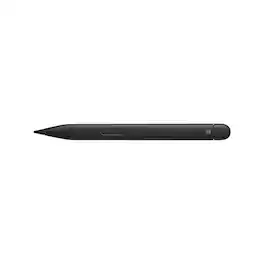
Microsoft - Slim Pen 2 for Surface Pro, Duo, Go and Laptop Studio - Matte Black
Reviews coming soon
About this product
Before you settle for less, elevate your digital writing and sketching experience with the Microsoft Slim Pen 2, designed specifically for Surface Pro, Duo, Go, and Laptop Studio. This sleek, matte black pen seamlessly bridges the gap between traditional pen and paper and the digital world, offering unparalleled accuracy and a convenient, storable design. The Microsoft Slim Pen 2 is meticulously engineered to provide the most refined shading experience yet. Featuring a sharper pen tip and an enhanced design, it allows you to interact with your screen at the optimal angle for ultra-precise tilting and shading. With an impressive 4,096 points of pressure sensitivity, your digital writing and drawing will feel more natural and fluid than ever before.This innovative pen is compatible with a broad range of Surface devices for charging, which are sold separately. It securely stores and recharges when placed in the Surface Pro Signature Keyboard or when magnetically attached to the Surface Laptop Studio. Equipped with a haptic motor, the Slim Pen 2 replicates the tactile sensation of writing and drawing on paper, directly on your PC's screen. You can adjust the level of feedback you experience when selecting objects, hovering, deleting, and more, making your digital interactions more intuitive and responsive.As our best-performing pen to date, the Microsoft Slim Pen 2 offers real-time writing, pinpoint accuracy, and exceptional shading capabilities. It's ideal for note-taking, sketching, and navigating, providing a natural and intuitive user experience. Enhance your productivity with the Slim Pen 2, which is always charged and ready to use right out of the box, empowering you to unleash your creativity instantly.With built-in wireless charging and secure storage options in the Surface Pro Signature Keyboard or Surface Laptop Studio, you'll always know where your pen is. Capture your ideas instantly with the Microsoft Slim Pen 2, whether you're brainstorming and sketching with colleagues over Microsoft Teams, using Microsoft Whiteboard, editing presentations on the fly, filling out and signing documents, or taking personal handwritten notes in Microsoft Journal. Experience the future of digital writing and drawing with the Microsoft Slim Pen 2.
Features
PRECISION CONTROL
Experience unparalleled accuracy with 4,096 pressure levels and zero force inking, allowing for incredibly detailed and nuanced strokes on your Surface device.
SEAMLESS COMPATIBILITY
Works flawlessly with Surface Pro 3-9, Pro X, Duo, Duo 2, Go, Go 2, Go 3, Laptop 1-4, Studio 1,2, Book 1-3, and Laptop Studio, plus MPP-supported devices.
NATURAL WRITING FEEL
Enjoy a pen-on-paper sensation with haptic feedback (on supported devices like Surface Pro 8 & Laptop Studio), enhancing your creative and note-taking experience.
EXTENDED BATTERY LIFE
Create and work for longer with up to 15 hours of typical use on a single charge, ensuring your Slim Pen 2 is ready when inspiration strikes.
INTUITIVE DESIGN
Features a side button and top button with eraser functionality, providing quick access to essential tools for seamless workflow and efficient editing.
Specifications
- Model CompatibilityMicrosoft Surface Pro 3, Microsoft Surface Pro X, Microsoft Surface Laptop Studio
Reviews
This product doesn't have any reviews yet.
Compare similar products
Before you settle for less, elevate your digital writing and sketching experience with the Microsoft Slim Pen 2, designed specifically for Surface Pro, Duo, Go, and Laptop Studio. This sleek, matte black pen seamlessly bridges the gap between traditional pen and paper and the digital world, offering unparalleled accuracy and a convenient, storable design. The Microsoft Slim Pen 2 is meticulously engineered to provide the most refined shading experience yet. Featuring a sharper pen tip and an enhanced design, it allows you to interact with your screen at the optimal angle for ultra-precise tilting and shading. With an impressive 4,096 points of pressure sensitivity, your digital writing and drawing will feel more natural and fluid than ever before.This innovative pen is compatible with a broad range of Surface devices for charging, which are sold separately. It securely stores and recharges when placed in the Surface Pro Signature Keyboard or when magnetically attached to the Surface Laptop Studio. Equipped with a haptic motor, the Slim Pen 2 replicates the tactile sensation of writing and drawing on paper, directly on your PC's screen. You can adjust the level of feedback you experience when selecting objects, hovering, deleting, and more, making your digital interactions more intuitive and responsive.As our best-performing pen to date, the Microsoft Slim Pen 2 offers real-time writing, pinpoint accuracy, and exceptional shading capabilities. It's ideal for note-taking, sketching, and navigating, providing a natural and intuitive user experience. Enhance your productivity with the Slim Pen 2, which is always charged and ready to use right out of the box, empowering you to unleash your creativity instantly.With built-in wireless charging and secure storage options in the Surface Pro Signature Keyboard or Surface Laptop Studio, you'll always know where your pen is. Capture your ideas instantly with the Microsoft Slim Pen 2, whether you're brainstorming and sketching with colleagues over Microsoft Teams, using Microsoft Whiteboard, editing presentations on the fly, filling out and signing documents, or taking personal handwritten notes in Microsoft Journal. Experience the future of digital writing and drawing with the Microsoft Slim Pen 2.

Write, sketch, navigate, and recharge. Take handwritten notes and draw with the same feeling you get with pen on paper, with exceptional accuracy and a new storable design. Surface Slim Pen (2nd Edition) also delivers incredible shading and exceptional pressure sensitivity.¹

Surface Pen delivers a natural writing and drawing experience, with ink that flows out in real time with virtually no lag or latency. Tilt support lets you shade your sketches just like you would with a graphite pencil.¹ Surface Pen also delivers exceptional artistic precision - with 4,096 pressure points that respond to the lightest touch.

Get the ultimate writing experience on reMarkable Paper Pro with Marker Plus. With the balance and weight of a real pen, carbon-filled tips, and a convenient built-in eraser, it’s the natural choice. Designed to work exclusively with the groundbreaking color display to deliver realistic friction and natural writing feel, it offers precise control, incredible responsiveness, and all-day comfort.
| Pros for Microsoft - Slim Pen 2 for Surface Pro, Duo, Go and Laptop Studio - Matte Black | |||
|---|---|---|---|
| There were no pros for this product— | Ease of use, Overall Performance, Compatibility, Design, Weight | Ease of use, Overall Performance, Compatibility, Drawing, Battery Life | Overall Performance, Pen Quality |
| Cons for Microsoft - Slim Pen 2 for Surface Pro, Duo, Go and Laptop Studio - Matte Black | |||
| There were no cons for this product— | Price, Lag, Connectivity, Charger, Tip | Price, Lag, Connectivity, Tip Durability, Clip | There were no cons for this product— |
Specs
Be the first to ask a question.
We’ll try to get your question answered within 24 hours by a Best Buy customer or brand representative.