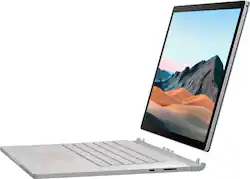
The newly released Microsoft Surface Book 3 replaces the Surface Book 2 with some noteworthy upgrades. My unit comes with a configuration of a 10th generation 1.3 ghz i7 Intel processor, 16 gigs of DDR4 RAM, a 256 gig SSD hard drive, and Nvidia GTX GeForce dedicate graphics processor with 6 gigs of dedicated video. A bright 15 inch “Pixel Sense” detachable monitor with a resolution of 3240 x 2160 pixels rounds out the major features. Microsoft can configure this generation of Surface Book in a number of ways from a 13 to 15 inch monitor, i5 or i7 processors, or up to 32 gigs of RAM and more powerful graphics, so depending on your needs, there will be a variation of this you can configure that’s best for you (at a cost, of course).
Full disclosure: Best Buy reviewers in this invitation-only program are provided products for the purpose of writing honest, unbiased reviews. I will always provide my honest opinions on all products reviewed. .
One of the main reasons people get these are for the versatility. The screen (which houses some of the laptop’s guts) can be detached and used like a tablet on it’s own, with it’s own battery supply built in. When used with the Surface Pen (which unfortunately they do NOT include with these units), your creative juices can go wild with the bright, colorful, high-res screen. The backlit keyboard unit has a battery of it’s own as well, and when the two are attached, you get some pretty good battery life as well as much improved graphics power as this is where the graphic card is housed. A note though – a 17 hour possible battery life is quoted in specs, and in reality, I found it to be a bit less than half of that when running the screen at least at 50% brightness and doing “real world” projects and uses. Your mileage may vary depending on how you use it. You can use it as a standard laptop, or detach the screen and re-attach it backwards to use in tent mode or as a tablet with the keyboard attached, or just carry around the screen as a standalone tablet (with less power as the graphic card and one of the batteries are again, housed, in the keyboard section). One minor issue is that with the monitor holding several components inside, it can get a bit warm in use, but it never gets so hot that it’s worrisome. The keyboard and track pad feel rock solid, and the Surface 3 has a nice typing feel to it, and has the ports most need; two USB-3 ports, one USB-C, SD card reader, headphone jack.
Speakers are standard in terms of volume and clarity – nothing outstanding but much better than on lesser machines. The web cam is very good being true HD, and has very good lower light clarity. A “rear” camera (in the upper corner of the lid) is also of good quality if you have need of it. The microphones are clear, though I did find I had to speak up just a bit louder than on some other machines for them to pick me up and react. A magnetic connector on the charger helps prevent accidents if someone or a pet walks by and accidentally pulls the power cord while in use – it just pops free of the machine, preventing it from being dragged off of the table.
Processing power overall is good. The Surface Book 3 breezed through Paint Shop Pro projects even with multiple layers being applied to photos, large resizing of pics, and having several projects open at once. I decided to try to tax the system by using an old Microsoft screen capture program called Expression Encoder – it allows you to take screen captures of video up to 10 minutes in length (free version), and when converting and saving those clips to your computer, can really tax a system. My mid-range desktop will whine and whirrrr (fan) when using it, sounding like it’s near death. It can take several minutes to process even shorter 4-5 minute videos. The Surface Book handled this pretty well. I took some 3-5 minute grabs and encoded them to save, and while the fan did come on and it was still pushing some limits, overall it did a very good job handling this. The i7 processor and dedicated Nvidia graphics worked well together. The machine did get a little warm during the processing, but not “hot”. I don’t think this will give people any issues when using it for video processing and conversions, especially if you configure it with a bit more RAM. 4K video playback went without any hiccups. I wouldn’t give it an award for processing power, but it’s about what I would expect from any laptop with this configuration of hardware.
Because you are dealing with a thin laptop with cooling considerations that a desktop may not have, I think the processor operates at a lower wattage than it’s cousins used in desktops, because while again, the processing power is “good”, a very similarly configured desktop I use at work seemed to work a bit faster as it of course has cooling fans, and more room for air circulation. Not a problem for daily tasks, photo editing, basic video editing, etc. If you want to get more serious, you’ll want to configure a machine with more RAM and higher Graphics. If you will be using this quite a bit in tablet mode, consider the 13 inch option, as while the 15 inch model is great for desk and office work, it’s a bit bulky to use as a tablet – the 13 inch version would be your option if you are in the field, traveling, or holding that screen a lot.
Glitches? Only one so far. You can as with many Windows laptops now, configure your login so that the web cam recognizes your face and speeds up the login process. Twice, I’ve had it do this, yet the web cam will stay ON, along with the on light and red Windows Hello cam light next to it. Trying to go into the camera app to turn it off didn’t work and I’ve had to reboot to reset it correctly. It’s only happened twice but hopefully will be fixed in a firmware/software update at some point.
The Surface Book 3 is not inexpensive. It’s a well spec machine with a bright, beautiful, removable screen, and is built very well, and you do pay for that, along with it’s various special features. In order to justify the price tag, you should be someone who will take advantage of those features. This would necessitate having the Surface Pen, and that’s one of my big gripes – that they don’t include it. The approx. $100 pen is an additional feature, which in my opinion, should be included with EVERY Surface Book configuration. The retail price for my configuration hovers around the $2,300 range. You do get excellent build quality and a premium screen for that price, but in my opinion, I think for this price, the SSD drive should be at least 512 gigs (or even 1 TB?) and again, the Surface Pen should be included. I’ll be greedy, too – an outstanding extra would be a basic protective case you could slip the monitor in when in tablet-only mode to protect it and prop it up while in use (I can dream, can't I?). Only you can decide if the price is justified for your specific needs and uses, but if it is, you should enjoy the investment. If not and you just need the basic specs, shop around as you can get something without quite all the bells and whistles for a few hundred less.