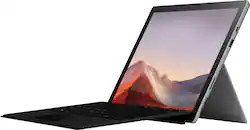
Microsoft - Surface Pro 7 - 12.3" Touch Screen - Intel Core i3 - 4GB Memory - 128GB SSD with Black Type Cover - Platinum
- Key Specs
- Screen Size: 12.3 inches (Size of the screen, measured diagonally from corner to corner.)
- Screen Resolution: 2736 x 1824 (Screens come in a range of resolutions (measured in pixels, horizontal x vertical). The higher the resolution, the greater the picture quality.)
- Processor Model: Intel 10th Generation Core i3 (Your computer's processor is like its brain. Working in combination with system memory, the power of the processor determines the complexity of software you can run, how many programs you can have open at the same time, and how fast those programs will run. Most computers feature an AMD, Intel or Snapdragon processor.)
- Total Storage Capacity: 128 gigabytes
- Operating System: Windows 10 Home (The operating system manages all software and hardware, including files, memory and connected devices. Most importantly, it lets you interact with your device and your programs in a visual way; otherwise, you'd be typing computer code to get anything done.)
- Voice Assistant Built-in: No (A digital assistant built into the device that uses voice commands to answer questions and control smart devices.)
- Wireless Connectivity: Bluetooth, Wi-Fi (The manner in which a device sends data to another device over a short distance without the use of wires or cables.)
- Battery Chemistry: Lithium-ion
- 2-in-1 Design: true (A laptop and a tablet combined in one lightweight, portable device. Sometimes referred to as "convertible" or "hybrid" laptops, these devices deliver the processing power and keyboard of a laptop. When you're ready to play, either detach the screen or fold your 2-in-1 into tablet mode to comfortably watch movies, play games, read an e-book and more.)
- Security Features: Facial recognition
- General
- Brand: Microsoft
- Model Number: QWT-00001
- Product Name: Surface Pro 7 - 12.3" Touch Screen - Intel Core i3 - 4GB Memory - 128GB SSD with Black Type Cover
- Color: Platinum
- Model Family: Microsoft Surface Pro
- Year of Release: 2019
- Display
- Screen Type: PixelSense
- Screen Size: 12.3 inches (Size of the screen, measured diagonally from corner to corner.)
- Screen Resolution: 2736 x 1824 (Screens come in a range of resolutions (measured in pixels, horizontal x vertical). The higher the resolution, the greater the picture quality.)
- Stylus Input: Built for Windows Ink (Active) (An active stylus/pen is able to communicate directly with a compatible device; active electromagnetic resonance (EMR) pens are powered via a device's screen and active electrostatic (AES) pens require an additional power source. A passive stylus does not have electronic features and is compatible with most capacitative touch screens.)
- High Dynamic Range (HDR): false (An HDR-compatible 4K TV or other HDR-compatible product displays HDR video content when it's available from sources like 4K Ultra HD Blu-ray Discs and 4K streaming services.)
- Processor
- Processor Brand: Intel
- Processor Model: Intel 10th Generation Core i3 (Your computer's processor is like its brain. Working in combination with system memory, the power of the processor determines the complexity of software you can run, how many programs you can have open at the same time, and how fast those programs will run. Most computers feature an AMD, Intel or Snapdragon processor.)
- Storage
- Total Storage Capacity: 128 gigabytes
- Memory
- System Memory (RAM): 4 gigabytes (Random-access memory (RAM) is a computing device's short-term data storage, which allows active information to be accessed quickly. The size and type of RAM determines how efficiently the device can handle large amounts of information at one time. For example, gaming or video editing requires more RAM for optimal performance.)
- Type of Memory (RAM): LPDDR4X (Each type of RAM delivers a different level of speed, bandwidth, energy efficiency and performance.)
- Expandable Memory Compatibility: microSD, microSDXC
- Compatibility
- Operating System: Windows 10 Home (The operating system manages all software and hardware, including files, memory and connected devices. Most importantly, it lets you interact with your device and your programs in a visual way; otherwise, you'd be typing computer code to get anything done.)
- Operating System Compatibility: Windows
- Voice Assistant Built-in: No (A digital assistant built into the device that uses voice commands to answer questions and control smart devices.)
- Connectivity
- Wireless Connectivity: Bluetooth, Wi-Fi (The manner in which a device sends data to another device over a short distance without the use of wires or cables.)
- Network Connectivity: None (The manner in which a device sends data to another device over a long distance using a cellular network.)
- Compatible Wireless Standard(s): Wireless-A, Wireless-AC, Wireless-B, Wireless-G, Wireless-N (The wireless networking standard(s) the device is backwards compatible with. This includes networking protocols based on the IEEE 802.11 standard (alphabetically ascending) and the Wi-Fi Alliance standard (numerically ascending), both of which provide high-throughput wireless local area networks (WLANs). Devices designed to work with specific standard(s) will be backwards compatible with previous versions but may not run at optimal performance when using earlier iterations.)
- Headphone Jack: true (The device features an interface that allows for the connection of headphones.)
- Bluetooth Version: 5.0 (The Bluetooth specification formalized by the Bluetooth Special Interest Group. All versions of the Bluetooth standard are backwards compatible with previous versions.)
- GPS Enabled: false
- Interface(s): 3.5mm audio, DisplayPort, USB-A, USB-C (Refers to the types of connections that devices use to interact and communicate with each other.)
- Data Plan Required: false
- Power
- Charging Interface(s): Proprietary (The connection for transmitting power to charge the device.)
- Battery Life (up to): 10.5 hours (Battery life will vary depending on the product configuration, product model, applications loaded on the product, power management setting of the product and the product features used by the customer. As with all batteries, the maximum capacity of this battery will decrease with time and usage.)
- Battery Chemistry: Lithium-ion
- Camera
- Front-Facing Camera: true
- Front Facing Camera Megapixels: 5 megapixels (The more megapixels, the more detail that the camera facing the user can capture.)
- Front Facing Camera Video Resolution: 1080p (Refers to the number of pixels, both horizontally and vertically, used by the camera facing the user to capture video. The higher the resolution the finer the video detail that can be seen.)
- Rear-Facing Camera: true
- Rear Facing Camera Megapixels: 8 megapixels (The more megapixels, the more detail that the camera facing away from the user can capture.)
- Rear Facing Camera Video Resolution: 1920x1080 (1080p) (Refers to the number of pixels, both horizontally and vertically, used by the camera facing away from the user to capture video. The higher the resolution the finer the video detail that can be seen.)
- Features
- 2-in-1 Design: true (A laptop and a tablet combined in one lightweight, portable device. Sometimes referred to as "convertible" or "hybrid" laptops, these devices deliver the processing power and keyboard of a laptop. When you're ready to play, either detach the screen or fold your 2-in-1 into tablet mode to comfortably watch movies, play games, read an e-book and more.)
- Keyboard Included: true
- Security Features: Facial recognition
- Stylus Dock: None
- Dimensions
- Product Height: 7.9 inches (The out of box height of the item. Height is measured as the vertical distance from the bottom of the item to the top as it would be primarily used or placed.)
- Product Width: 11.5 inches (The out of box width of the item. Width is measured as the horizontal distance from one side of the item to the other as it would be primarily used or placed.)
- Product Depth: 0.33 inches (The out of box depth of the item. Depth is measured as the distance from the front of the item to the back as it would be primarily used or placed.)
- Product Weight: 38.08 ounces (The out of box weight of the item.)
- Certifications Listings & Approvals
- EPEAT Qualified: true (The Electronic Product Environmental Assessment Tool (EPEAT) was designed to provide an environmental assessment tool for purchasers. In order to qualify for EPEAT, a product must meet all 23 required criteria.)
- EPEAT Level: Gold (The Electronic Product Environmental Assessment Tool (EPEAT) was designed to provide an environmental assessment tool for purchasers. In order to qualify for EPEAT, a product must meet all 23 required criteria. Products are rated Bronze, Silver or Gold based on how many of 28 optional criteria they meet (below 50%, 50%, 75%).)
- Included
- Included Software: Microsoft Office 365 30-Day trial
- Stylus Included: false
- Warranty
- Warranty - Parts: 1-year limited hardware
- Warranty - Labor: 1 year
- Other
- UPC: 889842512212
At your desk, on the couch, or out in the yard, Surface Pro 7 adapts to the way you work with laptop-to-tablet versatility. And now, it delivers more power than ever, with a laptop-class Intel Core processor, all-day battery¹, Instant On, and improved graphics — plus more multitasking connections, including both USB-C and USB-A ports. 
- Premium performance on the go: Powered by Qualcomm®, the new custom Microsoft SQ1 processor delivers multitasking laptop performance, all-day battery life¹, and fast LTE and Wi-Fi connectivity.
- No Wi-Fi, no problem: In addition to Wi-Fi, every model comes enabled with blazing-fast LTE Advanced Pro³ connectivity.
- See more and do more on 13" screen: The virtually edge-to-edge high-resolution PixelSense display touch screen and Surface signature 3:2 ratio give you more workspace. Ambient light sensing automatically adjusts to lighting conditions.
- Our thinnest Surface ever⁹: Perfect for your on-the-go lifestyle - sleek and slim, in Matte Black, Surface Pro X is just 7.33mm thin and starts at 1.7 pounds.²
- Modern connections for multitasking: Two USB-C ports allow connecting to displays, docking stations and more, as well as accessory charging.
- Your laptop, your way: The next-generation laptop features the versatility of a studio and tablet, so you can type, touch, draw, write, work, and play more naturally.
- Complete your experience with powerful accessories that are always at your fingertips: Make it a full laptop and portable studio with Surface Pro X Signature Keyboard, Slim Pen*, and Surface Arc Mouse.*
- Next-generation laptop-grade performance with on-the-go mobility: Up to 16GB RAM and 256GB of storage.⁴
- All-day battery life: Up to 13 hours¹, and the ability to go from empty to full fast - about 80% in just under an hour.⁸ Comes with Instant On and improved battery standby that extends your battery when you're away.¹
- Do more with the Windows you know: Comes with Windows 10 Home, giving you familiar features, trusted security, and automatic updates.
- You are the password: Log in securely with Windows Hello sign-in, a fast and secure way to unlock Surface Pro X.
- Work without an office: Get more done with Office 365* and quickly accomplish everyday tasks with fast web browsing in Microsoft Edge and Chrome.
Whats Included
- Microsoft Surface Pro 7
- Power supply
- Quick start guide
- Safety and warranty documents
- Surface Pro Type Cover - Black
A: Great question! The difference between the two Surface Pro 7 models is that model VDH-00001 does not come with a keyboard while model QWT-00001 includes the Type Cover.
A: The short answer is yes, the Surface Pro 7 is a computer in a tablet format. Now for the long answer. Verify the minimum requirements for a Windows computer for the online school you are enrolled with, as well as the minimum requirements for your program, before deciding which Surface model to consider. You posted your question on the I3 / 4GB RAM / 128 GB storage model, normally fine for general purposes, but may be limited if you are doing work offline that is graphics intensive such as graphic design and/or game developing. Before retiring I was online faculty for technology courses at both undergrad and graduate levels, and this model meets the requirements for the course material for my courses, in the online classroom environment provided by the school I facilitated for. Your school may have different minimum requirements, however, so make sure you check before deciding which model.
A: Surface Pro 7 has a 5.0MP front-facing camera with 1080p full HD video and a 8.0MP rear-facing autofocus camera with 1080p full HD video.
Q: Is the keyboard included with this ?
A: Yes, it did and everything was packaged in a single box, so I am nearly certain that wasn't because it was part of a promotion or anything.
Q: Is this better than the MacBook Pro and does it come with the keyboard
A: I don’t know about the Mac book pro but I have a Mac book and I like the surface pro 7. I use it more then my Mac book. I like the split screen. I can do two things at once. It does come with a keyboard it is also the cover for the surface pro. Hope this was helpful.
Q: The new Surface Pro 7 charger appears to have a USB port- is this really the case?
A: Yes! It’s super handy since the surface only has one usb & one usb-c.
Q: Does this laptop include a pen?
A: Surface Pro 7 does not come included with Surface Pen. If you're interested in checking out Surface Pen you can find it here: https://www.bestbuy.com/site/microsoft-surface-pen-poppy-red/6376778.p?skuId=6376778.
Q: Does this come with Word, PPt, Excel, etc.?
A: It comes with a 30 day trial.
People also viewed
 $549.99The price was $1,199.99
 $1,149.99The price was $1,499.99
 $329.99The price was $899.99
 $999.99The price was $1,049.99
 $1,349.99The price was $1,639.98
Today's top picks
 $199.99The price was $249.99
 $149.99The price was $239.99
 $789.99The price was $1,049.99