Cyber Monday is hereEnds Tomorrow.Shop now

Main Content

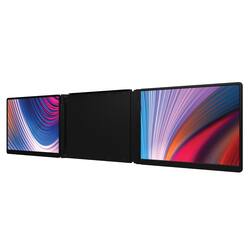
Monduo - 16" LED Portable Monitor - Black

Model: MD010P
SKU: 6571122
$799.99
or
$33.34/mo.
suggested payments with24-Month Financing
Show me how
Finance OptionsView your offers
Special OffersOn related products
Standard Geek Squad Protection
Availability
Fulfillment Options
Order now for pickup on Wed, Dec 10 at
Sold by Best Buy

Highlights

  • Key Specs
    • Refresh Rate: 144Hz (The number of frames per second the device can produce natively without enhancement. Higher rates help produce smooth, seamless pictures.)
    • Maximum Resolution: 2560 x 1600 (Maximum resolution refers to the highest number of pixels that a screen can process and display. Higher resolution signals produce more detailed images.)
    • Response Time: 3 milliseconds (The speed at which pixels can change colors is called response time. It is measured in milliseconds (ms).)
    • Panel Type: QLED (Technology that affects response time and image quality.)
    • Synchronization Technology: FreeSync (AMD Adaptive Sync) (Generally, these technologies allow syncing between a computer/console game's frame rate and the device's refresh rate for a smoother display without tearing.)
    • Screen Size: 16 inches (Size of the screen, measured diagonally from corner to corner.)
    • Display Connector(s): 1 x HDMI (The number and type of connectors used to connect to an external display.)
  • General
    • Brand: Monduo
    • Model Number: MD010P
    • Product Name: 16" LED Portable Monitor
    • Color: Black
    • Operating System Compatibility: Mac, Windows
  • Display
    • Refresh Rate: 144Hz (The number of frames per second the device can produce natively without enhancement. Higher rates help produce smooth, seamless pictures.)
    • Maximum Resolution: 2560 x 1600 (Maximum resolution refers to the highest number of pixels that a screen can process and display. Higher resolution signals produce more detailed images.)
    • Native Resolution: 2560 x 1600 (Native resolution of a screen refers to its single, fixed resolution. Sometimes screens must scale an image up or down in order to fit the native resolution. This can cause a loss of resolution or detail.)
    • Contrast Ratio: 1200:1 (Measured difference between a displayed image's brightest whites and darkest blacks. The larger the first number, the more detail and color that can be displayed.)
    • Response Time: 3 milliseconds (The speed at which pixels can change colors is called response time. It is measured in milliseconds (ms).)
    • Display Type: LED
    • Panel Type: QLED (Technology that affects response time and image quality.)
    • Synchronization Technology: FreeSync (AMD Adaptive Sync) (Generally, these technologies allow syncing between a computer/console game's frame rate and the device's refresh rate for a smoother display without tearing.)
    • Aspect Ratio: 16:9 (The measurement of the width of a screen compared to the height of a screen, expressed as a ratio.)
    • Curved Screen: false
    • Pixel Density: 2560 pixels per inch (The number of pixels present per inch on the device's display. Higher pixel density improves the clarity and sharpness of the displayed image.)
    • Brightness: 500 candela per square meter (A measure of the total light output.)
    • Screen Size: 16 inches (Size of the screen, measured diagonally from corner to corner.)
    • High Dynamic Range (HDR): true (An HDR-compatible 4K TV or other HDR-compatible product displays HDR video content when it's available from sources like 4K Ultra HD Blu-ray Discs and 4K streaming services.)
    • Touch Screen: false (Touch-screen devices make navigating more intuitive. Using a touch-screen display, you can do things such as tap to select, hold and drag to move items, swipe to scroll, and pinch to zoom.)
    • On-Screen Display Languages: 5 (The available language options for displayed text.)
    • Display Surface: Standard glass
    • Color Gamut (NTSC): 100 percent
    • Color Gamut (Standard RGB): 100 percent
  • Connectivity
    • Number of HDMI Inputs (Total): 1
    • Display Connector(s): 1 x HDMI (The number and type of connectors used to connect to an external display.)
    • Number of USB Ports (Total): 1
    • USB Ports: 1 x USB-C (The number and type of USB ports the product has.)
  • Compatibility
    • Wall Mountable: false (The product is able to be secured to a wall. Some products are designed ready to mount, while others may require additional hardware/accessories for installation.)
    • Voice Assistant Built-in: No (A digital assistant built into the device that uses voice commands to answer questions and control smart devices.)
  • Features
    • Tiltable: true
    • Built-In Webcam: true
    • Integrated Speaker(s): true
    • Built-in Speaker Type: Front firing (Backward, downward, and front-firing speakers direct sound into the room from those respective directions. A soundbar is typically long and rectangular, and designed to act as an all-in-one speaker with greater sound production than that of a TV alone. An acoustic surface is the result of small sound actuators embedded directly behind the screen, turning the entire screen's surface into a speaker.)
    • Smart Capable: true (Smart, or smart-capable devices are able to connect directly to your home network in order to stream content from the Internet, run Internet-based apps, or connect to other smart devices.)
  • Dimensions
    • Product Height Without Stand: 9.6 inches
    • Product Width: 15.2 inches (The out of box width of the item. Width is measured as the horizontal distance from one side of the item to the other as it would be primarily used or placed.)
    • Product Depth Without Stand: 9.6 inches
    • Product Weight: 4.1 pounds (The out of box weight of the item.)
    • Stand Included: false
    • Cord Length: 4 inches
  • Power
    • Power Consumption: 500 watts
  • Certifications Listings & Approvals
    • ENERGY STAR Certified: false (Devices carrying the ENERGY STAR service mark, such as computer products and peripherals, kitchen appliances, and other products, generally use 20% to 30% less energy than required by federal standards.)
    • EPEAT Qualified: false (The Electronic Product Environmental Assessment Tool (EPEAT) was designed to provide an environmental assessment tool for purchasers. In order to qualify for EPEAT, a product must meet all 23 required criteria.)
  • Warranty
    • Warranty - Parts: 1 year limited
    • Warranty - Labor: 1 year limited
  • Other
    • UPC: 198168067383

Make working on your laptop easier than ever. The Monduo 16-In. Pro Duo Display is a dynamic addition to your laptop setup, meticulously tailored to complement 16-in. laptops. Its seamless USB-C and HDMI connections instantly expand your workspace with 2 additional screens, enhancing your productivity and entertainment.

  • Reducing motion blur: Experience unparalleled gameplay and professional work with rapid 144Hz refresh rate, reducing motion blur and creating a fluid visual experience without any lag. 2K resolution offers users a stunning, sharp display, enhancing everything from detailed work documents to intricate graphic designs and immersive gaming worlds.
  • Large screens: Large display provides ample space for multi-tasking professionals and gaming enthusiasts, allowing for comprehensive game interfaces, wider viewing angles, and the ability to have multiple windows open for efficient workflow management.
  • Brightness and color: Vibrant, true-to-life colors: with 500 nits of brightness paired with a 100% DCI-P3 color gamut, the display delivers vivid, brighter visuals and a wider spectrum of colors, mimicking real-life quality and ensuring a stunning display under any lighting condition.
  • Reducing motion blur: Experience unparalleled gameplay and professional work with rapid 144Hz refresh rate, reducing motion blur and creating a fluid visual experience without any lag. 2K resolution offers users a stunning, sharp display, enhancing everything from detailed work documents to intricate graphic designs and immersive gaming worlds.
  • Large screens: Large display provides ample space for multi-tasking professionals and gaming enthusiasts, allowing for comprehensive game interfaces, wider viewing angles, and the ability to have multiple windows open for efficient workflow management.
  • Brightness and color: Vibrant, true-to-life colors: with 500 nits of brightness paired with a 100% DCI-P3 color gamut, the display delivers vivid, brighter visuals and a wider spectrum of colors, mimicking real-life quality and ensuring a stunning display under any lighting condition.
Whats Included
  • Monduo 16" Tri-Screen Monitor
  • 1x HDMI Cable
  • 1x Power Cable
  • 1x Short USB-C Cable
  • 1x Long USB-C Cable
  • Manual
  • Monduo 16" Tri-Screen Monitor
  • 1x HDMI Cable
  • 1x Power Cable
  • 1x Short USB-C Cable
  • 1x Long USB-C Cable
  • Manual

Q: What is the refresh rate of the Monduo monitor?

A: The Monduo monitor has a refresh rate of 144Hz.

Q: What type of panel does this monitor use?

A: This monitor uses a QLED panel.

Q: Does this monitor have built-in speakers?

A: Yes, the monitor has integrated speakers.

Q: How is the color quality of this monitor?

A: This monitor has vibrant, true-to-life colors with 500 nits of brightness paired with a 100% DCI-P3 color gamut that delivers vivid, brighter visuals and a wider spectrum of colors.

Q: What is the response time of this monitor?

A: This monitor has a response time of 3 milliseconds.

Q: Does this monitor come with a stand?

A: No, the Monduo 16" LED Monitor does not come with a stand.

Q: What screen sizes does this support? Specifically will this support and attach to a 14.4 inch laptop screen size? Or is it only specifically for 16 inch displays?

A: The 16" Monduo Pro Duo Display supports laptops that are 16" onwards. If you have a 14" laptop, we would recommend going for the 14" Monduo Pro Duo Display which we also stock with BestBuy.

Q: Does this work with AMD and Intel processor Windows laptops? Does this pass power to the laptop since my laptop charges from 1 of the 2 USB-C ports?

A: Yes, the works with AMD and Windows laptops. The Monduo will need to be powered by your laptop via 2 USB-C ports, so if you have these 2 ports available, then you may be able to connect. Your laptop must be able to support 2 external monitors, as well.

Sponsored

Compare similar products

Monduo - 16" LED Portable Monitor - Black
3.9(16)

Make working on your laptop easier than ever. The Monduo 16-In. Pro Duo Display is a dynamic addition to your laptop setup, meticulously tailored to complement 16-in. laptops. Its seamless USB-C and HDMI connections instantly expand your workspace with 2 additional screens, enhancing your productivity and entertainment.

AOC - 16T15 15.6" IPS Portable Monitor, FHD, 1920x1080, 60Hz, 5Ms, USB-C,Carry Case / Stand - Black

AOC 16T15 16'' Class USB-C Ultra-Slim Portable Monitor with IPS Panel, Full HD 1920x1080 Resolution, 60Hz, 5ms,Carry Case acts as sand for Portrait/Landscape View, PC/MacBook, VESA Mount, Two 1watt built-in speakers

Mobile Pixels - TRIO MAX 2.0 14.1" LCD Monitor - Black
3.5(14)

The Mobile Pixels Trio Max 2.0 Portable Laptop Monitors are upgraded, plug and play monitors where you can go from 1 screen to 3. It's easy to use as an ultimate solution for the working professionals, gamers, stock traders, entrepreneurs, coders, and more. And as always, you can take it on the go.

Mobile Pixels - TRIO 2.0 13.3" LCD Monitor - Black
4.1(15)

The Mobile Pixels Trio 2.0 Portable Laptop Monitors are upgraded, plug and play monitors so you can go from 1 screen to 3. It's easy to use as a ultimate solution for the working professionals, gamers, stock traders, entrepreneurs, coders, and more. And as always, you can take it on the go.

Pros for Monduo - 16" LED Portable Monitor - Black
Resolution, Portable, Screen size, Crisp, Refresh ratePortability, Overall Performance, Resolution, Setup, USB-COverall Performance, PortabilityPortability
Cons for Monduo - 16" LED Portable Monitor - Black
Connections, Backlight bleed, Cheap hinges, Gaming, HeavyBrightness, Connectivity, Signal, SpeakersWeightThere were no cons for this product

Specs

Reviews

Customers are saying

Customers are impressed with the Monduo 16" LED Monitor's refresh rate and screen brightness. Many comments praise the vibrant and crisp visuals, especially at 144hz. The high refresh rate, combined with the excellent color saturation and brightness, makes for a beautiful display. Reviewers found the monitor to be a great addition to their existing setups.

This summary was generated by AI based on customer reviews.

Customer Images

The vast majority of our reviews come from verified purchases. Reviews from customers may include My Best Buy members, employees, and Tech Insider Network members (as tagged). Select reviewers may receive discounted products, promotional considerations or entries into drawings for honest, helpful reviews.

  • Rated 4 out of 5 stars

    Great workspace addition with limitations

    With editing (photos, voice, videos), this has been a fantastic addition. Adding two additional workspaces is great in theory, but actually realizing it has increased workflow efficiency tenfold. The screens are bright, crisp and vibrant. I have used external travel monitors before, and they were usually just for basic functionality, but this set-up, paired with the right system, can actually be used in more intensive applications. Especially with the 1080p resolution and 144hz refresh rate. But to note, that may be limited. I'll explain below. The instructions that came with the unit weren't the best in explaining connections. I was able to get it rolling fairly easily, but having a diagram of different types of connection diagrams would have been helpful in minimizing any unnecessary connections. I connected it to both my 17" Alienware and to my 15" Samsung Smart book. With the Alienware, there is a dedicated HDMI and DisplayPort, but no video through the USB-C. So, I needed to connect three cables to my Alienware. 1 HDMI and 2 USB-C, one for power and another for the display extension. That is a lot of connecting. Granted, if you have a separate power adapter, you can subtract one connection from your pc. On the Samsung, the video comes through the USB-C. That only required two USB-C connections to get running. My wishlist would have included some sort of passthrough for the monitors so only one side needs connecting as the monitors are wired through the bracket. Not too tedious, but be aware of your system set-up when purchasing. On that note, when using with the Alienware, it does not function as a makeshift Ultrawide monitor. For some reason, the laptop monitor is wired differently so that when you try to use the monitor as a fullscreen gaming panel, it will only recognize the Monduo screens as displays. This is not Monduos fault, but this is something to be aware of if you planned to use for an Ultrawide gaming monitor. In addition, even through windows, I get the screens to share, but if I wanted to stretch an editing window across all three monitors, it appears not to be an option. For both of these situations, I will look to tinker, but as of now, they are unfortunate limitations. Lastly, connecting the monitors has been hit or miss. They connect through a spring bracket that closes tightly to lock onto your screen. For my unit, the bracket doesn't lock in place, so you have to stretch it over the screen. The screen are definitely LEDs, so I get extremely nervous each time as if too much pressure is applied, or the bracket snaps to hard, you could easily damage the screen. What would have made this a non-issue would be if you could leave it on and close the lid. No, if you are storing your laptop, you have to take it off each time. So, practice extreme caution. I really am enjoying the set-up thus far and would happily recommend it, but with the understanding of the possible hogging of ports and the iffy screen bracketing. Once I get the gaming figured out, it'll be a dream for travel gaming!

    Posted by JKhan

  • Rated 3 out of 5 stars

    Great for travels, saving space, working on the go

    I’ve been using the new dual LED monitor setup from Monduo for a week now and I’m really impressed with the quality, performance and ease of use. Not only is it a really cool, eye-catching piece of technology, it’s a must have for anyone who works on the go using their laptop. The Monduo monitor arrives very nicely packaged in a foam lined box that comes with everything you need to get started, including a quick start guide, four cables and a 90-degree charging adapter. Looking at all the cables can appear a little overwhelming at first, but you will only need to use two or three at a time, and once you realize how to set up your laptop, repeating the steps is quick and easy. I’ve been able to successfully use this on two different laptops that I own. My Acer Swift Edge 16 and my Alienware m16 R2. The Monduo works for both laptops, however I do have to run the Monduo monitors at a lower refresh rate when using the Swift Edge. If I set them both to 120Hz, and use them both for streaming video or playing a game, my laptop's performance suffers. Running them both at 60Hz works perfectly well and is sufficient for most of my daily work. Another issue with the Swift Edge is that it uses one of the USB-C ports for power. So if I want to charge the laptop while using the Monduo, I have to connect one Monduo screen to the laptop with the included USB-C cable and the other screen using the included HDMI cable. I then have to connect the included USB-C power-only cable from the screen using the HDMI cable, to a power adapter that I already owned, since Monduo did not include a power adapter. It would be nice if power could pass through from one screen to the other so that I didn’t have to power the screen when it’s connected with an HDMI cable. Using the Mondue with my Alienware m16 is great! Both screens run at 144Hz with no noticeable performance lag. I also don’t have the issue of needing to connect one of the screens to the power cable if I need to charge the laptop, since the Alienware doesn't use USB-C to charge. The Monduo QHD 144Hz LED display is bright with sharp images and rich colors. Although you can see the difference in color saturation, contrast and finish, it still looks really great next to the OLED display on my Acer and it pairs beautifully with the display on my Alienware. I do notice quite a bit of backlight bleed on the displays. Much more on the left screen, than the right. It’s not as noticeable when you are actively using them to work or view bright content, but it’s quite noticeable with a black screen. The Quick Start guide instructs you to follow a QR code which takes you to the Monduo website where you can download the Monduo app and the latest drivers. Windows users do not need drivers, but the website still recommends the app for simple management of the Monduo displays. I downloaded the app and from what I could tell, it didn’t do much more than the touch controls on the front of the displays, which allow you to effectively manage each display. I also was unable to open the app the next day, so I uninstalled it and I likely won’t reinstall it again. The design of these displays is efficient, portable and the unit seems quite durable. I wouldn’t be afraid to travel with this, as long as I put it in a laptop sleeve or something similar.. The displays are thin, the kickstand works well and I appreciate the easy-to-use touch sensitive controls on the front of each display. I would like it if Monduo innovated the hinges to include tilt and rotation, which would allow for a much more desirable viewing angle, when they are not fully extended, but for now, this will do. The further extended the displays, the better it looks, although this might not be as much of an issue if you are using a tilted laptop base. Overall this is a really cool product for anyone who wants the ability to comfortably use three high-end displays on their lap, for a quick browsing session. Or for anyone who frequently needs to set up an impromptu workstation with three displays for some work or creativity. It’s also great for anyone who is short on space or outlets and doesn’t have the room for two full size monitors and an open laptop.

    Posted by Orion

  • Rated 3 out of 5 stars

    Great picture quality, bad for portability.

    The Monduo 16” Pro duo has some great features, but it’s not really ideal for portability. The Monduo comes packaged very nicely, in a box that looks like it was made for a MacBook pro. Inside the box, you have the screen and several different sized cables to choose from. The Monduo is able to be connected via HDMI or USB-C/Thunderbolt 4. Each screen has 3 ports underneath them: 2 USB-C and 1 HDMI mini inputs. The screens are able to flex open in so you can place it over your 16” monitor, and there is a kickstand that can fold open on the back for support. Each screens supports a resolution of 2460x1600p with a refresh rate of 144hz. The screens themselves look great, the colors are very bright and vibrant, and the images are extremely clear. There are built-in touch controls on each monitor which I had to find out on my own, because there are no instruction manuals included, just a quick start guide. Each screen will have to be plugged in separately, with its own cable. For my setup I used an Asus ROG M16 16” gaming laptop, and I connected everything into a thunderbolt 4 Hub. After adjusting the displays, I was able to get a nice tri display running. I tried downloading the windows version software from the website, but the file they gave me wasn’t even recognized by widows. Nevertheless, you don’t really need any software for the screen to works properly. Now, I want to mention the overall experience of the using the Monduo. First off, this is not meant to be used on the road while traveling. This must be stationary on a desk. This is mainly due to the weight and balance of the screens being too heavy for the laptop’s screen to support without balancing it correctly. Also, due to the screens needing your laptop’s battery power, your laptop really needs to be plugged into an outlet. Second, I tried putting my laptop on an angled cooling stand, but that quickly failed because the weight of the screens kept forcing my laptop closed. So, the only way I was able to place the screens was at a 90deg angle. This caused me to need to use a laptop desk stand on my desk, just to be at eye level. Lastly, I tried playing some games on the duo. The only game I was able to get displayed correctly was MW2, and it wasn’t an ideal experience. The views on the sides were a little stretched and blurred to make it look like tunnel vision, not to mention the big gap between the screens - this really made it hard to play. Needless to say, I wouldn’t recommend gaming on this. Overall, I have mixed feelings about Monduo 16” Pro Duo. The screens look beautiful and are easy to connect, but the balance issue requires you have to set them on a desk at a 90-degree angle. While gaming works, full display support is limited to few games and even with that, the gap in the displays makes it hard to game on. On the other hand, if you’re using the displays for multi-tasking, they do a good job for that. So, I would recommend the Monduo for anything other than gaming.

    Posted by Ace254687

No content
Sponsored

Similar products from outside of Best Buy

sponsored

Finance Options

My Best Buy® Credit Card
Choose a benefit:
$33.34/mo.suggested payments with 24-Month Financing
Or
10% back in rewardson your first day of purchases when approved for the My Best Buy® Credit Card.
Buy Now, Pay Later
8 payments starting at $100.00
Lease to own
Apply today with no credit needed and enjoy flexible payment options.

Special Offers

Included with Purchase
Free 6-month security software: $29.99 value