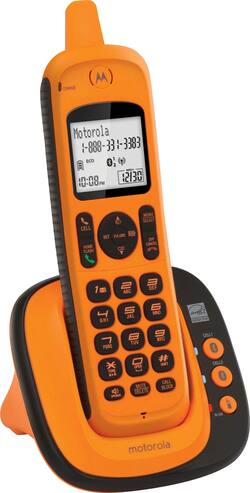
Motorola - XT801 DECT 6.0 Cordless Phone - Orange
- Key Specs
- Speakerphone: true
- Bluetooth Enabled: true (The device is capable of communicating with another device via Bluetooth, provided they are within the required range of each other. A Bluetooth-enabled device must also be the same Bluetooth version or higher than the accessory it is intended to pair with.)
- Expandable: true
- Frequency: DECT 6.0 Digital (A measurement of the electromagnetic radio waves a device emits.)
- General
- Brand: Motorola
- Model Number: XT801
- Product Name: XT801 DECT 6.0 Cordless Phone
- Color: Orange
- Keypad Location: Handset
- Dimensions
- Product Height: 8.55 inches (The out of box height of the item. Height is measured as the vertical distance from the bottom of the item to the top as it would be primarily used or placed.)
- Product Width: 4.35 inches (The out of box width of the item. Width is measured as the horizontal distance from one side of the item to the other as it would be primarily used or placed.)
- Product Depth: 4.33 inches (The out of box depth of the item. Depth is measured as the distance from the front of the item to the back as it would be primarily used or placed.)
- Product Weight: 13.76 ounces (The out of box weight of the item.)
- Features
- Backlit Keypad: true (Integrated lights allow for visibility of the keys in low-light conditions.)
- Volume Control: true
- Intercom: false (Allow two or more people to carry on a conversation over a wired circuit.)
- Display Type: Digital
- Call Waiting: true
- Caller ID: true
- Wall Mountable: true (The product is able to be secured to a wall. Some products are designed ready to mount, while others may require additional hardware/accessories for installation.)
- Call Conferencing: true
- Call Functions
- Flash Function: true
- Mute Function: true
- Redial: true
- Included
- Handsets Included: true
- Certifications Listings & Approvals
- ENERGY STAR Certified: true (Devices carrying the ENERGY STAR service mark, such as computer products and peripherals, kitchen appliances, and other products, generally use 20% to 30% less energy than required by federal standards.)
- Warranty
- Warranty - Parts: Not available
- Warranty - Labor: Not available
- Other
- UPC: 816479014932
Take calls in extreme conditions with this versatile Motorola Connect to Cell cordless phone. Rugged and waterproof, this dust-resistant device is ideal for building sites, backyards and pools. Simply pair your smartphone with this Motorola Connect to Cell cordless phone via Bluetooth to stay in touch without damaging your regular device.
- Expandable phone system: Can be expanded up to 5 handsets.
- DECT 6.0 digital technology: For interference-free secure calls and clear sound.
- Bluetooth® Connect to Cell™: When you pair your smartphone to the base, you can make or answer cellular calls on the shockproof and water-resistant cordless handset.
- Backlit screen: Offers an easy-to-see display.
- Call waiting and caller ID with 50-name-and-number memory: Displays the name and number of incoming calls and remembers up to 50 callers for convenient callback.
- Rugged design: Helps protect your cell phone from harsh conditions, both indoors and outdoors.
- Energy Star certified: Assures a high standard of energy efficiency.
Whats Included
- Motorola XT801 DECT 6.0 Cordless Phone
- Bluetooth Connect to Cell Amber
- Owner's manual
Q: How do you check voicemail.
A: First to be clear, there is no answering system included with this phone. That's good by me as that's what I was looking for. If your service provider supplies this service, they certainly provide a number to call to get your messages BUT this phone has a voice mail indicator and the #1 button has an icon indicating it is used for voice mail retrieval. It's mentioned in the Quick Start guide too. How to program it? Who knows??? It's not in the Quick Start guide; that only covers Basic Use. The QS guide (page 16) says the full user manual is available at www.motorolastore.com but it is not. I contacted motorolastore.com over a week ago but have not received any acknowledgement. I guess this is their business model; refer you to web site or another sucker for support. Anything but support attempt to provide support themselves. It's not hard to see why no one goes to Best Buy any more.
Q: Can I leave this phone plugged into the charger ( on ) all the time?
A: Mine is on the base/charger at all times, when I'm not using, it throughout the day. I have not noticed any problems with doing this.
Q: HOW FAR CAN I TAKE THIS CORDLESS FROM HOME?
A: I took it outside probably 200 feet from the house before it started to fade. Hope this helps
Q: How do you get the voicemail open?
A: press and hold the #1 button - to set it up hit menu button scroll through to Voicemail # hit select enter the voicemail # you use - hit select to save. now you just need to press and hold the #1 button to call VM hope that helps
A: Mine displayed the same message after I dropped it. There is a pin hole on the back of the phone just above the screw holding battery cover on. Stick the end of a paperclip in the hole to push the button. Mine came back on with all the memory numbers still intact.
People also viewed
 $105.99The price was $115.99
 $96.54The price was $119.95
Today's top picks
 $199.99The price was $249.99
 $479.99The price was $729.99
 $789.99The price was $1,049.99
 $799.99The price was $1,199.99