Early Black Friday DealsNew Doorbusters through SundayShop now

Main Content
product image

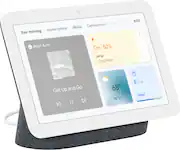
Nest Hub 7” Smart Touchscreen Display with Google Assistant (2nd Gen) - Charcoal

Model: GA01892-US
SKU: 6450818
This item is no longer available in new condition. See similar items below
  • Key Specs
    • Built-In Speakers: true
    • Featured Streaming Services: Netflix, Disney+, Hulu, Sling TV, Apple Music, Spotify, YouTube, YouTube TV, Google Play Movies & TV, Pandora (Streaming services and other programs are available on this device. Keep in mind, there may be more services supported than just those shown here.)
    • Number of Microphones: 3
    • Search Engine Used: Google
    • Streaming Media Player(s) Supported: Chromecast
  • General
    • Brand: Google
    • Model Number: GA01892-US
    • Product Name: Nest Hub 7” Smart Touchscreen Display with Google Assistant (2nd Gen)
    • Color: Charcoal
  • Audio
    • Built-In Speakers: true
    • Featured Streaming Services: Netflix, Disney+, Hulu, Sling TV, Apple Music, Spotify, YouTube, YouTube TV, Google Play Movies & TV, Pandora (Streaming services and other programs are available on this device. Keep in mind, there may be more services supported than just those shown here.)
    • Number of Speakers: 1
    • Tweeter Size: 1.7 inches
  • Voice
    • Voice Assistant Built-in: Google Assistant (A digital assistant built into the device that uses voice commands to answer questions and control smart devices.)
    • Number of Microphones: 3
    • Microphone Features: Three far-field microphones
  • Connectivity
    • Wireless Multi-Room Audio: true (Technology that allows multiple speakers and/or soundbars to be connected wirelessly and play audio in separate rooms.)
    • Wireless Multi-Room Technology: Google Cast (Proprietary technology that allows multiple speakers and/or soundbars to be connected wirelessly and play audio in separate rooms.)
    • Connectivity Technology: Wi-Fi, Bluetooth (The manner in which a device sends data to another device over a short distance.)
    • Bluetooth Version: 5.0 (The Bluetooth specification formalized by the Bluetooth Special Interest Group. All versions of the Bluetooth standard are backwards compatible with previous versions.)
    • Works With: Google Home, Nest, Hue, SmartThings (Compatible with or able to be connected to other smart devices or applications.)
    • Search Engine Used: Google
    • Wireless Connectivity: Wi-Fi (The manner in which a device sends data to another device over a short distance without the use of wires or cables.)
    • Operating System Compatibility: Android, Apple iOS
  • Features
    • Streaming Media Player(s) Supported: Chromecast
    • Control Button(s): Volume, Touch
    • Wake Word: Hey Google, Okay Google (The term or phrase used to activate a device.)
    • Alarm Function: false
    • Processor Model: Quad-core 64-bit 1.9 GHz ARM CPU (Your computer's processor is like its brain. Working in combination with system memory, the power of the processor determines the complexity of software you can run, how many programs you can have open at the same time, and how fast those programs will run. Most computers feature an AMD, Intel or Snapdragon processor.)
  • Power
    • Power Source: Plug-in
    • Voltage: 15 volts (Amount of power needed to support an electrical current.)
  • Display
    • Display Screen: true
    • Screen Size: 7 inches (Size of the screen, measured diagonally from corner to corner.)
    • Touch Screen: true (Touch-screen devices make navigating more intuitive. Using a touch-screen display, you can do things such as tap to select, hold and drag to move items, swipe to scroll, and pinch to zoom.)
    • Screen Resolution: 1024 x 600 (Screens come in a range of resolutions (measured in pixels, horizontal x vertical). The higher the resolution, the greater the picture quality.)
  • Dimensions
    • Product Height: 4.74 inches (The out of box height of the item. Height is measured as the vertical distance from the bottom of the item to the top as it would be primarily used or placed.)
    • Product Width: 2.73 inches (The out of box width of the item. Width is measured as the horizontal distance from one side of the item to the other as it would be primarily used or placed.)
    • Product Depth: 6.98 inches (The out of box depth of the item. Depth is measured as the distance from the front of the item to the back as it would be primarily used or placed.)
    • Product Weight: 1.19 pounds (The out of box weight of the item.)
  • Warranty
    • Warranty - Parts: 1 year
    • Warranty - Labor: 1 year
  • Other
    • UPC: 193575009223

Meet the second-gen Nest Hub from Google,¹ the center of your helpful home. Stay entertained in the kitchen with shows, videos, and music. In the living room, control your compatible lights, TVs, and other smart devices with a tap or your voice. And in the bedroom, Nest Hub can help you wake up easier with a Sunrise Alarm.

  • Keep your family connected.: Nest Hub works with your Nest speakers and displays to keep everyone in sync. Broadcast messages across the house – tell everyone dinner’s ready or it’s time to go. Chat from room to room. Make Duo audio calls.²
  • Nest Hub respects your privacy.: You can turn off the mic at any time with the mic switch. And easily clear your Google Assistant history whenever you want.
  • The easiest way to be entertained.: Catch up on Netflix shows. Watch YouTube videos and listen to music on the enhanced speaker. Stream from the music services you use most, like YouTube Music, Spotify, and Pandora. Play, pause, browse, and control the volume with a tap. Or just say “Hey Google.”³
  • Effortlessly track your sleep.: With Nest Hub on your bedside table,⁴ you can track when you go to bed, when wake up, and how long you’ve slept.⁵ Sleep Sensing uses Motion Sense to detect movement and breathing – without a camera.
  • Your home's control center.: Nest Hub shows all your connected devices in one place, so you can control them with a tap.⁶ Or just ask Google. And with an additional mic on Nest Hub, it hears you better than ever.
  • The hub of your connected home.: Control your smart home – with thousands of compatible devices. Turn on lights, lock the doors, or turn up the thermostat with a tap. Nest Hub also works with Nest video doorbells and cameras. Just say, “Hey Google, show me the front door camera” to see your live feed.
  • Hands-free help.: Just ask Google about the weather, news, sports, or almost anything, and get quick answers.
  • Wind down easily. Wake up gently.: With Nest Hub you can fall asleep and wake up easier. From the “Your evening” page, set your alarm, control your compatible lights and other connected devices, and play soothing sounds to help you drift off. Nest Hub’s Sunrise Alarm wakes you up gently.
  • Make restaurant reservations with ease.: Booking a restaurant reservation gets even easier with your Nest Hub 2nd Gen. Now it’s simpler to book a table at your local restaurant right from your display.
  • Access Calm⁷ with Google Assistant on your Nest Hub 2nd Gen.: Meditations from Calm will be available through Google Assistant by saying, "Hey Google, show me meditations from Calm" or "Hey Google, start a meditation."
  • Keep your family connected.: Nest Hub works with your Nest speakers and displays to keep everyone in sync. Broadcast messages across the house – tell everyone dinner’s ready or it’s time to go. Chat from room to room. Make Duo audio calls.²
  • Nest Hub respects your privacy.: You can turn off the mic at any time with the mic switch. And easily clear your Google Assistant history whenever you want.
  • The easiest way to be entertained.: Catch up on Netflix shows. Watch YouTube videos and listen to music on the enhanced speaker. Stream from the music services you use most, like YouTube Music, Spotify, and Pandora. Play, pause, browse, and control the volume with a tap. Or just say “Hey Google.”³
  • Effortlessly track your sleep.: With Nest Hub on your bedside table,⁴ you can track when you go to bed, when wake up, and how long you’ve slept.⁵ Sleep Sensing uses Motion Sense to detect movement and breathing – without a camera.
  • Your home's control center.: Nest Hub shows all your connected devices in one place, so you can control them with a tap.⁶ Or just ask Google. And with an additional mic on Nest Hub, it hears you better than ever.
  • The hub of your connected home.: Control your smart home – with thousands of compatible devices. Turn on lights, lock the doors, or turn up the thermostat with a tap. Nest Hub also works with Nest video doorbells and cameras. Just say, “Hey Google, show me the front door camera” to see your live feed.
  • Hands-free help.: Just ask Google about the weather, news, sports, or almost anything, and get quick answers.
  • Wind down easily. Wake up gently.: With Nest Hub you can fall asleep and wake up easier. From the “Your evening” page, set your alarm, control your compatible lights and other connected devices, and play soothing sounds to help you drift off. Nest Hub’s Sunrise Alarm wakes you up gently.
  • Make restaurant reservations with ease.: Booking a restaurant reservation gets even easier with your Nest Hub 2nd Gen. Now it’s simpler to book a table at your local restaurant right from your display.
  • Access Calm⁷ with Google Assistant on your Nest Hub 2nd Gen.: Meditations from Calm will be available through Google Assistant by saying, "Hey Google, show me meditations from Calm" or "Hey Google, start a meditation."
Whats Included
  • Display
  • Power Adapter
  • Quick Start Guide
  • Safety and Warranty
  • Display
  • Power Adapter
  • Quick Start Guide
  • Safety and Warranty
Product Manuals
Disclaimers
  • ¹ Google Nest Hub requires a Wi-Fi network, a nearby electrical outlet, and a compatible (Android, iOS) mobile device. Minimum OS requirements are available at g.co/home/req. iOS is a trademark of Cisco and is used under license.
  • ² To make calls, Google Duo accounts required for you and call recipient.
  • ³ Subscription services may be required for certain content.
  • ⁴ Sleep Sensing features are subject to your permissions and settings. They use motion, sound, and other device and sensor data to work and require placing the device close to the bed and calibrating the device for your sleeping position. Learn more at g.co/sleepsensing/preview
  • ⁵Subscription required (sold separately).
  • ⁶ Compatible smart devices required.
  • ⁷ For users with an existing account, you can access your content.  If you don’t have an account, you can access several free tracks or create an account and enroll in a 1 month free trial of Calm Premium
  • ¹ Google Nest Hub requires a Wi-Fi network, a nearby electrical outlet, and a compatible (Android, iOS) mobile device. Minimum OS requirements are available at g.co/home/req. iOS is a trademark of Cisco and is used under license.
  • ² To make calls, Google Duo accounts required for you and call recipient.
  • ³ Subscription services may be required for certain content.
  • ⁴ Sleep Sensing features are subject to your permissions and settings. They use motion, sound, and other device and sensor data to work and require placing the device close to the bed and calibrating the device for your sleeping position. Learn more at g.co/sleepsensing/preview
  • ⁵Subscription required (sold separately).
  • ⁶ Compatible smart devices required.
  • ⁷ For users with an existing account, you can access your content.  If you don’t have an account, you can access several free tracks or create an account and enroll in a 1 month free trial of Calm Premium

Q: Is the power rating 110v-220v?

A: Nest Hub comes with a 15W adapter with an auto-volt Input voltage of 100V - 240V. Any input level within this range should work.

Q: What are the improvements over the first generation hub?

A: Moatly the soli radar sleep sensor, re-tuned bass for better sound, 3 mics instead of 2, and on board command processing instead of querying the server as much, and internal hub-like network enhancement to allow communication with lights etc if your wifi went out. Sounds like Amazon's sidewalk but google calls it something else. Unclear if processor is new. Beveled edge is cosmetically different. Screen res is the same as gen 1.

Q: Are you able to hear radio stations from across the country? If I live in NY, can I listen to a station in Oklahoma? And do I need to buy anything else? Speaker, receiver, etc? Thanks

A: I forgot to mention in my previous answer that, no, you don't need any additional equipment. Everything is streamed over the Internet, and played on the built-in speaker. You do have the option of subscribing to TunedIn's premium service, which will have fewer ads and more contents. Before buying this device, try out TunedIn on your phone, tablet or computer. You can either go to TunedIn's website, or download their app. What you hear is exactly what you'd hear on this device.

Q: Is there a lot of installation involved (I'm a senior-senior)??

A: No just plug it in follow on screen instructions about 2 min and it done. Very easy

Q: Does this 2nd Gen have a Camera?

A: No. Nest Hub (2nd gen) doesn't have a camera. But, it has a Soli sensor for Motion Sense. Motion Sense uses low-energy radar to detect movement like breathing and gestures even without a camera.

Q: Can it play Netflix?

A: Absolutely! If you have a Netflix subscription, simply link your account in the Google Home app and you can play Netflix movies, TV shows and documentaries by using your voice on Nest Hub. Take a look at the following link for more details: https://support.google.com/googlenest/answer/7214982

Q: Does this display advertisements like the Amazon Echo Show? I am tried of having 'suggestions' constantly shown instead of selected photos.

A: No it shows a slide show of images when not in use, and other than that it will show things like the weather. Mine shows no ads.

Q: Is this a good solution for an intercom type system for a townhouse when my wife doesn't want to tell at me from upstairs? We use Google Home Mini for lights and timers and things.

A: The Google Home speakers and hubs have a feature where if you say "hey Google broadcast" it will then broadcast whatever you say after that to all speakers or if you say hey Google broadcast followed by a specific speaker or hub on your network it will broadcast what you say but to only that device specified. This does work very intercom like just without the ptt buttons