Save up to 50% on 3-Day Sale deals.Ends 12/7.Shop now

Skip to content
Main Content

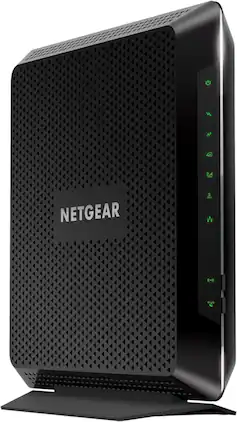
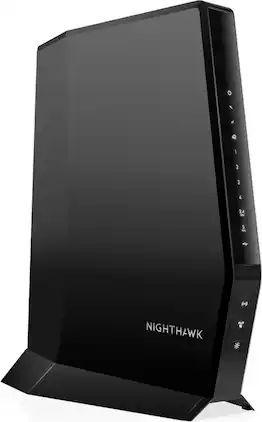
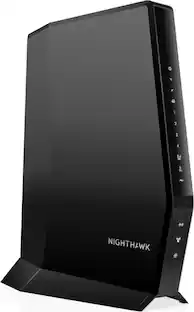
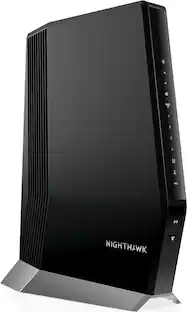
NETGEAR - Nighthawk AC1900 Router with DOCSIS 3.0 Cable Modem - Black

Model: C7000-100NAS
SKU: 4403100
$192.99
or
Finance OptionsView your offers
Standard Geek Squad Protection
Availability
Fulfillment Options
Pickup at
Sold by Best Buy

More Buying Options

Highlights

  • Key Specs
    • Wi-Fi Range: 1800 square feet (The device will provide a Wi-Fi connection to this approximate area.)
    • Wi-Fi Mesh System: false (A single wireless network consisting of a main router (connected directly to a modem) that connects to a series of satellite modules or nodes placed around the home. Routers with this capability promote stronger, faster wireless signals as well as increase Wi-Fi coverage by reducing interference and eliminating dead zones.)
    • DOCSIS Certification: 3.0 (DOCSIS (Data over Cable Service Interface Specification) is a telecommunications standard that allows high-bandwidth data transfer via a coaxial cable for internet access. Each version updates the previous standard and is backwards compatible with other versions.)
    • Channel Bonding: 24 x 8 (The process of combining adjacent channels within a given frequency band to deliver faster broadband speeds. Channel bonding combinations are indicated as "downstream x upstream" e.g. 16x4 (16 channels dedicated for downloading data and 4 channels for uploading). The more channels, the more network traffic the device can support.)
    • Number Of LAN Ports: 4 (Number of devices able to be connected to the Local Area Network (LAN). LAN ports allow wired connections to other networking devices (wireless access points, range extenders, etc.) in order to share the internet connection received through a WAN port.)
    • Wi-Fi Speed: 1.9 gigabits per second (The maximum rate at which data is transferred between a network device and wireless router.)
    • Downstream Data Speed: 600.0 megabits per second (The maximum speed at which data is downloaded from the internet.)
    • Internet Service Provider (ISP) Compatibility: Cox Communications, Spectrum, XFINITY from Comcast (The internet service provider(s) that the device is able to work with and/or connect to with minimal setup.)
  • General
    • Brand: NETGEAR
    • Model Number: C7000-100NAS
    • Product Name: Nighthawk AC1900 Router with DOCSIS 3.0 Cable Modem
    • Color: Black
  • Security
    • Data Encryption: true
    • Encryption Type: WPA, WPA2-PSK (The security protocols or certification programs that protect the Wi-Fi network.)
    • Firewall Type: NAT, SPI (The method the firewall uses to filter and process data to increase network security, primarily by blocking malicious traffic requests while allowing legitimate traffic through.)
    • Security Features: WPA and WPA2-PSK Wi-Fi Protected Access, SPI and NAT double firewall protection, DoS (denial-of-service) attack prevention
    • Parental Controls: true (Allows user to block unwanted content, signals, channels, networks, etc. from being received or accessed.)
  • Network
    • Band Technology: Dual (Refers to the number of frequency bands used to wirelessly transmit an internet signal. For example, dual-band devices may use one 2.4 and one 5 GHz band, while tri-band devices may use one 2.4 and two 5 GHz bands. Multiple bands also provide more flexibility for designating connected devices to specific band use.)
    • Ethernet Standard: 10/100/1000 (Each standard is a variation of the IEEE 802.3 set of computer networking technologies known as Ethernet. New versions evolved to include higher bandwidth, different physical media, and other new and improved features. Standards are often denoted by speeds (in Megabits per second). For example, a 10/100/1000 Ethernet port transmits at 10 Mbps, 100 Mbps, and 1000 Mbps (1 Gbps).)
    • Number Of Connected Devices: 30
    • Number of Antennas: 3
    • Frequency Band: 2.4 GHz, 5.0 GHz (Bands may be grouped into categories such as low- and high-band VHF (Very High Frequency), low- and high-band UHF (Ultra High Frequency), or certain frequency channels (measured in MHz or GHz). Generally, higher frequencies transmit information faster but have shorter range than lower frequencies.)
    • Wireless Networking Standard: Wi-Fi 5 (The wireless networking standard used by the device. Each iteration of the standard developed by the Wi-Fi Alliance corresponds to an existing IEEE 802.11 protocol; for example, standard 802.11ac (or AC) is termed Wi-Fi 5. Refers specifically to the standard the device is designed to use, but ultimately determines product interoperability and backward compatibility including previous versions.)
    • Wireless Standard: AC, N (The wireless networking protocol used by the device. Each iteration of the protocol is based on the 802.11 standard developed by the Institute of Electrical and Electronics Engineers (IEEE) Standards Association. Denoted by letters following 802.11 (802.11a, 802.11ac, etc.), each version, published in alphabetical order, encompasses all previous versions.)
    • Wi-Fi Range: 1800 square feet (The device will provide a Wi-Fi connection to this approximate area.)
    • Number of 2.4Ghz Streams: 1 (A router's streams are like lanes on a highway. The more streams a router has, the less traffic congestion. Because the 2.4 GHz band is used to transmit wireless signals to a wide variety of devices, there is often high amounts of traffic on that stream. But with multiple streams, each can be designated to a specific device for optimal performance. For example, if one 2.4 GHz stream is assigned to one device, such as a desktop computer, it leaves the remaining streams open for guest users, devices that use more data, or devices with specific band compatibility.)
    • Number of 5.0Ghz Streams: 1 (A router's streams are like lanes on a highway. The more streams a router has, the less traffic congestion. The 5.0 GHz band provides high speed, short-range data transmission and typically has less traffic than the 2.4 GHz band. With multiple streams, each can be designated to a specific device for optimal performance. For example, if one 5.0 GHz stream is assigned to one device, such as a streaming media player, it leaves the remaining streams open for guest users, devices that need less data, or devices with specific band compatibility.)
    • Wi-Fi Mesh System: false (A single wireless network consisting of a main router (connected directly to a modem) that connects to a series of satellite modules or nodes placed around the home. Routers with this capability promote stronger, faster wireless signals as well as increase Wi-Fi coverage by reducing interference and eliminating dead zones.)
    • Ethernet Switch: true (Connects multiple devices to expand the Local Area Network (LAN).)
  • Certifications Listings & Approvals
    • DOCSIS Compliant: true
    • ENERGY STAR Certified: false (Devices carrying the ENERGY STAR service mark, such as computer products and peripherals, kitchen appliances, and other products, generally use 20% to 30% less energy than required by federal standards.)
    • DOCSIS Certification: 3.0 (DOCSIS (Data over Cable Service Interface Specification) is a telecommunications standard that allows high-bandwidth data transfer via a coaxial cable for internet access. Each version updates the previous standard and is backwards compatible with other versions.)
  • Features
    • App Compatible: true (The product can be connected to a program or software application on a mobile device, which then receives collected data from the product.)
    • App Name: Nighthawk app
    • Beamforming: true (A signal processing technique that enables a router to focus a Wi-Fi signal in a specific direction. The router determines where a connected device in the network is located and projects a stronger signal in that specific direction. This can result in faster and higher quality data transfer as well as reduced signal interference.)
    • Integrated Modem: true
    • Auto Detecting: true
    • Wireless: true
    • Channel Bonding: 24 x 8 (The process of combining adjacent channels within a given frequency band to deliver faster broadband speeds. Channel bonding combinations are indicated as "downstream x upstream" e.g. 16x4 (16 channels dedicated for downloading data and 4 channels for uploading). The more channels, the more network traffic the device can support.)
  • Ports
    • Number Of WAN Ports: 0 (Number of devices able to be connected to the Wide Area Network (WAN). This type of port may simply be labeled "Internet," and it allows the device to share its internet connection with all devices connected to it via LAN ports.)
    • Port Type(s): Co-Axial, RJ-45 (USB 2.0 connects external drives, gaming controllers, smartphones, MP3 players and other accessories.USB 3.0 transfers data faster than USB 2.0, but only when used with USB 3.0 devices.USB Type-C provides fast speeds and versatile power, featuring connectors with identical ends that plug in upside down or right side up. Adapters allow for video as well as backward compatibility.Thunderbolt provides ultra-high bandwidth for fast data transfer between devices featuring a Thunderbolt or MiniDisplayPort connection.HDMI allows you to connect a projector or display HD media on your HDTV or monitor.Media card slots allow you to transfer photos from your digital camera or camcorder.)
    • Number Of LAN Ports: 4 (Number of devices able to be connected to the Local Area Network (LAN). LAN ports allow wired connections to other networking devices (wireless access points, range extenders, etc.) in order to share the internet connection received through a WAN port.)
  • Speed
    • Wired Speed: 1000.0 megabits per second (The maximum rate at which data is transferred between a network device and router using an Ethernet cable.)
    • Wi-Fi Speed: 1.9 gigabits per second (The maximum rate at which data is transferred between a network device and wireless router.)
    • Gigabit Ethernet Speed: true (Supports the gigabit Ethernet networking standard, which has a data rate of at least one gigabit per second, or 1,000 Mbps.)
    • Downstream Data Speed: 600.0 megabits per second (The maximum speed at which data is downloaded from the internet.)
    • Auto Speed Sensing: true
  • Compatibility
    • System Requirements: PC: Windows 2000, XP, Vista, 7, 8 or 10; Mac; Unix; Linux; active Internet connection; electrically connected power outlets; Microsoft Internet Explorer 5.0 or later, Firefox 2.0 or later, Safari 1.4 or later or Google Chrome 11.0 or later browser (The software that a product must have for it to be able to integrate with another product.)
    • Bluetooth Enabled: false (The device is capable of communicating with another device via Bluetooth, provided they are within the required range of each other. A Bluetooth-enabled device must also be the same Bluetooth version or higher than the accessory it is intended to pair with.)
    • Internet Service Provider (ISP) Compatibility: Cox Communications, Spectrum, XFINITY from Comcast (The internet service provider(s) that the device is able to work with and/or connect to with minimal setup.)
  • Dimensions
    • Product Height: 1.7 inches (The out of box height of the item. Height is measured as the vertical distance from the bottom of the item to the top as it would be primarily used or placed.)
    • Product Length: 9.66 inches (The out of box length of the item. Length is measured as the longest dimension of the item.)
    • Product Width: 8.31 inches (The out of box width of the item. Width is measured as the horizontal distance from one side of the item to the other as it would be primarily used or placed.)
    • Product Weight: 1.6 pounds (The out of box weight of the item.)
  • Warranty
    • Warranty - Parts: 1 year
    • Warranty - Labor: 90 Days
  • Other
    • UPC: 606449106657

The Nighthawk Dual-Band AC1900 Router with 24 x 8 DOCSIS 3.0 Cable Modem delivers WiFi speeds of up to 1.9Gbps. It ensures uninterrupted HD video streaming with 24x8 channel bonding. Save up to $120 a year by eliminating Internet service provider rental fees. This cable modem router supports XFINITY from Comcast, Spectrum, Cox & more.Find the perfect Wi-Fi solution

  • Cable Modem with WiFi: This is a two-in-one device that provides Internet to your home and WiFi connectivity. No separate WiFi Router required.
  • Compatibility: Compatible with XFINITY from Comcast, Cox, and Spectrum. Call your Internet service provider for additional compatibility information.
  • Cable Modem Routers: Your All-In-One WiFi Solution: Using your own NETGEAR Cable Modem Router will deliver the fast speeds you are expecting from your provider, while optimizing WiFi coverage in your home. Get ready for improved download speeds, even during peak hours.
  • Powerful security: NETGEAR devices come with security measures built in as well as enhanced safety features and updates designed to help protect you and your family.
  • Fast WiFi Performance: Get up to 1800 sq ft wireless coverage and 30 devices connected with AC1900 speed (up to 1900 Mbps). With WiFi this great, it means all of your devices will surf, stream, & game at lightning fast speed.
  • Save on monthly rental fees: Is your cable service provider charging you every month to lease their equipment? Save money by buying and owning your cable modem or cable modem router. Replace your rented equipment can save you up to $168/yr in rental fees.
  • DOCSIS 3.0 technology: Up to 16x faster download speeds than the DOCSIS 2.0 standard.
  • Best for cable provider plans up to 400Mbps speed: 8x4 24x8 Channel Bonding and DOCSIS 3.0 technology delivers fast Internet to your home - even during peak Internet usage hours!
  • Ethernet Ports and more: 4 Gigabit Ethernet ports and 1 USB port give you fast wired connections to your computer, game console, storage drive, and other devices.
  • Cable Modem with WiFi: This is a two-in-one device that provides Internet to your home and WiFi connectivity. No separate WiFi Router required.
  • Compatibility: Compatible with XFINITY from Comcast, Cox, and Spectrum. Call your Internet service provider for additional compatibility information.
  • Cable Modem Routers: Your All-In-One WiFi Solution: Using your own NETGEAR Cable Modem Router will deliver the fast speeds you are expecting from your provider, while optimizing WiFi coverage in your home. Get ready for improved download speeds, even during peak hours.
  • Powerful security: NETGEAR devices come with security measures built in as well as enhanced safety features and updates designed to help protect you and your family.
  • Fast WiFi Performance: Get up to 1800 sq ft wireless coverage and 30 devices connected with AC1900 speed (up to 1900 Mbps). With WiFi this great, it means all of your devices will surf, stream, & game at lightning fast speed.
  • Save on monthly rental fees: Is your cable service provider charging you every month to lease their equipment? Save money by buying and owning your cable modem or cable modem router. Replace your rented equipment can save you up to $168/yr in rental fees.
  • DOCSIS 3.0 technology: Up to 16x faster download speeds than the DOCSIS 2.0 standard.
  • Best for cable provider plans up to 400Mbps speed: 8x4 24x8 Channel Bonding and DOCSIS 3.0 technology delivers fast Internet to your home - even during peak Internet usage hours!
  • Ethernet Ports and more: 4 Gigabit Ethernet ports and 1 USB port give you fast wired connections to your computer, game console, storage drive, and other devices.
Whats Included
  • Ethernet cable
  • Nighthawk Dual-Band AC1900 Router with 24 x 8 DOCSIS 3.0 Cable Modem
  • Power adapter
  • Quick install guide
  • Ethernet cable
  • Nighthawk Dual-Band AC1900 Router with 24 x 8 DOCSIS 3.0 Cable Modem
  • Power adapter
  • Quick install guide

Q: What is the maximum WiFi coverage of this router?

A: The Nighthawk AC1900 router provides up to 1800 sq ft of wireless coverage.

Q: What type of security protocols does this router support?

A: This router supports WEP and WPA/WPA2 wireless security protocols.

Q: Does this device include a modem or do I need a separate one?

A: This is a two-in-one device that includes both a cable modem and a WiFi router, so you don't need a separate modem.

Q: How many devices can connect to the WiFi at the same time?

A: This router supports up to 30 devices connected at the same time.

Q: What is the wireless speed of this router?

A: The Nighthawk AC1900 can provide WiFi speeds up to 1.9 Gbps.

Q: Is this router compatible with Spectrum?

A: Yes, this router is compatible with Spectrum, as well as XFINITY from Comcast and Cox.

Q: How is the connection in a multi family home? (say two stories )

A: You will not have an issue. I live in a 2 story 3500 square foot house and the device is in the front living room. We have full coverage throughout the house and speeds at 5ghz exceeding 200mps. It's a great product.

Q: I AM A SENIOR CITIZEN AND NOT TECH SMART -- I HAVE COMCAST TRIPLE PLAY IN MY HOME (TV, PHONE, INTERNET) -- CAN I REPLACE COMCAST WIFI MODEM WITH THIS AND SAVE A $10.00 MONTHLY FEE ?? APPRECIATE ANY HELP AND ADVISE.

A: This unit will not support the phone part of the package. If however, you disconnect the phone service it will work fine for your internet service. I connacted Xfinity and change/upgraded my package eliminating the phone portion and increasing internet speed for about the same amount I was paying before.

Sponsored

Compare similar products

NETGEAR - Nighthawk AC1900 Router with DOCSIS 3.0 Cable Modem - Black

The Nighthawk Dual-Band AC1900 Router with 24 x 8 DOCSIS 3.0 Cable Modem delivers WiFi speeds of up to 1.9Gbps. It ensures uninterrupted HD video streaming with 24x8 channel bonding. Save up to $120 a year by eliminating Internet service provider rental fees. This cable modem router supports XFINITY from Comcast, Spectrum, Cox & more.

NETGEAR - Nighthawk AX2700 Router with 32 x 8 DOCSIS 3.1 Cable Modem - Black

Interconnect your smart devices at home with this NETGEAR Nighthawk AX6 cable modem router. The NETGEAR Armor protection keeps your data secure, while the six-stream dual-band Wi-Fi 6 offers speeds of up to 2.7 Gbps to deliver smooth streaming on multiple devices. This NETGEAR Nighthawk AX6 cable modem router features a built-in DOCSIS 3.1 cable modem to support ultra-fast multi-Gigabit internet, and the Smart Connect feature enables seamless setup.

NETGEAR - Nighthawk BE3600 Dual-Band Wi-Fi 7 Router - Black

Leverage the power of Wi-Fi 7 for speeds up to 3.6 Gbps at 1.2x faster than Wi-Fi 6. The Nighthawk RS100 Wi-Fi 7 Dual-band Router provides up to 2,000 sq. ft. Wi-Fi coverage and capacity for up to 50 devices. Experience stunning streaming, video conferencing and reliably connect smart home devices. NETGEAR Armor protects your family’s Wi-Fi by creating an automatic shield for all connected devices.

NETGEAR - Nighthawk BE6500 Dual-Band Wi-Fi 7 Router - Black

Leverage the power of Wi-Fi 7 for speeds up to 6.5 Gbps, offering 20% faster performance than Wi-Fi 6. This Nighthawk BE6500 Wi-Fi 7 dual-band router from NETGEAR delivers up to 2,500 sq. ft. of Wi-Fi coverage and supports up to 80 devices. Enjoy stunning 4K streaming, seamless videoconferencing, and reliable connections for all your smart home devices. NETGEAR Armor safeguards your family’s Wi-Fi by providing automatic protection for all connected devices.

Pros for NETGEAR - Nighthawk AC1900 Router with DOCSIS 3.0 Cable Modem - Black
Speed, Ease of use, Performance, Range, SetupSpeed, Ease of use, Performance, Setup, RangeOverall Performance, Speed, Range, Connectivity, Signal StrengthSpeed, Overall Performance, Setup, Range, Coverage
Cons for NETGEAR - Nighthawk AC1900 Router with DOCSIS 3.0 Cable Modem - Black
Lag, BufferingLag, PriceSetup DifficultyConnectivity

Specs

Reviews

Customers are saying

Customers find value in the Nighthawk AC1900 Router's ease of use, strong performance, and wide range. Positive feedback frequently highlights the straightforward setup and reliable signal strength, resulting in consistently good connectivity and coverage. While some users reported occasional lag or buffering, these issues were not widely reported. The router's price point also receives praise for offering good value.

This summary was generated by AI based on customer reviews.

Customer Images

The vast majority of our reviews come from verified purchases. Reviews from customers may include My Best Buy members, employees, and Tech Insider Network members (as tagged). Select reviewers may receive discounted products, promotional considerations or entries into drawings for honest, helpful reviews.

  • Rated 5 out of 5 stars

    Best purchase made!!

    The only high-speed internet provider I can use is Comcast xFinity and their SB3 & newest SB4 would not allow for a steady connection and would be offline more than online. Read the end to note if you have xFinity Home, which is Comcast’s security system. After 11 tech visits and 3 supervisors came by, countless call ins, I decided to purchase my own modem/router combo to see if I could resolve the inconsistency & it was resolved. The associate at the local Best Buy suggested this one since I have so much connected with my home being smart and have several Nest Cameras streaming 24/7. Right when I changed out the modem settings with tech support via FB Messanger (as tech support closed at 8pm), my life changed. I now have constant high speed internet connection and it has not once went down in the couple weeks I have owned this brand and model. If I knew it would have resolved my issues since Jan 2019 and it’s June 2019 now, I would have made this purchase much sooner. Comcast employees can’t explain why “using my own modem and router is working but their devices wouldn’t. Not even the newest model on the market, the SB6). I have Google Home Hub, Brother laser printer, 2 iPhone Max Xs phones, HD xFinity cable box, Samsung TV, 4 Nest Outdoor Cameras, smart defuser, smart doorbell camera, my xFinity Home alarm system, and much more connected at all times and nothing once since changing to this modem/router have had any issues. When I tell Google Hub to stream one of my cameras, it doesn’t have one delay and I can also have it streaming on my phone app and MacBook Pro all at the same time without gang flaws. With the rented devices, it would lag and have the time not work. It’s literally night and day difference and I recommend this one to everyone. It has a high range which covers far corners of the home I live in which is 3200 total sq feet. Have great signal while outside and on patio far from where it is plugged in, it’s excellent. Well worth the money spent to have decent internet access and Comcast xFinity has no reason on why, as I stated above, my personally owned modem will work while the two they offer did not, it is pitiful. Also, saving the extra $15 per month will add up and eventually over time save me monthly rental fees. My neighbor which runs off the same cable line as the house was built in the 1890s and made into two units have their services and while mine was down, theirs remained up and online. They own their own modem and router which worked when mine wouldn’t. Same connection, different results. All cable lines were replaced, the converters changed out to new ones, the pole had MOCHA filters all changed out, they couldn’t resolve the issue whatsoever. Note: the touchpad for xFinity Home (alarm system) doesn’t recognize this modem as a modem nor router). Home technicians had to come and place a “side car” gateway, which is plugged into the Ethernet port on back of this device to allow touchpad to utilize WiFi for smart functions and notifications while backup 3g still worked but had delays, the WiFi option didn’t recognize it. I even had a tech from India call center try to make the SB6 modem from xFinity act as a gateway and it would not work (I was given tech a temporary access codes to go into tech settings). It was free of charge for technician to place the “side car” which is basically a wireless router with hidden SSDI and password, all secure and unable to access in general for the touchpad to sync properly to WiFi settings. It’s some security protocol which I tried googling yet not able to resolve on my part. **photo attached shows the “side car” needed and installed.**

    Posted by MattInLouisiana

  • Rated 5 out of 5 stars

    Best router hands down for Gaming and Streaming

    This is hands down the BEST router for gaming and streaming. I had a Motorola Surfboard and it always dropped Wi-Fi connections. I upgraded my internet to Xfinity Extream 150mbps down and I was not getting the speed. I got this router and it peeks at 190mbps most times. But please be aware that you MUST go through the router settings and check EVERY signal channel on both 2.4ghz and 5ghz bands for the BEST speed. Change the channel and do a speed test. Right each channel down with the speed and determine which channel outputs the best signal and max speed. Trust me and ALWAYS open your ports within the router for best PS4 and Xbox connections.

    Posted by PSNdeaofly

  • Rated 5 out of 5 stars

    Great buy!!

    We have RCN and was getting sick of paying a rental fee for their modem/router. Heard great things about the Nighthawk series from friends and decided to buy this when I noticed it on sale. Set up was a breeze -- simple and quick. The Nighthawk also offers all sorts of advanced set up options that are easily accessible for those who know what they are doing. My only worry was whether or not the internet connection would not be unreliable or too slow through the device, and after several months, we've had no problems staying connected and our internet speed is great. Highly recommend!!

    Posted by Ryan

No content
Sponsored

Similar products from outside of Best Buy

sponsored

Finance Options

My Best Buy® Credit Card
10% back in rewardson your first day of purchases when approved for the My Best Buy® Credit Card.
Buy Now, Pay Later
4 payments starting at $48.25