Rating 3.6 out of 5 stars with 87 reviews
3.6- Video Quality (33)
- Installation (10)
- Cable Length (8)
- Overall Performance (8)
- Field of View (7)
- Connectivity (7)
Customer Images
The vast majority of our reviews come from verified purchases. Reviews from customers may include My Best Buy members, employees, and Tech Insider Network members (as tagged). Select reviewers may receive discounted products, promotional considerations or entries into drawings for honest, helpful reviews.
- Rated 2 out of 5 stars
Not worth the money
After watching their advertisement for this IQ cam I guess I was hoping for it to work as advertised. Not at all, it doesn't even read license plates of cars that are literally in front of me, I decided to buy another IQ but this time I went with the 4K, I thought this would resolve my issues of clarity and quality. WRONGGGGG, I have both IQ cams, 1k on my wife's car and the 4K on my truck, LET ME TELL YOU GUY'S, THEIR IS NO DIFFERENCE WHATSOEVER IN VIDEO QUALITY. I WISH I CAN ADD THE VIDEOS HERE AS PROOF. To make things worse, I've been trying to contact customer service that doesn't exist, thru phone the line is always busy and it hangs up after 5seconds, thru chat it's a bot that doesn't answer any questions and thru email, well I'm still waiting for a response....... I'll we wait one more week before I return this 2 junk cams. I have it to 2 ⭐ because you do get notifications if you subscribe to a $10 or $20 per month.
Posted by FernandoS
- Rated 5 out of 5 stars
Compact High-Resolution Security
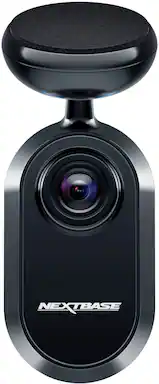
Adds a rear-facing, rear-mounted camera to the iQ’s two built-in cameras. Now your iQ will record all three views so you always know what’s in front, inside and behind your vehicle. Plus, it adds a rear-facing motion sensor for all-around parking awareness. Easy to install and fully integrated to enhance your dash cam’s capabilities and your peace-of-mind whether driving or parked. Highlights: * Records in 1440p (same as the iQ 2K’s front camera) * Wide 140 degree field of view. * Has a built-in motion sensor. * Has subtle status lights that match those on the main dash cam. * Easy single-cable installation. * Flexible mounting with a ball-joint. * Long enough cable (7.5m/24.5’) for even the largest vehicle. * Includes extra mounting adhesive disc if needed. * Includes trim tool and wire mounting clips for a clean installation. Room for Improvement: * The right-angle USB-C plug on the end could make it more challenging to thread through tight spaces. * Cable cannot be detached from the rear camera. Setup: Installation of the Rear Window Camera (RWC) is relatively easy to wire up. As is typical of additional cameras like this, the most time-consuming part of the installation is in cleanly hiding the wire that connects the camera at the rear of the vehicle to the main dash cam at the front of the vehicle. In my case, it took me less than 5 minutes to wire up the camera and another hour to neatly thread and hide the single USB-C cable that connects the dash cam to the RWC. The single USB-C cable provides data and power between the dash cam and the RWC. Threading that single cable made it easier than if there were several cables. I positioned the RWC loosely on my rear window in the general area but didn’t stick it to the glass yet. I then started working the wire from the back to the front and tucking it behind headliners and other panels. Once the cable made its way up to the front, I plugged it in to the dash cam and started the setup in the iQ app to add the RWC and use the app’s live video feed to assist in framing the video before doing the final attachment of the RWC to the glass. Setup with the app was fast and easy. After plugging in the cable and telling the app to add the RWC, the iQ quickly recognized the RWC and showed me a live video feed so I could frame up the video and position the RWC while looking at my phone’s app. There is a lot of flexibility in the ball joint on the RWC’s mount so it wasn’t necessary to perfectly position it - just get it close and then move the camera around on its mount until the framing is perfect. That ball joint is firm enough to hold the camera in position through the roughest of driving. In my Polestar 2, there was quite a bit of excess cable so I just tucked it in behind a panel in the trunk. Most likely there is more than enough length for even the largest vehicle. Now that the RWC is plugged in and the cable is hidden and looking clean, I can start checking out the app’s new third camera feed and settings. Usage: The iQ dash cam has 2 built-in cameras; a front-facing and an interior-facing. There are also motion sensors in the main dash cam to detect things near your vehicle or inside it. The RWC not only adds a third camera but also adds another rear-facing motion sensor toward the back of the vehicle. Once you connect the RWC, you can adjust the dash cam’s settings and motion sensitivity to accommodate this additional camera. The two main settings to update once you get the RWC connected are the Exposure and Proximity settings. I generally don’t have the Proximity set to very far away from the car so I don’t get a lot of false alarm push notifications when parked. You can now set the rear-facing proximity with the RWC installed, and adjust the exposure of the video for that camera if needed. On the main screen, all three video thumbnails now show images whereas only two had content before the RWC was installed. When viewing “live” video from the iQ, you can also now toggle between all three video angles, and when viewing Events, Library or Downloaded video, all three cameras are now available. The only thing to consider when you have the third camera (the RWC) installed is that your storage card will now be saving video from three rather than two cameras, so it might be worth considering a card storage upgrade to keep more recordings from all three cameras. Overall: Easy to install and adds a third camera view and additional motion sensor to the iQ dash cam. No complaints and everything has been working great since installation. The parking security feature now has views out the rear as well as motion sensing back there.
Posted by gadgeTT
- Rated 1 out of 5 stars
It's not ready... works when it wants to.
Stay away for the moment Nextbase needs to workout ALL the bugs. Sometimes it records and sometimes it doesn't. When it records the video quality is good. Combined this with the price of the front windshield camera all the current bugs aren't worth the hassle. Hopefully Nextbase will get this together in the future. But for the moment let this bake a bit longer.
Posted by TECHNERD
- Rated 5 out of 5 stars
No Doubt - Best Vehicle Cam on the Market
The Nextbase IQ Rear Cam is the perfect companion for all-around safe security for watching your vehicle 24/7. When connected to the Nexbase IQ front-facing Smart Cam, it provides comprehensive security coverage with surround visibility of the front view, rear view, and view of the interior cabin. Impact and vandalism can easily activate the camera while in Park and while the vehicle is even unoccupied. The Cam syncs with an app on your phone and delivers video in 1440p HD, as a clear and excellent image. The 450-degree angle covered by the triple images from the combination of both cameras is ready 24/7 for whatever your vehicle may unfortunately encounter. The front camera has a 60 GB smart disk storage card that can be erased and reformatted. It can store video and function as a Guardian if another family member is driving your vehicle and as a second witness to accidents, threats to the vehicle, or bodily harm. Installation is designed to be straightforward and hassle-free. Everything needed for a thorough installation is included in the retail packaging. The rear camera operates off of the main forward-facing Smart IQ Cam, which is also the source of power by either being connected to the fuse box or OBD (onboard diagnostics). I have always had mine connected to the OBD with no problem. Packaged with the Rear IQ Cam is a 24.6-foot-long cord that connects to the forward-facing IQ Smart Cam. No Smart Disk is required for the rear camera as it saves video from all three views together on the Smart Disk that remains installed in the front IQ Smart Cam. There is a fitting tool to help tuck the cable behind the vehicle’s headliner, cable clips and ties if needed, an adhesive for sticking the Rear IQ Cam on the rear windshield window and even a spare. A cleaning pack also ensures a clean, tight connection with the crash-tested adhesive. Everything works great and installs easily, but I did have significant trouble with the app recognizing the Rear IQ Camera and applying the needed firmware. Without the app recognizing the installation step of the Rear IQ Cam, the rear camera remained unrecognized, and even though I knew that the rear cam was getting power because it was hot to the touch, it remained offline. I repeated the connection steps countless times over several hours and days, and only because of this frustrating issue did I consider giving this product four (4) stars. However, I reached out to the company directly and encountered exceptional, friendly, and excellent customer service help from an employee of the company. With his staff, he tweaked the app, hopefully making it better for all in the future, and without my verbal assistance, he completed the rear camera installation from afar through email communication of both directional updates. The process was stressless for me, and the Cam has continued to work great every time I drive the vehicle or open the Nextbase app. Because of this excellent and cordial customer service, the quality of the product, the continued excellence of the video, and the responsiveness of both CAMS, I have to give this product five (5) stars. It is an excellent product that I am happy to own, and I feel more comfortable and assured of my own safety and well-being when on the road, especially for long distances. I have had other dash cams, but nothing of this comprehensive responsiveness and security coverage, and I believe this is the best vehicle CAM system on the market. If you need peace of mind with your vehicle or family members’ driving and safety, this is a smart choice and a great investment. I would not hesitate to pick the cameras up and install them in your vehicle.
Posted by SwigglesMilam
- Rated 5 out of 5 stars
Ок
Ок ок ок ок ок ок ок ок ок ок ок ок ок ок ок ок ок ок
Posted by ViktarD