Everything for Back to School — and then someShop now

Skip to contentGo to Product Search
Main Content

One for All - Streamer Remote - Black

Model: R117935A07-00001
SKU: 10104238
Sold & shipped by

About this product

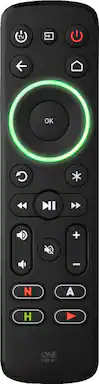
Control multiple devices with this One for All Streamer remote. The preprogrammed setting allows instant control of the Roku streaming box, and other programming can be added to mimic the function of additional remote controls for convenience. This One for All Streamer remote assigns a different ring color for each programmed device, so you always know which one is being controlled.

Features
  • Control up to three devices

    Enables easy control of your (IR) streaming devices and the basic functions of your TV and soundbar.

  • Multicolored ring

    Once you have set up your devices, the color of the menu ring reflects the devices you are controlling.

  • Four programmable buttons

    The Streamer remote features four handy shortcut keys to your favorite streaming services, you will be just one key press away from Amazon Prime, YouTube, Netflix or any other online streaming app.

  • Volume control

    This remote lets you assign volume control to a preferred device.

  • Learning function

    Allows to fully customize this remote by copying functions directly from your original remote.

  • Batteries required

    Four AAA batteries are required to power your remote control.

See all features
Specifications
  • Remote Control Type
    Universal
    Remote Control Features
    Backlit
    Number Of Devices Controlled
    3
Sponsored

Reviews

Customer Images

The vast majority of our reviews come from verified purchases. Reviews from customers may include My Best Buy members, employees, and Tech Insider Network members (as tagged). Select reviewers may receive discounted products, promotional considerations or entries into drawings for honest, helpful reviews.

  • Rated 5 out of 5 stars

    Excellent Remote - If You Put In The Work!

    I was he distant to purchase this because the reviews are pretty hit or miss but since it was on sale I decided eh, why not? I received it in the mail today and after spending maybe 30min watching a helpful YouTube video (https://youtu.be/N-1A3_0YOEI ) and reading the manual cover to cover, it took maybe 10 pain-less minutes to set up! But I say this as someone who loves problem solving and technology. It’s not always super intuitive but If you watch the video and read the instructions you’ll be okay! My set up was on a Samsung NU507100 Smart TV and a Vizio 2.1 SB3621n sound bar. I wanted a remote that would let me use my TV’s functions but that controlled the volume on the sound bar. This One For All remote (OFA) has a quick set up option that works for more popular TV/sound bar/streaming device brands. I used that for my TV and it made maybe 50% of the buttons function and for the sound bar, it worked for the volume but not for power button. I was able to get a lot more out of using the C-learning function which basically has you line up the IR sensor on the OFA remote with the one on the remote you want it to ‘learn’ from. Using this function was actually nicer because I had full control of which buttons I wanted ‘copied’ over from my TV’s remote. And EVERY button on the OFA remote is programmable. I was able to use the TV power button for my Samsung and then the red power button for my sound bar. For the dedicated streaming buttons, I assumed they only worked for streaming devices (Apple TV, Roku, etc.) and since my TV had built in apps, I didn’t think I could use it but the manual does provide instructions for programming macros for those buttons. Basically once you’ve finished programming all your TV buttons, you put the remote in ‘learning’ mode for the dedicated buttons and press whatever button sequence on your remote would get you to the app you want to use (for Netflix on my TV it was Home > Scroll Twice > Press Enter). So whenever I press the Netflix button, the remote makes the TV do the sequence without me having to press the buttons. It’s not SUPER direct of course but it only requires one button press! As a testament to it’s ease of use, after I finished programming it, I asked my partner (who is not very into tech and is easily frustrated by it lol) to test it out and they were able to use it right away! Anyway, that’s pretty much everything and I would HIGHLY recommend for anyone who relies on streaming/doesn’t have cable, is down to figure it out, and doesn’t want to spend a lot for a universal remote!

    This review is from One for All - Streamer Remote - Black

    Posted by Nico3D

  • Rated 5 out of 5 stars

    Works great

    Controller is really nice, has the soft touch plastic and I love that you can make the LED any color you want. Set up was super easy and it controls my LG OLED and Apple TV 4K perfectly. I should have purchased this a long time ago.

    This review is from One for All - Streamer Remote - Black

    Posted by Strider

  • Rated 3 out of 5 stars

    One for All review

    It works well with a sound bar and customer support is very helpful. Not useable for more than 3 items. This works best with streaming boxes I use it with Apple TV (2021), Polk Audio Signa S4 Sound bar and LG TVOLed C1 PUB. For set up I used option c for Remote learning worked the first time w/ sound bar the others took more attempts maybe because i'm inexperience. Interested to see this years next model.

    This review is from One for All - Streamer Remote - Black

    Posted by Adapt

  • Rated 5 out of 5 stars

    Cheap Hidden Gem!

    An absolute hidden gem of a product! For ~$25, it can LEARN ANY IR signal, has a super nice button layout and feel (I easily can feel the difference between the play and mute buttons in the dark, something that's incredibly important to me.) The buttons aren't quite as tactile and excellent feeling as the apple tv remote, but the apple tv remote is very limited in what it can do comparatively. Setting it up to control my Apple TV 4k and LG OLED was a breeze with the codes, requires no app (so is future proof from app being abandoned), and it was so easy getting it to learn the power and volume controls for my ancient audio amplifier. The input button can temporarily control the TV while selecting the input and then go back to controlling the streamer, which is super convenient. The buttons are big and spread out so I never fat finger buttons like I've done on most other remotes. I promise I'm not being paid: it's just rare that a product is designed so well for so cheap. A remote that has more functionality for the same price (with macros) is the Inteset 422-4, which I also use sometimes, but the rest of my family just uses the One for All because of its previously mentioned big spread out buttons that feel distinct from each other in the dark (+backlight) and its simplicity.

    This review is from One for All - Streamer Remote - Black

    Posted by GabeM

  • Rated 4 out of 5 stars

    Convenient

    Easy to set up and functions properly, the learn function is the best easy to control my surround sound and roku tv all at the same time. The buttons on the remote also light up so no having to squint or shine any lights to see in the dark. The buttons clearly eliminate so you can choose the right button,

    This review is from One for All - Streamer Remote - Black

    Posted by SMRTYMCFLY

Compare similar products

One for All - Streamer Remote - Black

Control multiple devices with this One for All Streamer remote. The preprogrammed setting allows instant control of the Roku streaming box, and other programming can be added to mimic the function of additional remote controls for convenience. This One for All Streamer remote assigns a different ring color for each programmed device, so you always know which one is being controlled.

One for All - 8 Device Universal Smart 8 TV Remote - Black

The Smart 8 remote operates the following devices: Smart Tv's, Streaming Boxes (Roku), Cable Set Top Boxes -DirecTv, Comcast, Dish, DVD & Blu-ray Players, Soundbars, Gaming Consoles, and more. Follow three simple steps to set up your remote in literally less than two minutes. An easy to understand quick start guide is included. The Smart 8 remote also has a Smart App to program your remote by pairing it to bluetooth. Simply select the devices you want to control in the app (Anroid and iOS) and the codes are sent to your remote. Control multiple devices as if they were one using the 5 activity keys - one button controls multiple devices. App direct keys allow quick access to your favorite streaming service such as Netflix, Hulu, Amazon Prime, YouTube.

Philips - OneTouch Universal Remote Control for Samsung Smart TV, LG, Sony, VIZIO, Fire TV, Roku TV, Remote Replacement - Black

Skip the hassle of programming your replacement remote with the patent-pending Philips OneTouch Streaming Remote. Designed for smart TVs, this remote comes preprogrammed to control six top TV brands and four popular streaming apps — no programming required. Operate your Samsung, LG, Sony and Vizio TVs, as well as Fire TVs and Roku TVs and enjoy direct access to Netflix, Prime Video, Disney+ and YouTube. You’ll soon discover this is the perfect replacement remote for every TV in your home — not to mention the perfect spare to keep on hand for when your TV’s remote breaks or goes missing. Setup is simple. Insert two AAA batteries, then press the TV device button for your TV’s brand. Whether you have a Samsung TV in the living room, a Sony TV in the kitchen, an LG TV in the bedroom, a Vizio TV in the office, a Fire TV in the den or a Roku TV in the home theater, this remote controls them all for endless entertainment at the touch of a button. Additionally, the fully backlit keypad is perfect for bingeing marathons when the lights are low. Take complete control of all your TVs with the Philips OneTouch Streaming Remote.

One for All - Smart Control Pro 5 Universal Remote - Charcoal grey
3.9(24)

The One For All Smart Control 5 Remote Control is perfect for controlling up to 5 devices seamlessly: TV, Set Top Box, DVD/Blu-ray, Sound bar, Audio devices, and Media Streamers (Roku Ultra, Apple TV). Programming starts with downlowding the free OFA Advanced app on your Smartphone. Simply connect your Smartphone to the Smart Pro 5 Remote and follow the prompts to set up this remote customized to your devices. The APP guides you through a few easy steps to complete the setup of your remote. Use the learning feature to fully customize this remote with ease, by copying unique functions directly from your original remote to the Smart Pro 5. The three app shortcut keys give you instant access to Netflix, Amazon Prime, YouTube or any other online streaming app. The three smart activities, Watch TV, Watch Movie and Listen to Music offer seamless control of your Home Theater Syset with the push of a button!

Pros for One for All - Streamer Remote - Black
There were no pros for this productCompatibility, Overall Performance, Connectivity, Ease of use, PriceEase of Use, Overall Performance, Compatibility, Connectivity, SetupEase of Use, Overall Performance
Cons for One for All - Streamer Remote - Black
There were no cons for this productBacklightButton LayoutThere were no cons for this product

Specs

Questions & Answers
  • Will this work with a Toshiba Amazon Fire TV?

    Unfortunately the streamer will not work with a amazon fire tv as the original remote is RF and not IR. BB One For All Support

    Answered by One For All
    One For All response
  • Does this remote work with any roku tv ?

    Yes this remote should work with roku tv's however the manual in the best buy version of the remote does not contain the codes. Here they are to set up a Hisense, RCA, Sharp or Sanyo Roku TV: 1. Hold down STB POWER and HOME until the red LED blinks twice 2. Press the HOME key 5 times 3. The LED will blink green twice and the remote should now work your Roku TV. To set up an Insignia Roku TV 1. Hold down STB POWER and HOME until the red LED blinks twice 2. Press the REPLAY key 5 times 3. The LED will blink green twice and the remote should now work your Roku TV. If you want to reset the remote to control a TCL Element, Philips, Magnavox, JVC, LG or Haier Roku TV 1. Hold down STB POWER and HOME until the red LED blinks twice 2. Press the BACK key 5 times 3. The LED will blink green twice and the remote should now work your Roku TV BB One For All Support

    Answered by One For All
    One For All response
  • Can I control the volume of my devices with this remote?

    Yes, you can assign volume control to your preferred device.

    This question and answer was generated by AI based on customer and product data.
  • How many devices can this One for All remote control?

    This remote is designed to control up to three devices.

    This question and answer was generated by AI based on customer and product data.
  • What is the benefit of the multicolored ring on the remote?

    The multicolored ring indicates which device you are currently controlling after setting up your devices.

    This question and answer was generated by AI based on customer and product data.
Ask a question
No content
Sponsored
Ask BlueAI