The vast majority of our reviews come from verified purchases. Reviews from customers may include My Best Buy members, employees, and Tech Insider Network members (as tagged). Select reviewers may receive discounted products, promotional considerations or entries into drawings for honest, helpful reviews.
Rated 5 out of 5 stars
Awesome Feather Lightweight Premium Laptop
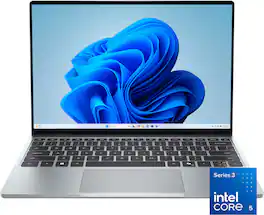
I am very happy with my purchase of Dell XPS 13.
I have been using Dell XPS of 2015 year as I love its sleek design and lightweight, making it perfect for my use and travel.
Since 2015 the latest model of 2026 I bought is impressive and seems more sleeker to me.
The chasis is great, the display is sharp and vibrant, and the performance is smooth and responsive.
The Face Recognition is great.
The keyboard and touchpad provide a great user experience.
It handles multitasking, browsing, office work, and everyday productivity without any issue. The build quality feels solid and premium.
Overall, great laptop. Highly recommended!
For some reason Dell decided last year to try and sunset the iconic XPS brand, which was Dell's Prosumer home lineup that blended impossibly thin and light laptops for the power home user on the go. While it looked a lot like the Macbook Air, it lacked the grunt to compete with the Pro, which was fine, because it was still the sleekest Intel-based Ultrabook option for Windows. I won't even bother trying to remember the name of what they tried to replace it with because they clearly listened to customer feedback and brought the XPS Moniker back with an even thinner and lighter XPS 13 that is aligned to compete with the Macbook Neo.
This unit is slightly beefed up and that's where some of the headscratching problems begin and why many will not be impressed with this XPS13 at this price point.
1. Due to the RAM and storage crisis driven by AI, this unit has double the RAM at 16GB compared to the entry level 8GB unit, but nearly doubles the pricetag to compensate. Before, 16GB was considered low-end for Windows but Microsoft has pledged to try and cut down memory usage in Windows to help combat that AI-memory shortage. How does it do? Not great. I'm sitting at 12GB with a browser and a few tabs open.
2. Only 512GB of storage. Again, AI has driven storage costs up a ton and before I'd say 1TB was the minimum for an Ultrabook with 32GB of RAM, but in this day and age, 512GB is what you get. You're instead forced to rely on external or cloud storage. I'm in a position to make use of this with a fast NAS, fast Wi-Fi 7, and a plethora of external USB-C including some Thunderbolt SSDs, but this is all additional costs and not a great solution for those who do not have internet or don't want to tie up valuable USB-C thunderbolt plugs.
3. I/O is a huge sacrifice on this new XPS13, its not the first time Dell has gone with just 2x Thunderbolt 4 connectors but they are both USB-C style and one of them is tied up for Power so this really limits your connectivity if you need external display, external storage, or a peripheral device. You will definitely want to use Bluetooth for any external mouse or keyboard or get a good USB-C Thunderbolt dock if you use this as your primary laptop and want to use external monitors. I have a Zenbook 14 which is just slightly thicker but it has both 2xTB4 but also a full-sized HDMI output as well as a USB-A connector, which makes it infinitely more flexible for outputs. No dongles and I can connect an external monitor or even a projector, which I just did for a Halloween trunk or treat.
4. The screen is a double downgrade from previous models. I've had an XPS13 and even ARM-based XPS laptops that had OLED, and they were glossy too. This new XPS13 unit is back to IPS and the finish is matte. Is this cost-cutting? I am not a fan. It is still touch screen which is nice, but I don't know why they went to matte and IPS again. This definitely is a downgrade as a media/movie device on the go as the colors do not pop as much and the blacks are not as good. It is brighter than OLED but the OLED screens I have were plenty bright.
5. The aluminum unibody is awesome and super sleek, but the buttom cut-out vents are SHARP. If you run your fingers from the center to the outside you will catch your finger and feel how sharp it is. If you do this fast if you're in a hurry, you might actually cut yourself. Dell should add a finishing pass on the body to grind town that sharp edge. I am thinking about taking a fine file and running it across the edge. They also got rid of the tapered wedge slope and it is more uniform across the front and back and both the top and bottom are nearly the same thickness, which is super thin.
Its not all bad on this version of the XPS13, and the thinness and lightness are truly amazing. There's also some major upgrades compared to the XPS13 units I've recently used.
1. The new Intel Panther Lake Core Ultra 7 355 is super powerful for such a thin and light laptop, but also extremely power efficient and cool running. You can actually run this without it getting hot or getting loud. There is a small fan that runs but very inaudible. It is also just warm and does not get hot at all.
2. The keyboard is backlit and goes back to individual keys instead of the spongy blended pads on the ARM-based XPS I had a few years ago. Typing on this feels great compared to that blended keypad with square keys that were right next to each other.
3. The speakers are really good, and loud. This also makes the screen downgrade that much more of a shame as it would've been a nice device to watch a game or shows around the house while on the go.
4. The Intel WiFi7 wireless network adapter is super fast, I am able to get 2Gbps up/down on my WiFi7 network and 2.5Gbps fiber plan which is as fast as my larger gaming laptop in the same room as my WiFi7 router. This is needed as this laptop highly relies on being a thin client with wireless connectivity.
5. Windows has also adapted to the wireless requirements of thin client computing and allows better integration with my iPhone with Phone Link and the ability to cast to a wireless display, like a TV with casting capabilities.
6. Battery life is excellent and low-power and resume is also excellent. You can close the lid and resume in seconds with Windows Hello and the battery doesn't drain out like my older XPS/Intel units.
So while it seems like there is a lot of negatives with this device, overall I still love it because of how portable it is. I can easily toss it in a bag and it basically feels the same size and thickness as an iPad and the battery is still where I left it even days later. The Intel Panther Lake chip is a nice blend with 4 Perf and 4 Low Power Efficient cores and feels snappy for what you will use this for. Web browsing, web-based AI prompting, 3D printing client, Youtube DIY tutorial companion, bill-paying portal, shopping center, etc.
The size and portability and ability to walk around holding it in 1 hand is a huge difference in accessibility and usability that eliminates that friction of reaching for your phone or an iPad. There are just some things I want to have a full Windows machine with keyboard and mouse for and this XPS13 makes this my go-to, although my Zenbook 14 did this as well for me. The XPS13 is just slightly thinner and lighter and also looks better, in my opinion but the Zenbook is similarly awesome. Hopefully, the RAM and storage crisis eases up soon and we can get back to having beefier storage and at least 32GB, and Dell goes back to the OLED screen and then I would have few complaints, but still the thinness and lightness of this new XPS13 is a sight to behold.
I've been looking for a small, thin, extremely portable Windows laptop for a while now, and I think I finally have one that checks all the boxes for my use, and maybe other peoples use as well. This machine offers a fast processor and vibrant touchscreen with adequate RAM for office or personal use. It's a fantastic travel addition for anyone needing the convenience of a high end machine on business trips or vacations.
So obviously, if you're looking at reviews for this machine, you're interested in a small, highly portable yet competent laptop. I use it primarily for personal use. Word processing, office apps, web browsing, etc.. The intel core 7 Ultra means you get crazy fast speeds for these types of applications. The processor speed is great, and you get the memory you need, to run any of the basic apps you want. I still see 16GB of RAM offered in gaming machines, so yeah, more than adequate. The display, is 3k which is important on a machine this small size, and it's clear and sharp, despite having integrated graphics and not a stand alone graphics card. On top of that, it's a touchscreen, which is always welcome for quick access tapping. The storage capacity is where some might give it a pass. I feel anything short of 1TB is probably going to be much less future proof. This guy has 512GB, so if you store a lot of files on your laptop, this may not be enough for you. For what I use this machine for, it's completely fine, and helps to keep the overall cost down. It has Wi-Fi 7 connectivity along with Bluetooth, a backlit keyboard, 2-Thunderbolt 4 connectors, and a small charger that looks like it should be included when you buy a cell phone, and I really like that you can use your own charging cable with it or just use the one that comes with it. The charger AC plug folds down so that you can slip it into a bag without it snagging on anything,
Each of the USB-C connectors offer Display Port and PD charging. It seems strange to see a machine like this with only 2 ports on it, but I think for the majority of people, this is going to be just fine. I really like the keyboard on this machine. It has extremely low profile keys but each one is large enough to make for comfortable typing. The keys themselves offer a very snappy response and it takes very minimal effort to press each one. They seem to be less than about .05” above the keyboard deck in height. The backlighting is clear on the keys themselves with only a tiny bit of light around the individual keys. The audio is surprisingly good for a laptop this thin. It offers way more low end sound than I expected and is great for movies and videos.
This laptop comes in at an unbelievable 2.2 pounds. It's 0.5” thin and looks really nice overall. It has a minimalist appearance but a high end look. It will fit easily into a backpack or bag and you won't even notice any extra weight (even with the included charger). The touchpad is well defined and large enough, and the left and right integrated buttons don't feel mushy like a lot of laptops I've used. The keyboard layout is pretty standard and unremarkable and includes a copilot key (if anyone is interested in that). This laptop is an absolute pleasure to use, and a welcome small format machine all around. It's responsive in use and the touchscreen is clear and sharp with deep, rich colors. The anti-glare finish on the screen means you can use it in any environment without worrying about reflections distracting you. The processor is fast and there's more than enough memory to do pretty much anything you need to do. This will definitely become my go-to machine for travel. It's the perfect size to take along on trips or to work, and you won't need to sacrifice speed and quality when you do.
I was encouraged to check out this powerful Dell XPS with the Intel Core 7 series 3 2026 processor that came with 16GB of RAM which was way more power than I needed. I have a different Dell XPS from earlier this year, but it had a less powerful processor and half the ram as this new model. I figured this newer model XPS would be powerful enough to run multiple programs simultaneously without having any issues and so far, it has performed great processing multiple programs at the same time.
I am always drawn to the DELL brand because of the long history of good quality products with desirable configurations at reasonable prices. So far, I have not had any issues that required technical assistance or needing to use the manufacturer warranty to repair anything.
I did the open box process with this new laptop which did not take very long since I always register my laptops with Windows. I like the convenience of being able to install many programs at once from another recent laptop that I have backed up with Windows.
I then started checking out the sound configuration and other features of the new XPS and was impressed with the sound quality I received after installing Apple Music on it. The Cirrus Logix XU quad speakers produce 360-degree sound, projecting audio upward and downward for a richer experience which really stands out.
A feature that I love on this model is the 13.4” 2. 5K touch, 2560 x 1440, 120Hz refresh, 500 nits, InfinityEdge touch-screen display. It produces smooth images and has been wonderful to watch Netflix shows or YouTube videos with this wonderful display.
I especially like how light they have made the XPS models and the materials and craftmanship really stands out to make it a great looking device. I also like that battery life is better than average depending on what you are doing on the laptop. If you are like me and typically use a laptop for personal programs, tasks, research, and entertainment, then it should perform well with how often you need to plug it in to charge it.
I have noticed that many different brands are adding Copilot as an AI to assist people with any needs they might find useful for. I occasionally use the Copilot function but have found a different program to use that is great to use on my mobile devices to take care of tasks I have delegated to it. I will see how much Copilot has improved to see if it can produce the same helpful results when I have time to set it up.
I always encourage people to check out the manufacturing details on the product listing so they can have a deeper look for special features they may be looking for in a smaller laptop. This one has exceeded my expectations and I will be referring it to my friends and others.
Performance:
This XPS comes with 16GB of Memory and 256GB of storage (soldered, so no potential to upgrade hardware in the future), which is good but not great. I edit and colorgrade videos, so I’d like to be able to use this for light colorgrading on Davinci Resolve, but 16GB is the bare minimum for running Davinci and so I experienced timeline lag, freezing, and slow loading speeds when I was seeing how far I could push it. Light video-editing and colorgrading does fine, but it definitely won’t be able to handle 3D effects or complex timelines. However, it can handle light creative work, so running Adobe Photoshop and Lightroom works decently well. So if you’re mainly using this laptop for office work that doesn’t require much power, this’ll do just fine, but if you’re looking to push it a bit for running video editing and complex photo editing, you may want to look elsewhere.
Build, Hardware:
This XPS has a solid, premium feel.The unibody is amazing, and it doesn’t bend or flex at all when picking it up or typing. It’s extremely sleek and comes in at 2.2lbs, making it the most portable laptop I’ve owned. I did notice that the edge on the screen near the hinge was quite sharp, almost sharp enough to cut you when picking it up. The keyboard is solid, and the keys are individual as opposed to blended which makes the typing experience all the more satisfying. The backlighting on the keys is well done and distinguishes the keys well.
This model only comes with 2 USB-C ports which is really limiting if you have other devices to use. No HDMI, no USB-A. You’re definitely going to have to resort to bluetooth devices and dongles.
Screen:
It’s built with a matte finish LCD screen, which is a bummer if you care about vibrant colors, contrast, and deep blacks. For me it’s a negative because I do colorgrading and photo editing, but for most who are just using it for casual everyday work, it’s probably fine.
Audio:
The speakers are really good! The audio quality is actually surprisingly clear and loud for voices, making it perfect for taking zoom calls and listening to dialouge driven television. On an interesting note, I noticed that even though there wasn’t much bass, the body would vibrate as if there was.
Who I think it’s perfect for:
I think this laptop is perfect for students who need a long battery life and don’t need to run any strenuous tasks. If portability and size is your primary metric, this is a great option just because of how sleek and lightweight it is. Though you won’t be able to do anything too intensive, this laptop is great for casual work (ie. document editing, programming, light creative work) I myself am a student and love this laptop because of how portable it is. I’ve had a pleasure using this laptop so far just because of how lightweight it is and the premium build + feel. I can really just take this everywhere, using it for everyday tasks: document editing, programming/coding, spreadsheets, assignments, and even light photo/video editing.
The XPS 13 embodies the essence of the XPS brand – combining groundbreaking design, innovation and effortless portability. It’s more than just a laptop, it’s a reflection of XPS’s commitment to pushing boundaries and delivering technology that works seamlessly in your hands, wherever life takes you.
The XPS 13 embodies the essence of the XPS brand – combining groundbreaking design, innovation and effortless portability. It’s more than just a laptop, it’s a reflection of XPS’s commitment to pushing boundaries and delivering technology that works seamlessly in your hands, wherever life takes you.
The first XPS CoPilot+ PC has powerful on-device AI that delivers cutting-edge responsiveness and unmatched speed for navigating demanding creative and multitasking workloads with efficiency.
The XPS 13 embodies the essence of the XPS brand – combining groundbreaking design, innovation and effortless portability. It’s more than just a laptop, it’s a reflection of XPS’s commitment to pushing boundaries and delivering technology that works seamlessly in your hands, wherever life takes you.