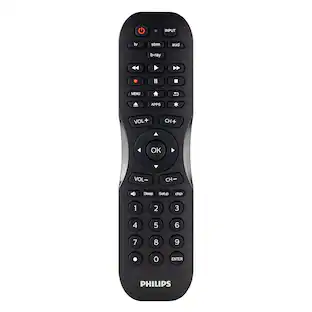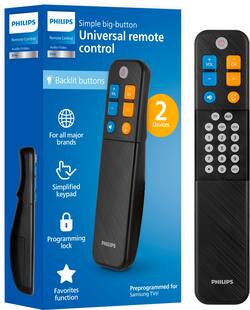
Philips - Elite EZ Slide 2-Device Universal Remote, For Seniors, Elders - Black
- Key Specs
- Remote Control Type: Universal
- General
- Brand: Philips
- Model Number: SRP9012B/27
- Product Name: Elite EZ Slide 2-Device Universal Remote, For Seniors, Elders
- Color: Black
- Features
- Remote Control Type: Universal
- Connectivity
- Wireless: true
- Power
- Rechargeable: false
- Battery Size: AA (The battery size required for operation.)
- Dimensions
- Product Weight: 0.23 ounces (The out of box weight of the item.)
- Other
- UPC: 030878763837
Minimize button overload and get back to basics with the Philips Elite EZ Slide 2-Device Universal Remote Control. Its simplified keypad includes easy-to-read, color-coded backlit buttons to control basic ON/OFF, volume and channel selection functions. Additional buttons are located beneath the EZ Slide cover, allowing you to program the remote and then hide the extra buttons that can be confusing or overwhelming to some. To protect the remote from accidentally being reprogrammed, the lock feature disables functionality of the hidden buttons. This universal remote comes preprogrammed for use with Samsung TVs but can easily be set up to operate other brands using your choice of auto code search or direct code entry programming. Additionally, the AUX button can be set to operate your set-top box or soundbar. For convenience, the power button will simultaneously turn ON/OFF both devices. And, when the sheer number of TV channels is overwhelming, the favorites function lets you program up to 10 of your most-watched channels and then set your channel selection buttons to scroll through only those channels you’ve selected. Enjoy hassle-free control of your home entertainment with the Philips Elite EZ Slide 2-Device Universal Remote Control.
- Large, simplified keypad: Big backlit buttons control basic ON/OFF, volume and channel selection; EZ Slide cover hides other buttons; great for seniors or anyone who wants hassle-free control of their home entertainment
- Multi-device control: Gain control of your TV and set-top box or soundbar in one easy-to-use universal remote; power button simultaneously turns ON/OFF both devices; CH+/- button is programmable to scroll through your 10 favorite channels
- Simple setup: Preprogrammed for use with Samsung TVs; easy direct entry and auto code search programming for other brands; AUX button can be programmed to operate a set-top box, soundbar or other compatible device; two AA batteries required.
- Prevents accidental reprogramming: Lock feature disables all buttons under the EZ Slide cover (except the lock button) to prevent unwanted reprogramming of the remote
- U.S.-based technical support: Backed by a limited-lifetime replacement pledge and free U.S.-based technical support that is available Monday-Friday, 7AM-8PM Central Time to assist with any questions or issues
Q: What type of batteries does this remote use?
A: This remote uses two AA batteries.
Q: Is this remote difficult to set up?
A: This remote is preprogrammed for Samsung TVs and features both auto code search and direct code entry for other brands.
Q: Does this remote offer any support if I have trouble?
A: Yes, this remote is backed by a limited lifetime replacement pledge and free U.S. based technical support.
Q: What is the benefit of the EZ Slide cover?
A: The EZ Slide cover hides extra buttons to simplify the remote and prevent accidental reprogramming.
Q: How many devices can this Philips remote control?
A: This Philips universal remote can control two devices.
Q: Can this be programed to direct tv.
A: Hello Herb, thank you for your question. I would not recommend this for Direct TV. It does not have any directional pad or a guide button, so it wouldn't completely control a Direct TV box.
Q: Does it work with a 3 to 4 year old Sanyo TV?
A: Meltor, thank you for your question. Our remotes do have multiple direct codes for Sanyo but If none of the codes provided offer the desired functionality, we recommend that you try the Code Search Method. This method will search through the codes stored in this remote to possibly find a code from an alternate brand that will offer full or partial functionality with your device. You can view all brands and codes on byjasco.com/remotecodes.
Q: Does this remote connect with a Midco cable box?
A: Hello Sassi, thank you for your question. Midco is not on our code list but we recommend that you try the Code Search Method. This method will search through the codes stored in this remote to possibly find a code from an alternate brand that will offer full or partial functionality with your device.
People also viewed
 $279.99The price was $380.00

Today's top picks
- $279.99The price was $380.00