Planar - PM16-S 16" Class WUXGA LCD Monitor - 16:10 - 16" Viewable - In-plane Switching (IPS) Technology - 1920 x 1200 - Black
Planar - PM16-S 16" Class WUXGA LCD Monitor - 16:10 - 16" Viewable - In-plane Switching (IPS) Technology - 1920 x 1200 - Black
More Buying Options
Related Item

Highlights
- Key Specs
- Refresh Rate: 144Hz (The number of frames per second the device can produce natively without enhancement. Higher rates help produce smooth, seamless pictures.)
- Maximum Resolution: 1920 x 1080 (Maximum resolution refers to the highest number of pixels that a screen can process and display. Higher resolution signals produce more detailed images.)
- Screen Size: 15.6 inches (Size of the screen, measured diagonally from corner to corner.)
- Display Connector(s): 1 x HDMI (The number and type of connectors used to connect to an external display.)
- General
- Brand: Planar
- Product Name: Planar PM16-S 16" Class WUXGA LCD Monitor - 16:10 - 16" Viewable - In-plane Switching (IPS) Technology - 1920 x 1200
- Color: Black
- Display
- Refresh Rate: 144Hz (The number of frames per second the device can produce natively without enhancement. Higher rates help produce smooth, seamless pictures.)
- Maximum Resolution: 1920 x 1080 (Maximum resolution refers to the highest number of pixels that a screen can process and display. Higher resolution signals produce more detailed images.)
- Contrast Ratio: 1200:1 (Measured difference between a displayed image's brightest whites and darkest blacks. The larger the first number, the more detail and color that can be displayed.)
- Display Type: LCD
- Aspect Ratio: 16:9 (The measurement of the width of a screen compared to the height of a screen, expressed as a ratio.)
- Curved Screen: false
- Brightness: 400.0 candela per square meter (A measure of the total light output.)
- Screen Size: 15.6 inches (Size of the screen, measured diagonally from corner to corner.)
- Connectivity
- Number of HDMI Inputs (Total): 1
- Display Connector(s): 1 x HDMI (The number and type of connectors used to connect to an external display.)
- Features
- Adjustable Stand Height: false
- Dimensions
- Product Width: 14 inches (The out of box width of the item. Width is measured as the horizontal distance from one side of the item to the other as it would be primarily used or placed.)
- Product Weight: 4.61 pounds (The out of box weight of the item.)
- Stand Included: true
- Certifications Listings & Approvals
- ENERGY STAR Certified: false (Devices carrying the ENERGY STAR service mark, such as computer products and peripherals, kitchen appliances, and other products, generally use 20% to 30% less energy than required by federal standards.)
- Warranty
- Warranty - Parts: 1 year
- Warranty - Labor: 1 year
- Other
- UPC: 810069811741
Planar PM16-S 16" Class WUXGA LCD Monitor - 16:10 - 16" Viewable - In-plane Switching (IPS) Technology - 1920 x 1200 - 16.7 Million Colors - 400 Nit - 3 ms - 60 Hz Refresh Rate - Speakers - Tilt - USB Type-C - VESA Mount Compatible
- 16" Portable Desktop Monitor: The Planar® PM16-S is a 16" portable monitor featuring Full HD+ resolution of 1920x1200. The IPS display boasts high brightness and a 100% DCI-P3 color gamut, delivering vivid and accurate visuals. With 120 additional vertical lines when compared to 1080p resolution, it enhances productivity on the go. The built-in desk stand offers a tilt range from 15° to 53°, while the included carrying case protects the display in
Whats Included
- MAG 275UPD E14 monitor, DisplayPort cable (1.4a), power cord (C13), quick guide
Compare similar products

Planar PM16-S 16" Class WUXGA LCD Monitor - 16:10 - 16" Viewable - In-plane Switching (IPS) Technology - 1920 x 1200 - 16.7 Million Colors - 400 Nit - 3 ms - 60 Hz Refresh Rate - Speakers - Tilt - USB Type-C - VESA Mount Compatible
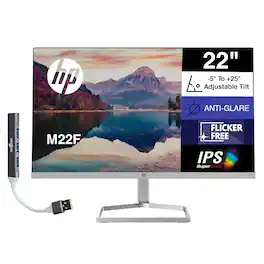
The 22" FHD IPS Monitor delivers stunning clarity and vibrant visuals with its 1920x1080 resolution and 16:9 aspect ratio, ideal for both home and office use. Featuring a 5ms GtG response time (with overdrive) and 300 nits of brightness, it ensures smooth performance and vivid image quality. The display offers a 1000:1 contrast ratio and wide 178° viewing angles, providing consistent color and brightness from any position. Designed with a modern aesthetic, it features a 3-sided micro-edge bezel and a stylish black head with a silver stand for a sleek, contemporary look. The anti-glare screen, low blue light mode, and AMD FreeSync technology work together to reduce eye strain and deliver a comfortable, flicker-free viewing experience. Users can easily adjust settings like brightness, color, and input through intuitive on-screen controls, supported by HP Display Center software for added convenience. Connectivity options include one HDMI 1.4 port and one VGA port, ensuring compatibility with a variety of devices. Compact and lightweight, the monitor measures 19.11 x 6.97 x 12.51 inches and weighs only 4.85 lb. Additionally, it includes the Dockztorm USB Hub (Special Edition Portable Docztorm Data Hub), offering super-speed data transfer rates of up to 5Gbps for enhanced connectivity and productivity.
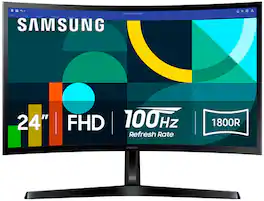
Samsung's 24" Essential S3 Curved Monitor creates an immersive viewing experience for your everyday use. The 1800R curved screen wraps more closely around the field of vision for a wider view which enhances depth perception and minimizes peripheral distractions. The 100Hz refresh rate reduces lag and motion blur to stay in the action when playing games, watching videos, or working on creative projects. Game Mode offers instant adjustment of color and image contrast, filling the screen with a clear view of every detail. Advanced eye comfort technology certified by TÜV reduces eye strain by minimizing blue light and decreasing irritating screen flicker. HDMI and D-sub enable devices to be plugged straight into the monitor for greater connectivity and convenience.

This 27 inch curved monitor with 200Hz high refresh rate and 1ms fast respond speed, support FreeSync and HDR10,which brings you better gaming experience.
Specs
Reviews
This product doesn't have any reviews yet.