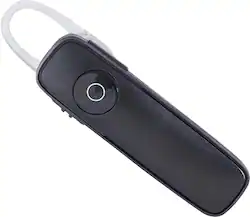
Plantronics - Marque 2 Bluetooth Headset - Black
- Key Specs
- Connection Type: Wired
- Headphone Fit: On-Ear
- General
- Brand: Plantronics
- Model Number: M165 BLACK
- Product Name: Marque 2 Bluetooth Headset
- Color: Black
- Audio
- Sound Isolating: false
- Connectivity
- Connection Type: Wired
- Connector Size: 1/8 in. (3.5mm)
- Design
- Headphone Fit: On-Ear
- Dimensions
- Product Height: 0.38 inches (The out of box height of the item. Height is measured as the vertical distance from the bottom of the item to the top as it would be primarily used or placed.)
- Product Width: 0.5 inches (The out of box width of the item. Width is measured as the horizontal distance from one side of the item to the other as it would be primarily used or placed.)
- Product Weight: 0.2 pounds (The out of box weight of the item.)
- Other
- UPC: 017229138421
Enjoy high-quality sound with this Plantronics Marque 2 M165 Bluetooth headset that features dual microphones to reduce unwanted background noise. DeepSleep mode helps limit energy use to conserve battery life.
- Designed for use with most Bluetooth-enabled cell phones: Including Samsung Galaxy S 5 models, Apple® iPhone® and Android models for wide-ranging use. Also compatible with Apple iPad®.
- Dual microphones: Enhance noise reduction for crisp, clear sound.
- DeepSleep mode: Helps extend battery life. Android battery meter and iPhone and iPad headset battery meter inform you of available power levels (additional fees may apply).
- Up to 7 hours talk time and up to 11 days standby: For reliable performance. AC charger makes it easy to keep your headset powered and ready for use.
- Voice commands: Allow simple hands-free answering.
- 3 sizes of silicone ear tips: Ensure a comfortable fit.
- Simple setup: Talks you through the pairing process for ease of use.
- MyHeadset app: Offers useful information (additional fees may apply).
Whats Included
- Plantronics Marque 2 Bluetooth Headset
- AC charger, 3 pairs of silicone ear tips (small, medium, large), clip-on ear loop
- Owner's manual
Q: Is it normal for a BT device to lose connection when I store my phone in my pocket?
A: Bluetooth can have a hard time going through solid objects and it can cause the headset to disconnect. Most of the time the phone being in your pocket will be ok as long as you keep it on the same side of your body that you are wearing your headset. If the problem persists you may want to try resetting the Bluetooth connection between your phone and headset to see if that helps the issue. To do so, first delete the headset from your cell phone's list of paired devices. Once deleted, make sure to power your phone completely off. Then power it back on. (This will reset the Bluetooth stack in the BT software on the phone). Then re-pair the headset with your phone. Thank you for contacting us. Plantronics Customer Support 1-855-765-7878
Q: will this work with iphone 5s
A: Yes. My wife has a 5s and it works great.
Q: Will this work with an iPhone 4?
A: Works with an iPhone 4s.
Q: how can I purchase additonal silicone ear tips?
A: Additional silicone ear tips can be purchased online at the Plantronics website.
Q: Bluetooth to pair with two phones
A: Hello- The Marque 2 can be paired with up to 7 devices. If you were to pair it with an 8th device it will just drop the oldest pairing. It also supports multipoint so you can have it actively connected to 2 devices at once, allowing you to take calls from 2 phones (note that you can not use the headset simultaneously with both phones). After the first time you pair the headset you will need to manually put it into pairing mode in order to connect to additional devices. To do this, start with the headset powered on. Now, press and hold the call control button for about 5-6 seconds until the light on the headset starts flashing red-white. Release the button and set the headset aside. On your cell phone, go to the Bluetooth menu and search for (or add) a device. The cell phone should find the headset. It will appear as "PLT_M165" in your list of devices. If prompted for a passkey, enter 0000 (four zeros). Note: Many phones do not prompt for a passkey.
Q: What is the difference between the M165 and the 170?
A: The A170 and M165 headsets are completely identical inside and out. Same features, same performance, same warranty. The differences are in what comes with the headset: - The A170 includes the "exclusive Apple charging kit": a 2-in-1 charging cable, enabling simultaneous headset/iPhone charging via a single USB connection, plus a USB car charger. Whereas the M165 includes a standard micro USB AC adapter for connection to a wall outlet.
A: undefined
Q: Red light is blinking red but not charging, why?
A: undefined
People also viewed
 Clearance$115.99The price was $209.99
 $115.99The price was $157.99
 $19.99The price was $24.99
Today's top picks
 $479.99The price was $729.99
 $69.99The price was $129.99
 $199.99The price was $249.99
 $49.99The price was $62.99










