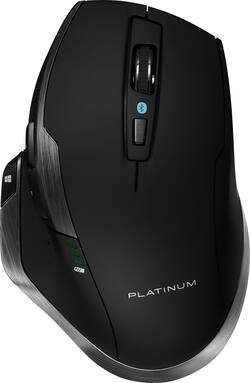
Platinum™ - Bluetooth 8-Button Mouse - Wireless - Black
- Key Specs
- Maximum Sensitivity: 1600 dots per inch (Mouse sensitivity is measured in dots per inch (DPI). The higher the DPI, the more sensitive the mouse is and may be more useful for high-density pixel screens. Lower DPI typically means more precision and accuracy in mouse movement.)
- Number of Buttons (Total): 8
- Connection Type: Wireless
- General
- Brand: Platinum™
- Model Number: PT-PNMBL8BK
- Product Name: Bluetooth 8-Button Mouse
- Color: Black
- System Requirements: Microsoft Windows 7 and above, Apple Mac OS 10.x or higher; one available USB port (The software that a product must have for it to be able to integrate with another product.)
- Features
- Mouse Type: Standard
- Performance
- Mouse Operation: Button(s), Scroll wheel
- Handedness: Right-handed
- Tracking Method: BlueTrack (There are several types of computer mice, optical and laser being among the most common. Optical mice detect less detail and provide more precise and accurate movement. Laser mice detect more detail and can be used on a wider variety of surfaces, but are more sensitive to small movements.)
- Maximum Sensitivity: 1600 dots per inch (Mouse sensitivity is measured in dots per inch (DPI). The higher the DPI, the more sensitive the mouse is and may be more useful for high-density pixel screens. Lower DPI typically means more precision and accuracy in mouse movement.)
- Minimum Sensitivity: 800 dots per inch (Mouse sensitivity is measured in dots per inch (DPI). The higher the DPI, the more sensitive the mouse is. Lower DPI typically means more precision and accuracy in mouse movement, but higher DPI may be useful for high-density pixel screens.)
- Number of Buttons (Total): 8
- Connectivity
- Connection Type: Wireless
- Wireless Connectivity: Bluetooth (The manner in which a device sends data to another device over a short distance without the use of wires or cables.)
- Operating System Compatibility: Mac, Windows
- Power
- Mouse Power Source: Battery-powered
- On/Off Switch: true
- Rechargeable Battery (Mouse): false
- Battery Size: AA (The battery size required for operation.)
- Number of Batteries Required: 2
- Batteries Included: true (Indicates whether the product comes with the required batteries for its operation.)
- Dimensions
- Product Height: 1.7 inches (The out of box height of the item. Height is measured as the vertical distance from the bottom of the item to the top as it would be primarily used or placed.)
- Product Width: 3.3 inches (The out of box width of the item. Width is measured as the horizontal distance from one side of the item to the other as it would be primarily used or placed.)
- Product Weight: 119.92 grams (The out of box weight of the item.)
- Other
- UPC: 600603215681
Enhance your desktop experience with this Platinum Bluetooth mouse. It's ergonomic angle and height are designed to place wrist in comfortable position. This Platinum Bluetooth mouse supports 1600 dpi for excellent responsiveness, and has vertical scroll for efficient browsing of web pages.
- Blue Trace technology: This technology combines the power of optical technology with the precision of laser technology for remarkable tracking on almost any surface including wood, granite, and carpet.
- Wirelessly connects to your computer with Bluetooth: This mouse connects to your computer without using wires.
- 8-button design includes back button and Windows button: The back button makes Web navigation simpler by letting you go back to a previous page with a click. The Windows button on the side of the mouse can be clicked to activate the Start menu.
- Scroll wheel: Scroll wheel can be used to scroll both vertically and horizontally.
- Ergonomic design: Mouse angle and height are designed to place wrist in a comfortable position
- Compatible with most Windows and Mac computers: Works across a wide array of computers.
Whats Included
- AA batteries (2)
- Platinum Bluetooth 8-Button Mouse
- Quick setup guide
Product Manuals
A: I had the same problem and I switch back to nano 2.4ghz regular. Bluetooth mouse lags when you get 5 feet and disconects. When idle disconects and reconects when you move the mouse or keyboard this is to save batteries life in long idles and is a pain due lags in reconection
A: I have been frustrated by not being able to use the back and forward buttons on my Platinum mouse when using OSX. I was also frustrated by the useless Windows key on my Razer keyboard. Both were solved using the BetterTouchTool. Map the forward and back buttons using the "Normal Mice" tab. Map the Windows and Zoom buttons in the "Keyboard" tab. Search for BetterTouchTool in your favorite search engine. There's a 45 day trial so you can make sure it will work before you spend any money. I'm sure there are other utilities out there that will do the same thing and don't charge anything if you're more patient than I was at the time.
Q: my mouse just suddenly dies and i put in new batteries, no ligts, nothing turns on
A: I had same problem and support promised a replacement, they never sent one. Nice mouse but fragile.
A: As it's a Bluetooth mouse (or so it seems from reading the description), I'm going to guess it's a Bluetooth issue and not a USB one. Not sure what the tech meant by a certain kind of USB, maybe a 3.0 port instead of a 2.0 but generally that makes no difference. Bluetooth mice are not the best, IMO, because when you move just 5 feet away or less, it disconnects. They also time out a lot, which may be what's happening with yours. Try re-pairing with your Bluetooth on your computer maybe? If not, then you may just have a defective mouse and could exchange/return it. The 2 I've recommended might be a better choice as they seem to use straight nano receivers which sometimes can have better quality and battery life. Hope this helps!
A: Try opening mouse and make sure the battery connectors aren't bent. Then leave battery cover off and see if you still get noise
Q: Where can I find a replacement dongle/USB Bluetooth stick?
A: undefined
Q: Is there a way to get a replacement dongle for this mouse?
A: undefined
People also viewed
 $75.99The price was $79.99
 $79.99The price was $119.99
 $109.99The price was $119.99






Today's top picks
 $199.99The price was $249.99
 $149.99The price was $239.99
 $789.99The price was $1,049.99











