Rating 4.7 out of 5 stars with 688 reviews
4.7- Ease of use (192)
- USB-C (90)
- Compatibility (64)
- Size (45)
- Performance (37)
- Heat (3)
- SD Card Slot (3)
- Speed (3)
Customer Images
The vast majority of our reviews come from verified purchases. Reviews from customers may include My Best Buy members, employees, and Tech Insider Network members (as tagged). Select reviewers may receive discounted products, promotional considerations or entries into drawings for honest, helpful reviews.
- Rated 5 out of 5 stars
Excellent option for failed laptop SD slot
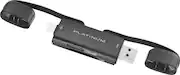
Very happy with this purchase. Bought because my LG Gram Windows 11 laptop MicroSD slot kept disappearing from device manager. The driver simply refused to update. (I tried multiple times!) This Platinum USB C/USB 3.2 stick plugged in and from the USB C side, immediately showed me the microSD contents. Quickly transferred to my laptop. Also tried the USB 3.2 side and it works fine. Tested with large SD adapter and it performed fine from both sides. Note that on the USB C side, it might be plugged in upside down (as in our picture). The USB 3.2 side was right side up. You may have to unplug your power cord as we did when having the larger adapter plugged in on the USB C side on the LG Gram. That's a small inconvenience easily overcome. It seems solidly built and you will not lose the caps. :) As a hobby photographer I use many MicroSD/SD cards, so this is an excellent device for transfers. And highly portable.
Posted by webtechgal
- Rated 5 out of 5 stars
It works and works well.
Works as required and as expected. I was able to use it frequently to copy files from sd and micro sd cards to my android and pc with no problems, and it worked at the speeds I wanted.
Posted by Daktylo
- Rated 5 out of 5 stars
Greatest card reader for windows
The greatest card reader i ever found for windows 10
Posted by BenitoAT
- Rated 5 out of 5 stars
Fast
Smooth at what its supposed to do. Has one job and the usbc provides fast speeds
Posted by Strong
- Rated 5 out of 5 stars
Nice
Having both USB-C and USB-A in the same device is very handy.
Posted by Tablet