Platinum™ - USB 3.0 Multiformat Memory Card Reader - Black
- General
- Brand: Platinum™
- Model Number: NS-DCR30A2
- Product Name: USB 3.0 Multiformat Memory Card Reader
- Color: Black
- Warranty
- Warranty - Parts: 1 year
- Warranty - Labor: 1 year
- Other
- Product Width: 1.9 inches (The out of box width of the item. Width is measured as the horizontal distance from one side of the item to the other as it would be primarily used or placed.)
- Product Height: 0.61 inches (The out of box height of the item. Height is measured as the vertical distance from the bottom of the item to the top as it would be primarily used or placed.)
- Product Length: 2.84 inches (The out of box length of the item. Length is measured as the longest dimension of the item.)
- Product Weight: 1.3 ounces (The out of box weight of the item.)
- USB Cable Included: true
- LED Indicator(s): true
- Computer Connectivity: Mac, Windows
- Plug and Play Operation: true
- Host Interface(s): USB 1.1, USB 2.0, USB 3.0
- Media Support: Secure Digital
- Number Of Memory Cards Supported: 1
- Number Of Slots: 5
- 2-Way Transfer: true
- Card-To-Card Transfers: false
- Concurrent Downloads Supported: false
- UPC: 600603187490
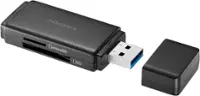
Easily transfer files from your memory card to your PC or Mac with this Insignia NS-DCR30A2 memory card reader, which supports a variety of formats, including SD, SDHC, SDXC, MMC, MS, M2 and CF.
- Supports multiple formats: Including SD, SDHC, SDXC, microSD, microSDHC, microSDXC, MMC, MS, MS PRO, MS Duo, MS PRO Duo, MS PRO-HG Duo, M2 and CF cards. An optional adapter (not included) allows use with RS MMC, miniSD and miniSDHC formats.
- USB 3.0 interface: With a 2.9' USB cable for fast data transfer to and from your compatible computer. Works with most models with Windows XP, Vista (32- or 64-bit), 7 (32- or 64-bit), 8 or 8.1 (32- or 64-bit) and Mac OS 10.4.x or later.
- Aluminum case: Creates a durable, stylish design. The compact, lightweight construction simplifies transport.
- Supports multiple formats: Including SD, SDHC, SDXC, microSD, microSDHC, microSDXC, MMC, MS, MS PRO, MS Duo, MS PRO Duo, MS PRO-HG Duo, M2 and CF cards. An optional adapter (not included) allows use with RS MMC, miniSD and miniSDHC formats.
- USB 3.0 interface: With a 2.9' USB cable for fast data transfer to and from your compatible computer. Works with most models with Windows XP, Vista (32- or 64-bit), 7 (32- or 64-bit), 8 or 8.1 (32- or 64-bit) and Mac OS 10.4.x or later.
- Aluminum case: Creates a durable, stylish design. The compact, lightweight construction simplifies transport.
Whats Included
- 2.9' USB 3.0 cable
- Owner's manual
- USB 3.0 Multiformat Memory Card Reader
- 2.9' USB 3.0 cable
- Owner's manual
- USB 3.0 Multiformat Memory Card Reader
Q: Will it work with Windows 10?
A: My infrared camera is 10 years old. We use the older version of the memory cards in the camera and have had trouble getting the data from the card to newer computers so I switched to this card reader. I have computers using Windows 7, 8 and a laptop using Windows 10. We switch this reader and our memory card back and forth when we are on site, and have never had a problem. I did not have any issues regarding drivers either, and I have had huge problems with drivers for USB Jump drives in the past.
Q: IS THERE A MANUAL FOR THIS ?
A: There was no manual. it was plug adn play on my laptop, Just go to my Computer, the card will appear
Q: Does this work for Military CAC Cards?
A: No, this is for memory cards like those used in phones and digital cameras.
A: I have an old Cybershot DSC-S50 with a 64MB Sony memory stick. The memory stick plugs into my HP PC built-in multi card reader (MS/PRO/Duo/PRO Duo slot) and reads the photos OK. However, when I use the Insignia reader plugged into a USB port, the card seems to fit OK, but is not recognised.
Q: Will it work with Chrome OS?
A: I use Chrome exclusively. I use the card reader almost every day with no problems. The USB connection should make it compatible with almost anything nowdays, but I do not know if the Chromebook has available USB ports.
Q: What's the difference between the 2.0 and 3.0 Reader?
A: USB 3.0 is much faster. The card reader can use both 3.0 and 2.0 ports if you have 3.0 version port on your computer. If you only have 2.0 version USB port on your computer the 3.0 version card reader will still work, it will just not be able to take advantage of the faster download speeds.
Q: Have Samsung D23 phone. Will I be able to retrieve photos n msgs I had but I deleted them
A: You will not be able to retrieve photos and messages that were already deleted.