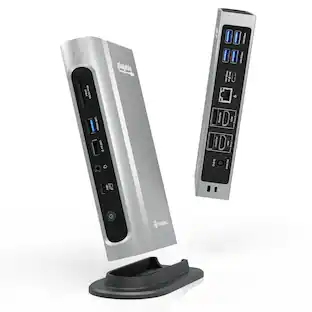
Plugable - Chromebook Docking Station Dual 4K USB-C, Chromebook Compatible Google Certified, Driverless 60W Universal Dock - Black
About this product
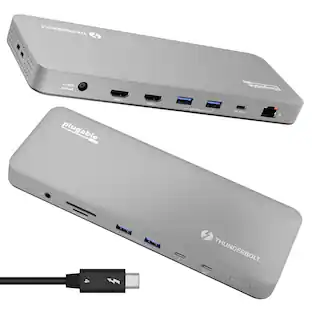
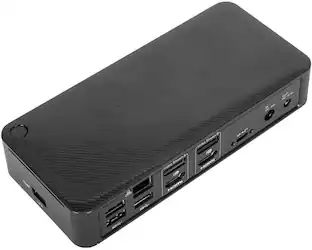
Strong security, simplicity and cost efficiency has made the Chromebook a popular choice. When you connect that to a docking station with two HDMI ports and two DisplayPort ports for extending two displays and up to 4K 60Hz resolution, 60W host charging, gigabit Ethernet, combination audio port, 4x USB 5Gbps ports, 2x USB 10Gbps ports, and 1x USB-C 10Gbps port, you go from laptop to productivity powerhouse. “Works With Chromebook” is actually a pretty tough badge to acquire. That’s because Google validates laptop docking stations that carry the claim to ensure the device will “work seamlessly with current and future ChromeOS devices.” Automatic secure firmware updates while the USB-C dock is connected to a Chromebook laptop. Perfect for ensuring employees always have the latest compatibility improvements and features. It doesn’t matter if you are on a Chromebook or a Windows laptop, this laptop docking station is all about choice. Offering two ports each, HDMI and DisplayPort, so users can standardize on one, or use a mix of both to extend to up to two screens. And no matter how you connect your displays, all video ports are capable of up to 4K 60Hz. And with 60W charging, this USB-C docking station will power your productive endeavors. Laptop docking station dual monitor resolution is dependent on host. DP 1.4 host is required for Dual 4K 60Hz. DP1.2 hosts will see resolutions up to 4K 30Hz This Plugable docking station provides full functionality to Windows 11 and Windows 10, systems with Thunderbolt 3 or 4, USB4, and USB-C. This product works with devices capable of running the latest version of ChromeOS and has been certified to meet Google's compatibility standards. Google is not responsible for the operation of this product or its compliance with safety requirements. Chromebook and the Works With Chromebook badge are trademarks of Google LLC.
Certified Chromebook Docking Station
Designed for reliable, high-performance use in business and education settings, this Works With Chromebook Certified 12-port docking station supports dual 4K 60Hz displays via 2x HDMI or 2x DisplayPort ports —perfect for classrooms, labs, and teacher workstations. Ideal for standardized Chromebook deployments across school districts or enterprise environments.
Dual 4K
Windows and Chromebook docking station dual monitor is supported through 2x HDMI and 2x DisplayPort connections. Users can standardize on one or use a mix of either HDMI or DP to add two screens, each with up to 4K 60Hz resolution
60W Charging
Charging dock provides 60W charging to host laptop so you can leave your power cord in your travel bag. And, because this dock is certified to work with Chromebook, you can rest assured the dock will intelligently manage power requirements
Compatibility
Laptop docking station is compatible with ChromeOS and Windows 10 and newer. Supports secure, Google-managed firmware updates in ChromeOS. DP 1.4 host is required for Dual 4K 60Hz
2-Year Coverage, Lifetime Support
Every Plugable product, including this docking station, is covered against defects for 2 years and comes with lifetime support. If you ever have questions, contact our North American-based team - even before purchase
- Maximum Number of Displays Supported2Maximum Supported Resolution4K (2160p)Number of DisplayPort Outputs (Total)1Passthrough PowerYes
Reviews
This product doesn't have any reviews yet.
Compare similar products
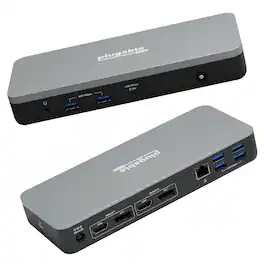
Strong security, simplicity and cost efficiency has made the Chromebook a popular choice. When you connect that to a docking station with two HDMI ports and two DisplayPort ports for extending two displays and up to 4K 60Hz resolution, 60W host charging, gigabit Ethernet, combination audio port, 4x USB 5Gbps ports, 2x USB 10Gbps ports, and 1x USB-C 10Gbps port, you go from laptop to productivity powerhouse. “Works With Chromebook” is actually a pretty tough badge to acquire. That’s because Google validates laptop docking stations that carry the claim to ensure the device will “work seamlessly with current and future ChromeOS devices.” Automatic secure firmware updates while the USB-C dock is connected to a Chromebook laptop. Perfect for ensuring employees always have the latest compatibility improvements and features. It doesn’t matter if you are on a Chromebook or a Windows laptop, this laptop docking station is all about choice. Offering two ports each, HDMI and DisplayPort, so users can standardize on one, or use a mix of both to extend to up to two screens. And no matter how you connect your displays, all video ports are capable of up to 4K 60Hz. And with 60W charging, this USB-C docking station will power your productive endeavors. Laptop docking station dual monitor resolution is dependent on host. DP 1.4 host is required for Dual 4K 60Hz. DP1.2 hosts will see resolutions up to 4K 30Hz This Plugable docking station provides full functionality to Windows 11 and Windows 10, systems with Thunderbolt 3 or 4, USB4, and USB-C. This product works with devices capable of running the latest version of ChromeOS and has been certified to meet Google's compatibility standards. Google is not responsible for the operation of this product or its compliance with safety requirements. Chromebook and the Works With Chromebook badge are trademarks of Google LLC.

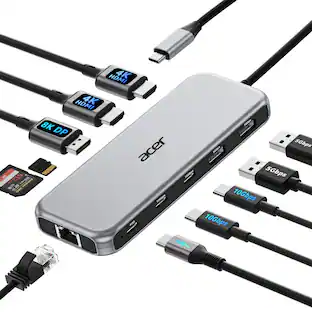
Hardware Interface:HDMI, USB 3.0, USB Type C ;Special Feature:Fast Data Transfer, Plug and Play, Portable;Compatible Devices:𝐖𝐢𝐧𝐝𝐨𝐰𝐬 𝐚𝐧𝐝 𝐦𝐚𝐜𝐎𝐒 𝐝𝐞𝐯𝐢𝐜𝐞𝐬 𝐰𝐢𝐭𝐡 𝐃𝐢𝐬𝐩𝐥𝐚𝐲𝐏𝐨𝐫𝐭 𝐀𝐥𝐭𝐞𝐫𝐧𝐚𝐭𝐞 𝐌𝐨𝐝𝐞 (𝐃𝐏 𝐀𝐥𝐭 𝐌𝐨𝐝𝐞)—𝐒𝐮𝐩𝐩𝐨𝐫𝐭𝐢𝐧𝐠 𝐝𝐢𝐬𝐩𝐥𝐚𝐲, 𝐜𝐡𝐚𝐫𝐠𝐢𝐧𝐠, 𝐚𝐧𝐝 𝐝𝐚𝐭𝐚 𝐭𝐫𝐚𝐧𝐬𝐟𝐞𝐫. Including Acer, Dell, Lenovo, Surface, HP, ASUS, MacBook, Samsung laptops and smartphones, as well as accessories like mice and keyboards.
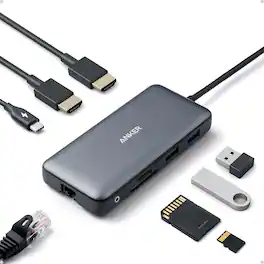
Anker Laptop Docking Station Dual Monitor, 8-in-1 USB C Hub with 4K HDMI | Dual HDMI USB C Dock, 1Gbps Ethernet, 85W Max PD, SD/TF Card Reader, for USB C Laptops, XPS and More (Charger Not Included)

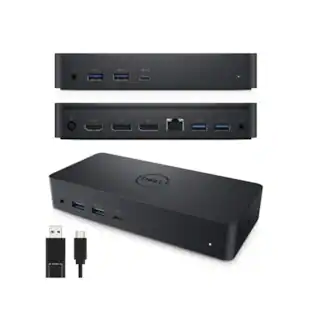
The Dell Universal Dock D6000 connects your laptop to multiple devices through a single USB-C or USB-A cable. Powered by DisplayLink technology, it supports up to three 4K displays simultaneously. Ports include 2 DisplayPort, 1 HDMI, 4 USB-A (one with PowerShare), 1 USB-C with PowerShare, Gigabit Ethernet, 3.5mm combo audio, and audio line-out. The dock delivers up to 65W power to your laptop while keeping peripherals connected, and the integrated USB-C cable includes a built-in USB-A adapter for wide compatibility.
| Pros for Plugable - Chromebook Docking Station Dual 4K USB-C, Chromebook Compatible Google Certified, Driverless 60W Universal Dock - Black | |||
|---|---|---|---|
| There were no pros for this product— | Overall Performance, Connectivity, Port Selection, Portability, Design | There were no pros for this product— | There were no pros for this product— |
| Cons for Plugable - Chromebook Docking Station Dual 4K USB-C, Chromebook Compatible Google Certified, Driverless 60W Universal Dock - Black | |||
| There were no cons for this product— | Cable Length, Heat Dissipation, Power Supply | There were no cons for this product— | There were no cons for this product— |
Specs
Be the first to ask a question.
We’ll try to get your question answered within 24 hours by a Best Buy customer or brand representative.
Customers often buy these together
 $189.99The price was $225.58
 Clearance$149.99The price was $199.00
 Clearance$107.99The price was $179.00
 $189.99The price was $259.99
 Top Deal$249.99The price was $379.99
 $57.99The price was $69.99


More to consider
 $117.99The price was $139.00
 $215.25The price was $230.64





Explore tech essentials Sponsored



Discover related products
 $12.99The price was $13.99
 $249.00The price was $275.00
 $30.99The price was $32.99
 $429.99The price was $648.99











Keep exploring
 $219.89The price was $249.99