
Plugable - USB C Dock VESA Mount Compact with 85W Charging Thunderbolt 4/3 USB4 Compatible - Black
Reviews coming soon
About This Item
- Key Specs
- Maximum Number of Displays Supported: 1
- Number of DisplayPort Outputs (Total): 0
- General
- Brand: Plugable
- Model Number: UD-CAM
- Product Name: USB C Dock VESA Mount Compact with 85W Charging Thunderbolt 4/3 USB4 Compatible
- Color: Black
- Display
- Maximum Number of Displays Supported: 1
- Ports
- Display Connector(s): 1 x HDMI (The number and type of connectors used to connect to an external display.)
- Number of DisplayPort Outputs (Total): 0
- Number of HDMI Ports (Total): 1
- Number of VGA Ports: 0 (VGA (Video Graphics Adapter or Video Graphics Array) is a display standard that transmits via analog signals. This type of interface is typically used to connect a computer to a display device such as a monitor, projector, or TV.)
- Number Of Ethernet Ports: 1
- USB Ports: 4 x USB-A (The number and type of USB ports the product has.)
- Power
- Powered: true
- Power Supply Included: true
- Compatibility
- Brand Compatibility: Windows, macOS, ChromeOS, Lenovo, Dell, HP
- Model Compatibility: Supports USB-C, USB4, TB3/4 systems incl. M1–M3 Macs, Intel TB3 Macs (2016+), Dell XPS/Latitude/Inspiron, Surface, HP ProBook/EliteBook/Spectre, Lenovo ThinkPad/IdeaPad/Yoga, LG Gram & other laptops with full-featured USB-C.
- Dimensions
- Product Height: 1.2 inches (The out of box height of the item. Height is measured as the vertical distance from the bottom of the item to the top as it would be primarily used or placed.)
- Product Length: 3.5 inches (The out of box length of the item. Length is measured as the longest dimension of the item.)
- Product Width: 3.9 inches (The out of box width of the item. Width is measured as the horizontal distance from one side of the item to the other as it would be primarily used or placed.)
- Product Weight: 6.3 ounces (The out of box weight of the item.)
- Warranty
- Warranty - Parts: 2 Year Limited Parts
- Warranty - Labor: 2 Year Limited Labor
- Other
- UPC: 819927011705
The Plugable UD-CAM USB-C Mini Docking Station provides an additional HDMI display output (via Alternate Mode, converted internally to HDMI for maximum compatibility), up to 85 Watts of Power Delivery (PD) to charge your host computer via USB-C (host computer must support PD over USB-C), gigabit Ethernet, audio, and expanded USB device connectivity. All through a single USB-C cable. The UD-CAM docking station utilizes new USB-C functionality to output native video over compatible USB-C ports. USB-C 'Alternate Mode' provides a direct pipeline to the graphics processor in your system, and your connected monitor will function and perform as a natively attached display. The Alternate Mode signal is converted to HDMI 1.4 to accommodate widely available HDMI monitors. Compatible Systems Plug and play installation on virtually any Windows, Mac, or Linux host which supports Alternate Mode (Alt Mode) video output functionality. Current examples are the 12" Retina MacBook with USB-C / Late 2016 / 2017 MacBook Pro / Lenovo Yoga 720 13" / Surface Book 2 / Dell XPS 13" (9350/9360) / Pixelbook. Dell XPS 15" (9550/9560) will function but displays a warning on boot if a 130W charger is not detected. Power and Charging The UD-CAM's power supply can charge hosts with up to 85 Watts of power via the USB Power Delivery standard. As mentioned above, some devices which support video output over USB-C will not charge via USB-C. For these systems, the charger from your system manufacturer will be required. In the Box UD-CAM Mini Docking Station, 1m long USB-C cable, 100W (20V, 5A) power supply with US power plug, VESA Mount, and quick start guide.
- Powerful USB-C Dock: Power up your productivity with a 4K HDMI port, Ethernet, audio input/output, and 4 USB ports while providing up to 85W of power to charge your attached USB-C or Thunderbolt 4/3 system
- Compact and VESA Mountable: This USB Type C docking station hdmi offers a sleek and minimal form factor which means saving valuable desk space and avoiding a clutter of electronics and cables. Includes a VESA mount to tuck the dock behind a monitor for an even lower profile at your workstation, perfect for a laptop dock setup
- 4K Performance: With DP Alt Mode, the usb c docking station vesa mount establishes a direct pipeline to your host graphics processor. Enjoy native-level display performances up to the host system's GPU capabilities
- Compatibility: This USB-C Dock is compatible with Windows 10 and newer, macOS 11+, and ChromeOS. Basically anything with a Thunderbolt 4/3, USB4, or a full-featured USB-C port with plug and play functionality (no software or driver installation needed)
- 2-Year Coverage, Lifetime Support: Every Plugable product, including this USB C dock VESA mount compact, is covered against defects for 2 years and comes with lifetime support. If you ever have questions, contact our North American-based team - even before purchase
Reviews
This product doesn't have any reviews yet.
Compare similar products

The Plugable UD-CAM USB-C Mini Docking Station provides an additional HDMI display output (via Alternate Mode, converted internally to HDMI for maximum compatibility), up to 85 Watts of Power Delivery (PD) to charge your host computer via USB-C (host computer must support PD over USB-C), gigabit Ethernet, audio, and expanded USB device connectivity. All through a single USB-C cable. The UD-CAM docking station utilizes new USB-C functionality to output native video over compatible USB-C ports. USB-C 'Alternate Mode' provides a direct pipeline to the graphics processor in your system, and your connected monitor will function and perform as a natively attached display. The Alternate Mode signal is converted to HDMI 1.4 to accommodate widely available HDMI monitors. Compatible Systems Plug and play installation on virtually any Windows, Mac, or Linux host which supports Alternate Mode (Alt Mode) video output functionality. Current examples are the 12" Retina MacBook with USB-C / Late 2016 / 2017 MacBook Pro / Lenovo Yoga 720 13" / Surface Book 2 / Dell XPS 13" (9350/9360) / Pixelbook. Dell XPS 15" (9550/9560) will function but displays a warning on boot if a 130W charger is not detected. Power and Charging The UD-CAM's power supply can charge hosts with up to 85 Watts of power via the USB Power Delivery standard. As mentioned above, some devices which support video output over USB-C will not charge via USB-C. For these systems, the charger from your system manufacturer will be required. In the Box UD-CAM Mini Docking Station, 1m long USB-C cable, 100W (20V, 5A) power supply with US power plug, VESA Mount, and quick start guide.

Connect your laptop to a 4K monitor, projector, and other devices with our USB-C 4-in-1 Multiport Adapter. This compact USB-C adapter is the perfect solution for home, the office, or in-between workstations. It features two USB-A ports to charge and connect your smartphone, tablet, keyboard, thumb drive, mouse, or other high consumption device while its HDMI port connects your MacBook Pro, Chromebook, or other USB-C laptop to a display with up to 4K resolutions. This Belkin USB-C Hub supports pass-through charging up to 100W so you don’t have to choose between port expansion and power. Gain up to 5 Gbps of bandwidth between connected devices, for quick data transfer between computer and peripheral devices. This computer docking station also supports high-definition display resolutions up to 4K through the HDMI Port. Encased in a sleek aluminum finishing that matches popular devices, this compact USB port hub is a stylish addition for your work, study, or play setup.
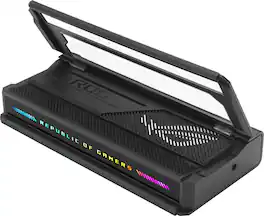
The ROG Bulwark Dock is a compact, sleek, 7-in-1 docking station that offers 4K at 144Hz and 8K at 30Hz output via HDMI 2.1, 1 x USB-C and 3 x USB-A for superfast up to 10 Gbps file transfers, gigabit Ethernet, audio jack and up to 100 watt USB Power Delivery to laptops and mobile devices.

This compact multi-port adapter is ideal for travel, featuring everything from the essential HDMI™ output, USB™ ports to Gigabit Ethernet and 100W Power Delivery passthrough. It gives you the ability to connect your Chromebook™, MacBook® , or other USB-C® compatible laptops to a 4K monitor or TV with 60 Hz refresh rate and audio. With USB™ Power Delivery 3.0, you can charge your laptop and power your peripherals with a single USB-C® power adapter even if your laptop only has one USB-C® port. In addition, you can connect or charge your USB™ devices via the SuperSpeed USB™ 5Gbps ports and access a wired network through the Gigabit Ethernet port. Through a single USB-C® (Thunderbolt™ 3 and 4 compatible) host cable, this compact adapter provides all the essential connectivity you need to create a workstation virtually anywhere!
| Pros for Plugable - USB C Dock VESA Mount Compact with 85W Charging Thunderbolt 4/3 USB4 Compatible - Black | |||
|---|---|---|---|
| There were no pros for this product— | Overall Performance, Connectivity, Ease of use, HDMI, Size | Overall Performance, Connectivity, Portability, Charging Speed, Compatibility | There were no pros for this product— |
| Cons for Plugable - USB C Dock VESA Mount Compact with 85W Charging Thunderbolt 4/3 USB4 Compatible - Black | |||
| There were no cons for this product— | Price, Cable Length, Heat | There were no cons for this product— | There were no cons for this product— |