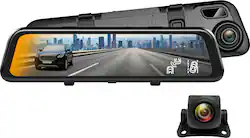
Rexing - M2 2K Front and Rear Mirror Dash Cam with Smart BSD ADAS GPS - Black
- Key Specs
- Field of View: 170 degrees
- Automatic Incident Detection: true
- G-Sensor: true
- Recording Resolution: 2560 x 1440 (Refers to the number of pixels, both horizontally and vertically, used to capture video. The higher the resolution the finer the video detail that can be seen.)
- Compatibility: Windows/MAC OS
- Camera Mounting Location: Rearview mirror, License plate
- Vehicle Camera Type: Back-up
- General
- Brand: Rexing
- Model Number: M2-BBY
- Product Name: M2 2K Front and Rear Mirror Dash Cam with Smart BSD ADAS GPS
- Color: Black
- Vehicle Camera Type: Back-up
- Recording & Playback
- Field of View: 170 degrees
- Automatic Incident Detection: true
- G-Sensor: true
- Recording Resolution: 2560 x 1440 (Refers to the number of pixels, both horizontally and vertically, used to capture video. The higher the resolution the finer the video detail that can be seen.)
- Loop-Cycle Recording: 1 minute, 3 minutes, Off
- GPS Enabled: true
- Camera Power Source: Vehicle battery
- Expandable Memory Compatibility: microSD
- Recording Feature: true
- Compatibility
- Compatibility: Windows/MAC OS
- Features
- Lane Guidance: true
- Integrated Microphone: true
- Night Vision: true
- Display
- Screen Included: true
- Screen Size: 12 inches (Size of the screen, measured diagonally from corner to corner.)
- Screen Resolution: 2560 x 1440 (Screens come in a range of resolutions (measured in pixels, horizontal x vertical). The higher the resolution, the greater the picture quality.)
- Mounting
- Camera Mounting Location: Rearview mirror, License plate
- Mount Included: true
- Mount Type: Other
- Screen Mounting Location: Rearview mirror
- Input
- Number Of Auxiliary Inputs: 0
- Number of USB Port(s): 1
- Dimensions
- Product Height: 0.75 inches (The out of box height of the item. Height is measured as the vertical distance from the bottom of the item to the top as it would be primarily used or placed.)
- Product Width: 2.75 inches (The out of box width of the item. Width is measured as the horizontal distance from one side of the item to the other as it would be primarily used or placed.)
- Product Depth: 12 inches (The out of box depth of the item. Depth is measured as the distance from the front of the item to the back as it would be primarily used or placed.)
- Product Weight: 0.82 pounds (The out of box weight of the item.)
- Warranty
- Warranty - Parts: 18 Months with Product Registration
- Warranty - Labor: 18 Months with Product Registration
- Other
- UPC: 810046602027
The REXING M2 Mirrored dash cam is our smartest camera that attaches right onto your rear view mirror and allows you to view the rear camera on a crystal clear 12" IPS Touch screen. Capture 2K+1080p video with recording from two separate perspectives at the same time by connecting the QHD 1440p front camera to the Full HD rear camera. The M2 is Packed with Advanced Driver Assisted Systems (ADAS) features like Blind Spot Detection, Lane Change Assist, Cross Traffic Alerts and Parking Assistance. Other notable features include Added GPS Logger, enhanced night vision, Recording, G-sensor and Parking Monitor. ***If a hardwire kit was not included wih your purchase, please contact bbyhwk@rexingusa.com.
- Rearview Mirror Design: The 12" IPS Touch Display offers a crystal clear mirrored view and is capable of displaying the connected backup camera's view for enhanced functionality. The camera Conveniently fits right over your existing rearview mirror by clamping securely into place.
- High-Quality Video Recording: Captures footage from two separate perspectives, 2K video in front and Full HD 1080p in the rear via a waterproof camera lens that is installed outside in the rear.
- Enhanced Night Vision: Our high performance sensors deliver and Wide Dynamic Range increases video quality in low light scenarios, perfect for reading license plates in the dark.
- Advances Driver Assisted Systems (ADAS): An electronic system that assists drivers in driving and parking functions, to detect nearby obstacles and alert the driver.
- Blind Spot Detection: The BSD helps alert the driver to the presence of vehicles that might escape detection in the side rear mirrors, enhancing confidence and helping to optimize safe operation.
- Lane Change Assist: Helps you change your lane by notifying you if there is a vehicle your blind spot.
- Cross Traffic Alert: Notify you of when a vehicle is backing into you or crossing near you.
- Stream Media: Option to have a rearview mirror, which constantly streams from the rear-facing camera to remove any rear blind spots.
- Auto Reverse Backup Camera Support: This rearview mirror automatically turns on the streams from the rear-facing camera when the car is put into reverse.
- Parking Mode/Surveillance Mode: Install our hardwiring cable to activate the Parking Mode feature which detects motion while your car is parked/off and automatically turns on and record. (Hardwire Kit Included)
- Energy Saving Mode: While your car is parked and off and the hardwire kit is installed, the dash cam will sleep and turn the display off, conserving your car’s battery life until it needs to wake up and record.
- Loop Recording: Video recordings / pictures are saved on an microSD card. When the storage limit is reached on the memory card, new recordings will automatically overwrite your oldest, unlocked, non emergency recordings.
- Collision Detection (G-Sensor): When the built-in gravity sensor detects a collision, the current video is locked, ensuring that important footage is kept protected. The locked video will be kept safe from being overwritten.
- GPS Logger Included: Have evidence and accurately see the driving history of your previous trips which displays the date, time, and location of your vehicle as you’ve traveled once you upload the dash cam footage to our GPS Player Application (Powered by Google Maps)
- 170° Ultra-Wide-Angle Lenses: Never miss anything that happens on the road by with sweeping 170° wide views both in the front and back of your vehicle via seven-layer glass lenses.
- Wide Dynamic Range Technology: Allows the camera to perform optimally in any lighting situation by adjusting the exposure to create balanced images and footage.
- Built-in Microphone and Speaker: Record and capture not only video but audio recordings to instantly play back to police officers, friends and families.
- MicroSD Class 10 Compatible (up to 256GB): Expand your camera's storage and recording capabilities with a microSD card (sold separately).
- Hardwire kit included: If a hardwire kit was not included wih your purchase, please contact bbyhwk@rexingusa.com.
Whats Included
- Rexing M2 Mirror Dash Camera
- Rexing Rear Camera + Rear Cable (20ft)
- In-car Power Cable (12ft)
- Hardwire Kit
- Quick Start Guide
- Installation Kits
- GPS Logger
Product Manuals
Q: Does the dash cam/rear cam record overnight? Stay recording without the car running?
A: Hi SevPanda! The M2 does have an advanced night vision chip and it does have the Parking Monitor feature which will monitor your car for vibrations while the car is parked and off using a low voltage draw from your car battery once hardwired directly to the battery. ( Intelligent Hardwire Kit needed)
Q: How difficult is to install?
A: In Springfield, Mo., I was quoted $150 to have it installed!!! Ridiculous!!!!
Q: when in reverse do parking lines appear on mirror to help you park?
A: Yes. But you have to calibrate the lines. I went to a parking lot and used the painted lines as a guide.
A: Hi Bmad! Our mirror cams are simply installed by strapping onto your existing rear view mirror and it does constantly streams what you would see in the back, really good for during the day and pitch dark scenarios where you wouldn’t normally see what’s going on behind you. Also when reversing, there are ADAS features that help you park and warn you know when you get to close to something.
Q: Can you also view camera through your iPhone both live and playback?
A: Hi Dayvid! The M2 does not have the WiFi feature to connect to your phone however we have many other models that have those options.
A: The clock, direction and speed are all functions of the GPS. Check that you've connected the GPS antenna properly and that it's in a place where it can receive a signal.
A: Hi there! You can have the display turn off via the screen saver feature in the settings.
A: Hi there! The GPS system is attached to the camera. Your car does not to have GPS in order for the function to work.
People also viewed
 $99.99The price was $199.99
 $159.99The price was $199.99
Today's top picks
- $159.99The price was $199.99
 $119.99The price was $149.99
 $49.99The price was $79.99