
Roku - 43" Class Select Series 4K LED Smart RokuTV (2025)
Series
LED 4K – SelectScreen Size Class
43"More Buying Options
Related Item

Highlights
- Key Specs
- Display Type: LED
- Resolution: 4K (2160p) (Refers to the number of pixels, both horizontally and vertically, used to capture video/images. The higher the resolution the finer the detail that can be seen.)
- Screen Size Class: 43 inches (The group size measurement of a screen. This differs from a screen size measured diagonally from corner to corner.)
- High Dynamic Range (HDR): true (An HDR-compatible 4K TV or other HDR-compatible product displays HDR video content when it's available from sources like 4K Ultra HD Blu-ray Discs and 4K streaming services.)
- High Dynamic Range Format: HDR 10+, Hybrid Log-Gamma (HLG) (There are a few HDR formats that tell the TV or other HDR-compatible product how to best utilize its capabilities to display HDR content. HDR technology can support one or multiple formats, each with various benefits to picture quality.)
- LED Panel Type: Standard LED
- Backlight Type: Direct Lit (Edge-lit: lights are on the edges of the display with ~10 zones of vertical LEDs. Direct-lit: lights are on the edges and behind the screen for more light uniformity than Edge-lit. Full array: direct-lit with local dimming for greater contrast with up to 100 zones of LEDs.)
- Refresh Rate: 60Hz (The number of frames per second the device can produce natively without enhancement. Higher rates help produce smooth, seamless pictures.)
- Specific Manufacturer Technologies: Bluetooth Headphone Mode, Variable Refresh Rate (VRR) (This is technology that's specific to a TV brand (sometimes called proprietary technology). Here you'll see terms related to picture quality, brightness, processors and more.)
- Smart Platform: Roku TV (Just like a computer, a smart TV needs an operating system (also called a smart platform) in order to access the Internet, connect with entertainment apps, and play streaming content. Some common TV smart platforms are; Roku TV, Android TV, and Chromecast.)
- Featured Streaming Services: Netflix, Disney+, Apple TV, HBO Max, Hulu, Paramount+, Peacock, Spotify, YouTube, ESPN+, Fandango, iHeartRadio, Pandora, Philo, Prime Video, SIRIUS, Sling TV, STARZ, Tubi, TuneIn, YouTube TV (Streaming services and other programs are available on this device. Keep in mind, there may be more services supported than just those shown here.)
- Number of HDMI Inputs (Total): 3
- TV Tuner Type: ATSC, Clear QAM
- Works With: Apple Home, Amazon Alexa, Google Home (Compatible with or able to be connected to other smart devices or applications.)
- Voice Assistant Built-in: Not Applicable, Not Applicable (A digital assistant built into the device that uses voice commands to answer questions and control smart devices.)
- General
- Brand: Roku
- Model Number: 43R4C5
- Product Name: 43" Class Select Series 4K LED Smart RokuTV (2025)
- Color: Black
- Series: LED 4K – Select (Part of a group of the same product type with similar features.)
- Model Year: 2025
- Dimensions
- Product Height With Stand: 24.5 inches
- Product Width: 37.7 inches (The out of box width of the item. Width is measured as the horizontal distance from one side of the item to the other as it would be primarily used or placed.)
- Product Depth With Stand: 9.2 inches
- Product Height Without Stand: 21.9 inches
- Product Depth Without Stand: 3.3 inches
- Product Weight With Stand: 14.8 pounds
- Product Weight Without Stand: 14.4 pounds
- Stand Width: 37.2 inches (The horizontal measurement of the stand/base, or the distance from the outside of one leg to the outside of the opposite leg, as it is attached to the product.)
- Stand Depth: 9.2 inches
- Adjustable Stand Width: false (Whether the stand can adjust to have more than one measurement either between the legs or the base itself.)
- Display
- Display Type: LED
- Resolution: 4K (2160p) (Refers to the number of pixels, both horizontally and vertically, used to capture video/images. The higher the resolution the finer the detail that can be seen.)
- Screen Size: 42.5 inches (Size of the screen, measured diagonally from corner to corner.)
- Screen Size Class: 43 inches (The group size measurement of a screen. This differs from a screen size measured diagonally from corner to corner.)
- High Dynamic Range (HDR): true (An HDR-compatible 4K TV or other HDR-compatible product displays HDR video content when it's available from sources like 4K Ultra HD Blu-ray Discs and 4K streaming services.)
- High Dynamic Range Format: HDR 10+, Hybrid Log-Gamma (HLG) (There are a few HDR formats that tell the TV or other HDR-compatible product how to best utilize its capabilities to display HDR content. HDR technology can support one or multiple formats, each with various benefits to picture quality.)
- Picture Quality Enhancement Technology: HDR Plus
- LED Panel Type: Standard LED
- Backlight Type: Direct Lit (Edge-lit: lights are on the edges of the display with ~10 zones of vertical LEDs. Direct-lit: lights are on the edges and behind the screen for more light uniformity than Edge-lit. Full array: direct-lit with local dimming for greater contrast with up to 100 zones of LEDs.)
- Curved Screen: false
- Refresh Rate: 60Hz (The number of frames per second the device can produce natively without enhancement. Higher rates help produce smooth, seamless pictures.)
- Closed Captioning: true (The text version of spoken audio displayed on the screen. Devices that can display closed captioning typically have the option to toggle the feature on or off.)
- Language(s) Displayed: English, Spanish, French, German, Portuguese (The available language options for displayed text or captions.)
- Features
- Remote Control Type: Voice control
- Specific Manufacturer Technologies: Bluetooth Headphone Mode, Variable Refresh Rate (VRR) (This is technology that's specific to a TV brand (sometimes called proprietary technology). Here you'll see terms related to picture quality, brightness, processors and more.)
- Smart Capable: true (Smart, or smart-capable devices are able to connect directly to your home network in order to stream content from the Internet, run Internet-based apps, or connect to other smart devices.)
- Smart Platform: Roku TV (Just like a computer, a smart TV needs an operating system (also called a smart platform) in order to access the Internet, connect with entertainment apps, and play streaming content. Some common TV smart platforms are; Roku TV, Android TV, and Chromecast.)
- Featured Streaming Services: Netflix, Disney+, Apple TV, HBO Max, Hulu, Paramount+, Peacock, Spotify, YouTube, ESPN+, Fandango, iHeartRadio, Pandora, Philo, Prime Video, SIRIUS, Sling TV, STARZ, Tubi, TuneIn, YouTube TV (Streaming services and other programs are available on this device. Keep in mind, there may be more services supported than just those shown here.)
- Screen Mirroring: true (Casts the screen of one device onto another wirelessly, using a common protocol (typically Bluetooth).)
- Screen Mirroring Technology: Apple AirPlay 2, Miracast
- Content Sharing: Mobile to TV (The device is capable of connecting to another device in order to send or receive streaming content. Share content from your mobile device to your TV or vice versa.)
- Indoor Or Outdoor Use: Indoor (Indicates the appropriate environment product was designed to be used in.)
- V-Chip: true (Feature that blocks television programming if it has a content rating outside of the acceptable rating(s) configured by the user.)
- TV Tuner: Digital (The ATSC TV Tuner is a component built into conventional TV sets or other devices for receiving over-the-air broadcast TV without a cable/satellite box. Digital tuners may be purchased separately and connected to a device if it does not have one built in.)
- Connectivity
- Number of HDMI Inputs (Total): 3
- Display Connector(s): 2 x HDMI, 1 x HDMI 2.1 (The number and type of connectors used to connect to an external display.)
- Network Connector(s): 1 x LAN
- Audio Only Outputs: 1 x Optical digital audio
- USB Ports: 1 x USB-C (The number and type of USB ports the product has.)
- HDMI Audio Return Channel (ARC): eARC
- Wireless Connectivity: Wi-Fi, Bluetooth (The manner in which a device sends data to another device over a short distance without the use of wires or cables.)
- TV Tuner Type: ATSC, Clear QAM
- RF Antenna Input: true (This input is used to connect devices such as antennas or cable boxes to a TV via a coaxial cable.)
- Number Of USB Port(s) (Total): 1 (The total number of USB ports including all generations and versions.)
- Wireless Networking Standard: Wi-Fi 5 (The wireless networking standard used by the device. Each iteration of the standard developed by the Wi-Fi Alliance corresponds to an existing IEEE 802.11 protocol; for example, standard 802.11ac (or AC) is termed Wi-Fi 5. Refers specifically to the standard the device is designed to use, but ultimately determines product interoperability and backward compatibility including previous versions.)
- Bluetooth Version: 5.2 (The Bluetooth specification formalized by the Bluetooth Special Interest Group. All versions of the Bluetooth standard are backwards compatible with previous versions.)
- Compatibility
- VESA Wall Mount Standard: 300mm x 300mm (VESA wall mount standards refer to the spacing of screw holes built into a TV in order to fit with standard TV wall mounts. These standards are implemented into most TVs and monitors.)
- Works With: Apple Home, Amazon Alexa, Google Home (Compatible with or able to be connected to other smart devices or applications.)
- Voice Assistant Built-in: Not Applicable, Not Applicable (A digital assistant built into the device that uses voice commands to answer questions and control smart devices.)
- Audio
- Built-In Speakers: true
- Built-in Speaker Type: Downward firing (Backward, downward, and front-firing speakers direct sound into the room from those respective directions. A soundbar is typically long and rectangular, and designed to act as an all-in-one speaker with greater sound production than that of a TV alone. An acoustic surface is the result of small sound actuators embedded directly behind the screen, turning the entire screen's surface into a speaker.)
- Surround Sound Supported: Dolby Audio (Surround sound systems use multiple audio channels and speakers to create an immersive sound experience for the listener. There are also various proprietary technologies that imitate this kind of sound via a device's built-in speakers or soundbar.)
- Number Of Speakers: 2
- Dialogue Enhancement: true (Improves clarity of dialogue in audio playback. This is typically achieved with dedicated speakers and/or technology that separates dialogue from the rest of the audio in order to make it clearer.)
- Power
- ENERGY STAR Certified: false (Devices carrying the ENERGY STAR service mark, such as computer products and peripherals, kitchen appliances, and other products, generally use 20% to 30% less energy than required by federal standards.)
- EPEAT Qualified: false (The Electronic Product Environmental Assessment Tool (EPEAT) was designed to provide an environmental assessment tool for purchasers. In order to qualify for EPEAT, a product must meet all 23 required criteria.)
- Estimated Annual Operating Cost: 32 United States dollars (Predicted cost of operating the product under average conditions for one year.)
- Estimated Annual Electricity Use: 200 kilowatt hours (Predicted amount of electricity needed to operate the product under average conditions for one year.)
- Rechargeable Battery (Remote Control): false
- Battery Size (Remote Control): AAA (The battery size required for operation.)
- Number Of Batteries Required (Remote Control): 2
- Number of Batteries Included (Remote Control): 2
- Included
- Stand Included: true
- Warranty
- Warranty - Parts: 1 Year Manufacturer Warranty
- Warranty - Labor: 1 Year Manufacturer Warranty
- Box Dimension
- Height: 25.6 inches
- Width: 42.2 inches
- Depth: 5.1 inches
- CubicDimension: 5509.632 inches
- Other
- UPC: 829610008134
A smart TV that makes sense. Roku Select Series 4K TVs are designed to upgrade your entertainment. Enjoy your streaming favorites on this flat screen TV. Catch every word with auto speech clarity or hook up headphones so you don’t wake the house. Watch free live television from the home screen or use the voice remote to find entertainment across thousands of apps. And your couch cushions are no match for the lost remote finder. Smart TV doesn’t have to be complicated. That’s why we’ve designed a line of flat screen smart TVs powered by the delightfully simple Roku experience.
- A treat for the eyes: Sharp 4K brings out rich detail on our 43" flat screen TV, while colors pop off in lifelike clarity with HDR10. Roku Smart Picture cleans up incoming TV signals, optimizes them, and chooses the right picture mode.
- Explore a world's worth of TV: Dive into all kinds of entertainment and easily find your favorites or soon-to-be favorites.
- A ton of entertainment at the best price—free: Your go-to streaming destination for free entertainment, Roku has 500+ TV channels, with live in-season shows, hit movies, weather, local news, and award-winning Roku Originals.
- Home sweet home screen: Move apps around and make the Roku experience your own with a home screen that easily gets you to what you want to watch fast.
- Just keeps getting better: Get the newest apps, features, and more with automatic software updates.
- A perfect fit for any smart home: Enjoy easy voice control with Roku Voice, Siri, Alexa, or Google Assistant. Effortlessly share videos, photos, music, and more from your Apple devices to your smart TV with Apple AirPlay.
- Seamless streaming: With fast Wi-Fi and apps that launch in a snap, Roku Select Series TVs get you to your entertainment quickly. Our intuitive interface makes exploring popular apps—plus free movies, shows, and live TV—as easy as it is fun.
- Enhanced voice remote: Search across thousands of apps with your voice and set personal shortcuts for your favorite apps. And even the deepest couch cushions are no match for the lost remote finder.
- How sound should sound: Not all TV speakers are created equal. Roku Select Series TVs are designed for clear speech and louder sound so you can catch every word. Use Bluetooth Headphone Mode to listen to your entertainment without waking the house.
- Effortlessly clean design: Make the screen the star of the show with a sleek, frameless design that modernizes your entertainment setup.
- Brilliant picture, always: A high-brightness LED backlight keeps your entertainment looking sharp
Whats Included
- 43" Class Select Series 4K Smart Roku TV (2025)
- Stands and screws
- Roku Enhanced Voice Remote with batteries
- Quick Start Guide
Product Manuals
Documents
- Energy_Guide_PDF
Disclaimers
- Web-based services and content require high-speed Internet service. Some services may require a subscription.
Q: What kind of wireless connectivity does the TV support?
A: This TV supports Wi-Fi wireless connectivity.
Q: What is the refresh rate for this TV?
A: The refresh rate for this TV is 60Hz.
Q: Does this TV support screen mirroring?
A: Yes, this TV supports screen mirroring.
Q: How many HDMI ports does this TV have?
A: This TV has a total of three HDMI inputs.
Q: Can I connect headphones to this TV?
A: Yes, you can use Bluetooth Headphone Mode.
Q: Is the remote control voice controlled for this TV?
A: Yes, the remote control is voice controlled.
Q: Does this TV have built-in speakers?
A: Yes, this TV has built-in speakers.
Q: How good is the sound ??? The last one I got had bad sound , very thin sounding ...
A: The sound is better than what we had. It still projects downward and that is not ideal. I have some hearing problems. I may see if I can get my hearing aids connecting to the TV via Bluetooth.
Compare similar products

A smart TV that makes sense. Roku Select Series 4K TVs are designed to upgrade your entertainment. Enjoy your streaming favorites on this flat screen TV. Catch every word with auto speech clarity or hook up headphones so you don’t wake the house. Watch free live television from the home screen or use the voice remote to find entertainment across thousands of apps. And your couch cushions are no match for the lost remote finder. Smart TV doesn’t have to be complicated. That’s why we’ve designed a line of flat screen smart TVs powered by the delightfully simple Roku experience.

Experience endless entertainment with access to all your favorite streaming apps, live news and sports, in-season TV, hit movies, and Roku Originals. And with an 4K ultra high-definition screen and Dolby Audio, you’ll enjoy spectacular images and sound that bring it to life. The Pioneer 43-inch Class LED 4K UHD Smart Roku TV is the perfect way to upgrade your downtime.
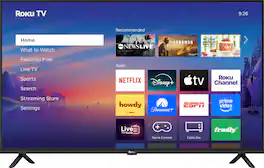
The smart TV you want. And a little more. Roku Select Series 4K TVs are designed to upgrade your entertainment. Enjoy your streaming favorites on this LED TV. Catch every word with auto speech clarity or hook up wireless headphones to avoid waking the house. Watch free live television from the home screen or use the voice remote to find entertainment across thousands of apps. It’s the perfect TV for bedrooms, living rooms, kitchens, or kids’ rooms. Smart TV doesn’t have to be complicated. That’s why we’ve designed a line of smart TVs powered by the delightfully simple Roku experience.
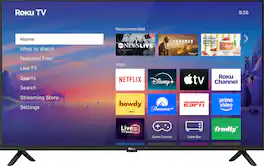
The smart TV you want. And a little more. Roku Select Series Full HD TVs are designed for a delightful streaming experience. Enjoy your favorites in bright Full HD and catch every word with auto speech clarity and night mode. Watch free live television right from the home screen or use the voice remote to find entertainment across thousands of apps. It’s the perfect TV for bedrooms, living rooms, kitchens, or kids’ rooms. Smart TV doesn’t have to be complicated. That’s why we’ve designed a line of flat screen TVs powered by the delightfully simple Roku experience.
| Pros for Roku - 43" Class Select Series 4K LED Smart RokuTV (2025) | |||
|---|---|---|---|
| Picture Quality, Setup Ease, Size, Connectivity, Brightness | Picture Quality, Setup Ease, Size | There were no pros for this product— | Picture Quality, Setup Ease, Size, Interface, Navigation |
| Cons for Roku - 43" Class Select Series 4K LED Smart RokuTV (2025) | |||
| Performance | There were no cons for this product— | There were no cons for this product— | There were no cons for this product— |
Specs

- LG - 86” Class UA77 Series LED AI 4K UHD Smart webOS TV (2025)$799.99The price was $899.99
- LG - 77" Class B5 Series OLED AI 4K UHD Smart webOS TV (2025)$1,399.99The price was $2,999.99
- LG - 65" Class C5 Series OLED evo AI 4K UHD Smart webOS TV (2025)$1,399.99The price was $2,699.99
- LG - 65" Class 70A Series QNED AI 4K UHD Smart webOS TV (2025)$399.99The price was $579.99


Reviews
Customers are saying
Customers value the 43" Class Select Series 4K LED Smart RokuTV (2025) for its amazing picture quality, ease of setup, and good performance. Many also appreciate its perfect size, great brightness, and lightweight design. Some customers feel that the remote control could be improved.
- Picture Quality (185)
- Setup Ease (62)
- Size (17)
- Performance (3)
Customer Images
The vast majority of our reviews come from verified purchases. Reviews from customers may include My Best Buy members, employees, and Tech Insider Network members (as tagged). Select reviewers may receive discounted products, promotional considerations or entries into drawings for honest, helpful reviews.
- Rated 5 out of 5 stars
Dave V
This TV was very easy to set up. I was able to get everything going in about 20 minutes. The picture quality is excellent for a bedroom TV. Restoring all of my was great with a they QR code that popped up. The free Roku channel has plenty of selections and is real easy to save channels that I like and select episodes as needed. I had to replace my old Roku TV because I broke the screen. I had problems with my old TV recognizing my Bose soundbar, but this new one works flawlessly. I have the Best Buy + memberchip, so the old TV was replaced for free except for a $10 upgrade fee. Because of the ease of using the roku channel, I have added the roku stick to 2 of my non smart TV's.
DaveV Posted
- Rated 5 out of 5 stars
Affordable and great quality
Affordable price for high-quality visuals, user-friendly Roku interface, and easy setup. Perfect for daily use, this TV also works well as a computer monitor, and fits nicely in my workout room.
Sandy Posted
- Rated 5 out of 5 stars
Love it!
I recently purchased the Roku 43-inch TV from Best Buy, and I couldn’t be happier with it! The picture quality is crisp and vibrant, and the built-in Roku interface makes it so easy to stream all our favorite shows and movies without extra devices or complicated setups. I mounted it on a rolling TV stand and paired it with a soundbar, which turned out to be the best idea ever—we can easily roll it outside on nice days and enjoy movie nights or big games under the stars with the family. The sound is clear and rich, and streaming is fast and smooth with no lag. It’s the perfect size for both indoor and outdoor use, easy to move, and has become a new favorite part of our family time together. Highly recommend!
MichaelH Posted