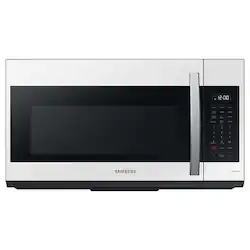
Samsung - BESPOKE Smart 1.9 cu. ft. Over-the-Range Microwave with Sensor Cook - White Glass
- Key Specs
- Color Finish: White
- Product Height: 17 1/16 inches (The out of box height of the item. Height is measured as the vertical distance from the bottom of the item to the top as it would be primarily used or placed.)
- Product Width: 29 7/8 inches (The out of box width of the item. Width is measured as the horizontal distance from one side of the item to the other as it would be primarily used or placed.)
- Product Depth: 16 1/2 inches (The out of box depth of the item. Depth is measured as the distance from the front of the item to the back as it would be primarily used or placed.)
- App Compatible: true (The product can be connected to a program or software application on a mobile device, which then receives collected data from the product.)
- Microwave Type: Over-the-range (Each microwave style has its own benefits. Built-in, over-the-range, and drawer style microwaves help save counter space. Over-the-range microwaves also provide necessary ventilation in place of a range hood. Countertop microwaves allow versatility in placement and do not require professional installation.)
- Control Type: Touchpad
- Sensor Cook: true (This feature uses sensors to detect steam and moisture levels emitted from cooking food to adjust cook time and power level accordingly.)
- Wattage: 1000 watts (Measurement of electrical power.)
- General
- Brand: Samsung
- Model Number: ME19CB704112/AA
- Product Name: BESPOKE Smart 1.9 cu. ft. Over-the-Range Microwave with Sensor Cook
- Color: White Glass
- Color Finish: White
- Dimensions
- Product Height: 17 1/16 inches (The out of box height of the item. Height is measured as the vertical distance from the bottom of the item to the top as it would be primarily used or placed.)
- Product Width: 29 7/8 inches (The out of box width of the item. Width is measured as the horizontal distance from one side of the item to the other as it would be primarily used or placed.)
- Product Depth: 16 1/2 inches (The out of box depth of the item. Depth is measured as the distance from the front of the item to the back as it would be primarily used or placed.)
- Product Weight: 60 pounds (The out of box weight of the item.)
- Cut-Out Dimensions
- Cut-Out Height: 17 1/16 inches (Minimum required height of the installation location for a standard installation of the product. This measurement will help you determine if the appliance will fit into the desired space and have the clearance necessary for proper operational use. Please refer to the manufacturer’s installation documentation for detailed measurement requirements.)
- Cut-Out Width: 29 7/8 inches (Minimum required width of the installation location for a standard installation of the product. This measurement will help you determine if the appliance will fit into the desired space and have the clearance necessary for proper operational use. Please refer to the manufacturer’s installation documentation for detailed measurement requirements.)
- Capacity
- Capacity: 1.9 cubic feet
- Microwave Size: Full-size
- Connectivity
- App Compatible: true (The product can be connected to a program or software application on a mobile device, which then receives collected data from the product.)
- Features
- Microwave Type: Over-the-range (Each microwave style has its own benefits. Built-in, over-the-range, and drawer style microwaves help save counter space. Over-the-range microwaves also provide necessary ventilation in place of a range hood. Countertop microwaves allow versatility in placement and do not require professional installation.)
- Timer: true
- Turntable: true (Rotating plate within the microwave cooking cavity that helps foods cook more evenly.)
- Interior Light(s): true
- Controls
- Control Type: Touchpad
- Sensor Cook: true (This feature uses sensors to detect steam and moisture levels emitted from cooking food to adjust cook time and power level accordingly.)
- Number of Preset Programs: 12
- Number of Fan Speeds: 4
- Number of Power Levels: 10
- Functions
- Oven Cooking Modes: Defrost, Cook
- Oven Preset Settings: 12
- Ventilation
- Maximum Air Flow Capacity: 400 cubic feet per minute (Maximum amount of air that the appliance can ventilate at its highest setting.)
- Electrical
- Amperage: 14.5 amperes (Strength of electrical current.)
- Voltage: 120 volts (Amount of power needed to support an electrical current.)
- Wattage: 1000 watts (Measurement of electrical power.)
- Power Consumption: 1700 watts
- Certifications Listings & Approvals
- Chemical Disclosures: Free of PFAS, PFOA, lead, and cadmium. Libre de PFAS, PFOA, plomo, y cadmio (The disclosure of Per- and Polyfluorinated Substances (PFAS) and/or other chemicals.)
- Warranty
- Warranty - Parts: 1 year
- Warranty - Labor: 1 year
- Other
- UPC: 887276701684
This Bespoke Smart Over-the-Range Microwave with a sizeable 1.9 cu. ft. capacity is Wi-Fi and voice enabled, featuring Sensor Cook technology that will automatically adjust cooking times for optimal results. This microwave beautifully complements other Bespoke White Glass kitchen appliances.
- Bespoke Design: Create your kitchen in your style with Bespoke appliances. This beautiful Over-The-Range microwave in Bespoke White Glass brightens up any kitchen with style.
- Large Oven Capacity: This microwave oven cavity has a sizeable 1.9 cu. ft. capacity that can hold larger serving sizes.
- SmartThings/Wi-Fi: Enjoy convenience and peace of mind with SmartThings. Monitor and control the microwave anytime, anywhere using the SmartThings App on your smartphone.¹
- SmartThings Cooking: Makes meal planning a seamless process. Search, plan, purchase and prep weekly meals via the SmartThings App on your smartphone.
- 4-Speed 400CFM Ventilation System: A 400 CFM ventilation system quickly and quietly eliminates steam and odor from the kitchen.
- Sensor Cook: Automatically adjusts cooking time for optimal results, when you're uncertain of how much time is needed to prepare a dish.
- Ceramic Enamel Interior: A beautiful & durable, scratch-resistant ceramic blue interior is easy to keep clean.
- Glass Touch Controls: A modern, glass touchpad provides precise control with a seamless, integrated design.
- LED Display: A white LED display makes settings and timing clearly visible for greater cooking convenience. The white color of the digital display provides a stylish accent to your kitchen interior.
- Voice Control: Using a voice assistant with the SmartThings App, like Samsung Bixby, Amazon Alexa, or Google Assistant, you can tell your microwave what you want it to do.³
- Eco Mode: Even when not in use, this microwave uses power to maintain essential functions. The Eco Mode button conserves power by turning off the display when not in use and is more convenient than unplugging the microwave when not in use.
Product Manuals
Q: Can I use this as a countertop microwave?
A: I wouldn't. There is a fan and a light on the bottom, for over the range use.
Q: Is the connection to the external vent on the top, the rear, or both?
A: Both. Center back and top for exhaust to exit wall or duct to roof. Need to flip it if you are not going to vent through wall or roof so the air recirculates to the front and thru the included air filter. Factory default set to rear exhaust. If you don't flip / rotate you'll be blowing that exhaust to your cabinet above or the wall.
A: We are glad you asked about the dimension of the microwave, MikeL. The Cavity Dimensions is 22 1/8" x 10 13/16" x 14 27/32" and the Outside Net Dimensions is 29 7/8" x 17 1/16" x 16 1/2". You can check it on this link: https://image-us.samsung.com/SamsungUS/home/home-appliances/microwaves/over-the-range/me19cb704112aa/ME19CB704112_V5.pdf If you have inquiries and needs further in the future, please contact us via the following options below: 1. Facebook Messenger: http://m.me/samsungsupport 2. Twitter: https://twitter.com/messages/compose?recipient_id=18768513 3. Samsung Community: https://us.community.samsung.com/t5/Samsung-Community/ct-p/us When you message us, please provide us with this reference number 1145694678, which will help our team pull up your information. ^Rainly
A: Dear Valued BestBuy Client, We're saddened that you had to go through this. To better assist you, don't hesitate to get in touch with our BestBuy Customer Service Department at 1(888) 237-8289. Available 24 hours a day. They can answer your question or transfer you to your local store to answer your specific inquiry. For added reference, I have shared this YouTube video for the proper microwave installation. Installing your over-the-range microwave: https://www.youtube.com/watch?v=eueYEAgeDWQ Have a great day! ^Chrystel
A: 100 start. Or you can hit the 30 second button twice, then start.
A: The one I installed. The clock doesn't run fast. You may need to call for your for service
A: There is a timer button and you are correct the buttons don't light up this is let down for me too
A: You connect the microwave to your Wi-Fi in your house by aiming your phone camera that one of the square barcodes on the top left front of the unit and clicking on the link that comes up. In the menu you hit the sink clock button and it sets it automatically or you can do it manually through the settings menu
People also viewed
 $429.99The price was $459.99
 $1,049.99The price was $1,239.99
 $449.99The price was $499.99
 $379.99The price was $419.99
 $449.99The price was $499.99
 $299.99The price was $569.99
Today's top picks
 $169.99The price was $249.99
 $349.99The price was $599.00
 $249.99The price was $314.99
 $249.99The price was $399.00
- $299.99The price was $569.99
 $199.99The price was $239.99
- $379.99The price was $419.99