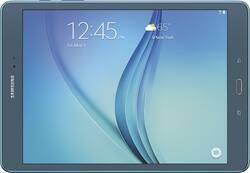
Samsung - Galaxy Tab A - 9.7" - 16GB - Smoky Blue
- Key Specs
- Screen Size: 9.7 inches (Size of the screen, measured diagonally from corner to corner.)
- Screen Resolution: 1024 x 768 (Screens come in a range of resolutions (measured in pixels, horizontal x vertical). The higher the resolution, the greater the picture quality.)
- Processor Model: Samsung (Your computer's processor is like its brain. Working in combination with system memory, the power of the processor determines the complexity of software you can run, how many programs you can have open at the same time, and how fast those programs will run. Most computers feature an AMD, Intel or Snapdragon processor.)
- Total Storage Capacity: 16 gigabytes
- Operating System: Android 5.0 Lollipop (The operating system manages all software and hardware, including files, memory and connected devices. Most importantly, it lets you interact with your device and your programs in a visual way; otherwise, you'd be typing computer code to get anything done.)
- Wireless Connectivity: Bluetooth, Wi-Fi (The manner in which a device sends data to another device over a short distance without the use of wires or cables.)
- Battery Chemistry: Lithium-ion
- General
- Brand: Samsung
- Model Number: SM-T550NZBAXAR
- Product Name: Galaxy Tab A - 9.7" - 16GB
- Color: Smoky Blue
- Year of Release: 2015
- Display
- Screen Size: 9.7 inches (Size of the screen, measured diagonally from corner to corner.)
- Screen Resolution: 1024 x 768 (Screens come in a range of resolutions (measured in pixels, horizontal x vertical). The higher the resolution, the greater the picture quality.)
- Processor
- Processor Brand: Samsung
- Processor Model: Samsung (Your computer's processor is like its brain. Working in combination with system memory, the power of the processor determines the complexity of software you can run, how many programs you can have open at the same time, and how fast those programs will run. Most computers feature an AMD, Intel or Snapdragon processor.)
- Storage
- Total Storage Capacity: 16 gigabytes
- Memory
- System Memory (RAM): 1.5 gigabytes (Random-access memory (RAM) is a computing device's short-term data storage, which allows active information to be accessed quickly. The size and type of RAM determines how efficiently the device can handle large amounts of information at one time. For example, gaming or video editing requires more RAM for optimal performance.)
- Expandable Memory Compatibility: microSD
- Compatibility
- Operating System: Android 5.0 Lollipop (The operating system manages all software and hardware, including files, memory and connected devices. Most importantly, it lets you interact with your device and your programs in a visual way; otherwise, you'd be typing computer code to get anything done.)
- Operating System Compatibility: Android
- Connectivity
- Wireless Connectivity: Bluetooth, Wi-Fi (The manner in which a device sends data to another device over a short distance without the use of wires or cables.)
- Network Connectivity: None (The manner in which a device sends data to another device over a long distance using a cellular network.)
- Headphone Jack: true (The device features an interface that allows for the connection of headphones.)
- GPS Enabled: true
- Power
- Charging Interface(s): Micro-USB (The connection for transmitting power to charge the device.)
- Battery Chemistry: Lithium-ion
- Camera
- Front-Facing Camera: true
- Front Facing Camera Megapixels: 2.0 megapixels (The more megapixels, the more detail that the camera facing the user can capture.)
- Rear-Facing Camera: true
- Rear Facing Camera Megapixels: 5.0 megapixels (The more megapixels, the more detail that the camera facing away from the user can capture.)
- Dimensions
- Product Height: 9.5 inches (The out of box height of the item. Height is measured as the vertical distance from the bottom of the item to the top as it would be primarily used or placed.)
- Product Width: 6.6 inches (The out of box width of the item. Width is measured as the horizontal distance from one side of the item to the other as it would be primarily used or placed.)
- Product Depth: 6.6 inches (The out of box depth of the item. Depth is measured as the distance from the front of the item to the back as it would be primarily used or placed.)
- Product Weight: 15.87 ounces (The out of box weight of the item.)
- Certifications Listings & Approvals
- ENERGY STAR Certified: true (Devices carrying the ENERGY STAR service mark, such as computer products and peripherals, kitchen appliances, and other products, generally use 20% to 30% less energy than required by federal standards.)
- Included
- Included Software: Microsoft Office
- Warranty
- Warranty - Parts: 1 year
- Warranty - Labor: 1 year
- Other
- UPC: 887276067667
Stay connected with this Samsung Galaxy Tab A SM-T550NZBAXAR tablet, which features dual-band Wi-Fi for easy Web access. The 9.7" TFT touch screen simplifies content navigation, and a Bluetooth 4.1 interface allows wireless pairing with select devices. 
- Android 5.0 Lollipop operating system: Allows you to remain connected and productive.
- 9.7" TFT touch screen with XGA (1024 x 768) resolution: Makes navigation simple and presents media in rich detail.
- 16GB storage capacity: Provides room to house pictures, videos, music and more.
- Quad-core processor: Samsung processor with 1.2GHz processor speed and 1.5GB RAM for efficient performance.
- Dual-band 2.4GHz/5.0GHz Wi-Fi (802.11a/b/g/n): Allows you to connect to the Web while within range of an available wireless network.
- Bluetooth 4.1 interface: Lets you pair with select Bluetooth-enabled devices.
- Side Sync 3.0 and Quick Connect: Make it easy to share content between your tablet, phone and computer.
- 5.0MP rear-facing and 2.0MP front-facing cameras: With 4x digital zoom and autofocus enable you to capture crisp photos and 720p high-definition videos. You can also edit photos and videos directly on the tablet.
- microSD slot: Accepts compatible cards up to 128GB (not included) for easy expansion.
- GPS with GLONASS: Helps you reach your desired destinations. Geotagging lets you add location information to your photos.
- Ultra Power Saving Mode: Turns off nonessential apps and switches to black-and-white display mode to help conserve battery life.
- Kids Mode: Lets you control the content that your children can view.
Whats Included
- Galaxy Tab A - 9.7" - 16GB
- Lithium-ion battery (6000 mAh)
- Owner's manual
Q: Is Microsoft Office a trial
A: The software on my tablet was NOT a trial. Made sure of that before purchasing as I checked all software and apps.
Q: Is there anything special in the HW of this tablet that enables the S-Pen to work?
A: The model with the S Pen is different hardware. The pen requires the specific digitizer in this tablet to work, the regular 9.7 model will not recognize the pen. This model also has 2GB of RAM while the regular 9.7 Tab A has 1.5 GB.
A: Yes, it works just like the note. I purchased this to replace my old note 10.1 and its been great. Everything works the same.
Q: Can you add a micro sd card to increase power and storage
A: On the Tab A, you can add a MicroSD card - I added 64GB, and it's wonderful. I'm not sure if it increases power at all, but it absolutely increases storage!
A: This is the sole reason I bought this device. The palm rejection is EXCELLENT! No, it will not mess up your writing at all.
Q: The viewing size of characters in relation to screen size
A: Yes this has larger text and a bigger easier to use keyboard. I have problems with my fat fingers, with small keyboards. This one suits me fine.
A: The s-pen is better than a finger or other stylus. It's thinner and in the s-notes program you can change the thickness and color of the pen. It also has other features when hovering above the screen, and when you depress the button on the side a menu of quick tasks opens up. Note taking is easy in the s-notes program and writing with the s-pen is useful in other programs like calendar, tasks, etc. S-notes converts writing to text pretty easily. There are a few quirks to it but it is very intuitive. The MS apps that are pre-loaded are read only, you have to pay to upgrade to write/edit functionality. They will work with other PC/Mac MS products but there may be some inconsistencies across platforms. The 9.7 vs 7 inch screen is a personal choice but I purchased the 9.7 for going to college and I'm glad I did. It's perfect for taking notes, writing equations, and sketching.
A: E-reading, absolutely most any tablet will do for that for sure. Watching movies is no problem for this tablet either. HOWEVER, if you're looking for a viewing experience much like you would expect from a nice Samsung HDTV This is NOT that tablet. Two reasons, the aspect ratio of this tablet is 4:3 much like an old Tube TV while all televisions made today are HD 16:9 ratio. Second the screen resolution on this tablet, tho fine for casual watching, an avid movie watcher may see this as sub par. so, If you're looking for a good tablet for reading and productivity I would recommend this tablet. The aspect ratio is more true to paper and with Office mobile Preloaded this guy shines. If youre looking to have a mini HDTV in your hands go for the Tab S. Its lightweight, power packed, and the display is INCREDIBLE!
People also viewed
 $1,459.99The price was $1,549.00
 $239.00The price was $269.99
 $629.99The price was $739.99

Today's top picks
 $499.99The price was $749.99
 $199.99The price was $249.99
 $789.99The price was $1,049.99