Rating 4.8 out of 5 stars with 12550 reviews
4.8- Storage (3684)
- Price (1435)
- Memory (1354)
- Performance (1209)
- Speed (811)
Customer Images
The vast majority of our reviews come from verified purchases. Reviews from customers may include My Best Buy members, employees, and Tech Insider Network members (as tagged). Select reviewers may receive discounted products, promotional considerations or entries into drawings for honest, helpful reviews.
- Rated 5 out of 5 stars
Great SD Card for my cell phone
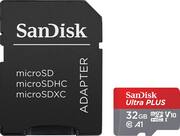
This SDHC card is plenty fast enough for my Samsung Galaxy S4. It has lots of room for storing pictures and music. It is very easy to move app data from your phone to the card. Now I have space to download high quality graphics games (like Despicable Me, LOL). The Adapter allows me to put the card in my PC's reader for faster copying (of photos) to my PC. Unfortunately you have to turn off the phone and take off the back cover to remove the card, yet it is still faster for a large number of files. Otherwise, just plug the phone into your PC via the USB cable. I am very happy with this purchase. If you need cards that can handle larger files (such as a movie file) then buy an SDXC card (typically capacity starts at 64 GB) which is formatted via exFAT.
Posted by ampmanroy
- Rated 5 out of 5 stars
Good product
I enjoy this product because it has lots of space and I got it for a low price. The price was lower than anywhere else.
Posted by Cristina
- Rated 5 out of 5 stars
Reliable Micro Memory Card
My Sony camcorders are the backbone of my video recording that are uploaded to my YouTube channel. Nearly 3000 videos with 9 Million views. About 50% of my videos were recorded on SanDisk Micros, with super results!
Posted by amigokanduvideos
- Rated 5 out of 5 stars
Exactly what I wanted for a great price!
Found it on sale and saved me $20. Great product and the customer service at the Fox Point, WI location is always superb!
Posted by ayokdoe
- Rated 5 out of 5 stars
Great microSDHC 32GB cards, never a problem
I have purchased a few of these SD cards, I use them for music and picture storage. I never had a problem .
Posted by dannycop