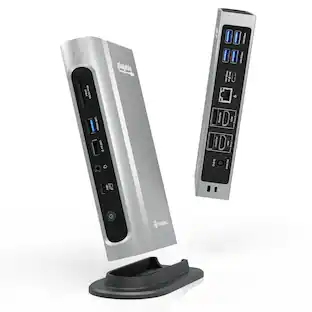
Satechi - USB-C Multimedia Adapter for M1/M2 with 2 4K HDMI, USB C PD (85W), USB-C, 2 USB-A for MacBook, iPad, Mac & Windows - Space Gray
About this product
Upgrade your tech to M1 with the Satechi USB-C Multimedia Adapter, featuring dual 4K HDMI display ports (60Hz/30Hz), USB-C charging, USB-C data, and two extra USB-A 3.0 data ports - all using a single USB-C connection to your M1 device. With its hi-res dual 4K display output, multitude of options for fast data transfer, and modern aluminum finish, the USB-C Multimedia Adapter is your all-in-one solution to enhancing your M1 experience.
Six Essential Ports, One Powerful Adapter
The USB-C Multimedia Adapter M1 provides all the ports you need for a productive workspace with two 4K HDMI ports (60Hz/30Hz), one USB-C PD charging port, one USB-C data port, and two USB-A 3.0 data ports for
Dual 4K HDMI Display
Features dual 4K HDMI ports, one up to 60Hz and another at 30Hz, to output hi-res display to up to two HDMI-enabled external monitors for the ultimate work setup. Requires a direct HDMI connection.
Perfect for Peripherals
Ideal for wired mice, keyboards, USB hard drives, and more, the adapter’s two USB-A data ports and USB-C data port connect a multitude of peripherals. Data ports do not support charging or video output.
- Maximum Number of Displays Supported2Maximum Supported Resolution4K (2160p), 4K (2160p)Number of DisplayPort Outputs (Total)0Number of Thunderbolt Ports (Total)0Passthrough PowerYes
Reviews
Rating 3.8 out of 5 stars with 113 reviews
Customer Images
The vast majority of our reviews come from verified purchases. Reviews from customers may include My Best Buy members, employees, and Tech Insider Network members (as tagged). Select reviewers may receive discounted products, promotional considerations or entries into drawings for honest, helpful reviews.
Compare similar products

Upgrade your tech to M1 with the Satechi USB-C Multimedia Adapter, featuring dual 4K HDMI display ports (60Hz/30Hz), USB-C charging, USB-C data, and two extra USB-A 3.0 data ports - all using a single USB-C connection to your M1 device. With its hi-res dual 4K display output, multitude of options for fast data transfer, and modern aluminum finish, the USB-C Multimedia Adapter is your all-in-one solution to enhancing your M1 experience.
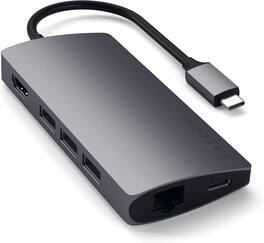
Enjoy fast data transfer and charging speeds with this Satechi Type-C multi-port adapter. The aluminum casing on the connector helps protect circuit boards, increasing durability, while the Gigabit Ethernet port offers seamless connection to wired networks. This Satechi Type-C multi-port adapter has a microSD slot and USB 3.0, USB Type-C and HDMI ports for connecting a wide array of devices.

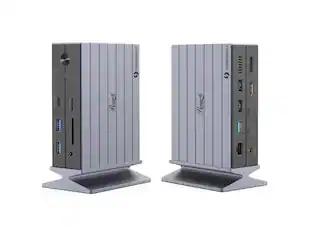
More screens, more speed, and more power for MacBook setups. A typical Thunderbolt 4 dock only supports a single display for MacBook M1/M2/M3 base chipset models. For busy professionals juggling multiple tasks and projects, this means minimizing and toggling between windows to meet workflow demands, hampering productivity and focus. The SD5900T EQ Thunderbolt 4 Quad 4K 40Gbps Dock leverages the power of Thunderbolt 4 and DisplayLink® technology to expand your visual workspace, boost productivity, and future-proof your setup - unlocking the full potential of your MacBook to support unrivaled connectivity and seamless multi-tasking. Up to Quad 4K Video via HDMI®, DP, and Thunderbolt Supports MacBooks with M1, M2, and M3 chipsets running macOS (11 or later) Data transfer speeds up to 40Gbps Daisy chain support Intel VT-d DMA protection Up to 100W charging (96W certified) Productive 16-in-1 design Composed of 100% post-consumer recycled (PCR) aluminum KonstantCharge ensures your devices remain charged even when the host cable is unplugged from your laptop. Zero-footprint mounting option Security cable lock slots 3-Year limited warranty
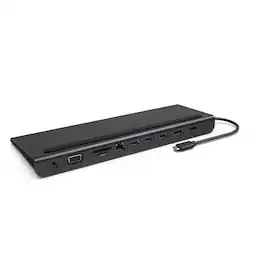
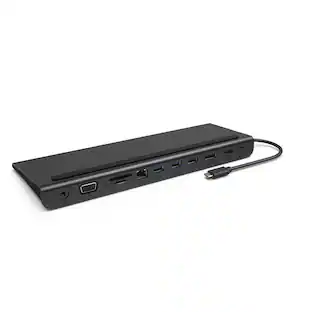
The Belkin Connect Universal USB-C 11-in-1 Pro Dock adds power and productivity to your setup with Silicon Motion technology, Mac, Windows, and Chromebook compatibility, and expansion up to 3 monitors. Get more done with 10Gbps transfer speeds and up to 100W of PD. Sustainably made, this Belkin USB-C hub's housing is made with a minimum of 72% post-consumer recycled content, while a 2-year limited warranty ensures your dock and other devices are safe and protected.
| Pros for Satechi - USB-C Multimedia Adapter for M1/M2 with 2 4K HDMI, USB C PD (85W), USB-C, 2 USB-A for MacBook, iPad, Mac & Windows - Space Gray | |||
|---|---|---|---|
| There were no pros for this product— | HDMI, Ease of use | There were no pros for this product— | Ease of use, HDMI, Overall Performance, Ports, Connectivity |
| Cons for Satechi - USB-C Multimedia Adapter for M1/M2 with 2 4K HDMI, USB C PD (85W), USB-C, 2 USB-A for MacBook, iPad, Mac & Windows - Space Gray | |||
| There were no cons for this product— | There were no cons for this product— | There were no cons for this product— | Cable Length, Power Supply, Price |
Specs
Can you add an additional monitor to this hub? If I plug in a HDMI Adapter or VGA Adapter to a lighting port on the hub, would I be able to add another monitor?
Answered by Satechi SupportHi Brett! Thank you for reaching out to us. Unfortunately, the "lightning" port is a USB-C PD (Power Delivery) port and is meant to connect a USB-C power adapter to charge your host computer. The adapter features two HDMI ports, which you can use HDMI-to-HDMI cable in one port and a HDMI-to-VGA cable in the other. Also, keep in mind that you would need to install Silicon Motion's Instant View in order for the second HDMI port on the adapter to function.

It appears this product requires a software download on a MacBook Pro and requires screen recording to be turned on. Does that sound correct and if so, are there privacy concerns to take into consideration?
Answered by Satechi SupportWe can confirm that this is normal. Rest assured, no one is actually viewing/recording your screen. The message you are receiving is the application confirming detection from the hub to your 2 external monitors (this is through the firmware Silicone Motion)
Can I use this adapter to connect an external drive to my MacBook Pro M1?
Answered by Satechi SupportYes, you will be able to use an external hard drive for data transfer through the USB-C data port. (up to 5 Gbps) The other USB-C port on the adapter will only support passthrough charging and will not support data transfer
Will this support the m1chip mac book if my monitor has a higher refresh rate than 60 hz
Answered by Satechi SupportIt'll support one 4K display at a max of 60Hz and a second 4K display at 30Hz
Can this support multiple externals monitors on an M1 Macbook Pro? or does it support only a single external monitor on M1 Mac devices?
Answered by Satechi SupportHello, yes this adapter will support up to 2 extended displays, you will need to download the silicon motion software to activate the second HDMI port (1x 4K @ 60Hz and 1x 4K @ 30Hz)
Find more like this
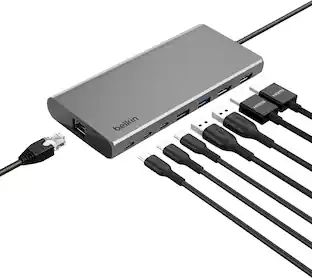 Top Deal$124.99The price was $139.99




Customers ultimately bought
- Top Deal$124.99The price was $139.99

Explore tech essentials Sponsored


Discover related products
 $12.99The price was $13.99
 $249.00The price was $275.00













Keep exploring
 $111.00The price was $139.00
 $219.89The price was $249.99