Sonos - Move 2 Portable Durable Smart Speaker (Each) - White
Customers are saying
Customers highly value the exceptional sound quality and impressive bass performance of this speaker. Users frequently praise its convenient portability and reliable battery life, which make it a versatile choice for various settings. While some individuals find the device slightly heavy or larger than expected, the overall consensus highlights its superior connectivity and aesthetic design.
Color
WhitePowerful stereo sound
The acoustic architecture replaces Move's single tweeter with two, unlocking a higher-fidelity stereo soundstage with crisp vocals and detailed instruments. With deep, dynamic bass powered by the precision-tuned woofer, you'll feel the emotional charge of a live performance.
Tuned to its environment
With automatic Trueplay tuning, Move 2 continually optimizes the sound for its surroundings. So, no matter where you are or what you play, you get an elevated listening experience.
More than double the battery life
Listen twice as long as with the previous generation. All the acoustic updates work in concert for increased efficiency, giving you up to 24 hours of playback on a single charge.
Ultra durable and water resistant
Shock absorbent materials protect against accidental drops, and the IP56 rating ensures spills, splashes, rain, dirt, and dust don't dampen your listening experience.
One speaker, infinite listening possibilities
Whether you want to put on a podcast in the kitchen, listen to radio by the pool, or play music at the park or beach, Move 2 does it all. Plus, enjoy easy multi room audio with more Sonos speakers around your home.
Easier to take it with you
Use the built-in handle to bring your music from one place to the next. When the battery needs a boost, set Move 2 on the included Wireless Charging Base, upgraded with a detachable power cable and more compact adapter. Charge on the go with any USB-PD power supply.
Your favorite sounds are just a tap or ask away
Stream using WiFi and Bluetooth. Control the sound with the Sonos app, your voice, and the intuitive touch controls.You can also connect a turntable or other device with an auxiliary cable and the Sonos Line-In Adapter.
Toned down impact
Move 2 reduces its idle energy consumption by more than 30% compared to its predecessor, incorporates recycled plastics, and features a removable and replaceable battery, so you can enjoy it even longer.
- Speaker PairingYesWirelessYesRechargeableYesUSB Device ChargingYes
Reviews
Rating 4.7 out of 5 stars with 191 reviews
- Sound Quality (605)
- Portability (214)
- Battery Life (126)
- Connectivity (46)
- Bass (28)
- Price (8)
- Size (4)
- Weight (4)
Customer Images
The vast majority of our reviews come from verified purchases. Reviews from customers may include My Best Buy members, employees, and Tech Insider Network members (as tagged). Select reviewers may receive discounted products, promotional considerations or entries into drawings for honest, helpful reviews.





Compare similar products

Unleash your listening experience with Move 2. Upgraded inside and out, this portable powerhouse puts heart-pumping stereo sound wherever you want it. Enjoy up to 24 hours of non-stop playback. Rated IP56, this speaker is both dust and water resistant, making it perfect for outdoor use.
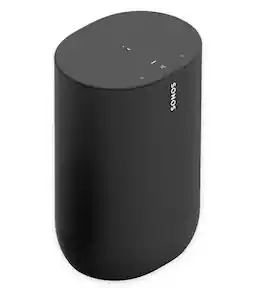
Stream music, radio, audiobooks, and more from all your favorite services, and take the sound from room to room and beyond. The weather-resistant design, rechargeable battery, and wide soundstage deliver an exceptional outdoor listening experience. Control is easy with the Sonos app, your voice, and Apple AirPlay 2 on WiFi. Switch to Bluetooth® when you're away. Effortlessly charge Move by setting it on the included Wireless Charging Base. Add other Sonos speakers around your home for multiroom listening. Everything works together over WiFi.
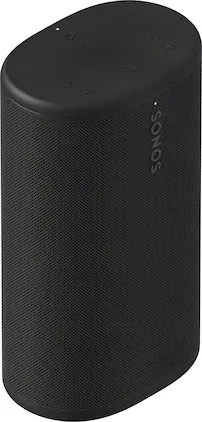
Powerful, portable, and ready for anything, Sonos Play delivers big stereo sound and bass in a go-anywhere design. Stream over WiFi or Bluetooth, and connect seamlessly to your Sonos system. With up to 24 hours of battery life, easy wireless charging, and IP67 waterproof durability, this smart speaker amplifies every moment, everywhere.
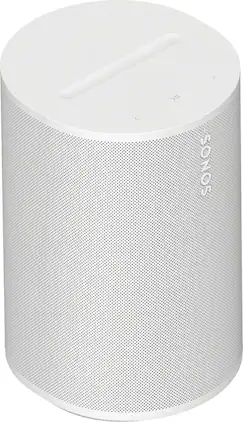
Era 100 SL transforms any space with rich stereo sound and deep bass – without built-in voice control. Stream from your favorite services, and easily connect the devices you love.
| Pros for Sonos - Move 2 Portable Durable Smart Speaker (Each) - White | |||
|---|---|---|---|
| Sound Quality, Portability, Battery Life, Connectivity, Bass | There were no pros for this product— | Sound Quality, Portability, Battery Life, Connectivity, Design | Sound Quality, Connectivity, Design, Ease of Setup, Size |
| Cons for Sonos - Move 2 Portable Durable Smart Speaker (Each) - White | |||
| Price, Size, Weight | There were no cons for this product— | There were no cons for this product— | There were no cons for this product— |
Specs
Customers often buy these together
 $168.00The price was $179.00


Customers ultimately bought
- $168.00The price was $179.00
 Top Deal$374.99The price was $449.99
 $169.99The price was $199.99
 $139.00The price was $159.00
 $139.00The price was $159.00
Your sound, your style Sponsored
 Top Deal$199.00The price was $269.00
 Top Deal$199.00The price was $269.00
Discover related products
 $299.99The price was $499.99
 $599.00The price was $699.00
 $84.99The price was $94.95
 $52.99The price was $64.99
 $26.99The price was $48.00
Keep exploring
 $89.99The price was $99.99
 $157.45The price was $209.95
 $49.99The price was $54.99
 $349.95The price was $419.95
 $1,029.90The price was $1,269.90
 $1,529.90The price was $2,069.90
 $1,434.95The price was $1,947.45