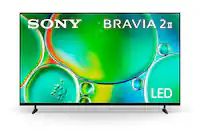
Sony - 50" Class BRAVIA 2 II LED 4K UHD Smart Google TV (2025)
Series
2Screen Size Class
50"- Best Buy essentials™ - Full Motion TV Wall Mount for 47–84" TVs - Black$59.99


More Buying Options
Related Item

Highlights
- Key Specs
- Display Type: LED
- Resolution: 4K (2160p) (Refers to the number of pixels, both horizontally and vertically, used to capture video/images. The higher the resolution the finer the detail that can be seen.)
- Screen Size Class: 50 inches (The group size measurement of a screen. This differs from a screen size measured diagonally from corner to corner.)
- High Dynamic Range (HDR): true (An HDR-compatible 4K TV or other HDR-compatible product displays HDR video content when it's available from sources like 4K Ultra HD Blu-ray Discs and 4K streaming services.)
- High Dynamic Range Format: HDR 10, Hybrid Log-Gamma (HLG) (There are a few HDR formats that tell the TV or other HDR-compatible product how to best utilize its capabilities to display HDR content. HDR technology can support one or multiple formats, each with various benefits to picture quality.)
- LED Panel Type: Standard LED
- Backlight Type: Direct Lit (Edge-lit: lights are on the edges of the display with ~10 zones of vertical LEDs. Direct-lit: lights are on the edges and behind the screen for more light uniformity than Edge-lit. Full array: direct-lit with local dimming for greater contrast with up to 100 zones of LEDs.)
- Refresh Rate: 60Hz (The number of frames per second the device can produce natively without enhancement. Higher rates help produce smooth, seamless pictures.)
- Motion Enhancement Technology: Motionflow XR 240 (Proprietary technologies produced in addition to the Refresh Rate that smooth out faster moving pictures to reduce blur and pixelation.)
- Smart Platform: Google TV (Just like a computer, a smart TV needs an operating system (also called a smart platform) in order to access the Internet, connect with entertainment apps, and play streaming content. Some common TV smart platforms are; Roku TV, Android TV, and Chromecast.)
- Featured Streaming Services: Disney+, ESPN+, Hulu, Netflix, Prime Video, YouTube TV, YouTube (Streaming services and other programs are available on this device. Keep in mind, there may be more services supported than just those shown here.)
- Number of HDMI Inputs (Total): 4
- Voice Assistant Built-in: Google Assistant (A digital assistant built into the device that uses voice commands to answer questions and control smart devices.)
- General
- Brand: Sony
- Model Number: K50S20M2
- Product Name: 50" Class BRAVIA 2 II LED 4K UHD Smart Google TV (2025)
- Color: Black
- Series: 2 (Part of a group of the same product type with similar features.)
- Model Year: 2025
- Dimensions
- Product Height With Stand: 28.12 inches
- Product Width: 43.75 inches (The out of box width of the item. Width is measured as the horizontal distance from one side of the item to the other as it would be primarily used or placed.)
- Product Depth With Stand: 10.12 inches
- Product Height Without Stand: 25.87 inches
- Product Depth Without Stand: 3.25 inches
- Product Weight With Stand: 22.1 pounds
- Product Weight Without Stand: 21.6 pounds
- Stand Width: 35 inches (The horizontal measurement of the stand/base, or the distance from the outside of one leg to the outside of the opposite leg, as it is attached to the product.)
- Stand Depth: 5.8 inches
- Adjustable Stand Width: false (Whether the stand can adjust to have more than one measurement either between the legs or the base itself.)
- Display
- Display Type: LED
- Resolution: 4K (2160p) (Refers to the number of pixels, both horizontally and vertically, used to capture video/images. The higher the resolution the finer the detail that can be seen.)
- Screen Size: 49.5 inches (Size of the screen, measured diagonally from corner to corner.)
- Screen Size Class: 50 inches (The group size measurement of a screen. This differs from a screen size measured diagonally from corner to corner.)
- High Dynamic Range (HDR): true (An HDR-compatible 4K TV or other HDR-compatible product displays HDR video content when it's available from sources like 4K Ultra HD Blu-ray Discs and 4K streaming services.)
- High Dynamic Range Format: HDR 10, Hybrid Log-Gamma (HLG) (There are a few HDR formats that tell the TV or other HDR-compatible product how to best utilize its capabilities to display HDR content. HDR technology can support one or multiple formats, each with various benefits to picture quality.)
- Picture Quality Enhancement Technology: 4K Processor X1
- LED Panel Type: Standard LED
- Backlight Type: Direct Lit (Edge-lit: lights are on the edges of the display with ~10 zones of vertical LEDs. Direct-lit: lights are on the edges and behind the screen for more light uniformity than Edge-lit. Full array: direct-lit with local dimming for greater contrast with up to 100 zones of LEDs.)
- Curved Screen: false
- Refresh Rate: 60Hz (The number of frames per second the device can produce natively without enhancement. Higher rates help produce smooth, seamless pictures.)
- Motion Enhancement Technology: Motionflow XR 240 (Proprietary technologies produced in addition to the Refresh Rate that smooth out faster moving pictures to reduce blur and pixelation.)
- Closed Captioning: true (The text version of spoken audio displayed on the screen. Devices that can display closed captioning typically have the option to toggle the feature on or off.)
- Features
- Remote Control Type: Voice control
- Smart Capable: true (Smart, or smart-capable devices are able to connect directly to your home network in order to stream content from the Internet, run Internet-based apps, or connect to other smart devices.)
- Smart Platform: Google TV (Just like a computer, a smart TV needs an operating system (also called a smart platform) in order to access the Internet, connect with entertainment apps, and play streaming content. Some common TV smart platforms are; Roku TV, Android TV, and Chromecast.)
- Featured Streaming Services: Disney+, ESPN+, Hulu, Netflix, Prime Video, YouTube TV, YouTube (Streaming services and other programs are available on this device. Keep in mind, there may be more services supported than just those shown here.)
- Screen Mirroring: true (Casts the screen of one device onto another wirelessly, using a common protocol (typically Bluetooth).)
- Screen Mirroring Technology: Apple AirPlay 2
- Content Sharing: Mobile to TV (The device is capable of connecting to another device in order to send or receive streaming content. Share content from your mobile device to your TV or vice versa.)
- Indoor Or Outdoor Use: Indoor (Indicates the appropriate environment product was designed to be used in.)
- TV Tuner: Digital (The ATSC TV Tuner is a component built into conventional TV sets or other devices for receiving over-the-air broadcast TV without a cable/satellite box. Digital tuners may be purchased separately and connected to a device if it does not have one built in.)
- Connectivity
- Number of HDMI Inputs (Total): 4
- Display Connector(s): 4 x HDMI (The number and type of connectors used to connect to an external display.)
- HDMI Audio Return Channel (ARC): eARC
- Wireless Connectivity: Bluetooth, Wi-Fi (The manner in which a device sends data to another device over a short distance without the use of wires or cables.)
- RF Antenna Input: true (This input is used to connect devices such as antennas or cable boxes to a TV via a coaxial cable.)
- Number Of USB Port(s) (Total): 2 (The total number of USB ports including all generations and versions.)
- Bluetooth Version: 5.3 (The Bluetooth specification formalized by the Bluetooth Special Interest Group. All versions of the Bluetooth standard are backwards compatible with previous versions.)
- Compatibility
- VESA Wall Mount Standard: 200mm x 200mm (VESA wall mount standards refer to the spacing of screw holes built into a TV in order to fit with standard TV wall mounts. These standards are implemented into most TVs and monitors.)
- Voice Assistant Built-in: Google Assistant (A digital assistant built into the device that uses voice commands to answer questions and control smart devices.)
- Audio
- Built-In Speakers: true
- Built-in Speaker Type: Downward firing (Backward, downward, and front-firing speakers direct sound into the room from those respective directions. A soundbar is typically long and rectangular, and designed to act as an all-in-one speaker with greater sound production than that of a TV alone. An acoustic surface is the result of small sound actuators embedded directly behind the screen, turning the entire screen's surface into a speaker.)
- Power
- ENERGY STAR Certified: false (Devices carrying the ENERGY STAR service mark, such as computer products and peripherals, kitchen appliances, and other products, generally use 20% to 30% less energy than required by federal standards.)
- EPEAT Qualified: false (The Electronic Product Environmental Assessment Tool (EPEAT) was designed to provide an environmental assessment tool for purchasers. In order to qualify for EPEAT, a product must meet all 23 required criteria.)
- Estimated Annual Operating Cost: 34 United States dollars (Predicted cost of operating the product under average conditions for one year.)
- Estimated Annual Electricity Use: 209 kilowatt hours (Predicted amount of electricity needed to operate the product under average conditions for one year.)
- Rechargeable Battery (Remote Control): false
- Battery Size (Remote Control): AAA (The battery size required for operation.)
- Number Of Batteries Required (Remote Control): 2
- Included
- Wall Mount Included: false
- Stand Included: true
- Warranty
- Warranty - Parts: 1 year
- Warranty - Labor: 1 year
- Box Dimension
- Height: 29.5 inches
- Width: 47.2 inches
- Depth: 5.8 inches
- CubicDimension: 8075.92 inches
- Other
- UPC: 027242932784
The time is now to experience content in lifelike 4K HDR picture. Everything you watch will be sharp, detailed and in bright, vibrant color. Google TV makes it easy to find your favorite movies and shows from all the top streaming apps.
- Powerful TV processing: The 4K Processor X1 delivers a lifelike picture that is full of rich colors and sharp details.
- Enhanced color and fine details: See natural and precise picture quality with a wide array of colors and dynamic contrast.
- Everything you stream. All on one screen.: Get access to all your favorite streaming apps in one place with Google TV. With Google Assistant, simply use your voice to search and ask questions.
- Effortlessly stream to your TV: Easily stream to your TV with support for Apple AirPlay 2 and Google Cast.
- Movies included: Get movies included with the SONY PICTURES CORE app.
- Intelligent motion handling: See blur-free picture quality in fast-moving sports and action-packed movies powered by Motionflow XR.
- Upscale all your content: Bring back lost texture and detail and see all your content upscaled to near-4K resolution with 4K XR-Reality PRO.
- Exclusive features for PlayStation 5: Take your PS5 gaming to the next level with BRAVIA exclusive features – Auto HDR Tone Mapping and Auto Genre Picture Mode – that optimizes picture quality for gaming and streaming.
- All your game settings in one place: Game Menu puts all your gaming picture settings and exclusive assist features in one place.
- All your Eco settings in one place: Eco Dashboard keeps all your energy efficiency settings in one place.
Whats Included
- Television
- Table top stand
- AC power cord
- voice remote control
- quick setup guide
- operation instructions
- warranty
Q: How far apart are the stand legs?
A: Hi Maybemytv, Thanks for your question and your interest in Sony products! Regarding your concern, the 50" BRAVIA 2 II legs' have a distance in between of 861.9 mm (34 Inches). We hope this information comes in handy, thanks for considering Sony products. Best regards, DiegoV
A: Hello JaySee, Thank you for considering Sony products! We appreciate your inquiry about using headphones with the K50S20M2 TV and are happy to assist you. We understand how important it is to enjoy your favorite programs without disturbing your wife. While this TV doesn’t have a headphone jack for wired headphones, it does support Bluetooth audio devices, so you can easily connect wireless headphones like Apple AirPods. This way, you can enjoy your viewing experience comfortably and quietly, creating a peaceful environment for everyone at home. If you would like guidance on pairing your Bluetooth headphones with the TV, you can find helpful instructions here: https://helpguide.sony.net/tv/musltn3/v1/en-003/04-06_01.html Best regards, -Fred
Q: does. This tv need cable connections other than wireless
A: Thank you for contacting Sony, Joe. No, the K-50S20M2 does not need a cable connection to function fully, beyond the power cord. The BRAVIA 2 II is a Google TV and has built-in Wi-Fi (including Wi-Fi 6E) that allows you to connect to the internet for streaming services (Netflix, YouTube, Hulu, etc.), app downloads, and updates without any network cables. Wired Internet (Optional): If you prefer a more stable connection for high-capacity 4K streaming or gaming, the TV includes a LAN/Ethernet port so you can connect it directly to your router with a network cable. To connect external devices like a cable/satellite box, Blu-ray player, or gaming console, the TV has multiple HDMI inputs and a standard RF (Antenna/Cable) input. You only need to use these if you are watching content from one of these external sources. In short, you can watch all your streaming content and use the smart features completely wirelessly. We appreciate your interest in Sony products. Should you require any further assistance, please don't hesitate to reach out for support here: https://us.esupport.sony.com/support/s/support-contact?language=en_US&category=tv Best regards, Gus, Sony North America Customer Support
Q: Can you use an Amazon Fire Stick with this tv?
A: Yes, just plug your Fire Stick in one of the HDMI slots and you're good to go!
Q: What sound bar is compatible with this tv?
A: undefined
Q: DOES THIS TV HAVE ON AND OFF AND VOLUME BUTTON ON THE TV
A: Thank you for contacting Sony, DEDEE. There is a single multi-function button located on the bottom of the TV, usually right in the center. You can use a short press to turn the TV on or bring up an on-screen menu for volume and inputs, while a long press will turn the power off. It’s a handy backup for those times the remote isn't within reach! We appreciate your interest in Sony products. Should you require any further assistance, please don't hesitate to reach out for support here: https://us.esupport.sony.com/support/s/support-contact?language=en_US&category=tv Best regards, Gus, Sony North America Customer Support
A: Thank you for contacting Sony, WTA4. The BRAVIA 2 includes a built-in digital tuner for enjoying free local OTA channels in high definition. While it doesn't have a built-in recording feature or internal DVR storage, you can easily use a third-party external DVR to record your favorite programs. We appreciate your interest in Sony products. Should you require any further assistance, please don't hesitate to reach out for support here: https://us.esupport.sony.com/support/s/support-contact?category=tv Best regards, Gus, Sony North America Customer Support
Compare similar products
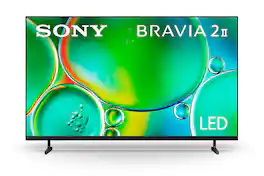
The time is now to experience content in lifelike 4K HDR picture. Everything you watch will be sharp, detailed and in bright, vibrant color. Google TV makes it easy to find your favorite movies and shows from all the top streaming apps.
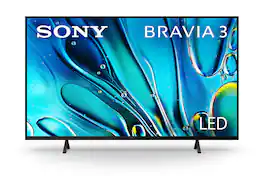
TV just got more exciting with incredibly vibrant picture and easy-to-use smart features. Everything you watch is enhanced with over a billion accurate colors with lifelike clarity and contrast that reveals every detail. Google TV brings together movies, shows, and more from across your apps and organizes them just for you.
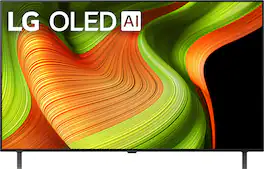
The LG OLED B5 is a premium watching experience that offers more than meets the eye. You'll be able to keep pace with the action with a native 120Hz refresh rate for smoother movement whether you're gaming or watching sports. Entertainment extras like Dolby Vision*, Dolby Atmos¹ and FILMMAKER MODE give you the big-picture experience straight from your couch. Enjoy outstanding picture powered by the α8 AI Processor, which uses AI to detect what you're watching and automatically improves the picture and sound quality of whatever you're watching. Search less and stream more, thanks to the next generation of AI technology from LG webOS 25. With Quick Cards, group your favorite apps into categories and even have instant access to over 300 free channels with LG Channels.² All LG OLED TVs have NVIDIA G-Sync, AMD FreeSync Premium and VRR to further improve gaming quality. And four HDMI 2.1 inputs allow you to plug in all the devices you need for the win. Whether you game on consoles or on the cloud,³ the LG Game Dashboard and Game Optimizer put all the control at your fingertips.

Elevate your entertainment with vivid visuals and dynamic audio tailored to your content. A color spectrum of over one billion shades brings scenes to life with distinctive contrast, highlighting details with precision. Plus, discover innovative personalized experiences with Samsung Vision AI and also enjoy access to thousands of live TV channels, movies and shows all for free while Knox protects your confidential data.
| Pros for Sony - 50" Class BRAVIA 2 II LED 4K UHD Smart Google TV (2025) | |||
|---|---|---|---|
| Picture Quality, Setup Ease, Connectivity, Durability | Picture Quality, Setup, Ease of use, Price, Features | Picture Quality, Setup Ease, OLED Quality, Refresh Rate, Black Level | Picture Quality, Setup, Contrast, Weight |
| Cons for Sony - 50" Class BRAVIA 2 II LED 4K UHD Smart Google TV (2025) | |||
| There were no cons for this product— | Remote Control, Connectivity, Operating System | Remote Control, Button Layout | Button Layout |
Specs
Reviews
Customers are saying
Customers often highlight the good picture quality of the 50" Class BRAVIA 2 II LED 4K UHD Smart Google TV (2025). They also appreciate the easy setup and ease of use. Additionally, customers mention that the TV seems to connect well to other devices.
Customer Images
The vast majority of our reviews come from verified purchases. Reviews from customers may include My Best Buy members, employees, and Tech Insider Network members (as tagged). Select reviewers may receive discounted products, promotional considerations or entries into drawings for honest, helpful reviews.
- Rated 5 out of 5 stars
Study tv
Outstanding quality and picture. The television connection was great and not complicated.
TerryS Posted
- Rated 5 out of 5 stars
Love It, as Expected. :)
All My TV’s & Soundbars are Sony. So I Know it’s a Brand I Trust & Love the Quality of. With that said, I bought this back at the end of Nov. & have not had the chance to put it up, until now. (I was in the process of moving..) & like I knew, it’s Beautiful - the color, picture/graphics, it’s Bigger than I had expected and I am just Very Pleased w/My Purchase & can’t wait to watch some movies in it! *currently have just played my PS5 on it. lol
Nikki Posted
- Rated 5 out of 5 stars
Sony is my preferred brand.
Nice picture, vibrant colors. Easy to install and use. Best Buy had a decent stock even after Black Friday.
RaymondO Posted