StarTech.com - USB 3.0 to Dual HDMI Adapter - Black
About this product
This StarTech USB 3.0 to Dual HDMI Adapter USB32HD2 lets you add two independent HDMI displays to your computer using a single USB 3.0 port. One of the HDMI ports can output resolutions up to 4K, while the other can output resolutions up to 1920 x 1200. Adding more displays to your workstation can be difficult, especially if your computer does not support MST or offer many external video ports. This USB to dual HDMI adapter features two video outputs, boosting your productivity by giving you more screen space to work from. One of the ports on this USB video adapter supports resolutions up to 4K at 30Hz, enabling you to connect a 4K monitor to your computer, even if your laptop or desktop video card doesn’t natively support 4K output. The USB to HDMI 4K adapter lets you extend or mirror your primary display onto an Ultra HD monitor or television. Using the high-bandwidth USB 3.0 interface, this USB 3.0 to HDMI adapter enables smoother scrolling through documents, higher resolutions and better overall performance than earlier USB adapters. This USB 3.0 to Dual HDMI Adapter USB32HD2 is backed by a StarTech.com 3-year warranty and free lifetime technical support.
THE STARTECH.COM ADVANTAGE
StarTech.com offers a 2-year warranty and free lifetime technical support on this adapter and has been the choice of IT professionals and businesses for over 30 years
INCREASED PRODUCTIVITY
The USB 3.0 to Dual HDMI Adapter lets you mirror or extend your display, using multiple apps at the same time by adding two independent HDMI monitors to your laptop using a single USB 3.0 port
HIGH RESOLUTION SUPPORT
Add astonishing picture quality through the USB 3.0 port of your computer by adding support for video resolutions of up to 4K at 30Hz
NO POWER SUPPLY NEEDED
Connect the 4K UHD dual monitor adapter directly to your computer without the need for an additional power supply
WINDOWS ONLY
This USB 3.0 to Dual HDMI Adapter is only compatible with Windows operating systems and does not support MacBook devices
- HDMI Cable TypeHigh Speed HDMI CableConnector Type (End 1)USB-AConnector Type (End 2)USB-A
Reviews
Rating 2.5 out of 5 stars with 2 reviews
The vast majority of our reviews come from verified purchases. Reviews from customers may include My Best Buy members, employees, and Tech Insider Network members (as tagged). Select reviewers may receive discounted products, promotional considerations or entries into drawings for honest, helpful reviews.

Compare similar products
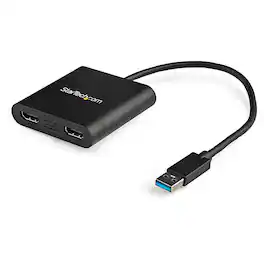
This StarTech USB 3.0 to Dual HDMI Adapter USB32HD2 lets you add two independent HDMI displays to your computer using a single USB 3.0 port. One of the HDMI ports can output resolutions up to 4K, while the other can output resolutions up to 1920 x 1200. Adding more displays to your workstation can be difficult, especially if your computer does not support MST or offer many external video ports. This USB to dual HDMI adapter features two video outputs, boosting your productivity by giving you more screen space to work from. One of the ports on this USB video adapter supports resolutions up to 4K at 30Hz, enabling you to connect a 4K monitor to your computer, even if your laptop or desktop video card doesn’t natively support 4K output. The USB to HDMI 4K adapter lets you extend or mirror your primary display onto an Ultra HD monitor or television. Using the high-bandwidth USB 3.0 interface, this USB 3.0 to HDMI adapter enables smoother scrolling through documents, higher resolutions and better overall performance than earlier USB adapters. This USB 3.0 to Dual HDMI Adapter USB32HD2 is backed by a StarTech.com 3-year warranty and free lifetime technical support.

This USB 3.0 to Dual HDMI Multi-Monitor Adapter acts as an external video card for your MacBook or Windows computers. It allows you to add two additional displays through your USB 3.0 port, boosting your productivity by giving you more screen space to work from. One of the HDMI ports can output resolutions up to 4K, while the other can output resolutions up to 2048 x 1152. This is the perfect alternative to a costly video card. With this USB 3.0 Multi-Monitor Adapter, you can quickly install the driver with a simple USB plug-in. Afterwards, connect the device to your monitors using HDMI cables and then you will have a dual-display workstation!

The Insignia USB-A 3.0 to Dual HDMI video adapter can mirror or extend your computer display to any HDMI-enabled monitor, TV, or projector. The HDMI-1 port can transfer up to 4K@30Hz resolution. The HDMI-2 port can transfer up to 1920x 1080P@60Hz. This adapter is compatible with Windows 10 or 11, but can’t support the Mac OS, Chrome OS, Android OS, Linux OS, Game OS. The driver can be installed automatically when computers internet connection is available, and Windows Update is enabled.

The JUA254 USB to HDMI Multi-Monitor Adapter works as an external video card, instantly allowing users to attach additional displays via HDMI connection without the hassle of a lengthy setup or having to install additional hardware. The USB 3.0 Display Adapter can support up to four displays running on the same computer, turning your workstation into a fully-functioning, multi-display powerhouse. This USB adapter works as an external video card, instantly allowing additional displays without the hassle of opening the computer casing and installing an external graphics card. You can have a second monitor with an extended display, a mirrored display, a rotational display (rotation mode not available for Mac), or make it your primary monitor. Now enjoy true 1080p HD resolution through any Windows or Mac computer with a USB 3.0 port. These adapters are also backwards compatible with USB 2.0 resolutions and playback, which are ideal for office applications. The simple plug-and-play function allows you to connect your computer to a second monitor or projector within seconds to create a new visual environment on Windows 10.
| Pros for StarTech.com - USB 3.0 to Dual HDMI Adapter - Black | |||
|---|---|---|---|
| There were no pros for this product— | Ease of use, Overall Performance, HDMI, Compatibility, Connectivity | Ease of use, HDMI, Compatibility, Performance, Dual Monitors | Overall Performance, Functionality |
| Cons for StarTech.com - USB 3.0 to Dual HDMI Adapter - Black | |||
| There were no cons for this product— | Heat, Price, Driver, Lag, Resolution | Heat, Driver Installation, Cord Length | There were no cons for this product— |
Specs
Explore related products Sponsored
Discover related products

Keep exploring
 $12.99The price was $14.99