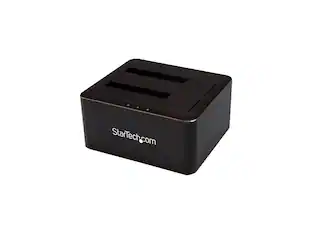
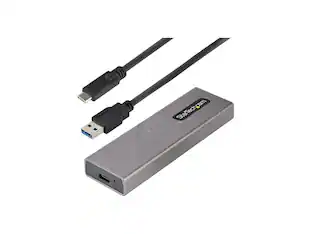
StarTech.com - USB 3.1 Hard Drive Docking Station - Black
About this product
Perform faster data transfers and backups with this StarTech hard drive docking station. Its USB 3.1 Gen 2 host connector provides up to 10 Gbps of data speed with UASP support, letting you access and archive large files quickly. This StarTech hard drive docking station handles SATA, 2.5-inch and 3.5-inch hard and solid-state drives with up to 6TB capacity.
Features
Compatible with 2.5" and 3.5" SATA hard drives and solid state drives
Provides compatibility with a variety of drives.
USB 3.1 Gen 2
Gives you greater bandwidth and speed with file transfer rates of up to 10 Gbps - twice the speed of USB 3.0 (USB 3.1 Gen 1) technology.
UASP support
Performs with a 70 % faster read speed and 40 % faster write speed over traditional USB 3.0 at peak performance.
OS-independent
No software or drivers required.
Top slot-loading design
The dock features a top-loading design that makes it easy to insert your drives. It also features drive doors to help stabilize inserted drives and prevent foreign objects from getting into the drive slots.
Specifications
- Drive Form Factor2.5 in.
Reviews
Rating 4.8 out of 5 stars with 4 reviews
The vast majority of our reviews come from verified purchases. Reviews from customers may include My Best Buy members, employees, and Tech Insider Network members (as tagged). Select reviewers may receive discounted products, promotional considerations or entries into drawings for honest, helpful reviews.

Compare similar products
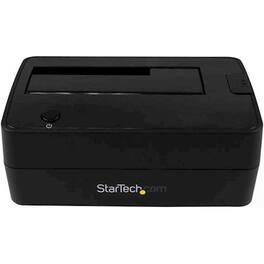
Perform faster data transfers and backups with this StarTech hard drive docking station. Its USB 3.1 Gen 2 host connector provides up to 10 Gbps of data speed with UASP support, letting you access and archive large files quickly. This StarTech hard drive docking station handles SATA, 2.5-inch and 3.5-inch hard and solid-state drives with up to 6TB capacity.

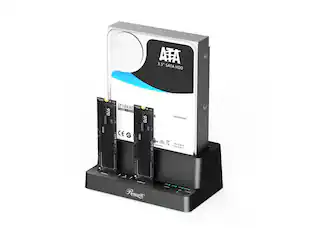
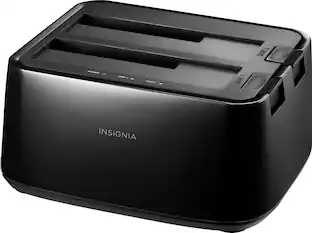
Connect and store external hard drives on your desktop with this Insignia hard drive enclosure docking station. Two slots accept SSD and HDD drives for simultaneous reading, and a USB 3.0 port allows for fast data transfer. An eject button lets you safely remove each drive when not needed, and this Insignia hard drive enclosure docking station features an LED indicator light to show the working status of each device.
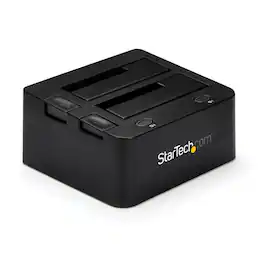
You can effortlessly enhance your data management and transfer capabilities with the UNIDOCKU33 USB 3.0 Universal HDD/SSD Dock. This robust and compact docking station is engineered to provide immediate access to your 2.5-inch or 3.5-inch IDE and SATA hard drives. It features two top-loading drive slots that eliminate the need for mounting the drives into a computer or external enclosure, streamlining your workflow and saving you valuable time.The UNIDOCKU33 is not only efficient but also user-friendly, supporting the latest in data transfer technology. It is equipped with UASP (USB Attached SCSI Protocol), which, when paired with a UASP-enabled host controller, unlocks the full potential of the latest SATA III (6 Gbps) drives, including solid state drives (SSD) and hybrid drives. This results in performance that is up to 70% faster than conventional USB 3.0 connections, significantly accelerating file transfers and backups.Key features of this reliable docking station include:- Maximum versatility with support for both SATA and IDE drives, as well as compatibility with 2.5-inch and 3.5-inch HDDs and SSDs.- Optimal performance with support for SATA III and UASP, ensuring swift and efficient data handling.- User-friendly operation with upright slot-loading SATA and IDE drive bays, which also contribute to a clutter-free workspace.- Broad compatibility with USB 3.0/2.0/1.1 and SATA revision I/II/III interfaces, as well as PATA (IDE) 66/100/133 MBps hard drives.- A compact, desktop-style form factor that fits seamlessly into any setup.- Plug-and-Play and hot-swap compatibility for ease of use.- A patented drive ejection mechanism for SATA drives and a combined power switch and status LED for each drive, enhancing user convenience.The UNIDOCKU33's slot-loading design securely holds the SATA and IDE drives upright, keeping them neatly off the desk. For SATA drives, the HDD can be inserted directly into the designated dock slot. The IDE drive slot is conveniently located near the rear panel 40-pin data and LP4 power connections, allowing for easy connection using the included IDE data and power cables.A single USB 3.0 connection to your host computer enables simultaneous access to both the IDE and SATA hard drives, providing a practical solution for data migration between different drive types. This docking station is also ideal for expanding the storage and backup capabilities of your computer system, supporting high-capacity drives (tested with up to 6TB for 3.5-inch and 2TB for 2.5-inch drives).Experience improved performance with UASP, which is supported on Windows 8, Mac OSX (10.8 or above), and Linux. In testing, UASP achieves a 70% faster read speed and a 40% faster write speed over traditional USB 3.0 at peak performance, along with an 80% reduction in required processor resources.The UNIDOCKU33 is a versatile and reliable choice for a variety of applications, including direct file transfers between SATA and IDE hard drives, fast data retrieval, data recovery from failed computers, quick backup to external drives for archiving, and testing or benchmarking multiple hard drives. With this docking station, you can streamline your data management tasks with confidence and efficiency.

Read, write, clone, boot, transfer, store, backup, verify…. do it all with your SATA drives of nearly two decades plus the latest technology NVMe SSDs here today and yet to come with the OWC Drive Dock. With this world's first dual bay SATA/U.2/M.21 drive dock, you open a new world of quicker and easier use of bare 2.5-inch and 3.5-inch hard drives and solid state drives. With both USB-A and USB-C cables included, the ultimate in flexible compatibility is yours with the OWC Drive Dock. Use your drives with millions of computers and tablets, including Thunderbolt 3, Thunderbolt 4, and USB4 as well as machines from decades ago. No tools, no drivers, no enclosure disassembly… just instant, effortless Plug and Play drive use and swaps. A built-in power supply eliminates the bulky, power brick hassle. Just plug the OWC Drive Dock's standard dual prong power cord into an AC outlet and you're ready to enjoy the incredible convenience of this quiet, fanless data access solution. Whether you are churning through many drives or performing archival backup, you can swap drives safely with the OWC Drive Dock. With each drive bay having its own power source, you can perform bare HDD handling best practices by powering off the desired bay and waiting for spin-down before removal. You can also leave a drive docked in an unpowered bay for immediate access while saving electricity or putting powered-on hours on the drive.
| Pros for StarTech.com - USB 3.1 Hard Drive Docking Station - Black | |||
|---|---|---|---|
| There were no pros for this product— | Ease of use, Data Transfer, Overall Performance, Compatibility, USB | There were no pros for this product— | There were no pros for this product— |
| Cons for StarTech.com - USB 3.1 Hard Drive Docking Station - Black | |||
| There were no cons for this product— | Size, Power, Connection | There were no cons for this product— | There were no cons for this product— |
Specs
Customers often buy these together
 $224.98The price was $242.99
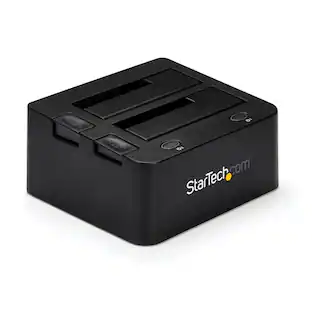 $113.49The price was $116.33

Customers ultimately bought
Explore tech essentials Sponsored
 Top Deal$44.99The price was $49.99


Discover related products
 $12.99The price was $13.99













Keep exploring
 $82.49The price was $87.15
 $299.99The price was $379.99