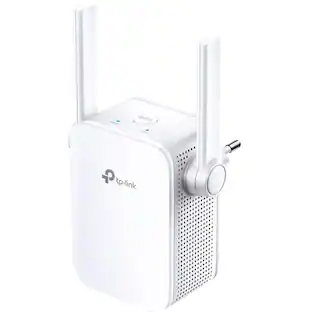
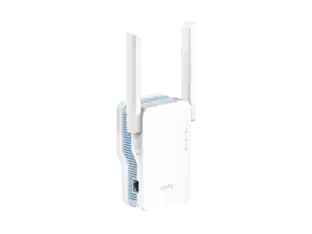
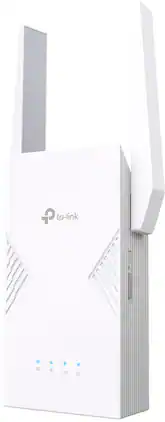
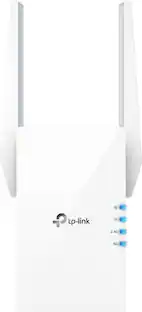
TP-Link - AXE5400 Tri-Band Mesh Wi-Fi 6E Range Extender - White
Customers are saying
Customers commend the AXE5400 Tri-Band Mesh Wi-Fi 6E Range Extender for its easy setup, impressive range, and overall performance. Users also appreciate its ease of use, strong signal strength, and extensive coverage. However, some customers have noted concerns about speed reduction, price, size and the limited Wi-Fi 6E band extension.
Highlights
Tri-Band networking
Ensure full band speeds to your devices thanks to RE815XE’s another dedicated band backhaul.
New 6 GHz band
Create an open and clear Wi-Fi network thanks to the brand-new 6 GHz band elimination interference from legacy devices.
Faster Wi-Fi 6E Speed
Experience Wi-Fi Speeds up to 5400Mbps with the wider 160MHz Channel tri-band Wi-Fi.
Larger Capacity
Wi-Fi 6E allows for 7 additional 160 MHz channels, enabling more simultaneous transmissions at the highest possible speeds.
Gigabit Ethernet port
Create fast, reliable wired connections for your PC, Smart TV, or gaming console anywhere in your home with the gigabit ethernet port.
Access Point Mode
Transform your extender into a high-speed wireless hub by connecting it to your router using an ethernet cable.
OneMesh technology
Create a mesh network that only needs one name and password by pairing RE815XE with compatible TP-Link Mesh router and easily move from room to room without changing your Wi-Fi network.
Set up in minutes
Easily set up and manage your Wi-Fi in a few quick and easy steps using the TP-Link Tether app (Android, iOS).
Smart Signal Indicators
Smart Signal Indicator will help you find the best spot to properly place the extender.
Universal compatibility
Compatible with all Wi-Fi-enabled devices and routers or access points. It even supports new AX phones, laptops and other devices.
Warranty and support
2-year warranty, 24/7 unlimited technical support by phone and email.
All Wi-Fi extenders are designed to increase or improve Wi-Fi coverage, not to directly increase speed. In some cases, improving signal reliability can affect overall throughput.
- Wi-Fi Speed5.4 gigabits per secondWireless StandardAX, AC, NForm FactorPlug-inBand TechnologyTriFrequency Band6.0 GHz, 5.0 GHz, 2.4 GHz
Reviews
Rating 4.4 out of 5 stars with 221 reviews
- Overall Performance (28)
- Setup (27)
- Range (26)
- Ease of use (25)
- Signal Strength (20)
- Speed (11)
- Price (4)
- Size (4)
- Wi-Fi 6E (3)
Customer Images
The vast majority of our reviews come from verified purchases. Reviews from customers may include My Best Buy members, employees, and Tech Insider Network members (as tagged). Select reviewers may receive discounted products, promotional considerations or entries into drawings for honest, helpful reviews.
Compare similar products

Tri-Band Wi-Fi 6E range extender uses new 6 GHz band to extend high-performance WiFi across your home to remove dead spots and WiFi drop zones. Enjoy smoother streaming, gaming, downloading and more with true tri-band speeds up to 5.4 Gbps with the wider 160 MHz channel. Pair with a TP-Link OneMesh compatible router to create a network that only needs one name and password. Easily set up and manage with TP-Link Tether app (Android, iOS). Plus, the intelligent signal indicator will help you find the best placement for your range extender.
Eliminate dead zones and enjoy faster, stronger, and smarter Wi-Fi with the Wi-Fi 7 Range Extender. Powered by Multi-Link Operation and 4K-QAM, it delivers up to 3.6 Gbps dual-band speeds with ultra-low latency, ensuring seamless streaming, lag-free gaming, and smooth multitasking anywhere in your home. With EasyMesh compatibility, your entire home stays connected under one Wi-Fi name, allowing you to roam freely without dropouts or manual switching. Need ultra-stable wired performance? The 2.5 Gbps Ethernet port has you covered. Setup is quick and effortless with WPS or the Tether app. Upgrade today and experience seamless Wi-Fi 7 coverage.

Upgrade your network now and enjoy lightning-fast Wi-Fi speeds with the TP-Link RE405BE, a cutting-edge Wi-Fi 7 device designed to enhance your home network experience. With support for Wi-Fi 7 features like MLO, 4K-QAM, and more, it delivers blistering wireless speeds of up to 6.5 Gbps, ensuring seamless connectivity throughout your entire home. Amplify your signal and eliminate dead zones with this range extender. Plus, it's EasyMesh-compatible for seamless whole-home coverage. Connect your smart TVs, computers, and game consoles at lightning speed using the ultimate 2.5 Gbps Ethernet Port.

Boost Wi-Fi like never before with the all-new TP-Link BE11000 Tri-Band Wi-Fi 7 Range Extender (RE655BE), the ultimate fix for expanding your Wi-Fi 7 coverage with ease. With Wi-Fi 7 Multi-Link Operation, wider 320 MHz channels, and a powerful 6 GHz band, enjoy tri-band Wi-Fi speeds up to 10.8 Gbps. Say goodbye to Wi-Fi dead zones and effortlessly boost your signal throughout your home. Whether you're a gamer, streamer, or have a busy household, the RE655BE has you covered. EasyMesh compatibility ensures a unified network for smooth roaming. Plus, the 2.5 Gbps Ethernet port offers lightning-fast stability for direct connections to smart TVs, computers, and game consoles.
| Pros for TP-Link - AXE5400 Tri-Band Mesh Wi-Fi 6E Range Extender - White | |||
|---|---|---|---|
| Setup, Range, Ease of use, Signal Strength, Overall Performance | Connectivity, Signal Strength, Range, Coverage, Ease of Setup | Connectivity, Signal Strength, Coverage, Range, Setup Ease | Ease of use, Range, Setup, Speed, Performance |
| Cons for TP-Link - AXE5400 Tri-Band Mesh Wi-Fi 6E Range Extender - White | |||
| Price, Speed, Size, Wi-Fi 6E | There were no cons for this product— | There were no cons for this product— | Price, Ethernet Port |
Specs
Will this extender work with the XE5300/AXE5300 mesh hardware?
Answered by TPLinkSupportNo, in a way that is beneficial. The extender can be connected to a Deco system but it would not be part of the Mesh network. It would be a seperate AP and act as such. If you are looking at the need to extend a Deco system I would recommend just adding another Deco.

Can I use 2 of these to extend my wifi to my shop. Meaning I can one of these hook up in my house with my router and the second one in my shop and amplify the signal of the first extender with the second one?
Answered by TPLinkSupportHi ShopTech. That will depend on the clarity and strength of the signal received at the shop location. A Wi-Fi extender's effectiveness depends on the strength and clarity of the signal it receives from the source. If the source signal struggles to reach the shop, there is a chance it may not yield a significant improvement. Another consideration would be our outdoor Wi-Fi solutions, such as our Deco Outdoor or EAP Outdoor models.
What is the maximum Wi-Fi speed supported by this range extender?
This range extender supports Wi-Fi speeds up to 5.4 gigabits per second.
This question and answer was generated by AI based on customer and product data.How many antennas does the TP-Link AXE5400 Tri-Band Mesh Wi-Fi 6E Range Extender have?
The range extender has 4 antennas.
This question and answer was generated by AI based on customer and product data.Does this range extender have a gigabit ethernet port?
Yes, it has a gigabit ethernet port for wired connections.
This question and answer was generated by AI based on customer and product data.
Customers often buy these together
Ethernet Cables
Network Routers
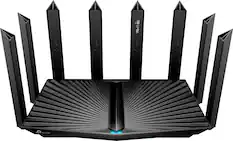
TP-Link - Archer AXE7800 Tri-Band Wi-Fi 6E Router - Black
Clearance$137.99The price was $229.99
More recommended items
 Network Adapters
 Network Switches
Customers ultimately bought
Explore tech essentials Sponsored
 $594.95The price was $629.95

Discover related products
 $13.99The price was $19.99
 $143.99The price was $144.99
 $229.00The price was $275.00









Keep exploring
 Labor Day Deal$39.59The price was $59.99