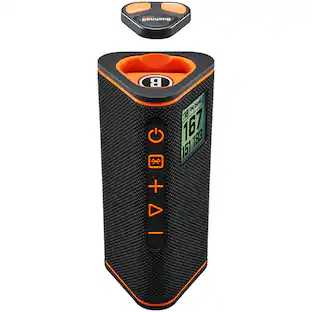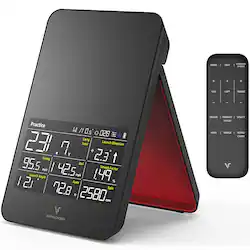
VoiceCaddie - Swing Caddie SC4 Portable Golf Simulator and Golf Launch Monitor with Bluetooth Connectivity via Smartphone or Tablet - Black
- Key Specs
- Color: Black
- General
- Brand: VoiceCaddie
- Model Number: SC4
- Product Name: Swing Caddie SC4 Portable Golf Simulator and Golf Launch Monitor with Bluetooth Connectivity via Smartphone or Tablet
- Color: Black
- Assembly Required: false
- Data
- Intended Sport: Golf
- Ball Data: Speed, Distance, Apex, Launch Angle, Launch Direction, and Spin Rate
- Club Data: Statistics for Each Club + Smash Factor
- Sensors: Barometer (Detects stimuli such as heat, light, sound, motion, or pressure and responds accordingly by operating a control or initiating a function of the device.)
- Features
- Pieces Included: Launch monitor
- Indoor or Outdoor Use: Indoor, Outdoor
- Compatibility
- Computer Required: false
- Operating System Compatibility: Apple iOS
- App Compatible: true (The product can be connected to a program or software application on a mobile device, which then receives collected data from the product.)
- Subscription: Optional but not included
- Wireless Connectivity: Bluetooth (The manner in which a device sends data to another device over a short distance without the use of wires or cables.)
- Power
- Power Source: Battery-powered
- Rechargeable Battery: true
- Battery Life (up to): 6 hours (Battery life will vary depending on the product configuration, product model, applications loaded on the product, power management setting of the product and the product features used by the customer. As with all batteries, the maximum capacity of this battery will decrease with time and usage.)
- Charging Interface(s): USB-C (The connection for transmitting power to charge the device.)
- Battery Chemistry: Lithium-ion
- Camera
- Built-in Camera: false
- Dimensions
- Recommended Space Dimensions: Place 5' behind ball on same level as ball (A list of the height, width, depth, and any other dimensions needed to properly use the product.)
- Launch Monitor Height: 7.59 inches (The out of box height of the item. Height is measured as the vertical distance from the bottom of the item to the top as it would be primarily used or placed.)
- Launch Monitor Width: 4.88 inches (The out of box width of the item. Width is measured as the horizontal distance from one side of the item to the other as it would be primarily used or placed.)
- Launch Monitor Depth: 1.14 inches (The out of box depth of the item. Depth is measured as the distance from the front of the item to the back as it would be primarily used or placed.)
- Launch Monitor Weight: 1.3 pounds (The out of box weight of the item.)
- Warranty
- Warranty - Parts: 1 year
- Warranty - Labor: 1 year
- Other
- UPC: 856640005833
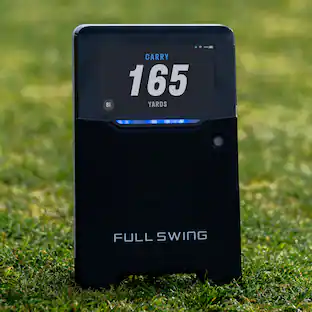
Prepare to revolutionize your golfing experience with the Voice Caddie SC4 Portable Golf Simulator and Golf Launch Monitor. Step onto the green and unlock a world of golfing possibilities! Seamlessly connect your smartphone or tablet via Bluetooth, and watch as the SC4 golf launcher monitor becomes the gateway to an exhilarating golfing adventure. Immerse yourself in simulator app integration, transporting you to stunning virtual courses that rival the real thing. But the SC4 goes beyond simulation—it offers a free simulator driving range demo, enabling you to perfect your swings and uncover your true potential. Precision is key, and the SC4 delivers. With its comprehensive metrics, including radar swing speed, ball speed, carry and total distance, smash factor, launch angle, apex, and spin, you'll have an in-depth understanding of your performance. Whether you're an aspiring or a seasoned professional, the SC4 is your golf swing speed monitor. Get ready to take your golfing journey to new heights with the extraordinary Voice Caddie SC4 Portable Golf Simulator and Golf Launch Monitor.
- Free driving range and 1 course: Swing Caddie x E6 Connect Simulator allows you to immerse yourself in photorealistic landscapes and lifelike courses – download and sign up through the E6 app (iOS only) and create your own golf launch monitor for home
- Superior radar precision: Achieve unparalleled accuracy with the SC4's advanced Doppler radar technology, providing precise swing analysis and realistic golf monitor simulation for unmatched performance insights
- Practice makes perfect: Fine-tune your swing technique with a driving range demo featured in this full swing kit launch monitor, allowing you to perfect your shots and unleash your full potential
- Metrics that matter: From swing speed to ball speed, distance to launch angle, the SC4 golf swing tracker captures performance metrics that can take your game from ordinary to extraordinary
- Weather-proof accuracy: Enjoy precise measurements regardless of weather conditions, thanks to the integrated barometric pressure sensor that comes with every SC4 golf swing caddie
Whats Included
- Swing Caddie SC4 Launch Monitor + Simulator
- Remote
- USB Cable
- User Manual
Q: Can you hook this up to a tv
A: Hello, this product does not connect to a tv.
People also viewed



Today's top picks
 $296.10The price was $329.00
 $169.99The price was $179.99
 $179.99The price was $189.99