Rating 4.7 out of 5 stars with 678 reviews
4.7- Overall Performance (206)
- Ease of Use (90)
- Size (58)
- Pressure Sensitivity (32)
- Precision (21)
- Connectivity (31)
- Nib Durability (8)
- Surface Texture (5)
Customer Images
The vast majority of our reviews come from verified purchases. Reviews from customers may include My Best Buy members, employees, and Tech Insider Network members (as tagged). Select reviewers may receive discounted products, promotional considerations or entries into drawings for honest, helpful reviews.
- Rated 5 out of 5 stars
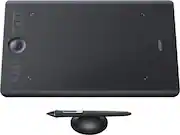
The Wacom Intuos Pro Medium
I was looking for a graphics tablet and purchased one with a screen. It hooked up to my computer but I never quite liked looking down. Someone suggested the Wacom Intuos Pro. I did research and settled on this very one. It was close to $400.00 but boy is it worth the money. The pressure sensitivity is amazing. The tablet size is perfect. The pen response is awesome. I use it for editing photos and also illustrating in Photoshop. I also use it for designing logos in Illustrator. The express keys are easy to customize. I can see why artists love Wacom products. This is worth every penny and I highly recommend the Intuos Pro Medium. Don't get the small because the screen size isn't big enough for illustrating and the large is overkill for illustrating. I'm sure the small is fine if you're a teacher and need to use it for writing out math problems but that's about it. This works beautifully! Highly recommend.
Posted by mlsdq
- Rated 5 out of 5 stars
Glad I took the plunge
After six years in my digital art journey, I decided it was finally time to take the plunge and buy a truly fancy tablet. Previously, I had used two different Huion branded tablets. While I do not regret purchasing them, and they both served me well (the first lasted me almost 4 years), the second wore out on me entirely too fast for my liking -- I had it only two years before the surface started wearing down, leaving me to uncomfortably scrape my stylus over the most used parts over and over again. So, I finally decided to try out this tablet I have heard high praises about for more than a decade now. Here are my thoughts: Pros: -surface feels just like paper. I was a bit taken aback at first, thinking I was scraping up my tablet with the KRSH KRSH KRSH sound of my stylus, as it was so different from the smoother feel I was used to with huion. however, I have grown to love it -the scroll wheel is very convenient -perfect size (for me), very comfortable in my lap -stylus is lightweight and comfortable to use, comes with an extremely sturdy weighted stand that is the best I've used so far -touch mode is very cool, very responsive ????: -nibs wear down extremely fast. like, EXTREMELY fast. i have to replace them every 20-ish hours of drawing time, it seems. while this is a con, i have learned it is important that the nibs wear down so that the surface of the tablet does not. in this sense, i'm fine with it. i'd rather replace the nibs than the entire device itself. cons: -drivers are weird. updated my driver software and it blue screen crashed my computer. had to go back to an older version, works fine now. -the wireless functionality is non negotiable, meaning you can't stop the device from charging to be used wirelessly even if you don't ever use it wirelessly. this leads to a little bit of warmth generating from the tablet while in use. also, you have to remember to shut it off when you unplug it from your device, as the tablet thinks it's just being put into wireless mode when it's disconnected. overall, i highly recommend this device to anyone pursuing digital art, design, etc seriously.
Posted by Aaron
- Rated 5 out of 5 stars
Exceptional as expected.
My first experience with a Wacom tablet and pen in college was fantastic. I was able to draw up chemical process diagrams lightning quick in Aspen and it was just fun to get in some doodling here and there when I had the time. I’m still waiting on my current profession, and programs used in it, to catch up so I can add this to the mix. Until then, I’ve been spending a lot of time in Photoshop working on old, scanned photos. There is only so much noise filters can do to repair physical damage on a digitized version. And to cover the gap of what they can do and what needs to be done you need patience, a steady hand, and this incredible input device. The unboxing experience is as premium as the unit itself. Every piece of it feels like it was perfectly engineered to be handled by someone with a soft and precise touch. Everything is well balanced. The pad isn’t awkward to handle when taking it out of wherever you might store it. The pen is light, and some may wish it had more weight. But the stand can double as a paper weight and will have no problem staying in place if you have a drafting desk that’s inclined. And don’t forget to look inside the stand as there is a very impressive array of additional pen tips provided. The only issue I’ve had with this is when my primary monitor is an ultrawide screen. The curser behaves as expected with your input needing to be sort of elongated in a horizontal fashion to get what you would normally expect if it were on a 16:9 screen. It’s a small price to pay for such a quality product. And I didn’t even touch what you can do as far as customization is concerned. Every button can be programed specific to active applications. Anything from simple copy/paste actions to complex macros in photoshop are a click away if you want it to be.
Posted by Caladbolg
- Rated 5 out of 5 stars
I’m glad I made this purchase
Works great! Easy setup, once the driver was installed I was able to get it up and running. I love the controls ease of use and the stylus responds well to pressure.
Posted by solRac
- Rated 5 out of 5 stars
Even Better Than I Thought It Would Be.
I finally had to replace my 16 yr old Wacom tablet (along with its backup, which I fried somehow). The new Wacom Medium tablet, along with the Pro Pen that came with it, are amazing. Perfect size for my desk setup, and a real pleasure to use. I was concerned that the feel of the pen on the tablet would not be satisfactory, but it is actually excellent. I like the feel of this tablet much better. The Quick Keys are probably the best thing about this; I have programmed in my 8 most used shortcuts, and it works flawlessly. Highly recommend this tablet to anyone who does photography, graphics work or digital art.
Posted by 1inthelight