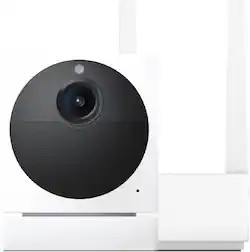
Wyze - Cam Outdoor v2 Starter Kit - White
- Key Specs
- Video Camera Resolution: Full HD (1080p) (Refers to the number of pixels, both horizontally and vertically, used to capture video/images. The higher the resolution the finer the detail that can be seen.)
- Field Of View: 130 degrees (The area of a target, measured as an angle from the location of viewing, that can be observed.)
- Night Vision: true
- Number Of Cameras Included: 1
- Camera Power Source: Battery-powered, Cable with AC Adapter/Plug-in
- Works With: Amazon Alexa, Google Assistant (Compatible with or able to be connected to other smart devices or applications.)
- Wireless Connectivity: Bluetooth, Wi-Fi (The manner in which a device sends data to another device over a short distance without the use of wires or cables.)
- Maximum Operating Temperature: 122 degrees fahrenheit (The highest recommended ambient (surrounding) temperature in which the product can ideally operate stated by the manufacturer. Generally long-term exposure of the product to temperatures more than the maximum can result in ineffective operation.)
- Storage Type: Cloud, Memory card, Cloud
- Indoor Or Outdoor Use: Indoor and outdoor (Indicates the appropriate environment product was designed to be used in.)
- Minimum Operating Temperature: -4 degrees fahrenheit (The lowest recommended ambient (surrounding) temperature in which the product can ideally operate stated by the manufacturer. Generally long-term exposure of the product to temperatures less than the minimum can result in ineffective operation.)
- Audio Communication: 2-way (1-way communication devices allow a user to hear detected audio, while 2-way communication adds the ability for a user to talk back through the device.)
- General
- Brand: Wyze
- Model Number: WVODV2B1
- Product Name: Cam Outdoor v2 Starter Kit
- Color: White
- Camera
- Video Camera Resolution: Full HD (1080p) (Refers to the number of pixels, both horizontally and vertically, used to capture video/images. The higher the resolution the finer the detail that can be seen.)
- Camera Resolution: 1920 x 1080 (Refers to the number of pixels, both horizontally and vertically, used to capture video/images. The higher the resolution the finer the detail that can be seen.)
- Field Of View: 130 degrees (The area of a target, measured as an angle from the location of viewing, that can be observed.)
- Night Vision: true
- Night Vision Distance: 50 feet
- Night Vision Image: Color
- Camera Movement: Fixed
- Zoom Mode: Digital
- Number Of Cameras Included: 1
- Frame Rate: 25 frames per second (The frequency at which consecutive images can be captured. The higher the frame rate, the more detail that can be captured.)
- Day/Night Mode: true (Captures images/video with optimal clarity by automatically adjusting settings to various light levels.)
- IP Camera: true (An Internet Protocol (IP) camera is able to record and display image/video data via the internet, without need for a local recording device.)
- Number of IR LEDs: 6 (Quantity of infrared (IR) LED lights for emitting IR light and allowing the camera to detect objects in low light.)
- Camera Iris: Automatic (The iris is the opening on a camera that controls how much light reaches its image sensor, which in turn affects image/video clarity. Fixed and manual irises are generally suited for locations with consistent levels of light. Automatic and "P" (precise) irises automatically adjust in response to changing levels of light and are suited for a wider variety of environments. "P" irises feature additional capabilities for improving footage clarity.)
- Image Sensor Type: CMOS (CCD and CMOS are the two main technologies used in image sensors. CCD, the older of the two types, turns analog light signals into digital pixels. This conversion happens without distortion, resulting in high-quality images. Newer CMOS sensors use transistors at each pixel to move electrical charges. CMOS sensors are typically less expensive, but also require more light to create distortion-free images.)
- Infrared Cut Off Filter: true (Often referred to as an IR or heat-absorbing filter, this camera feature is designed to block infrared light during the day to produce optimally lit images, while still allowing for night vision capabilities in low light.)
- Power
- Camera Power Source: Battery-powered, Cable with AC Adapter/Plug-in
- Rechargeable Battery: true
- Battery Chemistry: Lithium-ion
- Charging Interface: Micro-USB
- Voltage: 7.4 volts (Amount of power needed to support an electrical current.)
- Compatibility
- App Compatible: true (The product can be connected to a program or software application on a mobile device, which then receives collected data from the product.)
- App Features: Cloud storage optional, 2-way audio, record, playback, zoom, Remote Viewing
- Compatibility: Voice Control with Amazon Alexa and Google Assistant
- Brand Compatibility: Wyze
- Model Compatibility: Wyze Cam Outdoor
- Operating System Compatibility: Android, Apple iOS, Mac, Windows
- Works With: Amazon Alexa, Google Assistant (Compatible with or able to be connected to other smart devices or applications.)
- Voice Assistant Built-in: Amazon Alexa, Google Assistant (A digital assistant built into the device that uses voice commands to answer questions and control smart devices.)
- Connectivity
- Camera Connectivity: Wireless, Wired (Security system cameras can be set up in several ways. Wired cameras require cables for power and footage transmission, while wire-free cameras don't need cables for either. Wireless cameras still require cables for receiving power but are able to transmit footage via a wireless network.)
- Wireless Connectivity: Bluetooth, Wi-Fi (The manner in which a device sends data to another device over a short distance without the use of wires or cables.)
- Maximum Wireless Range: 350 feet
- Wireless Networking Standard: Wi-Fi 5 (The wireless networking standard used by the device. Each iteration of the standard developed by the Wi-Fi Alliance corresponds to an existing IEEE 802.11 protocol; for example, standard 802.11ac (or AC) is termed Wi-Fi 5. Refers specifically to the standard the device is designed to use, but ultimately determines product interoperability and backward compatibility including previous versions.)
- Frequency Band: 2.4 GHz (Bands may be grouped into categories such as low- and high-band VHF (Very High Frequency), low- and high-band UHF (Ultra High Frequency), or certain frequency channels (measured in MHz or GHz). Generally, higher frequencies transmit information faster but have shorter range than lower frequencies.)
- Encryption Type: Other (The security protocols or certification programs that protect the Wi-Fi network.)
- Recording & Playback
- Streaming Video: true (The ability to transmit a live video feed from the product.)
- Video Recording Capability: true
- Records Audio: true
- Subscription: Optional but not included
- Video Recording Prompt: Continuous Video Recording (CVR), Motion detection, Alarm
- Performance
- Maximum Operating Temperature: 122 degrees fahrenheit (The highest recommended ambient (surrounding) temperature in which the product can ideally operate stated by the manufacturer. Generally long-term exposure of the product to temperatures more than the maximum can result in ineffective operation.)
- Indoor Or Outdoor Use: Indoor and outdoor (Indicates the appropriate environment product was designed to be used in.)
- Protective Qualities: Water resistant, Weather resistant
- Minimum Operating Temperature: -4 degrees fahrenheit (The lowest recommended ambient (surrounding) temperature in which the product can ideally operate stated by the manufacturer. Generally long-term exposure of the product to temperatures less than the minimum can result in ineffective operation.)
- Storage
- Storage Type: Cloud, Memory card, Cloud
- Memory Card Type: microSD card, microSD
- Lighting
- Lighting Type: Automatic
- Features
- Audio Communication: 2-way (1-way communication devices allow a user to hear detected audio, while 2-way communication adds the ability for a user to talk back through the device.)
- 3-Axis Adjustable: true
- Auto-On Detection: Motion
- Mount Type: Ceiling mount, Flush mount, Freestanding
- Alarm Type: Audible, Silent, Voice
- Alarm Location: On camera
- Dimensions
- Product Height: 3.3 inches (The out of box height of the item. Height is measured as the vertical distance from the bottom of the item to the top as it would be primarily used or placed.)
- Product Width: 3 inches (The out of box width of the item. Width is measured as the horizontal distance from one side of the item to the other as it would be primarily used or placed.)
- Product Depth: 3 inches (The out of box depth of the item. Depth is measured as the distance from the front of the item to the back as it would be primarily used or placed.)
- Product Weight: 1 pounds (The out of box weight of the item.)
- Sensor
- Sensors: Light sensor, Motion sensor, Proximity sensor, Sound sensor (Detects stimuli such as heat, light, sound, motion, or pressure and responds accordingly by operating a control or initiating a function of the device.)
- Motion Detection Range: 30 feet
- Display
- Color Display: true
- Included
- Cable(s) Included: true
- Warranty
- Warranty - Parts: 1 year limited
- Warranty - Labor: 1 year limited
- Other
- UPC: 850025015523
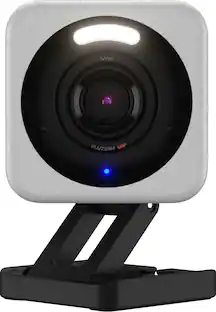
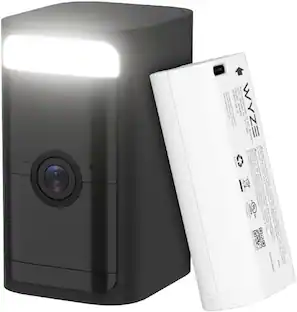
Wyze Cam Outdoor v2 takes everything you loved about the original wire-free, battery-powered Wyze Cam Outdoor to a whole new level. Now with our award-winning Starlight Sensor, you can see at night just as clear as day with Color Night Vision 1080p HD resolution. Get alerted when motion is detected, now up to 28% further away and set custom motion detection zones to only get alerts that matter to you. See even more than before with a wider, 130 degree field of view, so you can see more of what’s out there. Take advantage of the built-in security features like a motion-activated siren, two-way audio, and motion-detection alerts for even more peace of mind. Best of all, it’s easy to mount, has a 6-month battery life with easy recharging via microUSB, and you can even connect it to Wyze Solar Panel to eliminate the need to recharge ever again, depending upon your location.
- Now with color night vision: Record night time video in full, vivid color in environments up to 25x darker than traditional cameras.
- Battery powered and wire-free: Mount anywhere and leave it there with IP65 weather resistance. Get up to 6 months battery life on a single charge.
- Full home coverage: Protect every corner of your home with a 130 degree field of view. Connect up to 4 cameras to a single base station and view all video streams in the Wyze app.
- Smart security: Get notified about movement with a PIR sensor that senses body heat. Set custom detection zones. Scare away intruders with an optional motion-activated siren. Person and package detection available with CamPlus.
- Easy installation: Skip running wires or searching for outlets. Friendly step-by-step guides in the Wyze app make wireless DIY install a breeze.
Whats Included
- Wyze Cam Outdoor v2
- Camera Base Station
- Base Station Power Adapter
- Base Station Ethernet Cable
- Camera Charging USB Cable
- Quick Start Guide
- Screw Assembly
Q: Has anyone used the Wyze solar panel with this?
A: Yes. Plug it into the back of the camera where the charging port is and go. Had trouble getting it to stay connected so plan to cut off the silicon protector since the panel blocks the port. Should work out fine. Otherwise, the panel works great. Fully charged every day. Worth it!
A: Hi there, with regards to setting up the Wyze Cam Outdoor v2 it is the same as setting up the Wyze Cam Outdoor v1, you will need to setup first the Wyze Outdoor Base Station that comes with the bundle and then connect your camera. The outdoor Base Station serves as an extender that you will connect directly to your router. To learn more on how it works and to setup the device, you may check this link: (https://support.wyze.com/hc/en-us/sections/360011338891). If you have more questions or concerns, you may reach out to our team at (https://wyzelabs.zendesk.com/hc/en-us) so we may assist you further. Thank you and have a great day!
Q: Does it interfere with someone privacy inside their home?
A: no you dont even know its on.
Q: Is a subscription required to use this camera?
A: Officially no. In reality yes you are pretty limited without it. But it’s only $20 a year not per month so it’s cheap and you don’t need to worry about sd cards needing to be replaced which trust me you will be replacing them if you get even a moderate amount of triggering events.
A: Hello there! All Wyze devices are only compatible with 2.4 GHz Wi-Fi signals. They are not compatible with 5 GHz signals. We use 2.4 GHz because the signal reaches further from the source, allowing users to install their devices all over their homes depending on their Wi-Fi network's bandwidth. We also use 2.4 GHz because it is more widely available than 5 GHz. If you have 5 GHz available you most likely have a 2.4 GHz signal available too, your internet service provider should be able to help you with finding the information for the 2.4 GHz network. At this time we do not have plans to implement connectivity with 5 GHz network signals but you can vote for the feature on our roadmap here - https://forums.wyzecam.com/t/support-5ghz-wifi-band-for-wyze-cams/7095
People also viewed
 $64.99The price was $69.99
 $44.99The price was $59.99
 $258.00The price was $279.99
 $99.99The price was $149.99