PowerA - Joy-Con Comfort Grip for Nintendo Switch - Black
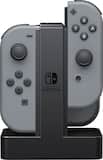
- PowerA - Joy-Con Charging Dock - Black$17.49The price was $22.99

More Buying Options
Related Item

About This Item
- Key Specs
- Brand Compatibility: SWITCH
- Model Compatibility: SWITCH
- General
- Brand: PowerA
- Model Number: 1501064-01
- Product Name: PowerA Joy-Con Comfort Grip for Nintendo Switch
- Color: Black
- Power
- Charging Method: Wired
- Compatibility
- Compatible Platform(s): Nintendo Switch, Nintendo Switch – OLED Model
- Brand Compatibility: SWITCH
- Model Compatibility: SWITCH
- Dimensions
- Product Height: 1.81 inches (The out of box height of the item. Height is measured as the vertical distance from the bottom of the item to the top as it would be primarily used or placed.)
- Product Length: 5.79 inches (The out of box length of the item. Length is measured as the longest dimension of the item.)
- Product Width: 3.98 inches (The out of box width of the item. Width is measured as the horizontal distance from one side of the item to the other as it would be primarily used or placed.)
- Product Weight: 0.198 pounds (The out of box weight of the item.)
- Warranty
- Warranty - Parts: 2 years
- Warranty - Labor: 2 years
- Other
- UPC: 617885015847
The Joy-Con Comfort Grip transforms the left and right Joy-Con into a single comfortable video game controller for Nintendo Switch. The ergonomic rubber grips keep your palms happy and your fingers from cramping during those long play sessions. Simply slide each Joy-Con Controller down the rails until they click, which allows the player indicator lights to shine through the center panel. Plus, the Comfort Grip stands up on its own, so you can display it next to your Nintendo Switch Dock.
Whats Included
- Comfort Grip
- Comfort Grip
Q: Does this comfort grip have an ergonomic design?
A: Yes, this grip features a lightweight, ergonomic design.
Q: Is this grip compatible with the Nintendo Switch?
A: Yes, this grip is compatible with the Nintendo Switch.
Q: How does this grip connect to the Nintendo Switch?
A: The Joy-Cons slide down the rails until they click.
Q: Does this grip allow the Joy-Cons to stand up?
A: Yes, the Comfort Grip stands up on its own.
Q: Can the player indicator lights be seen when using this grip?
A: Yes, the player indicator lights shine through the center panel.
Q: Is this able to charge the joy con controllers?
A: No it can't.
Q: Is this bigger than the grip that comes with the switch?
A: No. It's the same size.
Reviews
Customers are saying
Customers value the comfort and grip that the Joy-Con Comfort Grip provides, making it feel like a quality, original controller with a perfect fit. Some customers have noted issues with Joy-Con slippage and that the grip does not charge the Joy-Cons.
- Comfort (274)
- Grip (195)
- Quality (136)
- Joy-Con (5)
- Charging (4)
Customer Images
The vast majority of our reviews come from verified purchases. Reviews from customers may include My Best Buy members, employees, and Tech Insider Network members (as tagged). Select reviewers may receive discounted products, promotional considerations or entries into drawings for honest, helpful reviews.
Compare similar products

The Joy-Con Comfort Grip transforms the left and right Joy-Con into a single comfortable video game controller for Nintendo Switch. The ergonomic rubber grips keep your palms happy and your fingers from cramping during those long play sessions. Simply slide each Joy-Con Controller down the rails until they click, which allows the player indicator lights to shine through the center panel. Plus, the Comfort Grip stands up on its own, so you can display it next to your Nintendo Switch Dock.
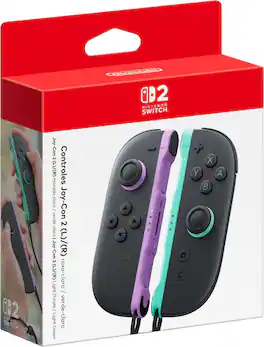
The updated Joy-Con 2 controllers have easy-to-use motion controls and HD rumble, along with the C Button for easy GameChat access and the mouse controls. (available in compatible games). Additional games, systems and/or accessories may be required for multiplayer mode. Internet, Nintendo Switch Online membership and Nintendo Account required for online features, including GameChat. Not available in all countries. Terms and GameChat requirements apply. support.nintendo.com Games, systems, some accessories and membership sold separately. Only for use with the Nintendo Switch 2 system.
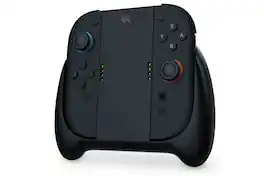
Connect your Joy-Con 2 controllers to the Next Charging Grip for a classic-style gaming experience - or use it as a convenient charging dock with the included USB-C cable.

The Joy-Con Charging Dock is the easiest solution for charging your Nintendo Switch Joy-Con Controllers. Charge 4 Joy-Con Controllers at a time for multiple players, or keep an extra pair charged for single players to switch out. Simply slide the Joy-Con Controllers down and wait until each charge LED turns green!
| Pros for PowerA - Joy-Con Comfort Grip for Nintendo Switch - Black | |||
|---|---|---|---|
| Comfort, Grip, Quality, Fit, Feel | Overall Performance, Color | Ergonomics, Charging Performance, Build Quality | Overall Performance, Charging, Ease of use, Size, Price |
| Cons for PowerA - Joy-Con Comfort Grip for Nintendo Switch - Black | |||
| Joy-Con, Charging | There were no cons for this product— | There were no cons for this product— | Cord Length, LED |