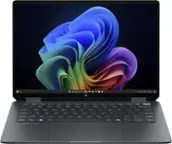
HP - OmniBook X Flip 2-in-1 - Copilot+ PC - 14" 2K Touch-Screen Laptop - AMD Ryzen AI 5 340 2025 - 16GB Memory - 512GB SSD - Meteor Silver
Screen Size
14"- Microsoft - Office 365 Personal (1 Person) (12-Month Subscription) - Activation Required - Windows, Mac OS, Apple iOS, Android [Digital]$99.99
![Microsoft - Office 365 Personal (1 Person) (12-Month Subscription) - Activation Required - Windows, Mac OS, Apple iOS, Android [Digital]](https://pisces.bbystatic.com/image2/BestBuy_US/images/products/fa90dd84-caf2-4bbe-86e9-18b037ea6563.jpg;maxHeight=160;maxWidth=166)

More Buying Options
Related Item

Highlights
- Key Specs
- Screen Type: IPS
- Screen Size: 14 inches (Size of the screen, measured diagonally from corner to corner.)
- Screen Resolution: 1920 x 1200 (Full HD+) (Screens come in a range of resolutions (measured in pixels, horizontal x vertical). The higher the resolution, the greater the picture quality.)
- Touch Screen: true (Touch-screen devices make navigating more intuitive. Using a touch-screen display, you can do things such as tap to select, hold and drag to move items, swipe to scroll, and pinch to zoom.)
- Brightness: 400 nits (A measure of the total light output.)
- Processor Model: AMD Ryzen AI 300 Series (Your computer's processor is like its brain. Working in combination with system memory, the power of the processor determines the complexity of software you can run, how many programs you can have open at the same time, and how fast those programs will run. Most computers feature an AMD, Intel or Snapdragon processor.)
- Storage Type: SSD
- Total Storage Capacity: 512 gigabytes
- System Memory (RAM): 16 gigabytes (Random-access memory (RAM) is a computing device's short-term data storage, which allows active information to be accessed quickly. The size and type of RAM determines how efficiently the device can handle large amounts of information at one time. For example, gaming or video editing requires more RAM for optimal performance.)
- Graphics: AMD Radeon 840M (Often referred to as a "graphics processing unit" (GPU), this device is responsible for displaying image content and decoding/encoding video content in programs and games.)
- Display Connector(s): 1 x HDMI 2.1 (The number and type of connectors used to connect to an external display.)
- Battery Life (up to): 19.5 hours (Battery life will vary depending on the product configuration, product model, applications loaded on the product, power management setting of the product and the product features used by the customer. As with all batteries, the maximum capacity of this battery will decrease with time and usage.)
- Battery Chemistry: Lithium-ion polymer
- 2-in-1 Design: true (A laptop and a tablet combined in one lightweight, portable device. Sometimes referred to as "convertible" or "hybrid" laptops, these devices deliver the processing power and keyboard of a laptop. When you're ready to play, either detach the screen or fold your 2-in-1 into tablet mode to comfortably watch movies, play games, read an e-book and more.)
- Backlit Keyboard: true (Integrated lights allow for visibility of the keys in low-light conditions.)
- General
- Brand: HP
- Model Number: 14-fk0013dx
- Product Name: OmniBook X Flip 2-in-1 - Copilot+ PC - 14" 2K Touch-Screen Laptop - AMD Ryzen AI 5 340 2025 - 16GB Memory - 512GB SSD
- Color: Meteor Silver
- Year of Release: 2025
- Display
- Display Type: LED
- Screen Type: IPS
- Screen Size: 14 inches (Size of the screen, measured diagonally from corner to corner.)
- Screen Resolution: 1920 x 1200 (Full HD+) (Screens come in a range of resolutions (measured in pixels, horizontal x vertical). The higher the resolution, the greater the picture quality.)
- Touch Screen: true (Touch-screen devices make navigating more intuitive. Using a touch-screen display, you can do things such as tap to select, hold and drag to move items, swipe to scroll, and pinch to zoom.)
- Synchronization Technology: FreeSync (AMD Adaptive Sync) (Generally, these technologies allow syncing between a computer/console game's frame rate and the device's refresh rate for a smoother display without tearing.)
- Brightness: 400 nits (A measure of the total light output.)
- Color Gamut (Standard RGB): 62.5 percent
- Processor
- Processor Brand: AMD
- Processor Model: AMD Ryzen AI 300 Series (Your computer's processor is like its brain. Working in combination with system memory, the power of the processor determines the complexity of software you can run, how many programs you can have open at the same time, and how fast those programs will run. Most computers feature an AMD, Intel or Snapdragon processor.)
- Processor Model Number: 340
- CPU Boost Clock Frequency: 4.8 gigahertz (Actual central processing unit (CPU) speed may vary by device configuration and design. The maximum rate at which the processor is able to execute tasks, typically only used for a short period of time as needed. This rate may temporarily boost the processor's performance, but may result in overheating, shutdown, or damage to equipment if sustained.)
- Number of CPU Cores: 6-core (A core, or "brain" of a CPU, allows it to receive and execute instructions. Each core can work independently or together to perform parallel operations.)
- CPU Cache Memory Level: L3
- L3 Cache: 16 megabytes (Cache memory, also called CPU memory, is random-access memory (RAM) that a computer microprocessor can access more quickly than it can access regular RAM. This memory is typically integrated directly with the CPU chip or placed on a separate chip that has a separate bus interconnect with the CPU.)
- Neural Processing Unit (NPU): true (Whether the product comes with an integrated neural processing unit (NPU) that performs computations for AI (artificial intelligence) functions to increase proficiency of the CPU and reduce power consumption.)
- Maximum NPU Performance: 50 trillions operations per second (The maximum neural processing unit (NPU) computations performed. NPUs increase proficiency of the CPU and reduce power consumption for AI (artificial intelligence) functions.)
- Storage
- Storage Type: SSD
- Total Storage Capacity: 512 gigabytes
- Solid State Drive Capacity: 512 gigabytes (The amount of data that can be stored on the device's solid state drive (SSD). SSD is a flash-based storage with faster speeds than a hard disk drive (HDD).)
- Solid State Drive Interface: PCIe 4.0 (Connects the solid state drive to the host system. PCI and SATA interfaces are the most common; PCI interfaces are typically faster, but SATA interfaces are compatible with a wider range of systems.)
- Memory
- System Memory (RAM): 16 gigabytes (Random-access memory (RAM) is a computing device's short-term data storage, which allows active information to be accessed quickly. The size and type of RAM determines how efficiently the device can handle large amounts of information at one time. For example, gaming or video editing requires more RAM for optimal performance.)
- Type of Memory (RAM): LPDDR5X (Each type of RAM delivers a different level of speed, bandwidth, energy efficiency and performance.)
- System Memory RAM Speed: 7500 megahertz (How fast the information-storing hardware operates. The faster the RAM, the faster memory can be transferred to other system components. Ultimately, faster RAM improves operational efficiency.)
- Graphics
- Graphics Type: Integrated (Dedicated graphics uses a separate graphics card for processing video images. Because it does not use memory from the system's RAM, there is no extra burden on the CPU and graphics are processed more efficiently. Integrated graphics shares system RAM to process video images.)
- GPU Brand: AMD Radeon
- Graphics: AMD Radeon 840M (Often referred to as a "graphics processing unit" (GPU), this device is responsible for displaying image content and decoding/encoding video content in programs and games.)
- Compatibility
- Operating System: Windows 11 Home (The operating system manages all software and hardware, including files, memory and connected devices. Most importantly, it lets you interact with your device and your programs in a visual way; otherwise, you'd be typing computer code to get anything done.)
- Connectivity
- Display Connector(s): 1 x HDMI 2.1 (The number and type of connectors used to connect to an external display.)
- Number of HDMI Outputs (Total): 1
- USB Ports: 1 x USB-C 4, 1 x USB-C 3.1, 2 x USB-A 3.1 (The number and type of USB ports the product has.)
- Number of USB Ports (Total): 4
- Headphone Jack: true (The device features an interface that allows for the connection of headphones.)
- Microphone Input: true (The device features an input for connecting an external microphone.)
- Wireless Connectivity: Bluetooth, Wi-Fi (The manner in which a device sends data to another device over a short distance without the use of wires or cables.)
- Wireless Networking Standard: Wi-Fi 6E (The wireless networking standard used by the device. Each iteration of the standard developed by the Wi-Fi Alliance corresponds to an existing IEEE 802.11 protocol; for example, standard 802.11ac (or AC) is termed Wi-Fi 5. Refers specifically to the standard the device is designed to use, but ultimately determines product interoperability and backward compatibility including previous versions.)
- Number Of Ethernet Ports: 0
- Cooling
- GPU Cooling System: Air
- Power
- Power Supply Maximum Wattage: 65 watts
- Battery Life (up to): 19.5 hours (Battery life will vary depending on the product configuration, product model, applications loaded on the product, power management setting of the product and the product features used by the customer. As with all batteries, the maximum capacity of this battery will decrease with time and usage.)
- Battery Cells: 3-cell
- Battery Chemistry: Lithium-ion polymer
- Camera
- Front-Facing Camera: true
- Front Facing Camera Megapixels: 5 megapixels (The more megapixels, the more detail that the camera facing the user can capture.)
- Built-In Microphone: true
- Features
- 2-in-1 Design: true (A laptop and a tablet combined in one lightweight, portable device. Sometimes referred to as "convertible" or "hybrid" laptops, these devices deliver the processing power and keyboard of a laptop. When you're ready to play, either detach the screen or fold your 2-in-1 into tablet mode to comfortably watch movies, play games, read an e-book and more.)
- Backlit Keyboard: true (Integrated lights allow for visibility of the keys in low-light conditions.)
- Touchpad Type: Multi-touch
- Media Card Reader: false (A hardware device that allows for access to data on a memory card and enables the transfer of its files to a computer. These devices may have one or multiple slots for various types of memory cards, and may be integrated into the computer or available as an external device.)
- Audio Technology: DTS: X Ultra
- Speaker Type: Poly Studio with dual speakers
- Windows AI: Copilot+ PC
- Security Features: Privacy camera
- Casing Material: Aluminum
- Dimensions
- Product Height: 0.58 inches (The out of box height of the item. Height is measured as the vertical distance from the bottom of the item to the top as it would be primarily used or placed.)
- Product Width: 12.32 inches (The out of box width of the item. Width is measured as the horizontal distance from one side of the item to the other as it would be primarily used or placed.)
- Product Depth: 8.6 inches (The out of box depth of the item. Depth is measured as the distance from the front of the item to the back as it would be primarily used or placed.)
- Product Weight: 3.11 pounds (The out of box weight of the item.)
- Certifications Listings & Approvals
- ENERGY STAR Certified: true (Devices carrying the ENERGY STAR service mark, such as computer products and peripherals, kitchen appliances, and other products, generally use 20% to 30% less energy than required by federal standards.)
- EPEAT Qualified: true (The Electronic Product Environmental Assessment Tool (EPEAT) was designed to provide an environmental assessment tool for purchasers. In order to qualify for EPEAT, a product must meet all 23 required criteria.)
- EPEAT Level: Gold (The Electronic Product Environmental Assessment Tool (EPEAT) was designed to provide an environmental assessment tool for purchasers. In order to qualify for EPEAT, a product must meet all 23 required criteria. Products are rated Bronze, Silver or Gold based on how many of 28 optional criteria they meet (below 50%, 50%, 75%).)
- Included
- Optical Drive Type: None (An optical disk drive (ODD) uses a laser light to read data from or write data to an optical disc. These discs include CDs, DVDs, and Blu-ray Discs. This allows you to play music or watch movies using prerecorded discs.)
- Numeric Keypad: false
- Warranty
- Warranty - Parts: 1 year
- Warranty - Labor: 1 year
- Other
- UPC: 198990145419
Let creativity reign with the HP OmniBook X Flip 14 Next Gen AI PC. With 4 versatile modes, this thin and light Next Gen AI PC enables you to work and play from anywhere, at any angle. AI-boosted power and speed, along with an all-day, fast-charge battery, keeps you going. While a 2K IPS touch screen provides the best possible view.
- Windows 11 Home Operating System: All the best elements of Windows 10, with added features to make it easier to log in to start working, gaming, or creating.
- AMD Ryzen AI 5 340 Processor With AMD Ryzen AI (50 NPU TOPS): Unlock transformational AI PC experiences with an AMD Ryzen AI processor. Designed for creators to experience pure speed, responsiveness, and power efficient AI processing for Copilot+ PCs.
- 16GB LPDDR5X Memory (RAM): Low power double data rate 5X memory optimizes a mobile laptop device for smooth and frequent actions, ensuring it meets the needs for high performance and efficient power consumption.
- AMD Radeon 840M Graphics: Built in for thrilling gaming performance, high resolution display support and hardware accelerated encoding with or without a discrete graphics card.
- 512GB Solid State Drive (SSD) Storage: With high-speed data transfer, the PCIe Gen4 NVMe M.2 SSD offers fast speed and efficient storage.
- 14-Inch 2K Touchscreen With IPS: Find your creative touch with intuitive control of your PC right from the screen featuring 1920 x 1200 resolution and 178-degree wide-viewing angles. Push your creativity with photo editing AI apps and optimized refresh rates from AMD FreeSync technology. Multitouch-enabled, IPS (in-plane switching), edge-to-edge glass, Corning Gorilla Glass 3.
- Copilot+ PC: Copilot+ PC will bring exclusive on-device AI experiences designed to accelerate productivity and creativity.
- Up To 19 Hours And 30 Minutes Video Playback Battery Life¹: All-day and all-night battery life gives you the endurance to work and create at any time.
- Wi-Fi 6E (2x2) And Bluetooth 5.3 Wireless Card: Expanding the faster speeds and improved performance of Wi-Fi 6 into the 6 GHz band. Excellent for fast data transfers.
- Poly Studio Audio With Dual Speakers: HP + Poly together will continuously accelerate innovation across our hybrid solutions, including AI-generated technology. With pitch perfect audio, you'll get the best experience to collaborate anywhere with audio tuned by Poly Studio.
- DTS: X Ultra Technology: Spatially accurate, 3D sound drops you into the middle of your favorite games, movies, and music with a level of depth and immersion you can feel.
- Next Gen AI Apps: The new HP AI Companion app increases your productivity with a collection of AI tools and solutions. Describe or draw your vision with text or image prompts and watch Paint Cocreator generate an interpretation of it. Live Captions turns spoken words in video calls and movies into English subtitles in real time.
- HP 5MP IR Camera With HDR Switch: Take visually stunning works of art with HP 5MP IR camera with HDR switch capabilities. With High Dynamic Range and 16:10 aspect ratio you get HD content natively, so you can capture more gradients between lights and darks for truer color accuracy.
- Scratch-Resistant Corning Gorilla Glass 3 Screen: Equipped with the durable Corning Gorilla Glass 3, engineered for unparalleled scratch resistance. Helps reduce accidental damage with strong, more durable protection than most displays. Plus the HP OmniBook X Flip 14 Next Gen AI PCs are designed using recycled metals and post-consumer recycled plastics.
- Ports: 1 USB Type-C (40Gbps signaling rate, USB Power Delivery, DisplayPort 2.1, HP Sleep and Charge), 1 USB Type-C (10Gbps signaling rate, USB Power Delivery, DisplayPort 2.1, HP Sleep and Charge), 2 USB Type-A (10Gbps signaling rate), 1 headphone/microphone combo, 1 HDMI 2.1.
- Weighs 3.29 lbs. And Measures 0.58" Thin: With 4 versatile modes, this thin and light Next Gen AI PC enables you to work and play from anywhere, at any angle.
- Making Responsible Choices: Designed using responsible materials like ocean-bound and post-consumer recycled plastic, and recycled metal to help drive progress toward a more sustainable future.
- Windows 11 Home Operating System: All the best elements of Windows 10, with added features to make it easier to log in to start working, gaming, or creating.
- AMD Ryzen AI 5 340 Processor With AMD Ryzen AI (50 NPU TOPS): Unlock transformational AI PC experiences with an AMD Ryzen AI processor. Designed for creators to experience pure speed, responsiveness, and power efficient AI processing for Copilot+ PCs.
- 16GB LPDDR5X Memory (RAM): Low power double data rate 5X memory optimizes a mobile laptop device for smooth and frequent actions, ensuring it meets the needs for high performance and efficient power consumption.
- AMD Radeon 840M Graphics: Built in for thrilling gaming performance, high resolution display support and hardware accelerated encoding with or without a discrete graphics card.
- 512GB Solid State Drive (SSD) Storage: With high-speed data transfer, the PCIe Gen4 NVMe M.2 SSD offers fast speed and efficient storage.
- 14-Inch 2K Touchscreen With IPS: Find your creative touch with intuitive control of your PC right from the screen featuring 1920 x 1200 resolution and 178-degree wide-viewing angles. Push your creativity with photo editing AI apps and optimized refresh rates from AMD FreeSync technology. Multitouch-enabled, IPS (in-plane switching), edge-to-edge glass, Corning Gorilla Glass 3.
- Copilot+ PC: Copilot+ PC will bring exclusive on-device AI experiences designed to accelerate productivity and creativity.
- Up To 19 Hours And 30 Minutes Video Playback Battery Life¹: All-day and all-night battery life gives you the endurance to work and create at any time.
- Wi-Fi 6E (2x2) And Bluetooth 5.3 Wireless Card: Expanding the faster speeds and improved performance of Wi-Fi 6 into the 6 GHz band. Excellent for fast data transfers.
- Poly Studio Audio With Dual Speakers: HP + Poly together will continuously accelerate innovation across our hybrid solutions, including AI-generated technology. With pitch perfect audio, you'll get the best experience to collaborate anywhere with audio tuned by Poly Studio.
- DTS: X Ultra Technology: Spatially accurate, 3D sound drops you into the middle of your favorite games, movies, and music with a level of depth and immersion you can feel.
- Next Gen AI Apps: The new HP AI Companion app increases your productivity with a collection of AI tools and solutions. Describe or draw your vision with text or image prompts and watch Paint Cocreator generate an interpretation of it. Live Captions turns spoken words in video calls and movies into English subtitles in real time.
- HP 5MP IR Camera With HDR Switch: Take visually stunning works of art with HP 5MP IR camera with HDR switch capabilities. With High Dynamic Range and 16:10 aspect ratio you get HD content natively, so you can capture more gradients between lights and darks for truer color accuracy.
- Scratch-Resistant Corning Gorilla Glass 3 Screen: Equipped with the durable Corning Gorilla Glass 3, engineered for unparalleled scratch resistance. Helps reduce accidental damage with strong, more durable protection than most displays. Plus the HP OmniBook X Flip 14 Next Gen AI PCs are designed using recycled metals and post-consumer recycled plastics.
- Ports: 1 USB Type-C (40Gbps signaling rate, USB Power Delivery, DisplayPort 2.1, HP Sleep and Charge), 1 USB Type-C (10Gbps signaling rate, USB Power Delivery, DisplayPort 2.1, HP Sleep and Charge), 2 USB Type-A (10Gbps signaling rate), 1 headphone/microphone combo, 1 HDMI 2.1.
- Weighs 3.29 lbs. And Measures 0.58" Thin: With 4 versatile modes, this thin and light Next Gen AI PC enables you to work and play from anywhere, at any angle.
- Making Responsible Choices: Designed using responsible materials like ocean-bound and post-consumer recycled plastic, and recycled metal to help drive progress toward a more sustainable future.
Whats Included
- HP OmniBook X Flip Laptop Next Gen AI PC
- 65 W USB Type-C power adapter
- Setup instructions
- HP OmniBook X Flip Laptop Next Gen AI PC
- 65 W USB Type-C power adapter
- Setup instructions
Product Manuals
Disclaimers
- ¹Battery life tested by HP using continuous FHD video playback, 1080p (1920x1080) resolution, 200 nits brightness, system audio level as image default, player audio level at 100%, played full-screen from local storage, headphone attached or through speaker (if no audio jack port), wireless on but not connected. Actual battery life will vary depending on configuration and maximum capacity will naturally decrease with time and usage.
- AMD, AMD Arrow logo and combinations thereof are trademarks of Advanced Micro Devices, Inc.
- This laptop does not include a built-in DVD/CD drive.
- ¹Battery life tested by HP using continuous FHD video playback, 1080p (1920x1080) resolution, 200 nits brightness, system audio level as image default, player audio level at 100%, played full-screen from local storage, headphone attached or through speaker (if no audio jack port), wireless on but not connected. Actual battery life will vary depending on configuration and maximum capacity will naturally decrease with time and usage.
- AMD, AMD Arrow logo and combinations thereof are trademarks of Advanced Micro Devices, Inc.
- This laptop does not include a built-in DVD/CD drive.
Q: What is the battery life of this HP laptop?
A: The battery life for this HP laptop is up to 19 hours and 30 minutes of video playback.
Q: What type of display does this HP laptop have?
A: This HP laptop has a 14-inch 2K touchscreen with IPS technology and Corning Gorilla Glass 3.
Q: What kind of graphics card does this HP laptop use?
A: This HP laptop uses the integrated AMD Radeon 840M Graphics.
Q: How much RAM does the HP OmniBook X Flip have?
A: The HP OmniBook X Flip has 16GB of LPDDR5x RAM.
Q: Does this HP laptop have a backlit keyboard?
A: Yes, this HP laptop comes with a backlit keyboard.
Q: What type of storage does this HP laptop have?
A: This HP laptop is equipped with a 512GB Solid State Drive (SSD).
Q: Which operating system does this HP laptop come with?
A: This HP laptop comes with the Windows 11 Home operating system.
Q: Does this laptop have MPP 2.0 compatibility for a stylus pen?
A: Thank you for your question about thisd HP OmniBook laptop! Yes, it is MPP 2.0-compliant.
Compare similar products
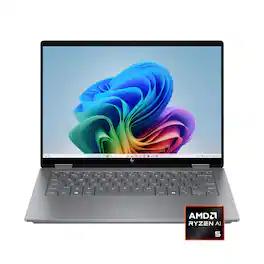
Let creativity reign with the HP OmniBook X Flip 14 Next Gen AI PC. With 4 versatile modes, this thin and light Next Gen AI PC enables you to work and play from anywhere, at any angle. AI-boosted power and speed, along with an all-day, fast-charge battery, keeps you going. While a 2K IPS touch screen provides the best possible view.

The future has arrived with HP OmniBook X Flip 16 Next Gen AI PC. Whether you want to be entertained or finish creative work, this AI-powered PC has the processor speed and performance to make it happen. Engineered with a dazzling 16" display and the ability to view it flat, folded, or flipped, you can enjoy vibrant, high-contrast colors in any angle that suits your mood. Made from sleek, recycled metal and designed with a backlit keyboard with large keycaps, your future PC is bright.

Take your creativity to go with the thin and light HP OmniBook X Flip 14 Next Gen AI PC. Multiple modes enable you to work and play from any angle, while a high-resolution edge-to-edge 2K multitouch-enabled display makes every view crisp and clear. An AI-powered Intel Core Ultra processor and an all-day, fast-charging battery ensures that you have the speed, performance, and endurance to create wherever you are. Copilot+ PCs bring exclusive on-device AI experiences designed to accelerate productivity and creativity.
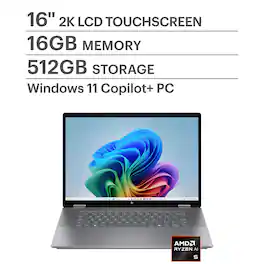
The future has arrived with HP OmniBook X Flip 16 Next Gen AI PC. Whether you want to be entertained or finish creative work, this AI-powered PC has the processor speed and performance to make it happen. Engineered with a dazzling 16" display and the ability to view it flat, folded, or flipped, you can enjoy vibrant, high-contrast colors in any angle that suits your mood. Made from sleek, recycled metal and designed with a backlit keyboard with large keycaps, your future PC is bright.
| Pros for HP - OmniBook X Flip 2-in-1 - Copilot+ PC - 14" 2K Touch-Screen Laptop - AMD Ryzen AI 5 340 2025 - 16GB Memory - 512GB SSD - Meteor Silver | |||
|---|---|---|---|
| Overall Performance, Portability, Battery Life, Touchscreen, Processor Speed | Overall Performance, Portability, Speed, Battery Life, Touchscreen | Overall Performance, Portability, Speed, Battery Life, Design | Overall Performance, Portability, Speed, Battery Life, Screen Size |
| Cons for HP - OmniBook X Flip 2-in-1 - Copilot+ PC - 14" 2K Touch-Screen Laptop - AMD Ryzen AI 5 340 2025 - 16GB Memory - 512GB SSD - Meteor Silver | |||
| Heat Dissipation | Weight, RAM | Heat Dissipation, Noise Level, Facial Recognition | Weight, Heat Dissipation, RAM, Keyboard Layout |
Specs

Reviews
Customers are saying
Customers have good things to say about the OmniBook X Flip 2-in-1 laptop, particularly its overall performance, brilliant screen quality, and awesome processor speed. The laptop's portability and impressive battery life are also appreciated. The only concern mentioned by customers is that the laptop gets pretty hot.
- Overall Performance (163)
- Portability (79)
- Battery Life (60)
- Heat Dissipation (6)
Customer Images
The vast majority of our reviews come from verified purchases. Reviews from customers may include My Best Buy members, employees, and Tech Insider Network members (as tagged). Select reviewers may receive discounted products, promotional considerations or entries into drawings for honest, helpful reviews.
- Rated 5 out of 5 stars
I LOVE my HP Omnibook!
I am in LOVE with my new HP OminBook! It's just the right weight and size, and I love that it flips over! That makes it GREAT for traveling! I also love that I've made my Apple using daughter a little jealous with my touch screen! I looked at numerous options and this is the perfect laptop!
AJDD Posted
- Rated 5 out of 5 stars
Excellent Daily Use Laptop
This laptop works excellent for me. I genuinely have yet to run into a single issue while using it. The touchscreen/tablet mode works exactly like you would want it to, the speed of this laptop is enough for most video games and daily work usage, and the battery life is almost always good enough for what I use it for. Being a college student that often needs to take notes, complete assignments, and procrastinate, it does everything I need it to.
This review is from HP - OmniBook X Flip 2-in-1 - Copilot+ PC - 14" 2K Touch-Screen Laptop - AMD Ryzen AI 5 340 2025 - 16GB Memory - 512GB SSD - Meteor Silver
CameronH Posted
- Rated 5 out of 5 stars
Affordable 2-in-1 laptop w/12-hr battery life
Executive summary: I have been looking for a 2-in-1 laptop with a long battery life, and this laptop fits the bill. It's rather light (3.1 lbs), has a large enough screen (14"), and can flip transform between the laptop and tablet modes. I wanted the laptop mode to type conveniently. I also wanted a tablet mode, so I could write on the screen with a stylus. CPU: The CPU is snappy, and I have not noticed significant lags or stutter. However, the Windows 11 system is heavy, so even with this CPU you'll find yourself waiting for the apps to start. Funny enough, when I do the same things on my Samsung Galaxy Tab S10 Ultra, I don't see as much lag, because Android is lighter on the system. Keyboard: Keyboard has a nice backlight and has an unusual design that does not leave any space between the keys. This is convenient when using the laptop in the tablet or stand mode (with the keyboard facing down). It takes some time getting used to, but once I did, I enjoyed the keyboard. The keys have substantial travel, and the keyboard is comfortable to type for long periods of time. Touchpad: The touchpad does its job well, although it's not the largest nor the most comfortable. Battery: The battery life is solid, and consistently gives you 12 hours on a single charge. There are several power profiles, and I found that both the "best battery efficiency" or the new snappier "AI" (where the laptop automatically picks the power settings based on the usage) profiles both give me 12 hours of light work (Citrix Workspace). Somewhat surprisingly, the battery time remaining function is disabled on Windows 11 out of the box. Once I enabled it, it became clear why it was disabled: the time remaining under-estimates the remaining time by a factor of 2. Display The laptop has an LCD display with 1920x1200 resolution. This is slightly higher than the HD resolution. Windows ClearType helps to make the fonts readable at smaller font sizes, although I recommend higher resolutions if you consistently need to work with small fonts. There is backlight leakage around the edges, especially -- in my case -- near the top left corner: see the attached photo. The backlight leakage is noticeable during startup, when the hp logo shows up. You can also see it when showing black screen in PowerPoint, which is what I did to take the attached photo. However, I have not been noticing it in day to day use. If you care about color reproduction, then I recommend that you go for a higher-resolution OLED display version: on HP's website, the OLED upgrade is $100, however, the shipping times are much longer than through BestBuy. Stylus: The stylus is sold separately, and HP makes it hard to figure out which one is compatible with this laptop. Although the maintenance manual recommends HP Active Rechargeable Tilt Pen MPP 2.0, this pen is inferior to the more recent HP 700 Multi-Pen. HP Active Rechargeable Tilt Pen MPP 2.0 pen magnetically attaches to the right side of the keyboard. However, whoever designed the laptop-pen combination was not thinking straight: once magnetically attached, the pen fools the laptop's lid magnetic sensor into thinking that the laptop lid is closed, and the display shuts off. To make matters worse, the tip of the pen blocks the headphone jack. You *could* attach the pen further away from the display hinge and avoid these problems, but then the attachment feels rather flimsy, and I worry about losing the pen. The pen itself is nothing to write home about: when I write, it skips from time to time, which makes for a frustrating writing experience. HP 700 Multi-Pen is more sensitive (so it does not skip when you write on the screen) and has a spring-loaded tip, which makes writing much more comfortable. Still, the quality of writing is not as good as on Samsung Galaxy Tab series tablets. However, if you are not planning to spend hours writing on the screen, the tablet will do an okay job.
Sasha Posted