Wacom - Intuos Graphic Drawing Tablet for Mac, PC, Chromebook & Android (Medium) with Software Included (Wireless) - Black
Wacom - Intuos Graphic Drawing Tablet for Mac, PC, Chromebook & Android (Medium) with Software Included (Wireless) - Black
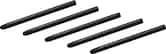
- Wacom - 4K Pen - Black$30.95The price was $47.00

More Buying Options

Specifications
- Screen Size0 inchesActive Area8.5 x 5.3Total Storage Capacity0 gigabytesWireless ConnectivityBluetoothBattery ChemistryLithium-ionPressure Levels4096
- Key Specs
- Screen Size: 0 inches (Size of the screen, measured diagonally from corner to corner.)
- Active Area: 8.5 x 5.3 (The size of the screen area that a user interacts with, either by stylus and/or touch (if supported).)
- Total Storage Capacity: 0 gigabytes
- Wireless Connectivity: Bluetooth (The manner in which a device sends data to another device over a short distance without the use of wires or cables.)
- Battery Chemistry: Lithium-ion
- Pressure Levels: 4096 (Allows the device to recognize different pressures from a compatible pen or stylus, which may control line thickness, opacity, or color. The more pressure levels, the more responsive the pen will feel.)
- General
- Brand: Wacom
- Model Number: CTL6100WLK0
- Product Name: Intuos Graphic Drawing Tablet for Mac, PC, Chromebook & Android (Medium) with Software Included (Wireless)
- Color: Black
- Year of Release: 2018
- Display
- Screen Size: 0 inches (Size of the screen, measured diagonally from corner to corner.)
- Stylus Input: Active (Electromagnetic Resonance) (An active stylus/pen is able to communicate directly with a compatible device; active electromagnetic resonance (EMR) pens are powered via a device's screen and active electrostatic (AES) pens require an additional power source. A passive stylus does not have electronic features and is compatible with most capacitative touch screens.)
- Graphic Resolution: 2540 lines per inch (The resolution generated by the device. The higher the resolution, the finer the detail that can be seen and reproduced.)
- Active Area: 8.5 x 5.3 (The size of the screen area that a user interacts with, either by stylus and/or touch (if supported).)
- Storage
- Total Storage Capacity: 0 gigabytes
- Compatibility
- Operating System Compatibility: Mac OS, Windows, Chrome, Android
- System Requirements: Windows 7 or later, Mac OS X 10.11 or later; Chromebook (devices running the latest Chrome OS), and Android smartphones/ tablets (OS version 6.0 or later); Easy plug-in via USB-A/Bluetooth: some devices require USB-C or OTG adapters; internet access (The software that a product must have for it to be able to integrate with another product.)
- Connectivity
- Wireless Connectivity: Bluetooth (The manner in which a device sends data to another device over a short distance without the use of wires or cables.)
- Interface(s): USB-A (Refers to the types of connections that devices use to interact and communicate with each other.)
- Power
- Charging Interface(s): USB-A (The connection for transmitting power to charge the device.)
- Battery Life (up to): 15 hours (Battery life will vary depending on the product configuration, product model, applications loaded on the product, power management setting of the product and the product features used by the customer. As with all batteries, the maximum capacity of this battery will decrease with time and usage.)
- Battery Capacity: 1265 milliampere hours (The amount of energy stored in the battery.)
- Battery Chemistry: Lithium-ion
- Features
- Pressure Levels: 4096 (Allows the device to recognize different pressures from a compatible pen or stylus, which may control line thickness, opacity, or color. The more pressure levels, the more responsive the pen will feel.)
- Number of Shortcut Keys: 4 (Allows for convenient access to frequently used software shortcuts.)
- Dimensions
- Product Height: 19.8 inches (The out of box height of the item. Height is measured as the vertical distance from the bottom of the item to the top as it would be primarily used or placed.)
- Product Width: 26.4 inches (The out of box width of the item. Width is measured as the horizontal distance from one side of the item to the other as it would be primarily used or placed.)
- Product Depth: 7.8 inches (The out of box depth of the item. Depth is measured as the distance from the front of the item to the back as it would be primarily used or placed.)
- Product Weight: 14.5 ounces (The out of box weight of the item.)
- Included
- Stylus Included: true
- Stylus Model Included: Wacom 4K Pen
- Stylus Stand Included: true
- Warranty
- Warranty - Parts: 1 year
- Warranty - Labor: 1 year
- Other
- UPC: 753218986832
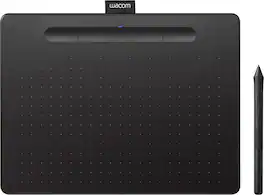
Step up to serious digital creation with the Wacom Intuos Medium Wireless drawing tablet. Featuring a spacious medium active area and Bluetooth connectivity to your computer, this graphics tablet gives aspiring artists and dedicated hobbyists the room and cord-free comfort to create with confidence. The pressure-sensitive battery-free pen delivers the reliable precision Wacom is known for - smooth, jitter-free lines with consistent pressure response. Work wirelessly or switch to wired mode for ultimate flexibility. Included downloadable software worth over $240 features 2 years of Clip Studio Paint Pro, 12 months of Boris FX Optics, and professional training resources. Four customizable ExpressKeys and a paper-like drawing surface streamline your workflow for illustration, photo editing, and digital painting. Certified Works with Chromebook and compatible with Windows, Mac, and all major creative apps. Backed by Wacom’s 40+ years of industry leadership - the reliable choice for creators ready to take their work seriously.
- COMPLETE CREATIVE STARTER KIT:: Register your Intuos tablet and gain access to some of the best creative software and online training.
- NATURAL, PRECISE DRAWING EXPERIENCE:: Battery-free pressure-sensitive Wacom EMR technology delivers accurate control with no charging or batteries needed - just pick up the pen and draw with instant response and true-to-life precision.
- PERFECT FOR BEGINNERS & EDUCATION:: Easy setup gets you drawing in minutes on Windows, Mac, or Chromebook; ideal for drawing, sketching, photo editing, design, and classroom use.
- SPACIOUS & COMFORTABLE:: Lightweight design with a paper-like drawing surface and 4 customizable ExpressKeys for instant access to your favorite shortcuts; medium size provides comfortable room for sweeping brush strokes & detailed illustrations.
- CLUTTER-FREE WORKSPACE WITH BLUETOOTH:: Connect wirelessly to your computer via reliable Bluetooth - no cable draped across your desk; Create comfortably without cord management hassles, or switch to wired mode when preferred.
- RELIABLE PERFORMANCE:: Wacom's proven reliability works seamlessly with your computer – no driver headaches, mysterious disconnects, or frustrating "why isn't this working?" moments common with cheaper alternatives.
- READY FOR YOUR FAVORITE SOFTWARE:: Works seamlessly with all major creative applications such as Photoshop, Painter, Krita, Affinity, Sketchbook and more.
Whats Included
- 3 replacement pen nibs
- Nib removal tool
- Quick start guide
- Regulation sheet
- USB cable
- Wacom Intuos Wireless Graphic Drawing Tablet (Medium) with Bonus Software included
- Wacom Pen 4K
Product Manuals
Q: so if it's wireless, what's the usb for??
A: If you do not have a Bluetooth connection to your computer then you will need to use the USB cord. Also, the USB cord is needed to charge the internal battery in the tablet.
A: Hello there, than you for asking. I'd like to clarify that the Intuos tablet doesn't have a screen, this is a pen tablet input device that sits next to your keyboard and needs to be connected to a computer to work. When you use the pen inside the active area of the tablet this one maps to the screen you have for your computer. That said, if he's getting started and you would like for him to work directly on a screen, then I would recommend to consider/explore the Wacom One as that is a Pen Display tablet. You can see it from here > https://www.bestbuy.com/site/wacom-one-13-3-graphics-tablet-flint-white/6393542.p?skuId=6393542 - Note that a computer is also nedeed. Hope that helps. Best!
Q: Just wondering, why is it more than double the cost of the smaller version?
A: The smallest version comes in two varieties, wired and wireless. The wired version is less than the wireless. The small wireless version is half the cost of the medium size. All of the medium sized tablets are Bluetooth wirelesss. The extra room you have on the medium size allows you to work on larger pictures and is well worth the extra price.
Q: Will it work with windows 10
A: Yes, my daughter uses this on Windows 10.
Q: Do you still have the option to connect directly via usb? My desktop at home doesn't have Bluetooth.
A: My tablet is connected via USB and works perfectly...
Q: does it work with power point and other MS office products ?
A: Thank you for the question. Yes, the Wacom Intuos tablet does work with MS Office software as well as a lot of other software programs.
A: Hello and thank you for reaching out about using the Wacom Intuos tablet to capture handwriting into a SVG file. Any of the applications mentioned will work. However, there is free software from Wacom such as Inkspace as mentioned, that will work just fine. Hopefully that will answer your question.
Q: What year was this released?
A: 2018
Compare similar products
Step up to serious digital creation with the Wacom Intuos Medium Wireless drawing tablet. Featuring a spacious medium active area and Bluetooth connectivity to your computer, this graphics tablet gives aspiring artists and dedicated hobbyists the room and cord-free comfort to create with confidence. The pressure-sensitive battery-free pen delivers the reliable precision Wacom is known for - smooth, jitter-free lines with consistent pressure response. Work wirelessly or switch to wired mode for ultimate flexibility. Included downloadable software worth over $240 features 2 years of Clip Studio Paint Pro, 12 months of Boris FX Optics, and professional training resources. Four customizable ExpressKeys and a paper-like drawing surface streamline your workflow for illustration, photo editing, and digital painting. Certified Works with Chromebook and compatible with Windows, Mac, and all major creative apps. Backed by Wacom’s 40+ years of industry leadership - the reliable choice for creators ready to take their work seriously.

Transform your creative ideas into digital reality with the Wacom Intuos Small Wireless drawing tablet. Perfect for beginners and casual artists, this compact graphics tablet delivers reliable Wacom-quality precision at an accessible price. The battery-free pressure-sensitive pen provides natural, responsive drawing with no charging needed - just pickup and draw. Get started immediately with over $240 in included downloadable creative software and trials, including 2 years of Clip Studio Paint Pro and 12 months of Boris FX Optics. The paper-like surface texture and four customizable ExpressKeys make digital art, photo editing, and design feel natural and efficient. Cut the cord clutter with the Wacom Intuos Small Wireless drawing tablet. Featuring Bluetooth connectivity to your computer and wired mode, this graphics tablet eliminates cable management hassles while delivering reliable precision at your desk, dorm room, or home office. Certified to work with Chromebook and compatible with Windows and Mac, Wacom Intuos seamlessly integrates with Adobe, Corel, and all major creative applications. Backed by Wacom’s 40+ years of industry leadership, you’re choosing the same pen technology company trusted by professional studios worldwide - at a beginner-friendly price.

Transform your creative ideas into digital reality with the Wacom Intuos Small drawing tablet. Perfect for beginners and casual artists, this compact graphics tablet delivers reliable Wacom-quality precision at an accessible price. The battery-free pressure-sensitive pen provides natural, responsive drawing with no charging needed - just pickup and draw. Get started immediately with over $240 in included downloadable creative software and trials, including 2 years of Clip Studio Paint Pro and 12 months of Boris FX Optics. The paper-like surface texture and four customizable ExpressKeys make digital art, photo editing, and note-taking feel natural and efficient. Certified to work with Chromebook and compatible with Windows and Mac, Wacom Intuos seamlessly integrates with Adobe, Corel, and all major creative applications. Backed by Wacom’s 40+ years of industry leadership, you’re choosing the same pen technology company trusted by professional studios worldwide - at a beginner-friendly price.
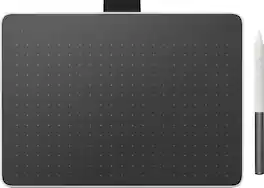
Say goodbye to traditional paper and hello to the digital canvas of the Wacom One tablet, Wacom One lets you express yourself with the natural feel of pen and paper with this compact drawing tablet. The Wacom One medium computer drawing pad is a gateway to the world of sketching, painting, or visually communicating your ideas. And this Bluetooth graphics tablet is compatible with PC, Mac, Chromebook, and Android devices, so you can effortlessly draw on your computer on any platform. This product works with devices capable of running the latest version of Chrome OS and has been certified to meet Google's compatibility standards. Google is not responsible for the operation of this product or its compliance with safety requirements. Chromebook, Android, and the Works with Chromebook badge are trademarks of Google LLC.
| Pros for Wacom - Intuos Graphic Drawing Tablet for Mac, PC, Chromebook & Android (Medium) with Software Included (Wireless) - Black | |||
|---|---|---|---|
| Ease of use, Quality, Size, Wireless, Drawing | Ease of use, Size, Wireless, Overall Performance, Price | Ease of use, Size, Quality, Drawing, Software | There were no pros for this product— |
| Cons for Wacom - Intuos Graphic Drawing Tablet for Mac, PC, Chromebook & Android (Medium) with Software Included (Wireless) - Black | |||
| Lag, Setup, Software, Compatibility, Learning Curve | Lag, Setup, Surface | Setup, Bluetooth, Sensitivity, Features, Screen | There were no cons for this product— |
Specs
Reviews
Customers are saying
Customers are impressed with the Intuos Graphic Drawing Tablet, particularly its ease of use, quality, and ideal size. Many appreciate the convenience of its wireless feature and find it suitable for drawing. Some customers have noted concerns about the software, compatibility, lag, learning curve, and setup.
Customer Images
The vast majority of our reviews come from verified purchases. Reviews from customers may include My Best Buy members, employees, and Tech Insider Network members (as tagged). Select reviewers may receive discounted products, promotional considerations or entries into drawings for honest, helpful reviews.
- Rated 5 out of 5 stars
Wacom-Intuos Graphic Drawing Tablet Review
As someone who was looking for a tablet that would provide a lag-free and user-friendly experience, I was drawn to the Wacom Intuos Drawing Tablet. And I must say, it has surpassed my expectations in every way. Right out of the box, I could tell that Wacom put a lot of thought into designing a tablet that's both functional and visually appealing. The sleek and slim profile makes it portable and aesthetically pleasing, but what really impressed me is the performance. The connectivity via Bluetooth ensures a clutter-free workspace, and the setup process was a breeze. The tablet was quickly recognized by my system, and I was able to get started without any unnecessary hassles. What sets this tablet apart is its responsiveness. I was eager to test the claim of a lag-free experience, and the Wacom Intuos delivered. Drawing, sketching, and illustrating felt fluid and natural, as if I was working with traditional media. The pressure sensitivity is on point, allowing for precise control and a wide range of artistic expressions. The learning curve was surprisingly minimal. The included software and tutorials were helpful in getting acquainted with the tablet, but even without them, the intuitive interface makes navigation and customization easy for both beginners and professionals. Battery life is also commendable. I can work for long hours without worrying about constantly recharging the tablet. It's another aspect that adds to the overall ease of use and convenience. In conclusion, the Wacom Intuos Medium Bluetooth Graphics Drawing Tablet is a must-have for anyone looking to explore digital art or enhance their existing skills. Its combination of flawless performance, ease of use, and attractive design make it a valuable investment for artists of all levels. Whether you're a seasoned artist or just starting out, the Wacom Intuos offers a perfect blend of performance and simplicity. It has made my artistic endeavors more enjoyable and efficient, and I'm confident it will do the same for you. Highly recommended!
- Rated 5 out of 5 stars
Works with everything!
I am a structural engineer and do a lot of hand sketches at my office. Transitioning to work at home, I needed a good alternative medium to produce sketches digitally. This tablet did not disappoint. I can sketch in PDFs all day and produce decent quality mark ups without using hand sketches or scans. The tablet acts as a canvas of your monitor, the tablet edges become the monitor edges and can be adjusted for multiple screens as well. The pen tool acts as a mouse and is set to "left-click" when pressed down on the tablet. By hovering over the tablet without pressing, you can track your mouse pointer on screen without "clicking" anything. There are two buttons on the pen that can be set to various key commands for quick use while drawing, and 5 buttons at the top of the tablet that do likewise. For example, I set one of the pen buttons to shift so I can draw on top of my previous notations in PDF Xchange without accidentally grabbing and dragging them. All in all, this is basically a pen version of a mouse and although it may be used with higher end digital media and graphic design software, it can also be used with anything and everything you'd prefer a digital pen to a traditional mouse. Works great for me! Make sure you verify your computer has Bluetooth before buying, mine did not turns out so now here I am installing an Intel m.2 card and antenna to use this feature. This comes with a corded options, sobim still able to use it, but if you don't need Bluetooth you ought to invest in the cheeper model without the Bluetooth option. PS - the pen nubs wear out so you'll need more eventually. There are extra nubs inside the pen when you purchase it, so that's nice. The 3 free programs were a bit weird to install and I haven't used them yet, but did get them downloaded. Not a lot of negative stuff to say here, I'm super happy with the purchase and will be even more psyched when I get Bluetooth going.
Jono Posted
- Rated 5 out of 5 stars
Plugs and plays right out of the box
Plug-and-play functionality is exactly as advertised. The tablet automatically adjusts itself to the size of your screen. Its ability to detect fine differences in pressure is very handy in graphics programs that give different effects based on pressure. It has greatly improved my image processing capabilities.
IanW Posted