
IOGEAR - 2-Port Full HD KVM Switch with HDMI and USB Connections - Gray
IOGEAR - 2-Port Full HD KVM Switch with HDMI and USB Connections - Gray
FREE shipping to
More Buying Options
About This Item
- General
- Brand: IOGEAR
- Model Number: GCS32HU
- Product Name: 2-Port Full HD KVM Switch with HDMI and USB Connections
- Color: Gray
- Features
- Selector Switch Box Type: KVM Switch
- Connectivity
- Input(s): 2 x HDMI, 1 x USB-A
- Number of Inputs: 2
- Number of Outputs: 2
- Dimensions
- Product Height: 1.98 inches (The out of box height of the item. Height is measured as the vertical distance from the bottom of the item to the top as it would be primarily used or placed.)
- Product Width: 8 inches (The out of box width of the item. Width is measured as the horizontal distance from one side of the item to the other as it would be primarily used or placed.)
- Product Depth: 2.55 inches (The out of box depth of the item. Depth is measured as the distance from the front of the item to the back as it would be primarily used or placed.)
- Warranty
- Warranty - Parts: 3 year limited
- Warranty - Labor: 3 Year Limited
- Other
- UPC: 881317520722
The 2-Port Full HD KVM Switch is plug-and-play. And all the cables you need are included. The KVM shows which computer you are using with a light on the unit (either PC1 or PC2). Toggling between two HDMI computers is as easy as clicking the remote port selector button allowing the user to multitask with two computers. Place the 6 ft remote port cable behind your computer set-up so the selector button can be placed on your desk for easy reach.
- HDCP: Watch any HDCP certified content
- Full HD: Full HD video quality up to 1920x1200@60Hz
- Connections: One USB keyboard, USB mouse, and HDMI monitor controls two HDMI computers
- Plug-n-Play: Plug-n-Play monitor support
- Compatibility: Compatible with PC and MAC operating platforms
- No Software Drivers Required: Simply connect the cables to the computers
- 6 Ft Remote Controller Cable: Computer selection via 6 ft remote controller cable that can be placed on your desk for easy reach
- Operating Systems: Windows 7, 8.1, 10, 11 Mac OS 9 to 10.x Linux, Unix and other USB supported systems *Additional drivers and support may be needed
Whats Included
- 1 x GCS32HU 2-Port Full HD KVM Switch with HDMI and USB Connections
- 1 x Quick Start Guide
- 1 x Warranty Card
Product Manuals
Q: How long is the remote controller cable for this KVM switch?
A: The remote controller cable for this KVM switch is 6 feet long.
Q: Does this KVM switch require a power adapter?
A: No, this KVM switch does not require a power adapter.
Q: Is this KVM switch compatible with Mac computers?
A: Yes, this KVM switch is compatible with both PC and Mac operating platforms.
Q: What is the maximum video resolution supported by this KVM switch?
A: This KVM switch supports Full HD video quality up to 1920x1200@60Hz.
Q: How do I switch between computers with this KVM switch?
A: You can easily switch between two HDMI computers by clicking the remote port selector button.
A: undefined
Q: Will this allow the 2 computers to also share a single keyboard and mouse ?
A: Yes it does allow for sharing of on keyboard and mouse.
Reviews
Customer Images
The vast majority of our reviews come from verified purchases. Reviews from customers may include My Best Buy members, employees, and Tech Insider Network members (as tagged). Select reviewers may receive discounted products, promotional considerations or entries into drawings for honest, helpful reviews.
Compare similar products

The 2-Port Full HD KVM Switch is plug-and-play. And all the cables you need are included. The KVM shows which computer you are using with a light on the unit (either PC1 or PC2). Toggling between two HDMI computers is as easy as clicking the remote port selector button allowing the user to multitask with two computers. Place the 6 ft remote port cable behind your computer set-up so the selector button can be placed on your desk for easy reach.
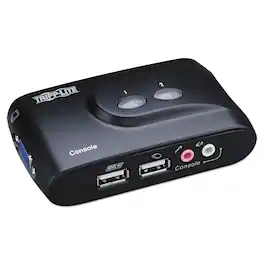
Control two computers through one keyboard, monitor and mouse. This self-powered switch requires no AC adapter. Speaker and microphone connections allow you to share audio components between computers, while independent switching provides an uninterrupted flow between machines. Operate the switch via hot keys, software or buttons on switch. Compact design saves desk space and compatible with all major operating systems.

One of the most compact KVMs IOGEAR has to offer, the 2-Port 4K KVM Switch with HDMI Connection, USB and Audio is for users with two computers using one monitor, keyboard and mouse. It is perfect for a home office or small to medium-sized business that need to conserve workspace and streamline desktop setups. The 2-Port 4K KVM Switch is plug-and-play. And all the cables you need are included. Easily switch between two computers with a touch of the remote button on your desktop. The KVM shows which computer you are using with a light on the unit. Additionally, the KVM was designed with a hook design for a space-saving and organized workstation.
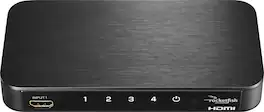
Quickly select which device to use with your TV using this Rocketfish four-port HDMI switch. The quartet of ports lets you connect a wide variety of devices to a single TV so that you can seamlessly switch between them using the remote. 4K 60Hz video compatibility ensures powerful images straight from this Rocketfish four-port HDMI switch.
| Pros for IOGEAR - 2-Port Full HD KVM Switch with HDMI and USB Connections - Gray | |||
|---|---|---|---|
| There were no pros for this product— | There were no pros for this product— | There were no pros for this product— | Ease of use, HDMI, Performance, Compatibility, Setup |
| Cons for IOGEAR - 2-Port Full HD KVM Switch with HDMI and USB Connections - Gray | |||
| There were no cons for this product— | There were no cons for this product— | There were no cons for this product— | Remote Control, Price, Auto Switch, Picture Quality, Input Switching |