Samsung - 27" Odyssey OLED G5 (G50SF) QHD 180Hz 0.03ms G-Sync & FreeSync Compatible Glare Free Gaming Monitor - Black
More Buying Options
Related Item

Highlights
Compare similar products
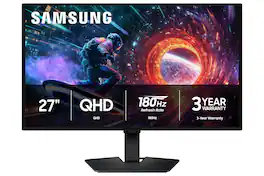
Samsung’s 27" Odyssey OLED G5 QHD Gaming Monitor delivers hyper-real visuals and lightning-fast action for exhilarating gameplay, and QD-OLED with QHD resolution provides unmatched picture quality and produces the highest levels of color accuracy and brightness. OLED Safeguard keeps the screen cool by actively helping to prevent burn-in with a Thermal Modulation System, Logo and Taskbar Detection, and Screen Saver while 3-year warranty protects the monitor for the long haul. Glare Free technology enables uninterrupted gaming as it keeps the screen clear of reflections from external light sources. The Pantone Validated screen accurately reproduces 2100+ colors for more immersive gameplay, while HDR10 provides brighter highlights and nuanced shadows for added depth. 180Hz Refresh Rate and 0.03ms (GtG) response time enables fast reactions for ultra-smooth gaming, plus G-Sync compatibility along with AMD FreeSync™ reduces choppiness, screen lag, and image tearing. Black Equalizer improves visibility in shadows, and Virtual Aim Point increases accuracy. Auto Source Switch+ allows instantaneous switching between connected devices.

The Q27G41ZDF delivers lightning-fast 240Hz refresh rates, 0.03ms GtG pixel response, and low input lag for ultra-responsive gameplay. The ultra-responsive QD-OLED panel and 10-bit color space provides sharp visuals with unbelievable contrast and vibrant colors, while the NVIDIA G-SYNCA Compatible AdaptiveSync and HDR ready panel enhances clarity and fluidity. Built for eSports, its stable base ensures a solid setup for intense matches.
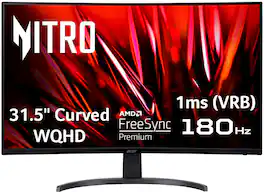
Acer's EDB323QU 31.5" curved panel monitor with WQHD resolution delivers the incredible. Crisp, true-to-life colors come alive with the amazing 2560 x 1440 resolution, allowing you to enjoy High-Definition entertainment in the comfort of your home. The wide view angle technology lets you share what's on your screen with friends and family as colors stay true no matter what angle you're viewing from. Crisp, true-to-life colors come alive with the amazing 2560 x 1440 resolution, allowing you to enjoy High Definition entertainment in the comfort of your home. Through AMD FreeSync Premium technology, the game’s frame rate is determined by your graphics card, not the fixed refresh rate of the monitor, giving you a serious competitive edge. Smooth, tear-free gameplay!! And a whole lot more.
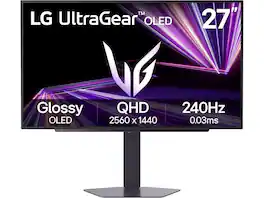
LG 27GX704A-B 27-inch Ultragear QHD (2650x1440) OLED Gaming Computer Monitor 240Hz, 0.03ms, NVIDIA G-Sync Compatible, AMD FreeSync Premium Pro, VESA Display HDR TrueBlack400, HDMI 2.1, DisplayPort
| Pros for Samsung - 27" Odyssey OLED G5 (G50SF) QHD 180Hz 0.03ms G-Sync & FreeSync Compatible Glare Free Gaming Monitor - Black | |||
|---|---|---|---|
| There were no pros for this product— | Overall Performance, Refresh Rate, OLED Quality, Black Levels | Overall Performance, Refresh Rate, Screen Size, Resolution, Price | There were no pros for this product— |
| Cons for Samsung - 27" Odyssey OLED G5 (G50SF) QHD 180Hz 0.03ms G-Sync & FreeSync Compatible Glare Free Gaming Monitor - Black | |||
| There were no cons for this product— | Brightness, Connectivity, Size | Stand | There were no cons for this product— |
Specs
Reviews
Customer Images
The vast majority of our reviews come from verified purchases. Reviews from customers may include My Best Buy members, employees, and Tech Insider Network members (as tagged). Select reviewers may receive discounted products, promotional considerations or entries into drawings for honest, helpful reviews.
- Rated 5 out of 5 stars
This QD OLED Monitor is worth the Hype
I was excited to get my gaming on with the Samsung 27" Odyssey OLED G5 QHD gaming monitor. It's entry level, so it's affordable, but it's loaded with a QHD 2560x1440 panel, a 180Hz refresh rate (perfect for gaming), and an extremely fast .03ms response time. I've had a chance to spend a considerable amount of time gaming, movie nights, and general productivity and web surfing so here's what I've experienced. - Unboxing - The box is compact for a 27" monitor but well protected. You get the monitor panel, the base stand, the neck of the base, an external power brick, a display port cable, an HDMI cable, and a quick start guide. The monitor also has a peel away protective film protecting it from scratches or dust during shipping. Assembly is simple and quick. the stand snaps together and attaches to the back of the panel with two easy screws and a thumbscrew that's typically included with monitors. - Design & Build - Samsung went with a black matte classic look here with super thin bezels on the side if you want to add additional monitors. The build quality feels solid. There is a tilt up and down but not left to right or up and down and it sits low profile, however there's a 100 x 100 VESA Mount so it's easy to attach an arm if you want. There is nothing to indicate gaming here such as RGB or design accents, so I can see how it can be used for work or play. The base is small enough that it preserves space on your desk. It has a small area in the back you can run your cables through. There are 4 ports on the back of the monitor and no speakers: Display, HDMI, USB, Headphone/Mic jack. There's a basic joystick underneath the bottom center Samsung logo that triggers the OSD. There's an input button and up/down/left/right. You will also notice the monitor is glare free. There's a special coating that reduces the glare. I've often had OLEDs that are glossy and have issues with reflections, this one is remarkably free of reflections. Overall, the design is clean and minimal. - Specs & Features - The Samsung OLED G5 G50SF has a QD-OLED panel with 26.5 viewable area, 2560x1440 QHD resolution. It runs at 180Hz over DisplayPort 1.4 and 144Hz over HDMI 2.0. The gray to gray response time is .03ms. I would recommend using the DisplayPort while gaming to get the maximum refresh rate of 180Hz, although if you're hooking it up for console gaming 144Hz over HDMI is more than enough. NVIDIA G-Sync and AMD FreeSync are both supported. Color performance is excellent. For content creators there is 99% DCI-P3 coverage with 10-bit color depth and it's also pantone color validated. Brightness is 200 nits so it's lower than what I'm used to but it's surprisingly adequate indoors, plenty bright. Sometimes brightness is just a number but visually what you're actually seeing is all that matters and I can tell you this is a beautiful monitor, vibrant and bright. HDR10 is supported, and peak brightness will be even higher for HDR highlights. One standout feature is a Samsung 3-year warranty which gives me some peace. There are a handful of picture presets that have settings for movies, gaming (FPS & RPG), entertainment, and content creation among others. A few more notable features are the black equalizer to enhance visibility during games in dark areas. Virtual aim point gives you an on-screen crosshair overlay, and Auto Source Switch swaps between connected devices automatically. There are also some OLED specific features like Panel OLED care settings to help preserve the monitor. - Performance - This is where the G50SF stands out. The moment you begin playing a fast-paced FPS, the OLED really shows its strength. The .03ms response time isn't just marketing, QD-OLED pixel transitions are instant. Ghosting and smearing are essentially non-existent on this monitor. Most important to me, the motion clarity is exceptional (clarity is important to me because sometimes I can get a little dizzy while gaming if the motion clarity isn't super smooth). Every frame looks clear. With G-SYNC active, I didn't witness any tearing or stuttering. For competitive gaming this panel performs well. The response time and input lag are excellent, and the QHD is the sweet spot for most GPUs providing a sharp image without the requirements that 4K can demand. The true blacks on movies or games (especially the horror games) look incredible. Since the pixels shut off completely for blacks the contrast ratio is just about infinite. Watching anything with high contrast, like Sci-Fi movies is visually stunning. The glare free coating is great for daytime use. You won't get that overhead light or window glare that periodically occurs. - Pros/Cons - *Pros - Exceptional colors and accuracy - True blacks - Almost infinite contrast - Image quality is outstanding - Motion clarity is super smooth - Lightweight and easy to setup *Suggestions/Needs Improvement - Stand is tilt only, no height adjustment - No speakers - No additional USB Hub - Power brick is more clutter The Samsung Odyssey OLED G5 G50SF is an affordable OLED monitor that gets the important thing right. The image quality is impressive, the colors are vibrant, the blacks are perfect, and the motion clarity is excellent. For gamers, this is top tier performance. 99% DCI-P3 coverage and Pantone validation is equally impressive for content creators. There are a few things that would be nice adds but Samsung clearly focused on the core display experience and minimized unnecessary costs elsewhere. If you're a PC gamer using DisplayPort this monitor is easy to recommend. You're getting QD-OLED quality that focuses on the parts that matter. I've genuinely enjoyed gaming, movies, and content creation on this monitor and I would recommend it to anyone.
NanoEthan Posted
- Rated 5 out of 5 stars
Impressive, Responsive, and Affordable
I've had the Samsung 27" OLED G5 (G50SF) monitor for about a week, using it to game with my PC, and Playstation 5. My first thought when I took it out of the box was, Wooo! This thing is so light. Even with its included stand, the monitor is very light. I would say probably about 8 pounds. It has a very simple / no frills design. No RGB lights, No fancy logos or labeling. Just a nice solid black design. Build quality is pretty good. My only complaint about its design and build is that the stand is not height adjustable. You can only tilt the monitor back and forth. The stand is very light and easy to connect the monitor with a standard Phillips screw driver. There is no speakers on the monitor, so you'll need to connect some speakers wirelessly with your computer, or use the 3.5mm headphone jack on the back of the monitor. The display on this monitor is quite impressive. It has amazing contrast and color saturation. The colors just POP with this display. It is 2560x1440 resolution, 180hz refresh rate and 1,000,0000 : 1 contrast ration. This monitor is not very bright though, I think its rating is 300 nits, some sites claim it is 200 nits, To my eyes, it looks like it is closer to 300 nits. Translation.. It is not very bright. Some might be disappointed by that. Personally, I never put my displays at their max brightness, but with this monitor.. you'll have to keep it at 100% brightness. Even at its brightest setting, I had to go into my game settings and adjust the brightness a little to make it slightly brighter. It is not a deal breaker, but for competitive shooting games, low brightness might make it harder to see your opponents when they are hiding in shadows or dark areas. Personally, I don't play competitive shooters that often, so I don't need to blow out the shadows to reveal hidden players. I really like the color saturation and fast response times this monitor has, so the lower brightness is a small but worthwhile trade off for me. The monitor has an anti reflective coating which really helps prevent reflections when playing with lights above or behind you. A nice added feature, especially if you have a bright bedroom or a window near your setup. The monitor has 1 HDMI port, 1 Display Port, 1 USB port, and 1 Aux input port. Plenty of ports for your setup. At the end of the day.. I have to say that I really enjoy gaming on this monitor. I feel like a 27" monitor is the sweet spot for desktop gaming. Not too big, not too small. The OLED screen is beautiful and very responsive. I really like this monitor, and I think at this price point it is hard to beat. Like I said before, I just wish it was a Liiiiiitle bit brighter. But overall I love it, and I would recommend this monitor to anyone looking for an affordable and impressive OLED monitor.
Ponskippa Posted
- Rated 5 out of 5 stars
Premium monitor for gamers on a budget
A few years back, Samsung released their latest innovation, the QD-OLED panel. At launch, the technology was super expensive but set a high standard for color accuracy and brightness. Enter the Samsung 27-inch Odyssey OLED G5 G50SF. What's neat about this latest version of the G5 27 inch is that Samsung has opted to use an QD-OLED panel. Previous G5 versions have been and IPS or VA panel. This is a nice upgrade, but it does come with some trade-offs since this model is for more of the budget conscious buyers. I own both IPS and QD-OLED monitors from Samsung, and my favorite by far is QD-OLED panel due to the color accuracy and input times while gaming. Display And Build The monitor’s QD-OLED panel is beautiful. The colors pop out, and the black levels are really good. The brightness is perfect for my setup as I don't have much natural light in my office. 1440p at 27 inches is the sweet spot for my gaming setup as well. The monitor is capable of reaching 180Hz refresh rate for hard-core gamers with minimal lag input. My only gripe is the overall build quality. It seems that Samsung opted to keep costs low and chose to use a standard plastic build. The stand is capable of tilting the monitor and that’s about all it can do, but this is understandable with cost in mind. I recommend using a mount if adjustments are needed. The matte panel is a plus in my book as well. This helps with reflections and this option only existed on the premium options some years back. Options As far as inputs, they are pretty standard. 1 HDMI, DisplayPort, 3.5mm input and USB-A are all available for use. The USB is for updating the software manually. Actually, an update was available when I checked the Samsung website. It was a simple process updating the firmware by USB. After performing the update, the monitor seemed to perform much better at motion handling. There are several options for gamers, such as adaptive-sync, black equalizer, and virtual aim-point options. One thing to keep in mind when installing the monitor, if you use a HDMI cable the max refresh rate will be 144Hz. Higher refresh rates will require a DisplayPort connection. I’m primarily using the monitor for work right now and it’s been a night and day difference from my IPS monitor. I’m really impressed with this monitor. Overall This monitor is a great option for gamers who want to game at high refresh rates while using a stunning QD-OLED panel at a reasonable price point. The plastic build and the lack of height and swivel options with the stand are trade-offs. This is can be easily fixed by adding a mount for the monitor. This monitor is perfect for my setup and my needs for my home office and gaming setup. It’s worth a look for sure.
kriserikka Posted