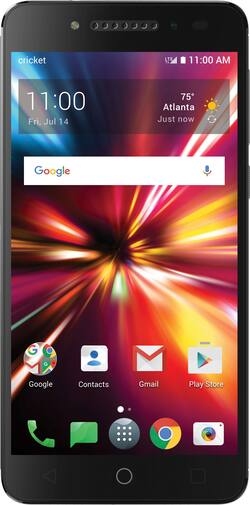
Alcatel - PULSEMIX with Power 4G LTE with 16GB Memory Prepaid Cell Phone - Black
- Key Specs
- Screen Size: 5.2 inches (Size of the screen, measured diagonally from corner to corner.)
- Rear-Facing Camera: 8 megapixels
- Processor Model: MT6738 (Your computer's processor is like its brain. Working in combination with system memory, the power of the processor determines the complexity of software you can run, how many programs you can have open at the same time, and how fast those programs will run. Most computers feature an AMD, Intel or Snapdragon processor.)
- Phone Memory (RAM): 2 gigabytes (Random-access memory (RAM) temporarily stores data so that it can be accessed quickly. The size of the RAM determines how efficiently the phone can handle large amounts of information at once, such as switching between several open apps.)
- General
- Product Name: Alcatel PULSEMIX with Power 4G LTE with 16GB Memory Prepaid Cell Phone
- Brand: Alcatel
- Model Number: DALK5002
- Display
- Screen Size: 5.2 inches (Size of the screen, measured diagonally from corner to corner.)
- Screen Resolution: 1280 x 720 (Screens come in a range of resolutions (measured in pixels, horizontal x vertical). The higher the resolution, the greater the picture quality.)
- Screen Type: TFT-LCD
- Camera
- Integrated Camera: Yes - Front and Back
- Front-Facing Camera: 2 megapixels
- Rear-Facing Camera: 8 megapixels
- Network
- Unlocked: false (Can be used with any carrier, typically by exchanging the phone's SIM card with another one compatible for the intended area of service. Can be used with a new or existing cellular service plan.)
- No-Contract: false (Can be purchased without committing to a contract with a cellular service provider. No-contract phones are only compatible with a specific carrier.)
- Mobile Hotspot Capability: true (A hotspot-enabled device is able to connect wirelessly to a cellular network and share the connection via Wi-Fi with nearby compatible devices.)
- 4G LTE Band: 1, 12, 2, 4, 5, 7
- Connectivity
- Headphone Jack: true (The device features an interface that allows for the connection of headphones.)
- Power
- Battery Capacity: 2800 milliampere hours (The amount of energy stored in the battery.)
- Wireless Charging: false
- Compatibility
- Charging Interface(s): USB Type C (The connection for transmitting power to charge the device.)
- SIM Card Size: Nano SIM
- Features
- Model Family: Alcatel Pulsemix
- Usage Time(s): Talk: up to 480 min; Standby: up to 560 hrs (All battery claims depend on network configuration and many other factors; actual results will vary. Battery has limited recharge cycles and may eventually need to be replaced. Battery life and charge cycles vary by use and settings.)
- Sensors: Accelerometer, Ambient light sensor, Compass, Proximity sensor (Detects stimuli such as heat, light, sound, motion, or pressure and responds accordingly by operating a control or initiating a function of the device.)
- Performance
- Operating System: Android 7.0 Nougat (The operating system manages all software and hardware, including files, memory and connected devices. Most importantly, it lets you interact with your device and your programs in a visual way; otherwise, you'd be typing computer code to get anything done.)
- Processor Brand: MediaTek
- Processor Model: MT6738 (Your computer's processor is like its brain. Working in combination with system memory, the power of the processor determines the complexity of software you can run, how many programs you can have open at the same time, and how fast those programs will run. Most computers feature an AMD, Intel or Snapdragon processor.)
- Processor Speed: 1.5 gigahertz (Actual central processing unit (CPU) speed may vary by device configuration and design. Also referred to as clock speed, this is how quickly the central processing unit (CPU) can receive and interpret instructions. The higher the number, the more operations per second that can be completed. Working in combination with system memory, the power of the processor determines the complexity of software you can run.)
- Phone Memory (RAM): 2 gigabytes (Random-access memory (RAM) temporarily stores data so that it can be accessed quickly. The size of the RAM determines how efficiently the phone can handle large amounts of information at once, such as switching between several open apps.)
- Storage
- Media Card Slot: microSD
- Other
- UPC: 711868002203
Connect to friends and family with this Alcatel Pulsemix smartphone for Cricket Wireless. It has an 8-megapixel rear camera and a 2-megapixel front camera for taking stunning selfies, and it comes with Android 7.0 Nougat, so it's ready for the latest Android apps. This 5.2-inch Alcatel Pulsemix smartphone has 16GB of internal memory for storing apps and media.
- Android 7.0 Nougat with more personalized settings and smarter notifications: Offers a fresh, fast platform to help you stay connected and productive while you're on the go.
- 4G LTE speed: Provides fast Web connection for downloading apps, streaming content and staying connected with social media.
- 5.2" HD touch screen display with Dragontrail Glass: High-definition touch screen with 1280 x 720 resolution displays texts, e-mails, games, photos and videos with clarity. Dragontrail Glass for added protection.
- Express your everyday mood with fun features like Color Catcher: Color Catcher coordinates your home screen and icons with your favorite colors.
- Power SNAPBAK included: Double the battery life of your smartphone.
Whats Included
- Cricket Wireless Alcatel PULSEMIX with Power 4G LTE with 16GB Memory Prepaid Cell Phone
- Power SNAPBAK
Q: I have Cricket already and will I need to pay an activation fee if I upgrade to this phone?
A: My local Cricket store advised me to purchase a new phone elsewhere as their available in-store phones were higher priced than retail stores like Best buy AND I would be charged an activation fee but if I bought a cricket phone elsewhere & brought it in to them there would be no activation fee. I did have to purchase a Sim card as the Alcatel Pulsemix I bought had a different size Sim and I wanted all my info transferred but was still much less expensive than the inflated price + activation
Q: Is this unlocked so as to where i can just pop my sim from cricket into it and it work?
A: It isn't unlocked, but it is a Cricket phone. Just put your Cricket Sim in and go
Q: I have a China Telecom Americas SIM card,can I use this SIM card?
A: No, you can't use the China Telecom Americas SIM card on this.
Q: Doesn't AT & T own Cricket ? Can I buy this phone and use it with my AT & T SIM card ?
A: Yes AT&T owns Cricket.I believe you can
A: Block Incoming Calls: Open “Contacts” Go to “All contacts” Select the phone number/contact you want to block Tap “Edit” > “Menu” and enable “All calls to voicemail” Unblock Calls: Launch “Contacts” Access “All contacts” Tap the contact you want to unblock Tap “Edit” > “Menu” Turn “All calls to voicemail” Off Block Messages: Launch Google Messenger Tap the conversation thread exchanged with the contact/phone number you want to block Tap “Menu” > “People & Options” Tap “Block [phone number]” > “OK” NOTE: The conversation thread and future messages from the blocked contact will be archived, and notification alerts are disabled for all archived items. Unblock Messages: Open Google Messenger Tap “Menu” Access “Archived” Select the conversation thread exchanged with the contact/phone number you want to unblock Tap “Menu” > “Unarchive” Press “Menu” again and access “People & Options” Tap “Unblock [phone number]” Enable Call Forwarding: Open “Phone” Tap “Menu” Go to “Settings” Tap “Call forwarding” (NOTE: this option might not be available if it isn’t supported by your carrier) Enter the phone number you want to use for call forwarding. Alternatively you can select a contact from the phonebook Tap “Enable” Enable Conditional Call Forwarding: Launch “Phone” Tap “Menu” > “Settings” Access “Call forwarding” Select to forward incoming calls “When unreachable”, “When unanswered” or “When busy” Enter or edit the phone number you want to use for call forwarding Tap “Update” / “Enable" to confirm Disable Call Forwarding: Open “Phone” Tap “Menu” Go to “Settings” > “Call forwarding” If necessary, tap the forwarding option you want to turn off Tap “Disable”
A: Yes. Just put your existing sim card in the new phone. It's that simple:)
A: yes it comes with a cricket sim
A: its the actual amount of total memory before any is used. remeber that it is part of the system software which includes the operating system which takes up almost and around 7 gigs in latest smartphones including android as well as windows. This is the minimum storage space requirement nowadays with mobile phones. In a nutshell... Operating system and preloaded apps take a fourth out of most phones... updates add to it