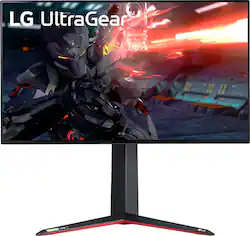
LG - 27" UltraGear UHD Nano IPS 1ms 144Hz G-SYNC Compatible Gaming Monitor with HDR (DisplayPort, HDMI, USB) - Black
- Key Specs
- Refresh Rate: 144Hz (The number of frames per second the device can produce natively without enhancement. Higher rates help produce smooth, seamless pictures.)
- Maximum Resolution: 3840 x 2160 (Maximum resolution refers to the highest number of pixels that a screen can process and display. Higher resolution signals produce more detailed images.)
- Response Time: 1 milliseconds (The speed at which pixels can change colors is called response time. It is measured in milliseconds (ms).)
- Panel Type: IPS (Technology that affects response time and image quality.)
- Synchronization Technology: G-SYNC Compatible (NVIDIA Adaptive Sync), FreeSync (AMD Adaptive Sync) (Generally, these technologies allow syncing between a computer/console game's frame rate and the device's refresh rate for a smoother display without tearing.)
- Screen Size: 27 inches (Size of the screen, measured diagonally from corner to corner.)
- Display Connector(s): 2 x HDMI, 1 x DisplayPort 1.4 (The number and type of connectors used to connect to an external display.)
- General
- Product Name: 27" UltraGear UHD Nano IPS 1ms 144Hz G-SYNC Compatible Gaming Monitor with HDR (DisplayPort, HDMI, USB)
- Brand: LG
- Operating System Compatibility: Not Applicable
- Model Number: 27GN950-B
- Color: Black
- Display
- Refresh Rate: 144Hz (The number of frames per second the device can produce natively without enhancement. Higher rates help produce smooth, seamless pictures.)
- Maximum Resolution: 3840 x 2160 (Maximum resolution refers to the highest number of pixels that a screen can process and display. Higher resolution signals produce more detailed images.)
- Contrast Ratio: 1000:1 (Measured difference between a displayed image's brightest whites and darkest blacks. The larger the first number, the more detail and color that can be displayed.)
- Response Time: 1 milliseconds (The speed at which pixels can change colors is called response time. It is measured in milliseconds (ms).)
- Display Type: LED
- Panel Type: IPS (Technology that affects response time and image quality.)
- Synchronization Technology: G-SYNC Compatible (NVIDIA Adaptive Sync), FreeSync (AMD Adaptive Sync) (Generally, these technologies allow syncing between a computer/console game's frame rate and the device's refresh rate for a smoother display without tearing.)
- Aspect Ratio: 16:9 (The measurement of the width of a screen compared to the height of a screen, expressed as a ratio.)
- Curved Screen: false
- Brightness: 400 candela per square meter (A measure of the total light output.)
- Screen Size: 27 inches (Size of the screen, measured diagonally from corner to corner.)
- High Dynamic Range (HDR): true (An HDR-compatible 4K TV or other HDR-compatible product displays HDR video content when it's available from sources like 4K Ultra HD Blu-ray Discs and 4K streaming services.)
- High Dynamic Range Format: VESA Certified DisplayHDR 600, HDR 10 (There are a few HDR formats that tell the TV or other HDR-compatible product how to best utilize its capabilities to display HDR content. HDR technology can support one or multiple formats, each with various benefits to picture quality.)
- Horizontal Viewing Angle: 178 degrees (The maximum angle at which the display can be viewed with acceptable visual performance from either side.)
- Vertical Viewing Angle: 178 degrees (The maximum angle at which the display can be viewed with acceptable visual performance from above or below.)
- Touch Screen: false (Touch-screen devices make navigating more intuitive. Using a touch-screen display, you can do things such as tap to select, hold and drag to move items, swipe to scroll, and pinch to zoom.)
- On-Screen Display Languages: English (The available language options for displayed text.)
- Connectivity
- Number of DisplayPort Inputs (Total): 1
- Number of HDMI Inputs (Total): 2
- Number of DVI Inputs: 0 (The number of digital cables carrying analog (VGA) video signals that can be connected to the product.)
- Number of Mini DisplayPort Inputs: 0
- Number of Thunderbolt Ports (Total): 0
- Display Connector(s): 2 x HDMI, 1 x DisplayPort 1.4 (The number and type of connectors used to connect to an external display.)
- Number of USB Ports (Total): 3
- USB Ports: 3 x USB-A 3.0 (The number and type of USB ports the product has.)
- Headphone Jack: true (The device features an interface that allows for the connection of headphones.)
- Compatibility
- Wall Mountable: true (The product is able to be secured to a wall. Some products are designed ready to mount, while others may require additional hardware/accessories for installation.)
- VESA Wall Mount Standard: 100mm x 100mm (VESA wall mount standards refer to the spacing of screw holes built into a TV in order to fit with standard TV wall mounts. These standards are implemented into most TVs and monitors.)
- Voice Assistant Built-in: Not Applicable (A digital assistant built into the device that uses voice commands to answer questions and control smart devices.)
- Features
- Tiltable: true
- Adjustable Stand Height: true
- Built-In Webcam: false
- Integrated Speaker(s): false
- Dimensions
- Product Height With Stand: 18.1 inches
- Product Height Without Stand: 13.9 inches
- Product Width: 23.9 inches (The out of box width of the item. Width is measured as the horizontal distance from one side of the item to the other as it would be primarily used or placed.)
- Product Depth (With Stand): 11.5 inches
- Product Depth Without Stand: 2.1 inches
- Product Weight: 16.9 pounds (The out of box weight of the item.)
- Stand Included: true
- Stand Width: 9.4 inches (The horizontal measurement of the stand/base, or the distance from the outside of one leg to the outside of the opposite leg, as it is attached to the product.)
- Power
- Power Consumption: 95 watts
- Power Saving/Off Mode: 0.5 watts (This mode will turn the display and/or the device off, or into a standby mode, after a preset length of time with no activity to conserve power.)
- Certifications Listings & Approvals
- ENERGY STAR Certified: false (Devices carrying the ENERGY STAR service mark, such as computer products and peripherals, kitchen appliances, and other products, generally use 20% to 30% less energy than required by federal standards.)
- EPEAT Qualified: false (The Electronic Product Environmental Assessment Tool (EPEAT) was designed to provide an environmental assessment tool for purchasers. In order to qualify for EPEAT, a product must meet all 23 required criteria.)
- Other
- UPC: 719192641495
High-performance, pro-level gaming. Even if you’re not a pro gamer, you’ll feel like one with LG’s 27” UltraGear monitor. The 1ms Nano IPS with UHD 4K resolution and VESA DisplayHDR 600, it combines color intensity and purity with ultra-fast 1ms response rates time and 144Hz refresh rate. Featuring custom gaming control, RGB sphere lighting, and NVIDIA G-SYNC compatibility with AMD FreeSync Premium Pro to minimize tearing and stutter — it's cutting-edge tech to give you the edge.
- 4K Nano IPS Gaming Monitor: LG UltraGear delivers an unparalleled immersive experience and ultra-fast speed of 144Hz on a 4K Nano IPS 1ms display.
- UHD 4K + Nano IPS + VESA DisplayHDR600: Nano IPS technology supports the express high-fidelity color for reproducing vivid scenes, while VESA DisplayHDR600 delivers dynamic contrast, on the large UHD 4K screen.
- IPS 1ms: Re-imagine every scene with vivid, responsive IPS. At 27" and 16:9 screen ratio (3840x2160), LG's UltraGear 4K Nano IPS Display features realistic, true color, enhanced contrast, clarity and detail, while delivering ultra-fast 1ms response rates. It's the best of both worlds.
- 144Hz Refresh Rate: Total Immersion with Overwhelming Speed. The 144Hz refresh rate monitor combined with a 1ms response rate offers smoother, clearer action while reducing blur and ghosting.
- NVIDIA G-SYNC® Compatible: LG 27GN950 Monitor is a NVIDIA-tested and officially verified G-SYNC® compatible monitor, reducing screen tearing and minimizing stutter for a smoother, faster gaming experience.
- AMD FreeSync™ Premium Pro: With FreeSync™ Premium Pro technology, gamers can experience seamless, fluid movement in hi-resolution and fast-paced games, It virtually reduces screen tearing and stuttering.
- Sound Sync Mode & Video Sync Mode: RGB Sphere Lighting 2.0 draws you deeper into the game with Sound Sync mode. The Video Sync mode in the RGB Sphere Lighting 2.0 lights up according to the game visuals for a fully immersive experience.
- Stylish Design: Designed For A Comfortable Gaming Experience. Customize your battle station in seconds. Raise, lower, tilt, pivot - the stand has a flexible ergonomic design to easily adapt to your environment and gaming style.
- Creative Work Atmosphere: This hardware calibrated monitor with 4K resolution covers 98% of DCI-P3 color gamut for true color accuracy so that you can master content creation during the day and game competitively during the night.
- *: *Select 'Faster Mode' to perform '1ms Response Time'. (Game Mode → Response Time → Faster Mode). In order to display 4K 144Hz, a graphic card supporting DSC must be used. Please check the graphic card manufacturer's website for DSC support.
Whats Included
- Monitor display and stand
- power cord
- USB3.0 Upstream Cable, HDMI cable, USB Type-C cable
- wall mount
- warranty card and user manual
Q: So is this a good monitor for ps4/ps5
A: Not really, no. Most reviewers are clear that this is more of a PC-focused monitor, especially due to the lack of HDMI 2.1 for 4k. For PS5, it will do 1080p@120hz. For Xbox Series X, it'll do 1440p@120hz. However, without HDMI 2.1, you will not be able to do 4k@120hz. 4K@60hz is the best you can do, due to the monitor having only HDMI 2.0.
A: It is a Gsync approved monitor. It uses AMD freesync that has been verified to work properly by Nvidia. You will be able to enable gsync via Nvidia Control Panel.
Q: I got a faulty monitor. Anyway to get a replacement? Or get this one repaired?
A: Check the back of your receipt for the LG 27'' UltraGear 4K UHD Nano IPS 1ms 144Hz G-Sync Compatible Gaming Monitor, Model # 27GN950-B to review their return policy. If you are past the return policy, you will need to have the monitor repaired. You can contact our Support Center at (800) 243-0000 for assistance with how to get the monitor repaired...^IFV
A: Things I would try: - reseat DP or HDMI 2.1 cable both on monitor and to back of PC - make sure graphics driver is latest for nvidia 3080 - make sure monitor firmware is latest , can be updated via OnScreen Control (can dl from LG site) I have a 2080ti and have had no issues with mine flickering when gsync is enabled, so hard to tell if its the monitor or card without more testing. I will say this though - the first 27gn950 I bought had screen flickering down the middle, returned it and bought another one, and 2nd one did not have this issue.
Q: Does this have a Built-In Webcam? It says it does in the specifications in the feature section.
A: No, this monitor does not have a built in camera. ^Daphane
Q: How do I turn off the back light on this monitor?
A: There is a small scroll wheel located on the bottom of the monitor. Press it in for a few seconds until the light turns off. You should only need to hold it down for about 3 seconds. This is also how you turn back on the light.
Q: So what would be a good monitor for ps4/ps5
A: This monitor offers 4K@60hz and has HDMI version 2.0.It will work with next generation consoles but will not offer the optimal 4K@120Hz which require HDMI version 2.1. ^Daphane
Q: When is the anticipated release date?
A: Amazon.Ca has it listed to release on August 24 and B&H has it listed to come out Sept. 2, so I would assume somewhere between those two dates.



















