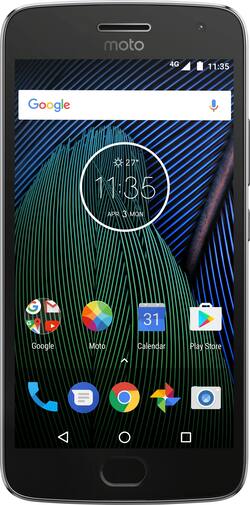
Motorola - Moto G Plus (5th Gen) 4G LTE with 64GB Memory Cell Phone (Unlocked) - Lunar Gray
- Key Specs
- Screen Size: 5.2 inches (Size of the screen, measured diagonally from corner to corner.)
- Rear-Facing Camera: 12 megapixels
- Carrier Compatibility: Verizon, Sprint, AT&T, T-Mobile, Cricket, TRACFONE, Net10, Simple Mobile, H2O Wireless
- Processor Model: Octa Core (Your computer's processor is like its brain. Working in combination with system memory, the power of the processor determines the complexity of software you can run, how many programs you can have open at the same time, and how fast those programs will run. Most computers feature an AMD, Intel or Snapdragon processor.)
- Phone Memory (RAM): 4 gigabytes (Random-access memory (RAM) temporarily stores data so that it can be accessed quickly. The size of the RAM determines how efficiently the phone can handle large amounts of information at once, such as switching between several open apps.)
- General
- Product Name: Moto G Plus (5th Gen) 4G LTE with 64GB Memory Cell Phone (Unlocked)
- Brand: Motorola
- Model Number: 01108NARTL
- Display
- Screen Size: 5.2 inches (Size of the screen, measured diagonally from corner to corner.)
- Screen Resolution: 1920 x 1080 (Screens come in a range of resolutions (measured in pixels, horizontal x vertical). The higher the resolution, the greater the picture quality.)
- Screen Type: LCD
- Camera
- Integrated Camera: Yes - Front and Back
- Front-Facing Camera: 5 megapixels
- Rear-Facing Camera: 12 megapixels
- Network
- Carrier: Unlocked
- Carrier Compatibility: Verizon, Sprint, AT&T, T-Mobile, Cricket, TRACFONE, Net10, Simple Mobile, H2O Wireless
- Unlocked: true (Can be used with any carrier, typically by exchanging the phone's SIM card with another one compatible for the intended area of service. Can be used with a new or existing cellular service plan.)
- Universal Unlocked: true (Can operate on any compatible SIM card and carrier.)
- Mobile Hotspot Capability: true (A hotspot-enabled device is able to connect wirelessly to a cellular network and share the connection via Wi-Fi with nearby compatible devices.)
- 4G LTE Band: 1, 12, 13, 17, 2, 25, 26, 3, 38, 4, 41, 5, 66, 7, 8
- Connectivity
- Headphone Jack: true (The device features an interface that allows for the connection of headphones.)
- Power
- Battery Capacity: 3000 milliampere hours (The amount of energy stored in the battery.)
- Wireless Charging: false
- Compatibility
- Charging Interface(s): Micro-USB (The connection for transmitting power to charge the device.)
- SIM Card Size: Nano SIM
- SIM Card Slots: Single SIM
- Stylus Dock: None
- Features
- Model Family: Motorola Moto G Plus
- Sensors: Accelerometer, Ambient light sensor, Proximity sensor, Magnetometer, Gyro sensor, Fingerprint sensor (Detects stimuli such as heat, light, sound, motion, or pressure and responds accordingly by operating a control or initiating a function of the device.)
- Maximum Depth Of Water Resistance: 0 feet (Measurement of the maximum depth of water in which the product is able to resist some degree of water penetration.)
- Performance
- Operating System: Android 7.0 Nougat (The operating system manages all software and hardware, including files, memory and connected devices. Most importantly, it lets you interact with your device and your programs in a visual way; otherwise, you'd be typing computer code to get anything done.)
- Processor Brand: Qualcomm Snapdragon
- Processor Model: Octa Core (Your computer's processor is like its brain. Working in combination with system memory, the power of the processor determines the complexity of software you can run, how many programs you can have open at the same time, and how fast those programs will run. Most computers feature an AMD, Intel or Snapdragon processor.)
- Processor Speed: 2 gigahertz (Actual central processing unit (CPU) speed may vary by device configuration and design. Also referred to as clock speed, this is how quickly the central processing unit (CPU) can receive and interpret instructions. The higher the number, the more operations per second that can be completed. Working in combination with system memory, the power of the processor determines the complexity of software you can run.)
- Phone Memory (RAM): 4 gigabytes (Random-access memory (RAM) temporarily stores data so that it can be accessed quickly. The size of the RAM determines how efficiently the phone can handle large amounts of information at once, such as switching between several open apps.)
- Storage
- Media Card Slot: microSD
- Other
- UPC: 723755011083
Talk and text on this Motorola Moto G Plus phone. Its Qualcomm Snapdragon processor ensures your apps run smoothly and quickly, and its TurboPower technology provides up to 6 hours of battery life on a 15-minute charge. This Motorola Moto G Plus phone is unlocked for use with most U.S. carriers.
- Qualcomm Snapdragon 625 processor: Octa-core 2GHz processor and 4GB of RAM deliver outstanding overall performance for opening and running applications, flipping through menus, running home screens and more.
- Android 7.0 Nougat OS: Makes it easier to take action in the moment, with more personalized settings and smarter notifications.
- Universal Unlocked: Compatible with all major U.S. carriers, including Verizon, AT&T, Sprint and T-Mobile. Also compatible with prepaid carriers including Cricket Wireless, Boost Mobile, MetroPCS, Simple Mobile, Total Wireless, Tracfone, Net10, Mint, and H2O.
- 4G LTE speed: Provides fast Web connection for downloading apps, streaming content and staying connected with social media.
- 5.2" touch screen LCD with Full HD 1080p resolution and 424 ppi: Extra-large screen is matched with a slim body to comfortably fit in your hand. Corning™ Gorilla™ Glass 3 resists scratches.
- 12.0MP camera with Dual Autofocus Pixels: With a high pixel density sensor the camera is able to lock onto a subject easily. Fewer missed shots, more stunning photos day or night. Also includes a front-facing 5.0MP camera for self-portraits.
- 64GB internal memory plus microSD slot: Extensive storage space for your contacts, music, photos, apps and more. Expand storage up to 128GB by adding a microSD card (sold separately).
- Your fingerprint keeps your phone secure: Swipe your finger on the backside sensor panel to unlock your phone.
- Use your smartphone as a mobile hotspot: Share your 4G data connection with other compatible wireless devices.*
- Access to Google Play: Browse and download apps, magazines, books, movies, and television programs directly to your phone.
- Listen to your favorite tunes: Store and play your MP3 files on your phone.
Whats Included
- Moto G Plus (5th Gen) 4G LTE with 64GB Memory Cell Phone (Unlocked)
- 3000 mAh Battery
- Power adapter
A: The one at Best Buy is as if you were buying it straight from Motorola. No Amazon offers to deal with. The only way you get the annoying Amazon Offers is if you buy that version on Amazon at their discounted price.
Q: how much of the 64gb is available?
A: Mine shows the operating system taking 10.29 GB. Installed pps take another 3 GB or so. Total available is about 51 GB
A: Go to Settings, Sounds, Power up sound, switch off.
A: Battery life is likely a bit better than the Moto X Pure, and the new Moto G5+ has an octa core processor. Is it an upgrade? Debatable. The G5+ is going to get OS updates longer than the Moto X from 2015, for sure. Not sure if that alone is worth it, but I think if you look at the whole package, buying is the right thing to do, unless you can wait for the next Moto X.
A: Yes, and it is easily fixed by disabling Enhanced LTE in the network settings.
A: Single sim only for US model
A: Hello.I have used this on both the Verizon and the T mobile network. I had zero issues on the Verizon network with wifi calls dropping out, and no voice quality issues. when I went to T mobile, however, initially I had no dropped calls, but after 3 weeks i did have issues with wifi drop outs. I only have this issue at home the phone has issues with transition between wifi and cellular calls ( at least my phone does)
A: Go into "Settings" then "Backup and Reset" on your G4 and ensure the "Back up my data" is "On." If not, turn it on and establish a backup account on Google. Your phone info will then be backed up to the Google "cloud" and can be brought over to your G5 during setup. I am not sure what the lag time is between setting up a new account and allowing sufficient time for your data to be backed up--might want to give it a day or two. If you have a SDC (mini-memory card) installed in your G4, make sure you "unmount" your SDC card from your G4 before you transfer it and your SIM card to your G5. Go to "Settings" and then select "Storage." Your SDC card will be at the bottom of the section. You should be able to "unmount" it there. Hope this helps.