Plugable - 8-in-1 USB C Docking Station for iPad with Stand, 100W Pass-through Charging USB-C Hub - Silver
More Buying Options
Related Item

About This Item
- Key Specs
- Maximum Number of Displays Supported: 1
- Number of DisplayPort Outputs (Total): 0
- General
- Brand: Plugable
- Model Number: UDS-7IN1
- Product Name: 8-in-1 USB C Docking Station for iPad with Stand, 100W Pass-through Charging USB-C Hub
- Color: Silver
- Display
- Maximum Number of Displays Supported: 1
- Ports
- Display Connector(s): 1 x HDMI (The number and type of connectors used to connect to an external display.)
- Number of DisplayPort Outputs (Total): 0
- Number of HDMI Ports (Total): 1
- Number of VGA Ports: 0 (VGA (Video Graphics Adapter or Video Graphics Array) is a display standard that transmits via analog signals. This type of interface is typically used to connect a computer to a display device such as a monitor, projector, or TV.)
- Number of USB Ports (Total): 2
- USB Ports: 2 x USB-A, 1 x USB-C (The number and type of USB ports the product has.)
- Headphone Jack: true (The device features an interface that allows for the connection of headphones.)
- Microphone Input: true (The device features an input for connecting an external microphone.)
- Memory Card Slot: true
- Memory Card Type: microSD, Secure Digital
- Power
- Powered: false
- Compatibility
- Brand Compatibility: Mac, Windows
- Model Compatibility: iPad Pro 12.9" (3rd–6th Gen), iPad Pro 11" (1st–4th Gen), iPad Air 5th Gen, Samsung Galaxy S8–S22, Note 10 & 20, Galaxy Tab S5e–S8, Microsoft Surface Pro 7, 8, 9.
- Dimensions
- Product Height: 8.1 inches (The out of box height of the item. Height is measured as the vertical distance from the bottom of the item to the top as it would be primarily used or placed.)
- Product Length: 3.9 inches (The out of box length of the item. Length is measured as the longest dimension of the item.)
- Product Width: 3.9 inches (The out of box width of the item. Width is measured as the horizontal distance from one side of the item to the other as it would be primarily used or placed.)
- Product Weight: 10.6 ounces (The out of box weight of the item.)
- Warranty
- Warranty - Parts: 2 Year Limited Parts
- Warranty - Labor: 2 Year Limited Labor
- Other
- UPC: 819927012870
Your mobile device is nearly (if not more) powerful than your laptop. And, while its portability is impressive, that doesn’t mean you shouldn’t add an HDMI screen, a couple of USB 3.0 ports, SD expansion, 100W pass-through charging, and a trusty audio jack when you’re working at a desk. The Little Screen Becomes the Big Screen: The Plugable USB-C Docking Station with Tablet Stand or Phone Stand (UDS-7IN1) adds functionality to your Windows tablet, M1 or M2 iPad Air or iPad Pro. Let’s start with your screen—when it comes time to get actual work done, the pinch and zoom will only get you so far. Extend to a bigger screen with a 4K 30Hz capable HDMI port. It’s like going from fun-sized to full-sized. 8-IN-1: Your content is looking real sharp on that big, 4K screen, but a bigger screen is just the start. What if you could add a real keyboard? And a real mouse? Then you’d be ready to get some real work done. In addition to the 4K HDMI port, this hub lets you power up with 100W pass-through charging (91W output), add a mouse and keyboard (or whatever you need) to the two USB 3.0 (5Gbps) ports, expand with SD and MicroSD ports, and tune out with the audio jack. Hub and Stand in One: As a hub, you get port expansion. As a stand, you get solid aluminum construction that manages to be incredibly durable and still light enough to carry with you. But don’t let its potential for portability fool you—the UDS-7IN1 still has just enough heft to hoist your iPad Pro 12.9. And the feeling of quality continues through to the hinges, too. With enough tension to stay put when you tap away at the screen, you might be surprised by the satisfying slide you experience when adjusting the stand for the perfect angle. And if you do decide to take it with you, the UDS-7IN1 folds flat enough to fit in your bag
- 8 Port Hub: Get more from your mobile device with eight new ports, including an HDMI port, 2x USB 3.0 ports (5Gbps), SD card and Micro SD card, 100W pass-through charging, and an audio jack, all stashed away in the base of an easy to adjust stand
- From Mobile to Desktop: More than an iPad stand for desk, use your phone or tablet as a computer by adding a screen with resolutions up to 4K 30Hz, take advantage of the 2x USB ports to add a mouse and keyboard, and expand your storage space with SD and MicroSD slots
- 100W Charging: If there’s work to be done, or screens to scroll, that battery isn’t going to last forever. Get charged and stay charged with 100W pass-through charging (up to 91W output) using your mobile device’s USB-C power supply (no extra cords to carry)
- Compatibility: USB C hub compatible with Microsoft Surface Pro 9, Windows 10 tablets or newer, M1 and M2 iPads with iPadOS 16+, and USB-C phones and tablets that support Alt Mode like Samsung Galaxy S series devices and the iPhone 15
- 2-Year Coverage, Lifetime Support: Every Plugable product, including this USB hub with stand, is covered against defects for 2 years and comes with lifetime support. If you ever have questions, contact our North American-based team - even before purchase
- 8 Port Hub: Get more from your mobile device with eight new ports, including an HDMI port, 2x USB 3.0 ports (5Gbps), SD card and Micro SD card, 100W pass-through charging, and an audio jack, all stashed away in the base of an easy to adjust stand
- From Mobile to Desktop: More than an iPad stand for desk, use your phone or tablet as a computer by adding a screen with resolutions up to 4K 30Hz, take advantage of the 2x USB ports to add a mouse and keyboard, and expand your storage space with SD and MicroSD slots
- 100W Charging: If there’s work to be done, or screens to scroll, that battery isn’t going to last forever. Get charged and stay charged with 100W pass-through charging (up to 91W output) using your mobile device’s USB-C power supply (no extra cords to carry)
- Compatibility: USB C hub compatible with Microsoft Surface Pro 9, Windows 10 tablets or newer, M1 and M2 iPads with iPadOS 16+, and USB-C phones and tablets that support Alt Mode like Samsung Galaxy S series devices and the iPhone 15
- 2-Year Coverage, Lifetime Support: Every Plugable product, including this USB hub with stand, is covered against defects for 2 years and comes with lifetime support. If you ever have questions, contact our North American-based team - even before purchase
Reviews
Customer Images
The vast majority of our reviews come from verified purchases. Reviews from customers may include My Best Buy members, employees, and Tech Insider Network members (as tagged). Select reviewers may receive discounted products, promotional considerations or entries into drawings for honest, helpful reviews.
Compare similar products
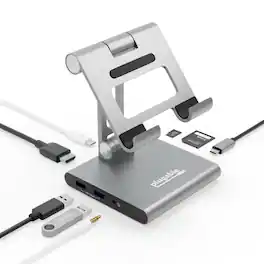
Your mobile device is nearly (if not more) powerful than your laptop. And, while its portability is impressive, that doesn’t mean you shouldn’t add an HDMI screen, a couple of USB 3.0 ports, SD expansion, 100W pass-through charging, and a trusty audio jack when you’re working at a desk. The Little Screen Becomes the Big Screen: The Plugable USB-C Docking Station with Tablet Stand or Phone Stand (UDS-7IN1) adds functionality to your Windows tablet, M1 or M2 iPad Air or iPad Pro. Let’s start with your screen—when it comes time to get actual work done, the pinch and zoom will only get you so far. Extend to a bigger screen with a 4K 30Hz capable HDMI port. It’s like going from fun-sized to full-sized. 8-IN-1: Your content is looking real sharp on that big, 4K screen, but a bigger screen is just the start. What if you could add a real keyboard? And a real mouse? Then you’d be ready to get some real work done. In addition to the 4K HDMI port, this hub lets you power up with 100W pass-through charging (91W output), add a mouse and keyboard (or whatever you need) to the two USB 3.0 (5Gbps) ports, expand with SD and MicroSD ports, and tune out with the audio jack. Hub and Stand in One: As a hub, you get port expansion. As a stand, you get solid aluminum construction that manages to be incredibly durable and still light enough to carry with you. But don’t let its potential for portability fool you—the UDS-7IN1 still has just enough heft to hoist your iPad Pro 12.9. And the feeling of quality continues through to the hinges, too. With enough tension to stay put when you tap away at the screen, you might be surprised by the satisfying slide you experience when adjusting the stand for the perfect angle. And if you do decide to take it with you, the UDS-7IN1 folds flat enough to fit in your bag

Anker USB C Hub for iPad, 551 USBC Hub (8-in-1), with Foldable Tablet Stand, 4K HDMI, 2 USB-A Data Ports, for iPad Pro 5th Gen/Air 5th Gen/Mini 6th and Later (Silver)
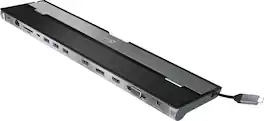
This triple display docking station turns your Mac or Windows laptop into a full workstation with a DisplayPort output, two HDMI outputs, and a VGA output, with resolution support up to 4K (3840 x 2160) on two displays and 1080p on the other one. You can also use your laptop screen for four displays in total, making it easy to access multiple applications at once. With 100W Power Delivery, three USB 3.0 ports, and a USB-C port, this docking station is perfect for your MacBook, Dell XPS, or other USB-C laptop requiring additional ports. This USB 3.0 docking station is also equipped with a RJ45 Gigabit Ethernet port, memory card reader/writer, and combo audio jack for maximum productivity. The elevated design assists with heat dissipation and, with its double-sided cable storage compartment, ensures an easy connection regardless of your USB-C port’s location. All 13 ports are combined into one slim docking station, so you’ll have all the connections you need to stay productive!

The TAA-compliant UD-3900 docking station with dual HDMI ports is a one-stop upgrade for your Windows, Mac, or Chromebook laptop or desktop. Connect up to 10 accessories through a single cable. Fully backward compatible with USB 3.0 and USB-C, Thunderbolt and USB4 computers. Features two HDMI video output ports for mirroring/extending your desktop to external monitors, a Gigabit Ethernet port (10/100/1000 supported, full-duplex required), audio input/output, two USB 3.0 ports, and four USB 2.0 ports. Compatibility: Windows 11, 10, 8.1, 8, and 7 drivers can be automatically installed by Windows Update (with an existing Internet connection) or can be downloaded from the Plugable website. Manual installation required on Mac. No installation required on ChromeOS (Chromebook). 2560x1440 (1440P) resolution only available with single native HDMI monitor. Cannot be mixed with non-DisplayLink USB graphics adapters and drivers (e.g. MCT, j5, or SMSC). HDCP/Blu-ray playback not supported. Not recommended for gaming. Linux/Unix are not supported. Power: Includes robust 20W UL certified power supply. Does not provide power to the attached computer. In the Box: UD-3900, premium 20W UL certified power adapter (US AC Wall Outlet Plug, 100-240V 50/60Hz), hybrid 2-in-1 USB 3.0 and USB-C cable, quick-install guide.
| Pros for Plugable - 8-in-1 USB C Docking Station for iPad with Stand, 100W Pass-through Charging USB-C Hub - Silver | |||
|---|---|---|---|
| There were no pros for this product— | There were no pros for this product— | Ease of use, USB-C, Overall Performance, Ports, Connectivity | There were no pros for this product— |
| Cons for Plugable - 8-in-1 USB C Docking Station for iPad with Stand, 100W Pass-through Charging USB-C Hub - Silver | |||
| There were no cons for this product— | There were no cons for this product— | Compatibility, Power Supply | There were no cons for this product— |