“How do I connect my xbox one controller to my lg phoenix 4”
Answer This Question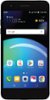
1-1 of 1 Answer
You need to put the controller into pairing mode by pressing the Xbox button and holding down the sync button simultaneously. After that, go into the settings for the AT&T Prepaid - LG Phoenix 4 with 16GB Memory Prepaid Cell Phone - Titan Black and select Bluetooth to open the Bluetooth menu & select the controller from a list of available devices...^IFV
Sorry, there was a problem. Please try again later.